Who should take meeting notes? Someone who isn't running the meeting and isn't the main decision-maker, because nobody can facilitate, decide and write accurately at the same time. In most teams that means a named note-taker, rotated each meeting so the job doesn't stick to one person. For recorded calls, an AI note-taker can do the typing, with a human checking decisions and owners before the notes go out.
Meeting Productivity 11 min read
Who Should Take Meeting Notes? Roles, Rotation and Where AI Fits
Who should take meeting notes: why it shouldn't be the facilitator, who fits each meeting type, how to rotate the job fairly and how AI turns note-taking into review.
By Sarma BKP, Founder & CEO, Acta · Updated
This guide explains the note-taker role, who fits it for each type of meeting, how to set up a fair rotation and where AI changes the job. It's for team leads, project managers and anyone who's tired of ending meetings with "did anyone write that down?". It doesn't cover formal minute-taking rules for boards or councils in detail; those follow your governing documents, and the secretary usually owns them.
Key takeaways
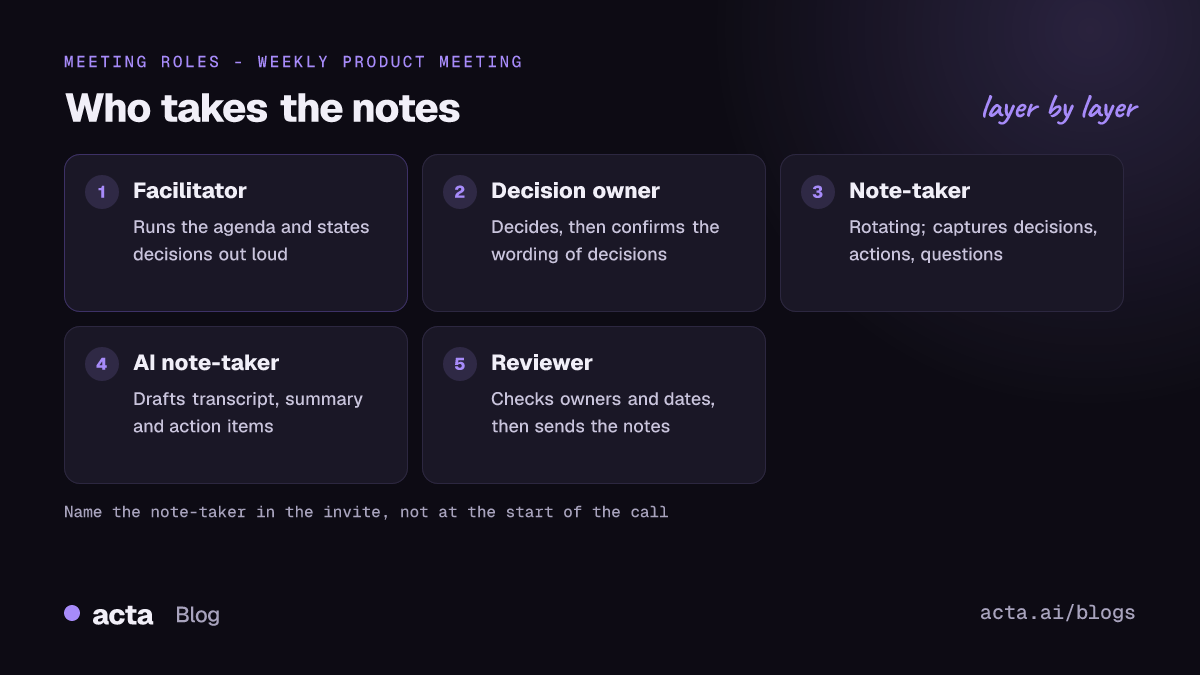
- Separate the roles. The facilitator runs the meeting, the decision owner decides, and a third person takes the notes.
- Name the note-taker in the invite, not at the start of the call, so they can prepare the template and nobody gets volunteered on the spot.
- Rotate in a fixed order, alphabetically or by a published list, so the job doesn't quietly settle on the most junior person or the same colleague every week.
- The note-taker's minimum output is three things: decisions, action items with an owner and a date, and open questions.
- With an AI note-taker, the human job shifts from typing to checking: confirm decisions and owners, fix names, and send the notes within a set time.
Table of contents
- Who should take meeting notes: not the person running it
- Each meeting role has a different note-taking job
- Who takes notes depends on the type of meeting
- Rotate note-taking so it doesn't stick to one person
- The note-taker captures decisions, actions and open questions
- AI note-takers change the job from typing to checking
- Common mistakes when assigning meeting notes
- Frequently asked questions
- Decide who takes notes in your next meeting
Who should take meeting notes: not the person running it
A meeting note-taker, sometimes called the scribe, is the person responsible for writing down what the meeting decided, who owns each action and what is still unresolved, then sharing it afterwards. It's a role, not a typing service. A good note-taker asks "who owns that?" when an action has no name, and "is that a decision or a suggestion?" when a discussion trails off.
The facilitator is the wrong person for this job. Running a meeting means watching the clock, drawing out quiet people and steering back to the agenda. Every minute spent typing is a minute not doing those things, and you can see it in the result: the facilitator's own notes tend to be thin exactly where the discussion was hardest. The same goes for the person whose decision it is. They need to listen and weigh options, not transcribe them.
So the default answer to "who should take meeting notes?" is a third person: someone with enough context to follow the discussion, who isn't presenting the main item. In a small meeting of three or four, that might be impossible, and the facilitator takes light notes. That's fine, but keep them to decisions and actions only.
Each meeting role has a different note-taking job
Even with a dedicated note-taker, everyone in the meeting has some responsibility for the record. Splitting it clearly avoids both gaps and three people writing the same thing.
- Facilitator: states decisions out loud so they can be captured ("so we're agreed: we launch on the 9th"), and reads back the action list in the last five minutes.
- Note-taker: writes decisions, actions with owners and dates, and open questions; asks for clarification when something is vague; sends the notes.
- Decision owner: confirms the wording of decisions before the notes go out, especially anything with money, dates or customers attached.
- Timekeeper: in longer meetings, a separate person keeps time so the facilitator and note-taker don't have to.
- Attendees: write their own personal to-dos, and correct the shared notes if something is wrong.
The read-back at the end matters more than any template. Our guide on ending a meeting with clear owners and deadlines covers it in detail, but the short version is: two minutes, every action, out loud, with a name and a date.
Who takes notes depends on the type of meeting
The right note-taker changes with the meeting. Here's a starting point that works for most teams.
| Meeting type | Who takes notes | Why |
|---|---|---|
| 1:1 | The report, or both in a shared doc | They own their development and actions |
| Daily standup | Usually nobody; blockers only | Updates are short and repeated |
| Weekly team meeting | Rotating team member | Spreads the load and the context |
| Project or steering meeting | Project coordinator or PM | They track the actions anyway |
| Client or sales call | A colleague, or a recorder | The lead needs eye contact and focus |
| Board or committee | The secretary | Minutes are a formal record |
| Interview | Second interviewer, or a recorder | Notes affect a hiring decision |
| Workshop | A named scribe, not the facilitator | Facilitating is a full-time job |
Client calls deserve a note. If you're leading the conversation, typing while the client talks costs you attention and rapport; see our post on sales call note taking without losing eye contact. Boards are the other special case. Formal minutes follow the organisation's rules, and the secretary normally owns them; our guide to nonprofit board minutes covers that role.
Rotate note-taking so it doesn't stick to one person
Without a rule, note-taking drifts to whoever volunteers first, and then it becomes "their job". Often that's the newest or most junior person, or someone who is quietly reliable. It costs them: the note-taker speaks less, because they're busy writing, and their ideas get less airtime. Over months, that adds up to less visibility for the same people.
A rotation fixes it. Keep it boring and predictable.
- List everyone who regularly attends, including senior people. If the manager is exempt, say why (for example, they're always facilitating).
- Fix the order, alphabetically or by a published list, and put the next note-taker's name in the invite.
- Allow swaps, not skips. If you can't do your turn, swap with someone and update the list.
- Skip the person presenting the main item. Move them to the next meeting.
- Use one template so notes look the same whoever wrote them.
Here's an illustrative example. A product team of six meets every Monday. The rotation list in the invite reads: Arjun, Dana, Marco, Priya, Sam, Wei. Dana facilitates, so she's on the list but only takes notes when someone else facilitates. In the week Priya presents the quarterly roadmap, Sam takes her turn and Priya takes his. Each person ends up taking notes about once every five or six weeks, which is light enough that nobody resents it.
Shared-document cultures go a step further. GitLab's handbook on all-remote meetings leans on written agendas and async follow-up, and its communication guidelines describe docs and issues as an async layer that creates durable artefacts. In that model, everyone adds to the notes as they go, and the named note-taker tidies and sends them.
The note-taker captures decisions, actions and open questions
The fastest way to make note-taking a reasonable job is to shrink it. Most notes fail because the note-taker tries to capture the discussion. Nobody reads that. People read the decisions and their own action items.
Meeting: ___ | Date: ___ | Facilitator: ___ | Note-taker: ___
Attendees: ___ | Absent: ___
Decisions: 1. ___ 2. ___ (one line each, with any condition attached)
Actions: Owner | Task | Due date
Open questions: ___ | Who will answer: ___ | By: ___
Key context (optional, three bullets max): ___
Next meeting: ___ | Next note-taker: ___
Filled in, a decision line looks like "Launch moves to 9 December if QA signs off by the 2nd", and an action line looks like "Marco | update the pricing page copy | Friday". If a line can't be filled with a name and a date, it isn't an action yet; it's an open question.
Send the notes within a fixed time, ideally the same day. For more on what to write and how to format it, see how to take meeting notes and meeting minutes best practices. If people who missed the meeting rely on the notes, our guide on sharing notes with absent colleagues covers the extra context they need.
AI note-takers change the job from typing to checking
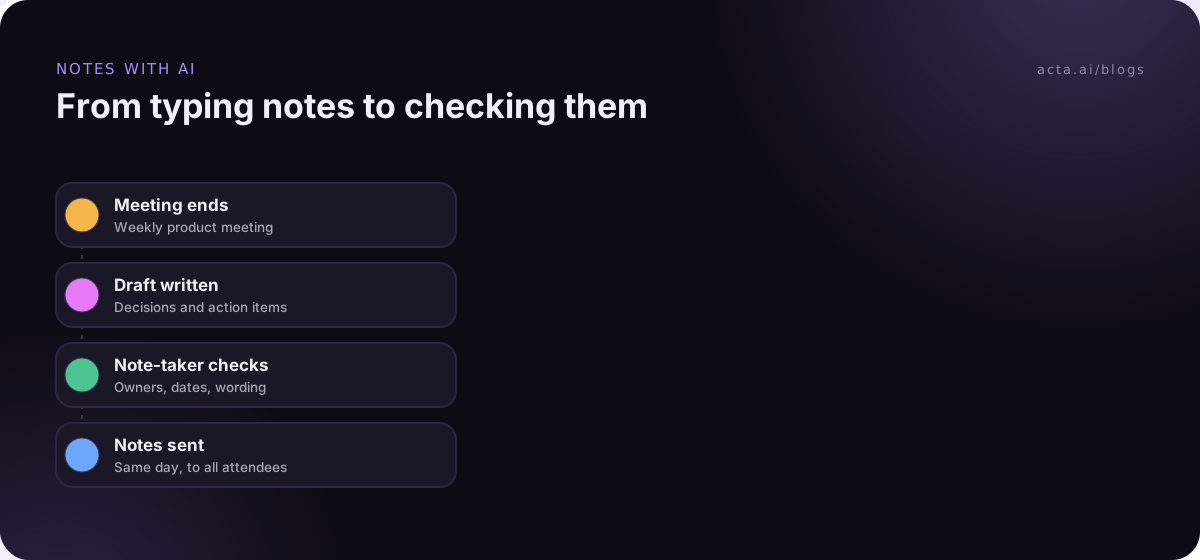
When a meeting is recorded, an AI note-taker can produce the transcript and a first draft of the notes. That doesn't remove the human role. It changes it. Someone still has to check that the decisions are stated correctly, that owners are the right people and that nothing confidential ended up where it shouldn't. AI summaries can misattribute a point or present a suggestion as a decision; our explainer on AI meeting notes accuracy covers where errors come from and how to check for them.
Here's how the roles look with AI in the room.
- AI: transcribes, drafts the summary, lists decisions and action items.
- Note-taker (now the reviewer): reads the draft within a set time, corrects decisions and owners, removes anything sensitive, and sends it.
- Facilitator: still states decisions out loud, which makes the AI draft far better, since it can only summarise what was said.
Recording changes the meeting, so tell people. It's good practice, and in many places the law, to let everyone know a call is recorded; our guide to recording meetings with AI and what to tell participants covers consent. If bots aren't welcome, a desktop recorder like the Acta desktop app or the Acta Chrome extension records from your own computer, so no extra participant joins.
Acta writes a transcript with speaker names, a summary, decisions and action items with owners after each recorded meeting, and drafts a follow-up email. The reviewer's job is to check and send it, which usually takes a few minutes rather than the half-hour of tidying that handwritten notes need. Acta doesn't use customer data to train AI models.
When should you still use a human note-taker without recording? Sensitive HR or legal conversations where people won't speak freely on a recording, meetings in rooms where nobody has a recording device, and formal minutes where your governing documents set the rules. Our post on recording sensitive meetings covers that judgement.
Common mistakes when assigning meeting notes
- Asking for a volunteer at the start: It puts people on the spot and the same person says yes. Name the note-taker in the invite.
- Letting the facilitator take notes in a big meeting: Both jobs get done badly. Split them once there are more than four or five people.
- Capturing the discussion instead of the outcome: Long notes don't get read. Decisions, actions and open questions first.
- No owner on actions: "We'll look into it" is not an action. The note-taker should ask for a name before the meeting ends.
- Trusting AI drafts without a reviewer: Someone has to own the final version, or errors go out under everyone's name.
- Sending notes days later: By then people have acted on their own memory. Same day is the goal.
Frequently asked questions
Should the meeting organiser take notes?
Usually not, if they're also facilitating. Running a meeting and writing accurate notes compete for the same attention, and the notes suffer where the discussion is hardest. In a small meeting of three or four, the organiser can take light notes on decisions and actions. In bigger meetings, name a separate note-taker in the invite.
Is it unfair to always ask the same person to take notes?
Yes, over time. The regular note-taker speaks less in meetings and gets less visibility for their ideas, and the job often falls to junior colleagues. A published rotation that includes senior people, with swaps allowed but no skipping, spreads the load. Naming the note-taker in the invite also stops the same person volunteering every time.
How do I rotate note-taking in a team meeting?
List everyone who attends regularly, fix the order, and put the next note-taker's name in each invite. Skip whoever is presenting the main item and move them to the next meeting. Allow swaps but not skips, and use one shared template so the notes look the same regardless of who wrote them.
Can an AI note-taker replace a human note-taker?
It can replace the typing, not the responsibility. An AI note-taker drafts the transcript, summary, decisions and action items, but a person should check decisions and owners, remove anything sensitive and send the final version. Some meetings, such as sensitive HR conversations, may be better with a human note-taker and no recording.
What is the difference between a note-taker and a minute-taker?
A note-taker records decisions, actions and key points for the team's own use, usually informally. A minute-taker produces formal minutes, often for a board or committee, following rules on what must be recorded, such as motions and votes. The minutes are usually approved at the next meeting. In most organisations, the secretary is the minute-taker.
Decide who takes notes in your next meeting
You can fix this before your next recurring meeting with five small changes.
- Separate the roles: name a facilitator, a decision owner and a note-taker who isn't either of them.
- Publish a rotation: list everyone, fix the order and put the next name in the invite.
- Shrink the template: decisions, actions with owner and date, open questions, and nothing else by default.
- Read back at the end: spend the last two minutes confirming every action out loud.
- Decide on AI: if you record, make the note-taker the reviewer and set a deadline for sending the notes.
To try the reviewer model, record your next team meeting with the Acta desktop app during the 15-day free trial and have this week's note-taker check the draft.
Found this useful? Share it with your team.