Quick answer: Good meeting notes capture three things: the decisions made, the action items (each with one owner and a due date), and the open questions still to answer. Add the date, attendees and purpose at the top, write in short bullets rather than full sentences, and share the notes with everyone the same day so people can correct them while the meeting is fresh.
Most meeting notes fail in one of two ways. Either they try to write down everything, and nobody reads them, or they are three vague lines like "discussed roadmap" that nobody can act on. Useful notes sit between those: a short record of what changed because the meeting happened.
This guide covers what to capture, three formats that work, a copy-paste meeting notes template, how notes differ from minutes, how to share and follow up, and when to hand the job to an AI note taker.
What to include in meeting notes
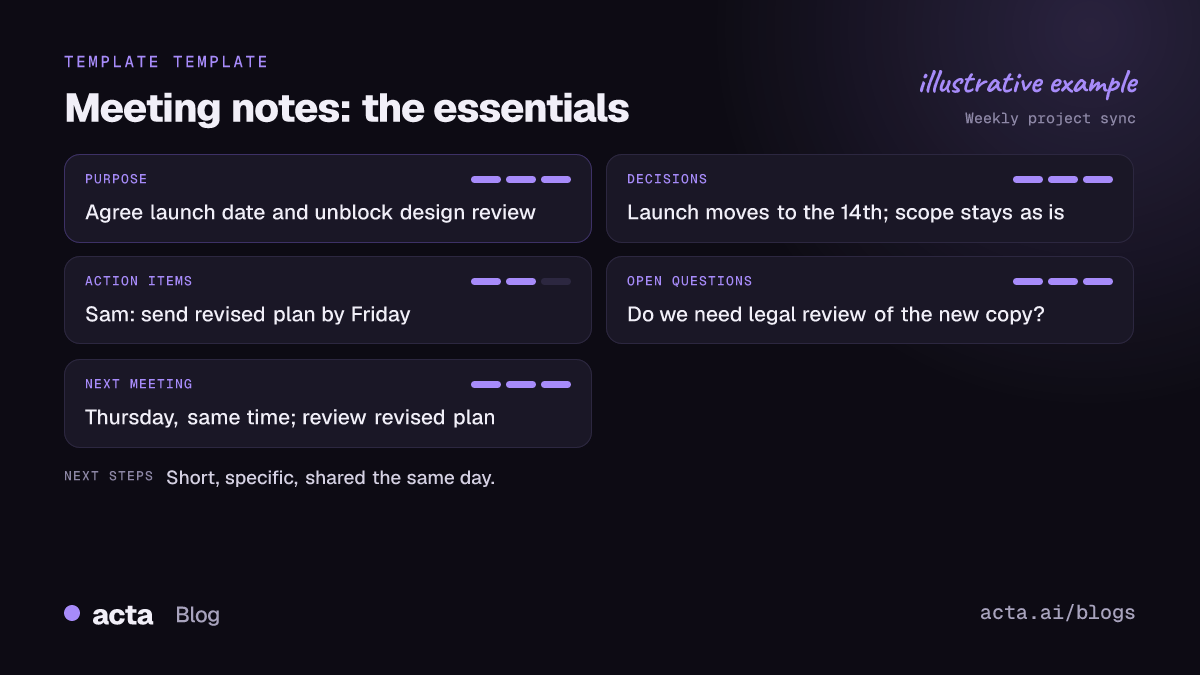
If you capture only these, your notes will be more useful than most:
- Header: meeting name, date, attendees, and the purpose in one line.
- Decisions: what was agreed, in plain words. "We'll launch on the 14th" beats "launch timing discussed".
- Action items: each one with a single owner and a due date. "Sam: send the revised plan by Friday." No owner means it won't happen; "the team" is not an owner.
- Open questions: things raised but not settled, and who will find the answer.
- Key context: one or two lines of reasoning behind a decision, when someone reading later would otherwise ask "why?"
- Next meeting: when, and what it should cover.
What to leave out: who said what in order, side conversations, and long quotes. If you need exact wording, that's what a recording or transcript is for.
How to spot a decision while you're writing
Listen for phrases like "let's go with", "agreed", "we'll do X", "that's settled" or "we won't". When you hear one, stop and write it down, then read it back to the room: "So the decision is X, right?" That ten-second check catches most misunderstandings. Our guide on how to track decisions made in meetings goes further.
How to take meeting notes: before, during and after
Before the meeting
- Copy the agenda into your notes and leave space under each item.
- Add the attendees and the purpose to the header.
- Pull in open action items from the last meeting so you can check them off.
During the meeting
- Write in fragments, not sentences. Clean up later.
- Mark items as you go: D for decision, A for action, Q for open question.
- When an action comes up without an owner or date, ask: "Who's taking that, and by when?"
- In the last two minutes, read the decisions and action items aloud.
After the meeting
- Tidy the notes within the hour, while you still remember the gaps.
- Move decisions and action items to the top.
- Send them to attendees the same day and ask for corrections.
- Put action items wherever your team tracks work.
Which meeting notes format should you use?
Pick the format that fits the meeting, not the one you used last time.
1. Outline (agenda-based) notes
Use the agenda as headings and write bullets under each. This works for structured meetings with a clear agenda, like project syncs and team meetings. It's the easiest format for others to scan because it follows the order of the meeting.
2. Action-first notes
Put two lists at the top, decisions and action items, and everything else below as optional context. This is the best format for status meetings, standups and client calls, where the main point is who does what next. If people only read the first five lines, they still get what matters.
3. The Cornell method
The Cornell note-taking system was developed by Walter Pauk at Cornell University for students. It splits the page into a narrow cue column on the left, a wider notes column on the right, and a summary area at the bottom. For meetings, adapt it like this:
- Notes column: what you write during the meeting.
- Cue column: after the meeting, mark each line as a decision, action or question, or add a keyword.
- Summary: two or three sentences at the bottom on what the meeting changed.
The Cornell method suits long discussions, workshops and training sessions, where you want to review and remember the content, not just track tasks.
A copy-paste meeting notes template
Copy this into your doc or notes app and fill it in. Delete any section you don't need.
- Meeting: [name]
- Date: [date]
- Attendees: [names]
- Note taker: [name]
- Purpose: [one line: what this meeting needs to achieve]
Decisions
- [What was decided, in one sentence]
- [What was decided, in one sentence]
Action items
- [Task] | Owner: [one name] | Due: [date]
- [Task] | Owner: [one name] | Due: [date]
Open questions
- [Question] | Who will find out: [name] | By: [date]
Discussion notes (optional)
- [Agenda item 1]: [key points, reasons behind decisions]
- [Agenda item 2]: [key points]
Next meeting
- When: [date and time]
- Agenda: [what to review, including open action items]
For recurring meetings with a fixed shape, a specific template saves time: see our standup, weekly meeting and 1:1 templates.
Meeting notes vs minutes: what's the difference?
The two are often used interchangeably, but they serve different purposes.
- Meeting notes are informal and practical. They exist to help the team remember and act. Anyone can take them, in any format.
- Minutes are a formal record, usually for boards, committees and governance meetings. They follow a set structure and are often approved at the next meeting. Michigan State University's guide to writing minutes is based on Robert's Rules of Order and sums up the main principle: capture what was done, not what was said.
If your meeting needs a formal record of motions, votes and resolutions, use minutes. Our meeting minutes template has a free format and example.
How to share meeting notes and follow up
Notes that sit in your personal notebook help one person. Shared notes help the team. A few rules:
- Same day. Notes sent a week later are a history lesson, not a tool.
- Lead with decisions and actions in the message itself, not just a link.
- Tag owners by name next to their action items.
- One home. Keep all notes for a project or team in one shared place so people can search them.
- Start the next meeting with last time's action items. That check is where most follow-through happens.
Action items that don't get done are rarely a note-taking problem; they are a follow-up problem. We look at why in meeting follow-through: why action items don't get done.
When should you let an AI note taker take meeting notes?
Taking notes by hand has a cost: the note taker is half out of the conversation. An AI note taker makes sense when:
- You are running the meeting, or need to be fully present (sales calls, interviews, 1:1s).
- You have many meetings a day and notes pile up unwritten.
- You need to find something said weeks ago across many meetings.
- You want action items and decisions tracked without copying them by hand.
Acta records Zoom, Google Meet and Microsoft Teams calls through a meeting bot, records without a bot through its desktop app and Chrome extension, and records in-person meetings through its mobile apps. It produces a transcript with speakers, a summary, action items with owners and due dates, and a decisions log, and can draft the follow-up email. It also has 40 report templates, including 1:1s and board minutes, and can pick one automatically from the conversation. See the full list on the features page.
AI notes still need a human check. Read the summary, fix any owner or date that is wrong, and share it. If you are new to these tools, our explainer on what an AI notes taker is covers how they work and where they fall short.
Any time you record a meeting for notes, tell participants first and get consent where the law requires it. Our guide on recording meetings with AI and what to tell participants explains how.
Common meeting notes mistakes to avoid
- Writing a transcript by hand. You'll miss the decision while writing the debate.
- Action items without owners or dates. "Look into pricing" is a wish, not a task.
- Burying decisions in the middle of paragraphs.
- Not reading back decisions before the meeting ends.
- Sharing late, or not at all.
- Different formats every week, so nobody knows where to look.
Frequently asked questions
What are the most important things to write in meeting notes?
Decisions, action items with one owner and a due date each, and open questions. Everything else is optional context.
How long should meeting notes be?
As short as possible while still being clear to someone who wasn't there. For most meetings, that is under a page, with decisions and actions at the top.
What is the difference between meeting notes and minutes?
Meeting notes are an informal record to help a team act. Minutes are a formal record of what was done, used by boards and committees, and are often approved at the next meeting.
Who should take meeting notes?
Ideally not the person running the meeting. Rotate the role, or use an AI note taker so everyone can take part, then have the organizer check and share the notes.
Can I use the Cornell method for meeting notes?
Yes. Write notes in the main column during the meeting, then mark decisions, actions and questions in the cue column and add a short summary at the bottom.
Want meeting notes with owners and due dates written for you? Try Acta free for 15 days.