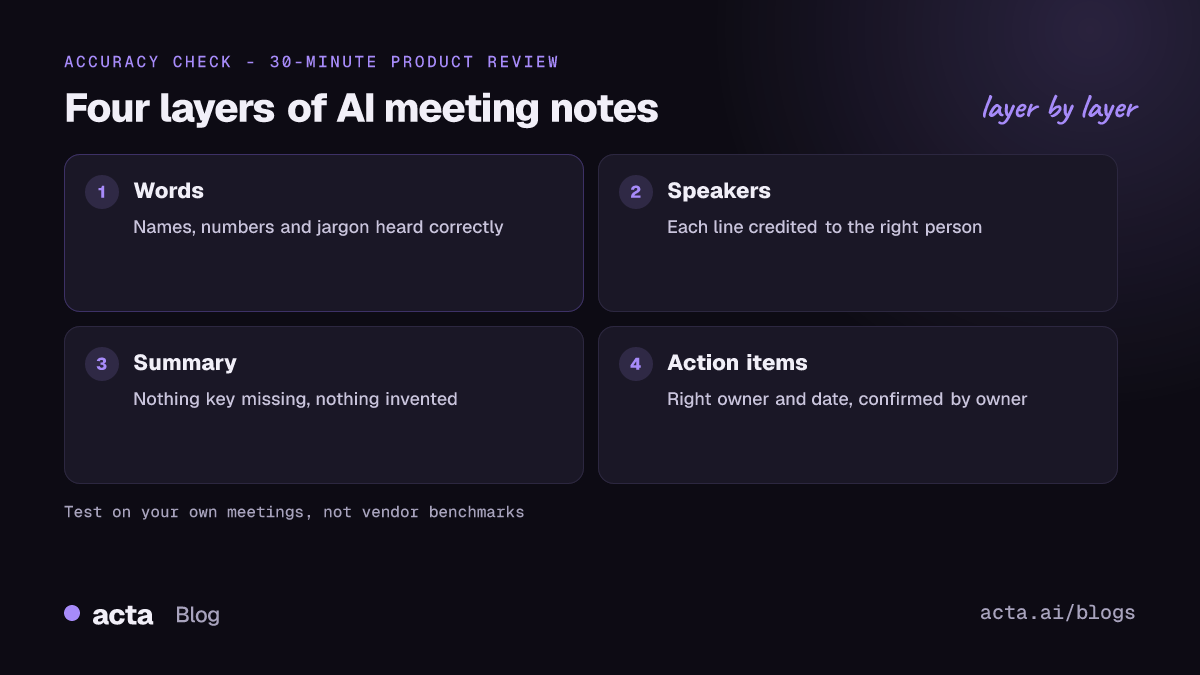
AI meeting notes accuracy depends on four layers, not one: the words in the transcript, who each line is attributed to, whether the summary is faithful to what was said, and whether action items have the right owner and deadline. Good audio and clear speakers usually give a usable transcript, but summaries can still drop or invent details, so test any tool on your own recordings before trusting it.
AI at Work 11 min read
AI Meeting Notes Accuracy: What Affects It and How to Test It
How accurate are AI meeting notes? The four layers that can fail, what drives errors, and a 30-minute test with a score sheet you can run on your own calls.
By Sarma BKP, Founder & CEO, Acta · Updated
This guide explains what "accurate" means for AI-generated notes, what pushes errors up, and how to run a short test on your own calls. It doesn't quote vendor accuracy figures, because a percentage measured on someone else's audio tells you little about your weekly stand-up with three accents and a laptop mic. If you need a verbatim legal record, such as a deposition, AI notes on their own are the wrong tool; use them as a draft for a human to check.
Key takeaways
- Judge AI meeting notes on four layers: words, speakers, summary faithfulness and action items. A tool can be strong on one and weak on another.
- Word error rate (WER) measures transcript accuracy only. It counts substituted, deleted and inserted words against a human reference transcript.
- Audio quality is the biggest lever you control: a close microphone, one speaker at a time and no client-side noise filters.
- Test with 3 real recordings of 20 to 30 minutes each, check 10 facts per meeting, and score names, numbers, decisions and owners.
- Always check numbers, names, dates and "who agreed to what" before you send notes outside the team.
Table of contents
- AI meeting notes accuracy has four layers
- Word error rate measures the transcript, nothing more
- Audio, speakers and vocabulary cause most transcript errors
- Summaries fail by omission and invention
- A 30-minute test tells you more than any benchmark
- A worked example: scoring a product review meeting
- AI notes beat manual notes on recall, not judgement
- Frequently asked questions
- Decide how far to trust your AI notes
AI meeting notes accuracy has four layers
An AI meeting note is the output of a pipeline. Speech recognition turns audio into text. Speaker diarization splits that text by voice and, ideally, attaches a name to each voice. A language model reads the labelled transcript and writes a summary, a list of decisions and action items. Each stage can go wrong, and errors flow downstream: if the transcript hears "fifteen" as "fifty", the summary will confidently report fifty.
So when someone asks "how accurate is it?", the honest answer is "which part?" Here's how the layers differ.
| Layer | What goes wrong | How to check it |
|---|---|---|
| Words (transcript) | Misheard names, jargon, numbers; dropped words in crosstalk | Compare a few minutes with a careful human transcript |
| Speakers | Two people merged, one person split, lines given to the wrong name | Check speaker labels at every change of voice in a 5-minute stretch |
| Summary | Key point missing, tentative idea reported as a decision, invented detail | List the decisions yourself, then compare |
| Action items | Wrong owner, missing deadline, task nobody agreed to | Ask each owner to confirm their items |
In my experience, teams worry most about the transcript and least about action items, when it's usually the other way round that hurts. A misspelled word in a transcript rarely matters. An action item assigned to the wrong person, sent to a client in a follow-up email, does.
Word error rate measures the transcript, nothing more
Word error rate (WER) is the standard measure of transcription accuracy. It's the number of errors divided by the number of words in a reference transcript written by a person. Errors come in three kinds: substitutions (a wrong word), deletions (a word missed) and insertions (a word added that nobody said). Google's guide to measuring speech accuracy notes that WER can even go above 100% when a system inserts a lot of text that wasn't spoken.
Speech vendors use WER to compare models. Microsoft's Custom Speech overview describes using it to decide whether a model needs more training, and it requires human-labelled, word-by-word transcripts to compare against. That second point matters: you can't measure WER without first paying someone, or yourself, to transcribe the audio by hand.
WER has blind spots for meetings. It weighs every word the same, so "the" and "Rs 4 lakh" count equally. It ignores who said what. And it says nothing about the summary, which is what most people actually read. A low WER is necessary for good notes but not sufficient. Treat a vendor's headline number as a measure on their test audio, not a promise about yours.
Audio, speakers and vocabulary cause most transcript errors
Most transcript errors come from a handful of causes you can predict, and several of them you can fix.
- Distance from the microphone. A laptop mic picking up a room of six people gives far worse audio than six people on their own headsets. Google's Speech-to-Text best practices recommend placing the microphone as close to the speaker as possible, avoiding clipping and turning off automatic gain control.
- Noise suppression before transcription. The same Google guidance says applying noise-reduction processing before sending audio to the recogniser typically reduces accuracy. Aggressive filters in some headsets and apps can cut parts of words.
- Crosstalk. When two people talk at once, both the words and the speaker labels suffer. This is the single most common reason summaries miss a point in a lively debate.
- Names and jargon. Product names, client names, acronyms and code names are the words most often misheard, and the ones that matter most. Some engines let you add custom vocabulary; Microsoft notes that custom models help with substitution errors but not with deletions or insertions.
- Accents and language mixing. Unfamiliar accents and switching languages mid-sentence raise errors. If your team mixes Hindi and English, read our guide to Hinglish transcription.
- Silence and unusual speech. Research on OpenAI's Whisper, "Careless Whisper" on arXiv, found that the model sometimes produced hallucinated text that was never spoken, and that this happened more for speakers with longer pauses, such as people with aphasia.
For practical fixes, our guide on improving transcription accuracy with accents, noise and crosstalk goes deeper, and speaker diarization for meeting AI explains why "who said what" goes wrong.
Summaries fail by omission and invention
A summary is a compression: a 45-minute meeting becomes 200 words. Something has to go, and the model decides what. That's where most of the real-world complaints about AI meeting notes accuracy come from. The errors fall into a few types.
- Omission. The summary skips a point that mattered to you, often because it was raised briefly or late in the call.
- Promotion. "We could maybe move launch to March" becomes "Decision: launch moves to March."
- Wrong attribution. A concern raised by the client is reported as your team's position, usually because speaker labels were wrong upstream.
- Invention. A detail appears that nobody said, such as a deadline or a figure. Less common with good transcripts, but it does happen.
- Flattened disagreement. Two people argued; the summary says "the team discussed options".
You can reduce these. Use a template that asks for specific fields (decisions, open questions, owners, dates) rather than a free-form summary. Prefer tools that link each point back to the transcript, so you can check a claim in seconds; our guide on verifiable citations from meeting transcripts explains why. And read reducing hallucinations in AI meeting summaries if invented details are your main worry.
A 30-minute test tells you more than any benchmark
The only accuracy number that matters is the one on your meetings. Here's a short test you can run on any tool during a trial. Get consent before recording, as covered in is it legal to record meetings with AI.
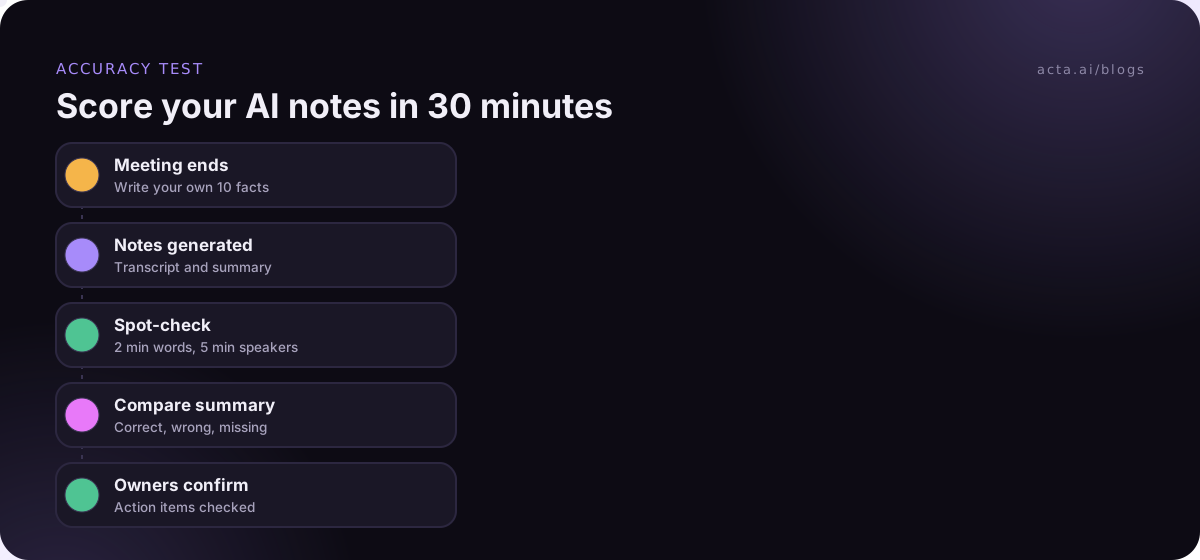
- Pick three real meetings. One easy (two or three people, good headsets), one typical (your usual team call), one hard (a room mic, crosstalk, an external party with a different accent). Aim for 20 to 30 minutes each.
- Write your own fact list during or right after each call. Ten items: the decisions, the numbers, the names mentioned, the owners and the dates.
- Spot-check the transcript. Pick a two-minute stretch and listen while reading. Note misheard names, numbers and dropped sentences.
- Check speakers. In a five-minute stretch, look at every speaker change. Are lines given to the right person?
- Score the summary against your list. For each of your ten facts: present and correct, present but wrong, or missing. Then look for anything in the summary that isn't on your list and wasn't said.
- Check action items with owners. Send the list to the people named and ask "is this yours, and is the date right?"
Copy this scoring sheet for each meeting:
- Meeting: [name, date, length, audio setup]
- Transcript spot-check (2 min): names wrong [ ], numbers wrong [ ], sentences dropped [ ]
- Speakers (5 min): speaker changes [ ], wrongly labelled [ ]
- Summary vs my 10 facts: correct [ ], wrong [ ], missing [ ], invented [ ]
- Action items: confirmed by owner [ ], wrong owner [ ], missing date [ ]
- Would I send this to a client unedited? yes / with edits / no
Three meetings take about 30 minutes of checking in total. That's enough to see a pattern: which layer is weak, and on which kind of meeting.
A worked example: scoring a product review meeting
Here's an illustrative run. A product team (Priya, Marco, Dana and Arjun) holds a 30-minute review on Microsoft Teams, everyone on headsets except Arjun, who joins from a meeting room with two colleagues around one laptop.
Priya's fact list has ten items, including "Decision: ship the export feature on 4 March", "Marco owns the pricing page copy, due Friday" and "Open question: does the API rate limit change?"
The transcript spot-check finds the product name "Ledgerly" written as "ledger lee" twice, and one sentence from the meeting room is missing where two people spoke at once. Speaker labels are right for the three headset users; the meeting room voices are grouped under one name.
Against the fact list, the summary gets eight items right. It misses the open question about the rate limit, raised in the last two minutes, and it reports "export ships 4 March" correctly but credits the decision to Arjun's room rather than Priya. No invented items. Action items: Marco confirms his; one task assigned to "Arjun" was actually taken by his colleague in the room.
The lesson is specific, not general: the tool is fine for headset calls, the meeting room setup is the weak spot, and late points need a check. The fix might be a speakerphone in the room, adding "Ledgerly" to custom vocabulary if the tool offers it, and a habit of recapping decisions out loud before the call ends.
AI notes beat manual notes on recall, not judgement
It's fair to compare AI notes with the alternatives, not with perfection. A person taking notes by hand captures what they think matters and misses what they didn't hear while typing. They rarely get every number down, and their notes reflect their own view of the discussion. An AI notetaker captures far more of what was said, keeps a transcript you can search later, and doesn't get tired in the fourth meeting of the day.
Where humans still win is judgement: knowing that a throwaway remark from the CFO was the real decision, or that a client's "sounds good" meant "we'll think about it". The practical answer for most teams is a hybrid. Let the AI produce the transcript and first draft, and have the meeting owner spend two minutes checking decisions, numbers and owners before anything goes out. If you want to go further, ask questions across meetings in a tool like Acta's OneChat, which answers with sources so you can check the original lines.
A short note on Acta, since you're reading this on its site. Acta writes transcripts with speaker names, summaries, decisions and action items with owners, and offers report templates for structured notes. How it records affects speaker accuracy: with the meeting bot, speakers are named from the participant list, which is more exact; with the bot-free desktop app, your voice is marked as you and the others are named from the conversation and your calendar invite. Run the same test above on it as you would on any tool.
Frequently asked questions
How accurate are AI meeting notes?
It depends on the audio, the speakers and the layer you measure. With clear headset audio and one person speaking at a time, transcripts are usually good enough to work from. Summaries and action items need more checking, because they can miss points or promote ideas to decisions. The only reliable figure is one you measure on your own meetings.
What is a good word error rate for meeting transcription?
There's no single cut-off, because WER depends heavily on the test audio. Compare tools on the same recordings of your meetings rather than on vendors' numbers. For meeting notes, look less at overall WER and more at whether names, numbers and decisions come through correctly, since those errors matter most.
Why does my AI notetaker get speaker names wrong?
Usually because voices overlap, several people share one microphone, or the tool has to guess names from the audio rather than the meeting's participant list. Headsets, one speaker at a time and a tool that reads names from the meeting help. Check the speaker labels before trusting who said what in the summary.
Can AI meeting summaries make things up?
Yes, occasionally. Summaries can add a detail that wasn't said, or turn a suggestion into a decision. Research on speech recognition, such as the Careless Whisper paper, has also documented invented text in transcripts. Check numbers, dates and commitments against the transcript before sharing notes, and prefer tools that link points to their source.
How do I improve AI meeting notes accuracy?
Fix the audio first: close microphones, no aggressive noise filters, one person speaking at a time. Spell out names and numbers clearly, recap decisions before the call ends, use a structured template, and add custom vocabulary if your tool supports it. Then have the meeting owner review decisions and owners before sending.
Decide how far to trust your AI notes
Accuracy isn't a yes-or-no property of a tool. It's how well a tool works on your kind of meeting. Settle it with evidence:
- Run the test: score three real meetings (easy, typical, hard) with the sheet above.
- Find the weak layer: words, speakers, summary or action items, and fix the cause rather than the symptom.
- Fix the audio: headsets or a proper speakerphone for meeting rooms, and no extra noise filters.
- Set a review rule: the meeting owner checks decisions, numbers and owners before notes leave the team.
- Retest after changes: rerun the test after a new room setup or a tool change.
If you'd like to run the test without a bot in the call, install the Acta desktop app and try it on your own meetings during the 15-day free trial.
Found this useful? Share it with your team.