Quick answer: Good sales call note taking means writing less during the call, not faster. Prepare a one-page grid before the call, jot only numbers, names, dates, the buyer's exact pain phrase and the next step, use a few shorthand symbols, and look down while the buyer is thinking rather than while they're talking. Let a recorder hold the detail so your attention stays on the person.
Every rep has had this moment. The buyer finally says the thing you've been fishing for ("honestly, if we don't fix this before the audit, my job's on the line"), and you're staring at your keyboard trying to spell "reconciliation". You got the words. You missed the face that went with them, and the follow-up question you should have asked.
This guide is about the in-call technique: what to write, when to write it and how to set up so the notes don't cost you the conversation. If you want the broader basics, how to take meeting notes covers formats and templates for any meeting.
Why does sales call note taking hurt rapport?
Two reasons, one about attention and one about what typing does to your brain.
The attention part is obvious once you notice it. Buyers can tell when you're writing instead of listening, and on video they see the top of your head and the keyboard glow. Research on conversation backs up the instinct. A 2021 study in PNAS that tracked pairs of people talking found that eye contact was positively linked with how engaging partners rated the conversation, and that eye contact tended to happen at moments of shared attention (Wohltjen and Wheatley, PNAS). So looking up is part of how two people stay in the same conversation, as well as good manners.
The typing part is less obvious. In the well-known 2014 study by Mueller and Oppenheimer, students who typed lecture notes tended to transcribe word for word, and did worse on conceptual questions than students who wrote by hand, even when told not to transcribe (Scientific American). That was students in lectures, not reps on calls, but the habit is familiar: give a fast typist a keyboard and they start taking dictation instead of thinking about what the buyer means.
What should you actually write down during a sales call?
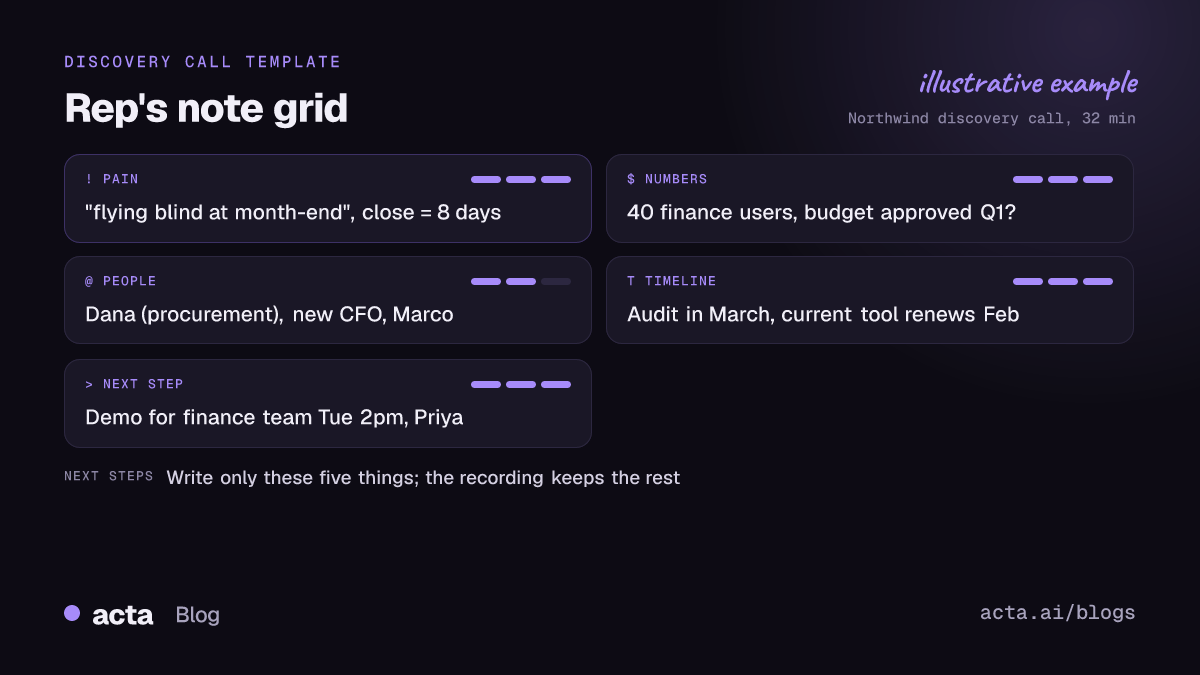
Much less than you think. If you're recording the call (more on that below), the transcript has everything. Your notes only need the things you'll act on in the next ten minutes, plus the moments that mattered. I'd limit it to five types:
Numbers
Seats, budget, current spend, contract dates, "eight days to close the month". Numbers are easy to mishear and hard to ask for twice without sounding like you weren't listening.
Names and roles
Every person mentioned who isn't on the call. "Dana in procurement", "the new CFO", "Marco who built the current spreadsheet". These are your map of the buying group.
The pain, in their words
Write the buyer's exact phrase, in quotes, even if it's clumsy. "We're flying blind at month-end" will land far better in your follow-up email after the call than your paraphrase.
Dates and deadlines
The audit in March, the board meeting, the renewal of the incumbent tool. Timelines create urgency you didn't have to invent.
The next step
Who does what by when. If this box is empty at the end of the call, you know what your last question should be.
That's it. Feature questions, small talk and your own pitch don't need writing down. For structured qualification you can map these boxes to your framework afterwards; our discovery call template with BANT and MEDDIC questions shows one way.
How do you set up a sales call notes template before the call?
Ten minutes of prep saves most of the in-call writing. Here's the routine:
- Draw the grid. One page, five boxes: Pain, Numbers, People, Timeline, Next step. Paper or a single doc, not a CRM form with 30 fields.
- Pre-fill what you know. Company size, attendees and titles, what they said on the last call. Anything already written is something you don't have to write while they talk.
- Write your three must-ask questions at the top. If you only get three answers, which ones would move the deal?
- Leave the margin empty. That's for the follow-up questions that occur to you mid-call. Jot two words, ask later.
- Set up your recording before the call starts, so you're not fiddling with it while the buyer introduces themselves.
A sales call notes template this simple can feel too basic. It's meant to. The fewer decisions you make about where something goes, the faster you look back up.
What shorthand works for sales call note taking?
You don't need a full system. Six or seven symbols you'll actually remember are enough:
- $ budget or spend ("$ approved Q1?")
- ! pain or problem ("! close = 8 days")
- @ a person ("@Dana procurement")
- T timeline or deadline ("T audit March")
- ? something to come back to ("? SSO req")
- > next step or action ("> demo finance Tue")
- "..." exact quote, word for word
The shorthand is for you, not for the CRM. Ten minutes after the call you'll expand it into proper sentences while it still makes sense. Leave it a day and "! T @M ?" means nothing.
When is it okay to look down and write?
Timing matters more than speed. A few habits that help:
- Write while they think, not while they talk. After you ask a big question, there's often a pause while the buyer gathers their answer. That's your moment to finish the last note.
- Say it out loud. "Hang on, I want to get that exactly right" before writing down a quote turns note taking into a compliment. Buyers like hearing that something they said was worth writing.
- Write during screen shares. When they're showing you their current process, everyone's looking at the screen anyway.
- Keep your head up for emotion. When the tone changes (frustration, hesitation, a laugh that isn't quite a laugh), stop writing entirely. That's when the real information is on their face.
On video, put your notes window directly under the webcam rather than on a second monitor off to the side. A glance down reads as listening; a head turned 45 degrees reads as checking email.
Should you type, write by hand, or record the call?
Each has a place.
In person, a notebook beats a laptop. An open laptop is a wall between you and the buyer, and the keyboard noise tells everyone exactly how much you're writing. For an in-person sales meeting, a phone recorder on the table (with permission) plus a paper grid is hard to beat; Acta's mobile app covers that case.
On video, typing is fine if you stick to the grid and resist the urge to transcribe. Mute while typing heavily if your keyboard is loud.
Recording changes the whole problem. Once the full conversation is captured, your job shifts from capturing everything to noticing the few things that matter, which is a much better use of your eyes. If the buyer's company doesn't allow meeting bots, a browser extension or desktop recorder captures the call from your own computer instead; Acta's Chrome extension works this way for Google Meet, Microsoft Teams in the browser and the Zoom web client (setup steps are in the Chrome extension help guide). Always tell the buyer you're recording. Laws differ by country and US state, so read our guide on recording meetings with AI and what to tell participants; it's general information, not legal advice.
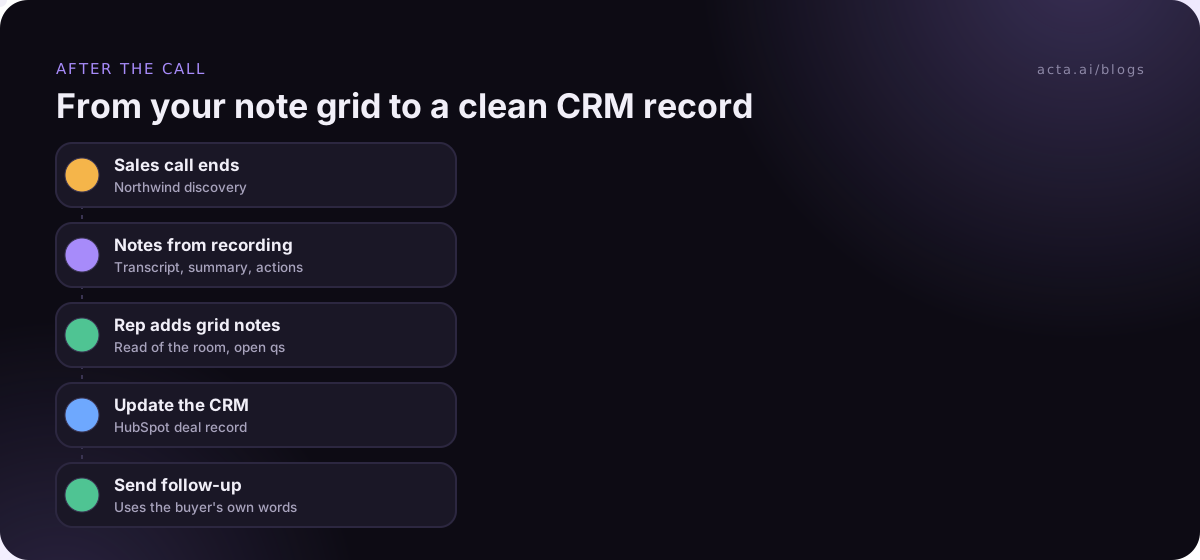
What should you do in the five minutes after the call?
This is where good discovery call notes are actually made. Block five minutes after every call, no exceptions:
- Expand your shorthand while you still remember what "? SSO" meant.
- Add what you noticed but didn't write: who seemed sceptical, who lit up, what they avoided answering.
- Check the next step has an owner and a date. If not, send a one-line email now to pin it down.
- Update the CRM. If you record calls, compare your grid with the generated summary and fix anything it got wrong. If the CRM never gets updated anyway, why reps don’t update the CRM is worth a read. Updating the CRM after a sales call covers how to automate most of this.
- Send the follow-up using the buyer's exact pain phrase from your notes.
Your grid and a recording do different jobs. The recording is complete. Your notes are your judgment: what you think mattered, what you'd ask next, how the room felt. Keep both.
How Acta helps with sales call notes
Acta records sales calls on Zoom, Google Meet and Teams, with a bot, the desktop app or the Chrome extension, and writes the transcript with speaker names, a summary, action items and a follow-up email draft. It can also push notes to Salesforce, HubSpot or Zoho, so your five minutes after the call go on judgment rather than typing. The sales page shows the report templates reps tend to use.
Frequently asked questions
Is it rude to take notes during a sales call?
No, most buyers expect it and many take it as a sign you're listening. What comes across badly is constant typing with your eyes down. Write briefly, look up often, and say when something is worth noting.
Should I take notes by hand or on a laptop?
In person, by hand is usually better because a laptop puts a barrier between you and the buyer. On video, typing is fine if you stick to a short grid instead of transcribing.
What's the best sales call notes template?
The simplest one you'll actually use: five boxes for pain, numbers, people, timeline and next step, with your must-ask questions at the top. You can map it to BANT or MEDDICC afterwards.
Do I still need notes if I record the call?
Yes, but far fewer. The recording keeps the full detail. Your notes capture your read of the buyer and the follow-up questions you want to ask, which no transcript holds.
How can I get better at sales call note taking quickly?
Record a few of your calls, then compare your notes with the transcript. You'll see what you wrote that didn't matter, and what you missed while looking down. Two or three rounds of that changes habits fast.
If you want to try it on your next few calls, Acta has a 15-day free trial.