An IT meeting minutes template should record more than who attended and what was discussed. IT minutes are evidence: which change was approved, by whom, under what conditions, which incident action is owned by which engineer, and what risk was accepted. Below are 8 copy-ready IT meeting minutes templates (CAB, incident review, steering, ops review and more) with notes on when to use each.
These are built for internal IT, infrastructure, service desk and security teams. If you need a general-purpose format for team meetings, our meeting minutes template is a simpler starting point.
Key takeaways
- Every IT minutes template needs four fields generic templates skip: ticket or change IDs, the decision with its conditions, the approver, and the risk accepted.
- Use a separate template per meeting type. CAB minutes and incident review minutes answer different questions.
- Write action items as owner, task, due date and ticket number. "Team to look into it" is not an action.
- Publish minutes within one working day and link them from the change or incident record.
- Keep incident review minutes blameless: describe what the system and process did, not who failed.
Table of contents
- IT minutes need IDs, approvers and conditions
- Change advisory board minutes record approvals and conditions
- Incident review minutes stay blameless and specific
- Steering and security minutes record decisions and accepted risk
- Operational IT meeting minutes templates track the routine work
- Match each IT meeting to its template
- Capture IT minutes from the call, not from memory
- Frequently asked questions
- Roll out one IT meeting minutes template at a time
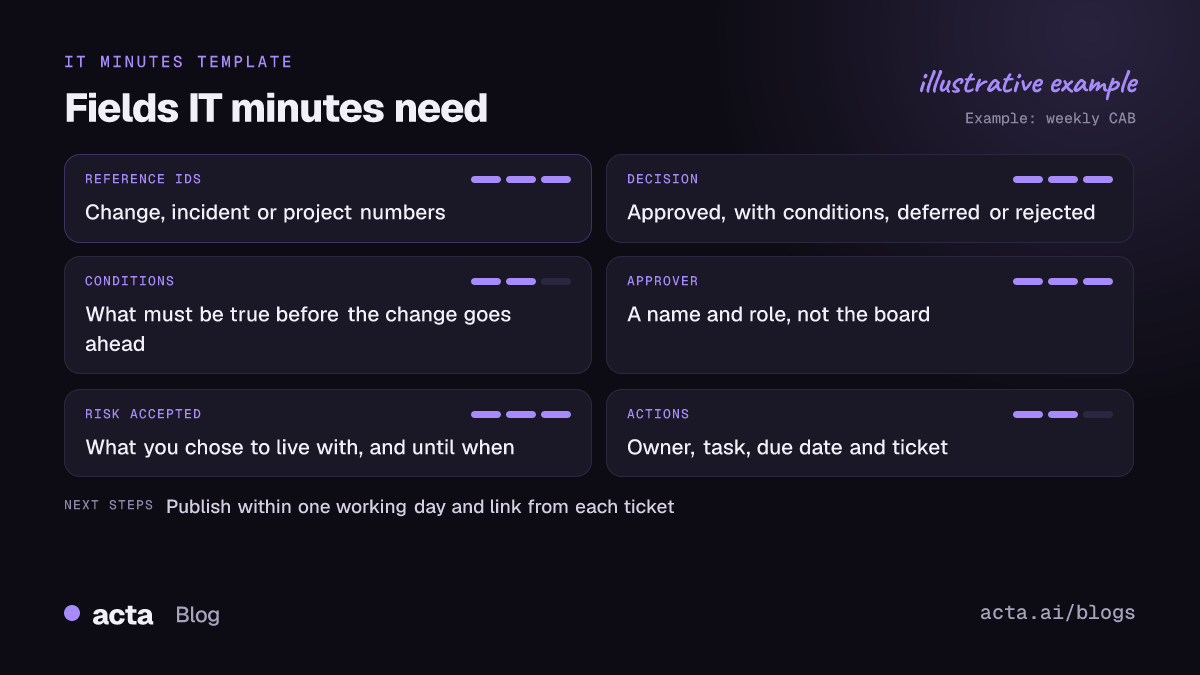
IT minutes need IDs, approvers and conditions
Ordinary minutes answer "what did we talk about?". IT minutes get read months later by someone asking a narrower question: who approved CHG-4471, was the rollback plan reviewed, why was this vulnerability left open until Q2? An auditor, a new manager or the engineer on call at 3am needs to find that answer in under a minute.
So every IT meeting minutes template below includes these fields on top of the usual date, attendees and agenda:
- Reference IDs: change, incident, problem or project numbers, so the minutes link to the record and back.
- Decision and conditions: "Approved, provided the database backup is verified before 22:00" is very different from "Approved".
- Approver: a name and role, not "the board".
- Risk accepted: what you knowingly decided to live with, and until when.
- Actions: owner, task, due date, ticket.
Leave out the discussion blow-by-blow. Two lines of reasoning per decision is plenty. If you want more on keeping minutes short enough to be read, see meeting minutes best practices.
Change advisory board minutes record approvals and conditions
1. CAB meeting minutes
When to use it: your weekly or fortnightly change advisory board. Atlassian describes the CAB as a group that reviews higher-risk changes, chaired by the change manager, and recommends a standard agenda and a set cadence. Your minutes should mirror that agenda, one block per change.
CAB minutes / date / chair (change manager) / attendees / quorum met: yes/no
Review of last week's changes: successful / failed / rolled back, with IDs
For each change: ID / title / requester / risk level / planned window
Decision: approved / approved with conditions / deferred / rejected
Conditions: [e.g. backup verified, comms sent 48h before]
Rollback plan reviewed: yes/no / approver: [name, role]
Upcoming freeze periods or conflicts
Actions: owner / task / due / ticket
Here's one change block filled in, from a fictional CAB:
CHG-4471 / Upgrade core switch firmware, HQ floor 3 / requester: Marco (network) / risk: medium / window: Sat 22:00-01:00
Decision: approved with conditions
Conditions: config backup taken and verified by Marco before 22:00; service desk briefed Friday; Priya on call for rollback.
Rollback plan reviewed: yes (revert to previous firmware image, about 20 minutes). Approver: Dana, change manager.
Note: floor 3 trading desk confirmed no weekend activity.
2. Emergency CAB (ECAB) minutes
When to use it: an urgent change approved outside the normal cycle, often over a quick call. Keep it short, but never skip it. The emergency changes are the ones auditors ask about.
ECAB / date and time / change ID / linked incident ID
Why it can't wait: [impact if delayed]
Approvers present: [names, roles]
Decision and conditions
Retrospective review date: [next regular CAB]
Incident review minutes stay blameless and specific
3. Post-incident review minutes
When to use it: the review meeting after a significant outage or security event. Google's SRE book argues that a postmortem should focus on contributing causes without blaming individuals. Write the minutes the same way: "the deploy pipeline allowed an unreviewed config change" rather than "Sam pushed a bad config".
Incident review / incident ID / severity / date of incident / facilitator / attendees
Summary: what users experienced and for how long
Timeline highlights: detected, escalated, mitigated, resolved (times)
Contributing factors: technical, process, detection
What went well
Actions: owner / action / priority / due / ticket
Follow-up review date
The full postmortem document is a separate artifact. These minutes record what the meeting agreed. Our post on blameless post-mortems from the review meeting covers how to turn the call into the full write-up.
Steering and security minutes record decisions and accepted risk
4. IT steering committee minutes
When to use it: monthly or quarterly meetings where IT leadership and business owners set priorities and budget.
IT steering committee / date / chair / members present / apologies
Portfolio status: project / RAG status / change since last meeting
Decisions: decision / rationale (2 lines) / decided by / budget impact
Escalations raised and outcome
Deferred items: item / revisit date
Actions: owner / task / due
5. Security and risk review minutes
When to use it: vulnerability reviews, risk register reviews, access reviews. The "risk accepted" line matters most here.
Security review / date / attendees / scope
Findings reviewed: ID / severity / system / status
Risk decisions: remediate by [date] / accept until [date], accepted by [name, role] / transfer
Exceptions granted: what, why, expiry
Actions: owner / task / due / ticket
Keep these minutes in a restricted space. Details of open vulnerabilities shouldn't sit in a team-wide wiki.
Operational IT meeting minutes templates track the routine work
6. Weekly IT operations or service review
When to use it: the weekly infra or service desk meeting. Keep it to metrics you actually track and exceptions worth discussing.
IT ops weekly / date / attendees
Service health: major incidents this week (IDs), SLA breaches, backlog trend
Upcoming changes and maintenance windows
Problems and recurring issues: problem ID / owner / next step
Capacity, licensing or renewal flags
Actions: owner / task / due / ticket
7. IT project status meeting
When to use it: migrations, rollouts and implementations with a project manager and a plan.
Project / date / PM / attendees / overall status (RAG)
Milestones: planned vs actual
Risks and issues: ID / description / owner / mitigation
Decisions needed and decisions made
Actions: owner / task / due
For a longer format, see the project status report from status meetings.
8. Vendor or MSP review minutes
When to use it: monthly or quarterly service reviews with a managed service provider, cloud vendor or software supplier.
Vendor review / vendor / contract ref / date / attendees (both sides)
SLA performance: agreed vs reported, disputed figures
Open tickets and escalations
Commitments made by the vendor: what, by when
Commercial items: renewals, price changes, credits
Actions: owner (our side / their side) / task / due
Vendor promises made verbally on these calls are the ones most often forgotten. Write each one down with a date. The vendor review meeting report post has a fuller version.
Match each IT meeting to its template
| Meeting | Template | Field that matters most |
|---|---|---|
| Weekly CAB | CAB minutes | Conditions per change |
| Urgent change call | ECAB minutes | Why it couldn't wait |
| After an outage | Incident review | Owned actions |
| Leadership priorities | Steering committee | Decision and budget impact |
| Vulnerability or access review | Security review | Risk accepted and expiry |
| Infra or service desk weekly | Ops review | Problem IDs and owners |
| Migration or rollout | Project status | Decisions needed |
| MSP or supplier call | Vendor review | Vendor commitments |
Capture IT minutes from the call, not from memory
The hardest part of IT minutes isn't the template. It's the person taking them, who is usually also presenting a change or answering questions. Conditions get missed, and approvals end up recorded as "approved" when the chair actually said "approved if the backup checks out".
Recording the meeting and drafting from the transcript fixes most of that. If you haven't used one, here's how a meeting recorder works. Get consent first (see the rules on recording meetings), and check your own security policy, since some organizations block meeting bots. If yours does, a desktop recorder captures Teams or Zoom calls from your own computer without a bot joining. The person taking minutes then reviews the draft against the template and fixes IDs and names.
Acta records Zoom, Google Meet and Teams calls and writes transcripts with speaker names, summaries, decisions and action items with owners, and it can push items to Jira or Confluence. You'd still check the change IDs and conditions yourself: a draft is a draft. Teams that already use it for engineering meetings often start with the IT team transcription setup.
Frequently asked questions
What should IT meeting minutes include?
Date, attendees and agenda as usual, plus the references generic minutes lack: change or incident IDs, each decision with any conditions, the named approver, any risk accepted and its expiry, and action items with owner, due date and ticket number. Leave out the full discussion; two lines of reasoning per decision is enough.
Who takes minutes in a CAB meeting?
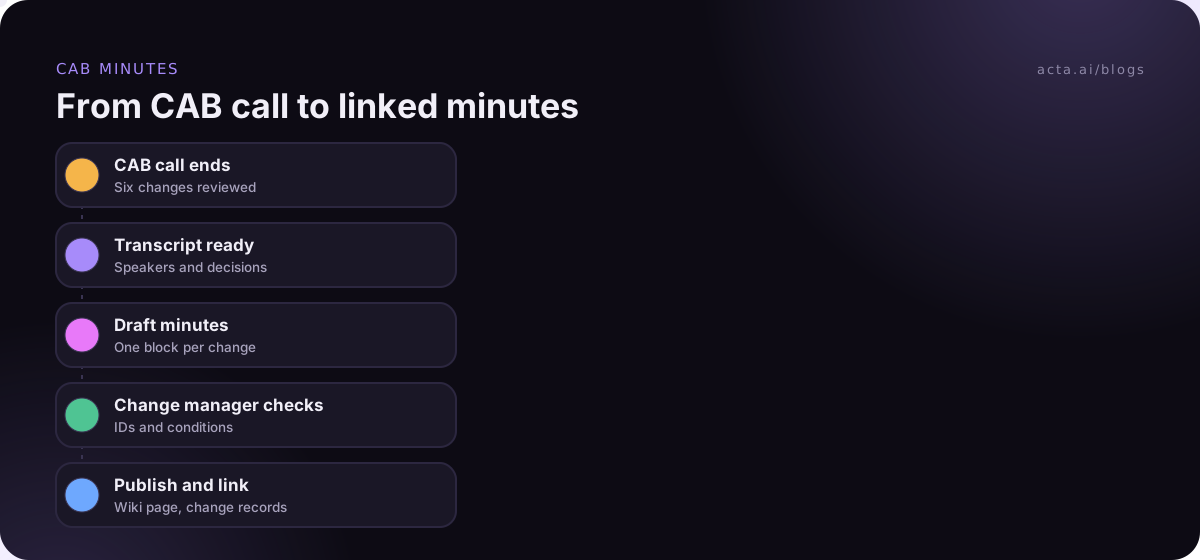
Often the change manager or a change coordinator, though the chair shouldn't also be the only note-taker if the board is busy. Whoever writes them, the change manager should check and approve the minutes before they're published and linked to the change records.
How soon should IT meeting minutes be sent?
Within one working day. CAB decisions affect weekend change windows, and incident actions lose momentum fast. Send a short version the same day if anything is time-critical, then publish the full minutes and link them from the relevant tickets.
Should incident review minutes name the person who caused the outage?
No. Describe what systems and processes allowed the failure and what will change. Naming individuals makes people less candid in the next review. Names belong in the action items as owners of fixes, not in the causes section.
Where should IT meeting minutes be stored?
Next to the work they describe: linked from the change, incident or project record in your service management tool, and in a wiki space with the right access. Keep security review minutes restricted.
Roll out one IT meeting minutes template at a time
Changing every meeting's format at once rarely sticks. Start where a gap hurts most:
- Pick one meeting: CAB is usually the best first candidate, because conditions and approvals are the most audited.
- Add the four IT fields: IDs, decision with conditions, approver, risk accepted.
- Set a publish rule: within one working day, linked from every referenced ticket.
- Assign a reviewer: the chair checks the minutes before they go out.
- Review after a month: ask whoever reads the minutes what they still couldn't find.
To draft minutes from Teams or Zoom calls without adding a bot, try the Acta desktop app with the 15-day free trial.