A good sales call notes template changes with the stage of the deal. Discovery notes need pain, impact and who decides; demo notes need reactions and objections; negotiation notes need terms and concessions; renewal notes need value delivered and risk. Below are eight copy-ready layouts, each with sections and formats (tables for stakeholders, checklists for next steps) you can paste into a custom template.
Use Cases 11 min read
Sales Call Notes Template: 8 Layouts for Every Stage of the Deal
Eight copy-ready sales call notes layouts, one per deal stage, with stakeholder tables, objection lists and next-step checklists you can build as a template.
By Sarma BKP, Founder & CEO, Acta · Updated
I build these for sales teams most weeks, and the same lesson keeps coming back: one generic "sales call" template ends up half empty on every call. Four or five stage-specific ones, each with five to seven sections, get read. If your team only runs short transactional calls with no follow-up, you probably need one simple template, not eight.
Key takeaways
- Use one template per call stage: discovery, demo, negotiation, renewal. A single all-purpose sales template leaves most sections empty.
- Put stakeholders in a table (Name | Role | Stance | Said) and next steps in a checklist with owner and due date. Those two sections carry most deals.
- Ask for the buyer's own words on pain and objections. Quotes survive a handoff; paraphrase doesn't.
- Keep each template to 5-7 sections and always include "Not discussed" handling, so gaps in qualification are visible.
- Test each layout on two past calls of the right stage before switching it on.
Table of contents
- A sales call notes template should match the call stage
- Discovery templates capture pain before product
- Demo templates record reactions, not features shown
- Negotiation templates track terms and concessions
- Renewal and expansion templates start from value delivered
- Build this as a custom template in Acta
- Five mistakes that make sales notes useless
- Frequently asked questions
- Roll out your sales templates one stage at a time
A sales call notes template should match the call stage
Sales meeting notes have one job: let someone who wasn't on the call (your manager, a solutions engineer, you in three weeks) know where the deal stands and what happens next. What that means changes with the stage. Early on, the unknowns are pain and buying process. Later, they're terms, approvals and dates.
Here's the set I'd start with. Each layout below lists the description (what the report should do), then the sections in order with a format for each.
| Template | Use it for | Key formats |
|---|---|---|
| 1. Discovery call | First or second call with a new prospect | Bullets, stakeholder table, checklist |
| 2. Qualification (BANT-style) | Short inbound qualification calls | Table, checklist |
| 3. Enterprise qualification | Complex deals with many approvers | Two tables, checklist |
| 4. Demo review | Product demos | Table of reactions, bullets, checklist |
| 5. Technical deep dive | Calls with IT, security or engineers | Requirements table, checklist |
| 6. Negotiation | Pricing and contract calls | Terms table, bullets, checklist |
| 7. Renewal | Renewal conversations | Value table, risks, checklist |
| 8. Expansion | Upsell and new-team calls | Opportunity table, checklist |
If you already follow a methodology, start there. Acta's built-in templates include a MEDDPICC deal report, SPICED, SPIN and BANT qualification, and you can browse them on the templates page. The layouts here are for teams who want their own version.
Discovery templates capture pain before product
Discovery call notes go wrong when they turn into a list of features the prospect asked about. The useful part is the problem, what it costs them, and who else cares. For the questions themselves, our discovery call template with BANT and MEDDIC questions covers the agenda side.
1. Discovery call template
When to use: first and second calls with a new prospect, any deal size.
What should this report do? For sales discovery calls with new prospects: record their current situation, problems and impact in their own words, who is involved in the decision, and agreed next steps.
1. Current situation (Paragraph): how they handle this today, tools in use, team size if mentioned.
2. Pain points (Bullets): each problem, with a short quote from the prospect.
3. Impact (Bullets): cost, time or risk they attached to the problem. Numbers only if they said them.
4. Stakeholders (Table: Name | Role | Involvement | What they said).
5. Timeline and triggers (Bullets): deadlines, events or reasons to act now.
6. Next steps (Checklist: task, owner, due date).
2. Qualification call template (BANT-style)
When to use: 15-20 minute inbound calls where the question is "is this worth a full discovery?"
1. Qualification summary (Table: Criterion | What we heard | Evidence quote), rows for Budget, Authority, Need, Timeline.
2. Fit concerns (Bullets): reasons this might not be a fit.
3. Next steps (Checklist).
Short on purpose. Rows that come back "Not discussed" tell you exactly what to ask on the next call.
3. Enterprise qualification template
When to use: deals with a long buying process. It borrows from MEDDPICC, which (as HubSpot's MEDDPICC overview and Zapier's guide both lay out) stands for Metrics, Economic buyer, Decision criteria, Decision process, Paper process, Identify pain, Champion and Competition.
1. Metrics and pain (Bullets): measurable outcomes and problems the buyer named.
2. Buying group (Table: Name | Role | Economic buyer, champion or other | Stance).
3. Decision criteria and process (Bullets): how they'll choose and the steps to a signature.
4. Paper process (Bullets): legal, security review and procurement steps mentioned.
5. Competition (Bullets): other vendors or "do nothing", in their words.
6. Gaps to close (Checklist): what we still need to learn, owner, date.
The "Gaps to close" section is the one sales managers read first. If you'd rather start from the built-in version, our MEDDPICC deal report post shows what it produces.
Demo templates record reactions, not features shown
Your demo script already says which features you showed. Demo call notes should capture what the buyer did with them: where they leaned in, what they challenged, what they asked to see again. Our guide to demo call structure covers running the call itself.
4. Demo review template
When to use: product demos at any stage.
1. Attendees and roles (Table: Name | Role | Main interest).
2. Reactions by area (Table: Feature or workflow | Reaction | Quote).
3. Objections and concerns (Bullets): each objection, who raised it, and how we answered.
4. Requests (Bullets): things they asked to see, trial, or receive.
5. Next steps (Checklist).
5. Technical deep-dive template
When to use: calls with IT, security or engineering reviewers.
1. Requirements (Table: Requirement | Raised by | Met, partly met or not met | Notes).
2. Integrations discussed (Bullets).
3. Security and compliance questions (Bullets): questions asked and answers given, or "follow up".
4. Open technical questions (Checklist: question, owner, due date).
Add an extra instruction such as "Only mark a requirement as met if we said so on the call." It stops the report from being optimistic on your behalf.
Negotiation templates track terms and concessions
Negotiation call notes are where vague summaries cost real money. "Discussed pricing and agreed to follow up" tells nobody whether you offered a discount. Track every term separately, and who moved.
6. Negotiation call template
When to use: pricing, contract and procurement calls.
1. Terms discussed (Table: Term | Their position | Our position | Status).
2. Concessions (Bullets): anything offered or conceded by either side, with who said it.
3. Approvals needed (Bullets): people or committees that must sign off, on both sides.
4. Risks to close date (Bullets).
5. Next steps (Checklist).
Use extra instructions like "Quote numbers and dates exactly as said." For clause-heavy deals, see contract negotiation notes, clause by clause.
Renewal and expansion templates start from value delivered
Renewal call notes should open with what the customer got, in their words, before any talk of terms. If they can't name value, that's your risk section written for you.
7. Renewal call template
When to use: renewal conversations, typically 60-90 days before the date.
1. Value delivered (Table: Goal | Outcome mentioned | Quote).
2. Usage and adoption (Bullets): teams, users or workflows mentioned.
3. Risks and complaints (Bullets): with who raised them.
4. Renewal terms discussed (Bullets): seats, term, price, timing.
5. Next steps (Checklist).
8. Expansion call template
When to use: upsell calls and conversations with a new team at an existing customer.
1. New use case (Paragraph): the team, the problem, how they handle it now.
2. Opportunity (Table: Team | Need | Size if mentioned | Sponsor).
3. Blockers (Bullets): budget, approvals, competing priorities.
4. Next steps (Checklist).
For the post-close handover, pair these with a QBR notes template so customer success keeps the same habits.
Build this as a custom template in Acta
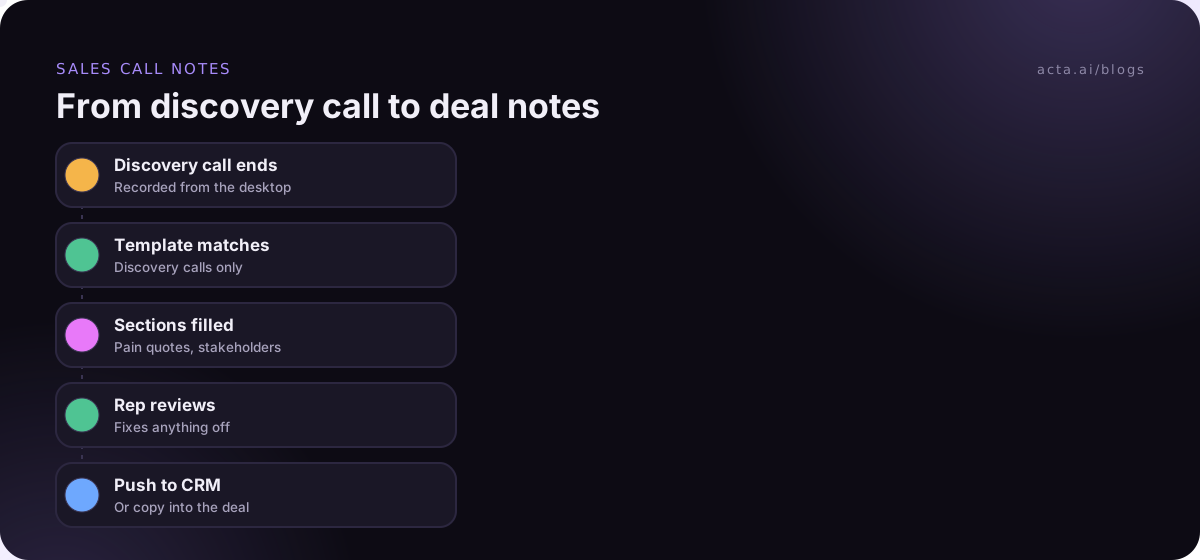
Custom templates are available on Acta's paid plans, not in the 15-day free trial (trial users can still use the built-in templates). The custom templates help article has every option; here's the discovery template as an example.
- Open Templates in the sidebar, select My templates, then + Create template.
- Name it ("Discovery call - mid-market").
- Under Start from, choose Built-in to copy BANT qualification or the MEDDPICC deal report, or Describe it and paste the description from template 1, then click Draft sections.
- Edit the sections to match the layout: title, what to write, and format. For Stakeholders choose Table and name the columns; for Next steps choose Checklist (task, owner, due date).
- Add extra instructions: "Use the prospect's own words for pain points."
- Under When should Acta use it?, choose Only matching meetings, so it runs on discovery calls and not on demos.
- Click Test on a past meeting, then Run on this meeting to preview. Nothing is saved or sent. Then Save.
- Optional: Share with my team so every rep can turn it on. Only you can edit it.
After each call, the report sits in the meeting's Templates tab as "Your template", with Copy, Download and Push to CRM, and it's emailed to you. If you'd rather adapt a built-in template step by step, our guide on customising a built-in meeting template walks through it.
Example output (illustration)
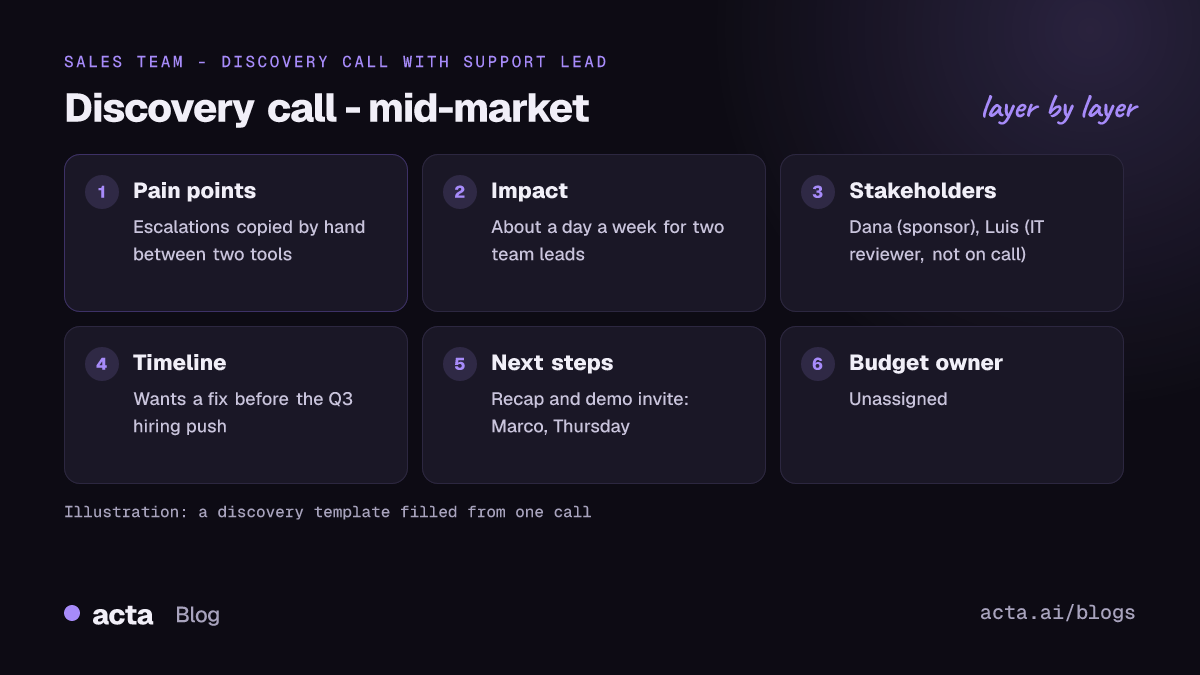
In short: Dana's support team loses about a day a week reconciling tickets between two tools; she wants a fix before their Q3 hiring push. Finance approval needed above a threshold she didn't state.
Pain points: "We copy every escalation by hand" (Dana). Weekend tickets get missed.
Impact: "About a day a week for two of my leads" (Dana).
Stakeholders: Dana Okafor | Head of Support | Sponsor | "I need this before we hire." Luis Ortega | IT lead | Reviewer | Not on call; Dana will loop him in.
Timeline and triggers: Hiring push starts in Q3.
Next steps: Send recap and demo invite (Marco, Thursday). Intro to Luis (Dana, next week). Confirm budget owner (Unassigned).
The report also carries a confidence rating and key quotes. Note the "Unassigned" step: nobody owned finding the budget holder, and the template made that visible.
Five mistakes that make sales notes useless
- One template for every stage. A negotiation section on a discovery call says "Not discussed" every time and teaches reps to ignore the report.
- Asking for a deal score. Nobody says "this deal is a 7" on the call. Ask for evidence and let the rep judge.
- Paraphrasing the buyer. "Customer is concerned about cost" loses the detail. Ask for quotes.
- Next steps without owners. Use the Checklist format; it forces task, owner and due date, and shows "Unassigned" where nobody took it.
- Notes that never reach the CRM. Decide where the notes live. Our post on updating the CRM after a sales call covers the options.
Where Acta fits
Acta records sales calls on Zoom, Google Meet and Teams and runs matching templates on each one; the sales page shows the deal reports. Many buyers don't love a bot in the call, so reps often use the desktop app instead, which records from their own computer. Either way, tell the buyer you're recording; our guide to recording consent and what to tell participants has wording.
Frequently asked questions
What should be in a sales call notes template?
At minimum: the buyer's situation and pain in their own words, the people involved and their roles, objections, and next steps with an owner and date. Then add stage-specific sections: decision process for discovery, reactions for demos, terms for negotiation, value delivered for renewals. Five to seven sections is enough.
How do I take discovery call notes without losing eye contact?
Write only time-stamps or single words during the call and let a recording and template do the rest. Your attention stays on the buyer, and the notes still come out structured. Our post on note-taking without losing eye contact has more techniques.
Should I use MEDDPICC or my own template?
If your team already forecasts on MEDDPICC, use it, either the built-in version or a copy you adjust. If you sell smaller deals with short cycles, a lighter discovery template like layout 1 or 2 above will be read more often. Methodology matters less than consistency.
What is the difference between demo call notes and discovery call notes?
Discovery notes record the buyer's problem, impact and decision process before you show anything. Demo notes record how the buyer reacted to what you showed: interest, objections and requests. Mixing them hides both. Keep separate templates and let each run only on matching meetings.
Can the template push notes into my CRM?
Each template report in Acta has a Push to CRM button alongside Copy and Download. Acta integrates with Salesforce, HubSpot and Zoho. Check how the report lands in your CRM on a test deal before relying on it, and keep sections named in a way your reps recognise.
Roll out your sales templates one stage at a time
Start with the stage where deals stall most, usually discovery or negotiation, and add the rest once reps trust the first one.
- Pick the first stage: the one where handoffs or forecasts go wrong most often.
- Copy one layout above: keep it to 5-7 sections, with a stakeholder table and a next-steps checklist.
- Test on past calls: run it on two real calls of that stage and fix vague sections.
- Share it with the team: one owner edits; everyone else turns it on.
- Review after ten calls: cut sections that always say "Not discussed".
Record your next discovery call with the Acta desktop app and see how your template reads before the follow-up email goes out.
Found this useful? Share it with your team.