Use Cases 6 min read
MEDDPICC Deal Reports From Every Sales Call, Written for You
MEDDPICC only works when the notes are honest and complete. Here is how Acta turns each sales call into a MEDDPICC deal report with gaps flagged.

Quick answer: A MEDDPICC deal report is a structured write-up of a sales call, organised by the eight MEDDPICC elements: metrics, economic buyer, decision criteria, decision process, paper process, identified pain, champion and competition. Acta writes it automatically from the recorded call, adds objections, procurement details, upsell signals and next steps, and flags which elements the call never covered.
Every enterprise rep knows the drill. After a strong discovery call, you are supposed to update the MEDDPICC fields in the CRM before the next meeting starts. In practice the next meeting has already started, and the fields get filled in from memory on Friday afternoon, if at all.
That gap matters. A forecast built on half-remembered notes treats a friendly evaluator as a champion and an unnamed approver as an economic buyer. The deal looks healthier than it is until procurement or a competitor shows up late.
What is MEDDPICC?
MEDDPICC is a qualification framework for complex B2B sales. It grew out of MEDDIC, which was developed at PTC in the 1990s; Paper Process and Competition were added later because large deals so often stall in contracting or lose to a rival nobody mapped. A good overview of the letters and their history is this explainer on what MEDDPICC means.
- Metrics: the measurable outcome the buyer expects, such as hours saved or cost removed.
- Economic buyer: the person who can release budget and say yes.
- Decision criteria: the technical, commercial and political tests the buyer will apply.
- Decision process: the steps, people and dates between now and a decision.
- Paper process: legal, security review, procurement and signature.
- Identify pain: the business problem that makes change urgent.
- Champion: an insider with influence who sells for you when you are not in the room.
- Competition: other vendors, in-house builds and the option of doing nothing.
The framework is a test of whether a deal is real, not a sales script. As this guide to qualifying complex B2B deals with MEDDPICC puts it, the point is to examine the forces that decide whether a deal will close. That only works if what was actually said gets captured.
What does Acta's MEDDPICC deal report include?
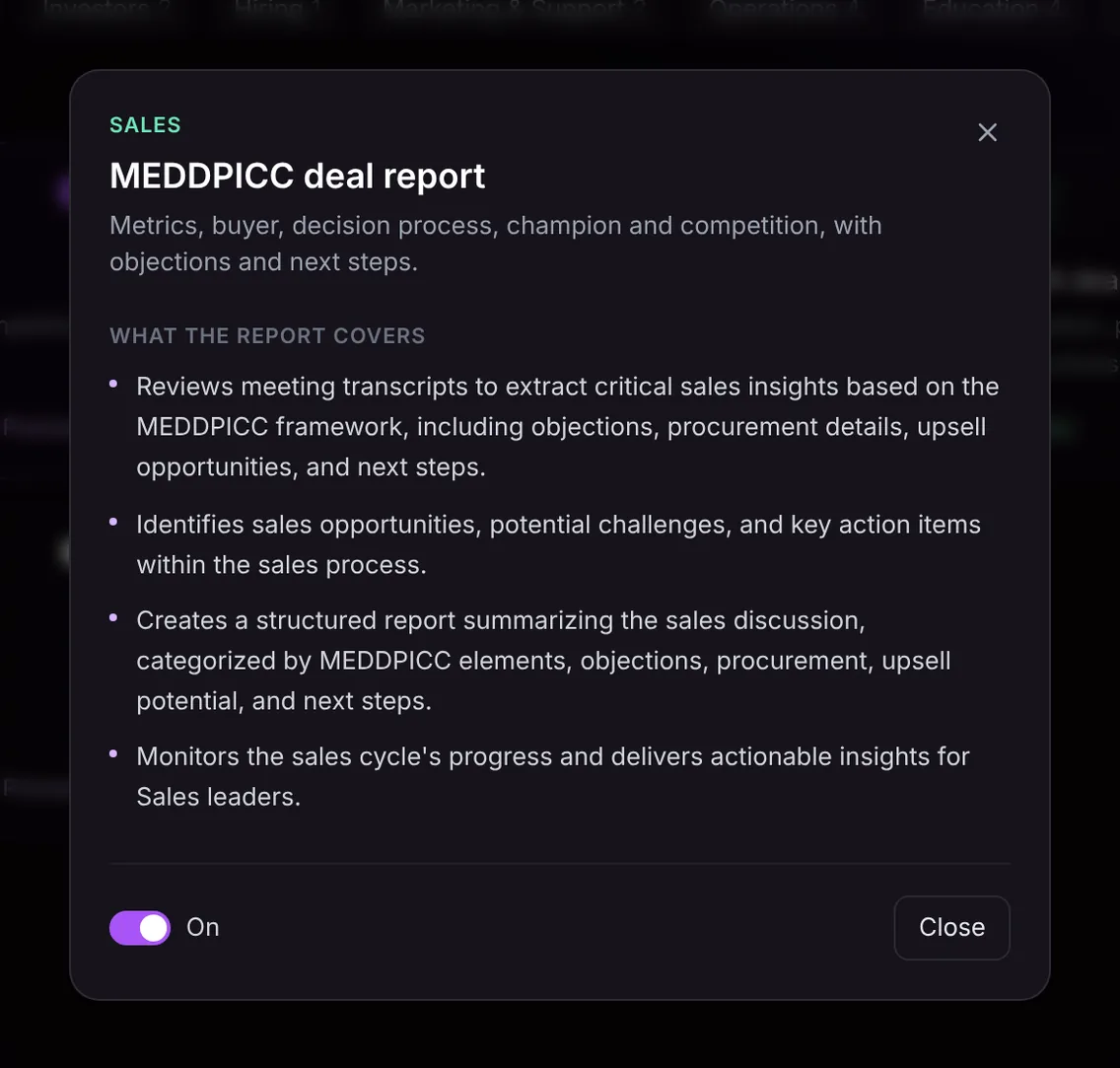
Acta reads the transcript of the call and builds the report around the framework, with the extras a sales leader needs for deal reviews:
- MEDDPICC insights from the transcript. Each element is filled from what the buyer and the rep said, alongside objections raised, procurement details, upsell opportunities and agreed next steps.
- Opportunities, challenges and action items. The report separates signals that move the deal forward from risks that could stall it, and lists who owes what.
- A structured summary by element. Metrics, buyer, criteria, process, pain, champion and competition each get their own section, followed by objections, procurement, upsell potential and next steps.
- Progress through the sales cycle. The report gives sales leaders a view of where the deal stands and what to do about it.
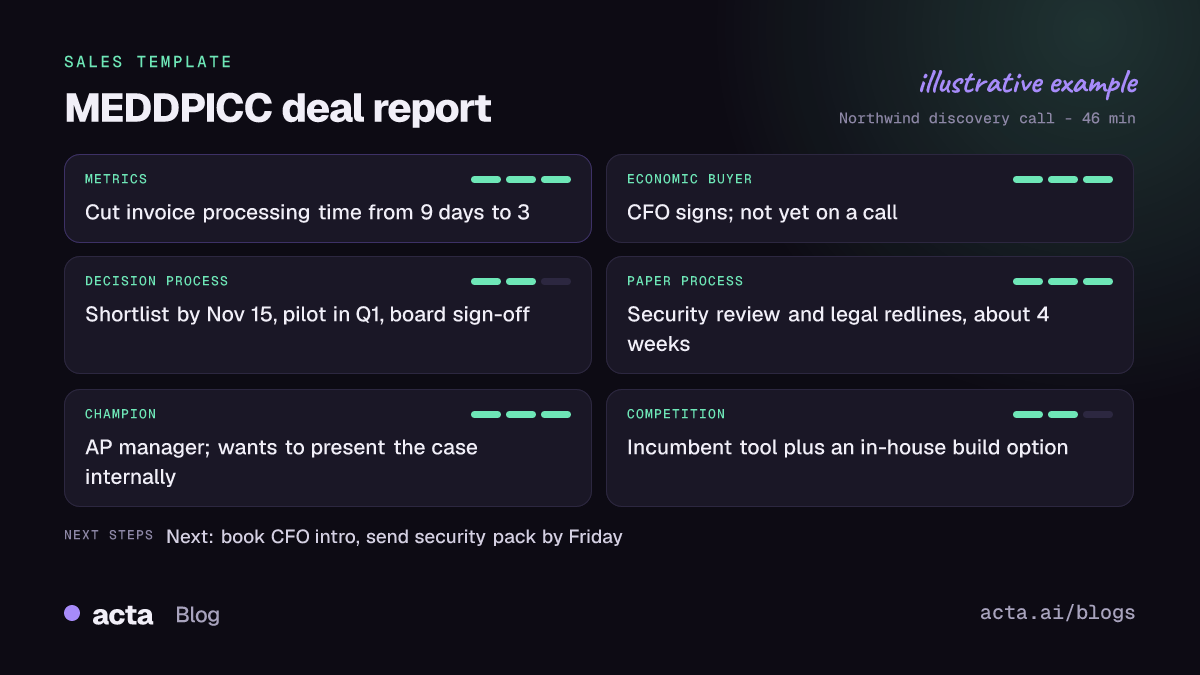
Like Acta's other sales reports, it also carries an "In short" summary, a confidence level that says what was missing, a qualification status, coverage of each MEDDPICC element on a three-point scale, "Ask on the next call" questions for the gaps, and key quotes with the speaker.
Here is the template in Acta's Templates page, with the preview of what the report covers:
And an illustrative example of a finished report:
Why is a MEDDPICC report useful, and who is it for?
The report is built for account executives selling into enterprise accounts and for the managers who coach them and own the forecast. It removes the typing, but the bigger win is honesty: the report only contains what was said, so an empty economic buyer section stays empty.
- Deal reviews. A manager can open the report before a pipeline review and see that the champion is strong but nobody has met the CFO. The conversation moves from "how is it going?" to "how do we get to the CFO?"
- Call preparation. The "Ask on the next call" list turns gaps into questions, such as who signs off after legal or what the security review involves.
- Handoffs. When a deal moves from an SDR to an AE, or from an AE to a solutions engineer, the next person reads the report instead of re-asking the buyer the same discovery questions.
- Late-stage risk. Paper process and competition are the two elements reps most often leave blank. Seeing them flagged early gives you time to start the security questionnaire or address the in-house build option.
For more on how sales teams use Acta beyond this report, see Acta for sales teams and the short answer on MEDDPICC notes from sales calls.
How does Acta pick the MEDDPICC template automatically?
You do not have to remember to switch the template on. After a meeting, Acta reads the conversation and picks a fitting template even if you have not turned it on. A call where the buyer talks about measurable goals, who approves spend, how the evaluation will run, procurement or legal steps, and which other vendors are in the frame is a clear MEDDPICC signal.
A report Acta picked this way is labelled "Auto", and Acta tells you why it chose it, for example that the call covered metrics, the economic buyer and the decision timeline. If you like the result, one click on "Turn on for future meetings" keeps the template on.
The reverse also holds. When the MEDDPICC template is on, it first checks whether the meeting is actually a sales conversation. Your weekly team stand-up will not get a forced MEDDPICC report full of blanks; it is listed under "Not relevant" with the reason.

How do you use the MEDDPICC deal report?
- Record the call. Acta records Zoom, Google Meet and Microsoft Teams calls through a meeting bot, the bot-free desktop app, the Chrome extension or the mobile apps. You can also upload a recording.
- Turn the template on. Open Templates in Acta, preview the MEDDPICC deal report and switch it on, or let Acta pick it automatically.
- Open the meeting. The report sits in the meeting's Templates tab, next to the summary and transcript.
- Share or file it. Copy it, download it as PDF, Word or Markdown, or use Push to CRM to add it as a note on the customer's contact in Salesforce, HubSpot or Zoho (paid plan, with that CRM connected).

Tips for a more complete MEDDPICC report
The report reflects the conversation, so the best way to improve it is to ask the questions out loud. Ask what success looks like in numbers. Ask who else has to approve, and what happens after they say yes. Ask how purchasing and legal review work at their company. Ask what they will do if they do nothing. Each of those answers lands in its own section.
If your team qualifies with a different framework, compare the SPICED deal report or the BANT qualification report, which suits faster, transactional cycles.
Frequently asked questions
What is the difference between MEDDIC and MEDDPICC?
MEDDIC covers metrics, economic buyer, decision criteria, decision process, identified pain and champion. MEDDPICC adds paper process and competition, which matter most in long enterprise deals with procurement and several vendors.
Will Acta guess MEDDPICC fields the buyer never mentioned?
No. The report only contains what was said in the meeting. Missing elements are shown as gaps, with the confidence level explaining what was missing and suggested questions for the next call.
Can I send the MEDDPICC report to my CRM?
Yes. Push to CRM adds the report as a note on the customer's contact in Salesforce, HubSpot or Zoho on a paid plan with that CRM connected. You can also copy it or download it.
Does it work for calls I recorded without a bot?
Yes. Reports are written the same way whether the call was captured by the meeting bot, the desktop app, the Chrome extension, the mobile apps or an uploaded recording.
Want MEDDPICC notes without the Friday catch-up? Start a free 15-day Acta trial and record your next discovery call.