A vendor review meeting template is a fixed set of sections you fill after every supplier review: service levels against target, issues and incidents since the last meeting, commercial and renewal terms discussed, risks, and actions with owners and dates. Use a short operational version for monthly service reviews and a fuller one for quarterly or pre-renewal reviews, and keep the SLA table identical from meeting to meeting so trends are obvious.
Use Cases 11 min read
Vendor Review Meeting Template: 7 Layouts With SLA Tables
Seven vendor review meeting template layouts with SLA tables, issues, renewal terms, risks and actions, plus how to pick one by vendor tier and a worked example.
By Sarma BKP, Founder & CEO, Acta · Updated
This post is for procurement leads, operations managers and IT owners who run regular reviews with suppliers. It gives seven copy-ready layouts, a table to choose between them, setup as a custom template in Acta and a filled-in example. If you only have two or three small vendors, a shared spreadsheet scorecard is probably enough and you can skip the template work.
Key takeaways
- Lead every vendor review with an SLA table: measure, target, actual, status, comment. Same rows every time.
- Write issues as a table with impact and status, so open problems carry forward instead of disappearing.
- Record commercial terms exactly as discussed, and mark anything not yet in writing as "verbal only".
- Match the template to the vendor's importance: a monthly service check for critical suppliers, a quarterly or annual review for the rest.
- End with a checklist of actions for both sides, each with an owner and a due date.
Table of contents
- Vendor reviews check performance against what the contract promised
- Three vendor review meeting template layouts for operations
- Four templates for strategic and specialist reviews
- Choose the template by vendor tier and cadence
- Build the vendor review as a custom template in Acta
- A filled-in vendor review example
- Mistakes that make vendor reviews toothless
- Frequently asked questions
- Set up your vendor review routine
Vendor reviews check performance against what the contract promised
A supplier review meeting exists to answer one question: is this vendor delivering what we pay for, and if not, what happens next? Everything in the notes should serve that. Victoria's government procurement guidance on monitoring supplier performance frames it as assurance that the provider is performing in line with the contract, which is a useful test for any section you are tempted to add.
In practice, a vendor performance review covers four areas. Service levels: did they hit the SLA targets? Issues: what went wrong, how bad was it, is it fixed? Commercials: anything about price, volumes, credits or renewal. Relationship: changes on either side, such as a new account manager, a reorganisation, a product being retired. Then actions.
The trouble is that these meetings are often friendly and vague. The vendor presents a deck, everyone nods, and three months later nobody can say whether the credit for last quarter's outage was agreed or just mentioned. A template forces the specifics onto the page. Our earlier post on vendor review meeting reports covers the keep-or-exit judgement; this one is about the layouts themselves.
Three vendor review meeting template layouts for operations
These three cover the routine reviews. Section, format in brackets, then what goes in. Copy them as they are and trim later.
1. Monthly SLA review
When to use it: monthly service reviews with critical suppliers, such as hosting, facilities, outsourced support or logistics.
1. SLA performance (Table: Measure | Target | Actual | Met? | Comment)
2. Incidents this period (Table: Incident | Date | Impact | Root cause stated | Status)
3. Service credits or penalties discussed (Bullets): amounts and terms exactly as said
4. Changes coming (Bullets): releases, staffing, process changes on either side
5. Actions (Checklist: task, owner, due date)
2. Quarterly supplier business review
When to use it: a quarterly meeting with a strategic supplier, usually with a manager from each side.
1. Vendor scorecard summary (Table: Area | Rating discussed | Trend | Comment)
2. Open issues carried forward (Table: Issue | Owner | Status)
3. Commercial points discussed (Bullets): volumes, pricing, invoices, credits
4. Improvement plans (Bullets): what the vendor committed to change
5. Risks (Bullets): supply, financial, security, key-person, as raised in the meeting
6. Actions (Checklist: task, owner, due date)
3. Pre-renewal contract review
When to use it: the review you hold well before the notice period on a contract opens, so you have time to fix gaps or go to market.
1. Performance over the contract term (Paragraph): the summary both sides agreed on
2. Contract renewal terms discussed (Table: Term | Current | Proposed | Agreed?)
3. Unresolved issues (Bullets)
4. Alternatives mentioned (Bullets): other suppliers, insourcing, scope changes
5. Decision and next steps (Paragraph)
6. Actions (Checklist: task, owner, due date)
The "Agreed?" column in the renewal table is the one that saves arguments. Mark each term "yes", "no" or "verbal only". Verbal agreements in a review meeting are common and worth very little until someone puts them in writing.
Four templates for strategic and specialist reviews
Some vendor relationships need a different shape. These four cover the cases I see most.
4. Incident or escalation review
When to use it: a one-off meeting with a vendor after a serious failure.
1. What happened (Paragraph): timeline in the vendor's and our words
2. Impact on us (Bullets)
3. Vendor's explanation and fixes promised (Table: Fix | Owner | Date promised)
4. Contractual consequences discussed (Bullets)
5. Actions (Checklist: task, owner, due date)
Scotland's Procurement Journey guidance on managing and improving supplier performance advises raising a service problem straight away and following it up in writing. This template is the written follow-up.
5. Software and SaaS vendor review
When to use it: quarterly reviews with a software supplier.
1. Usage and adoption discussed (Bullets)
2. Support tickets and response times (Table: Ticket or theme | Priority | Status | Comment)
3. Roadmap items relevant to us (Table: Item | Expected timing as stated | Matters because)
4. Licence and pricing discussion (Bullets)
5. Actions (Checklist: task, owner, due date)
Write roadmap timings exactly as stated, with the hedge the vendor used. "Hopefully Q2" and "Q2" are different promises.
6. Manufacturing or logistics supplier review
When to use it: monthly or quarterly reviews with suppliers of physical goods or transport.
1. Delivery and quality measures (Table: Measure | Target | Actual | Comment): on-time delivery, defects, returns
2. Quality issues and corrective actions (Table: Issue | Corrective action | Owner | Due)
3. Capacity and lead times discussed (Bullets)
4. Cost and price changes raised (Bullets)
5. Actions (Checklist: task, owner, due date)
7. New vendor 90-day check-in
When to use it: the first proper review after onboarding a supplier.
1. Onboarding status (Bullets)
2. Early performance against SLA (Table: Measure | Target | Actual)
3. Friction points on both sides (Bullets)
4. Agreed changes to ways of working (Bullets)
5. Actions (Checklist: task, owner, due date)
Choose the template by vendor tier and cadence
Not every supplier deserves a monthly meeting. Tier your vendors by how much it would hurt if they failed, then match the template.
| Template | Best for | Typical cadence | Sections |
|---|---|---|---|
| Monthly SLA review | Critical service suppliers | Monthly | 5 |
| Quarterly business review | Strategic suppliers | Quarterly | 6 |
| Pre-renewal review | Any contract coming up for renewal | Before notice period | 6 |
| Incident review | After a serious failure | One-off | 5 |
| SaaS vendor review | Software suppliers | Quarterly | 5 |
| Manufacturing or logistics | Physical goods and transport | Monthly or quarterly | 5 |
| 90-day check-in | Newly onboarded vendors | Once | 5 |
Most operations teams need three: the monthly SLA review, the quarterly business review and the pre-renewal review. Add the others when the situation comes up. NI Business Info's guide to reviewing your suppliers' performance is a sensible primer if you are setting up a review programme from scratch.
Build the vendor review as a custom template in Acta
If you record supplier meetings, Acta can fill these layouts from the transcript, so the SLA review section reflects what was actually said rather than what you remember of the vendor's slides. Custom templates are available on paid plans, not the 15-day free trial. Full details are in the custom templates help article.
- Open Templates in the Acta sidebar, pick My templates and click + Create template.
- Name it "Monthly vendor SLA review".
- Under Start from, choose Blank, or Built-in and copy the built-in Project status template if you want a starting point to change.
- In "What should this report do?" write: "For monthly service review meetings with suppliers: service levels against target, incidents and their status, service credits discussed, upcoming changes, and actions for both sides." This text also decides which meetings match.
- Add the five sections. Set "SLA performance" to Table with columns Measure, Target, Actual, Met?, Comment (tables take up to six named columns). Set "Incidents this period" to a Table as well, and "Actions" to Checklist for task, owner and due date.
- Extra instructions: "Quote figures and credit amounts exactly as said. Mark commercial points not confirmed in writing as verbal only."
- Under When should Acta use it? choose Only matching meetings, so it runs on vendor reviews and skips internal calls.
- Click Test on a past meeting, choose last month's review and Run on this meeting. Nothing is saved or sent. Adjust, then Save.
- Turn on Share with my team so other vendor owners can switch it on. Only you can edit it, which keeps the SLA table consistent across suppliers.
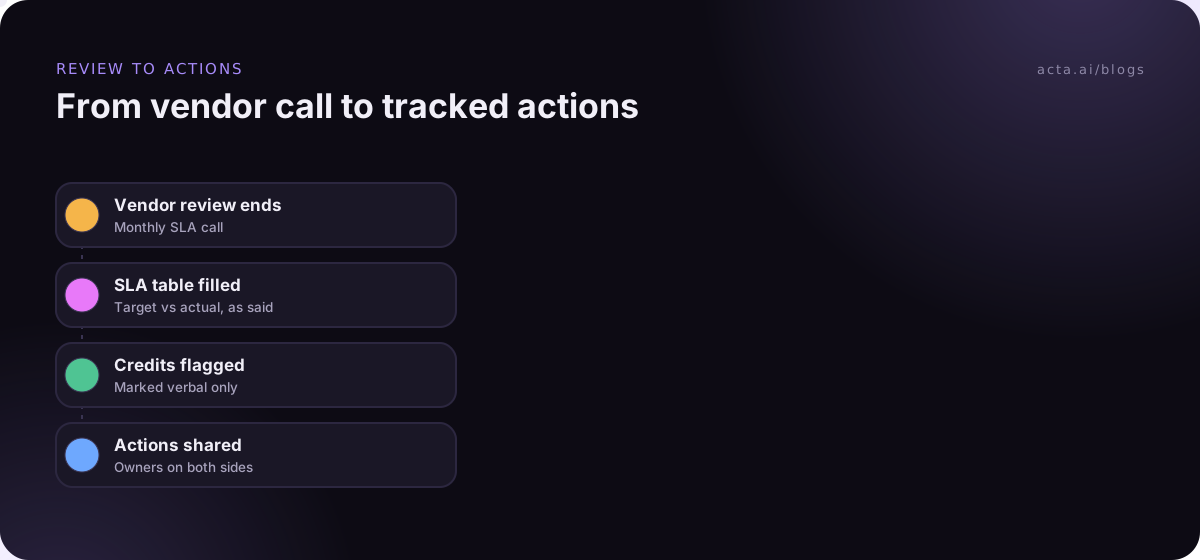
After the meeting, the report sits in the meeting's Templates tab as "Your template" or "Team template", with Copy, Download and Push to CRM, and it's emailed like other template reports. It starts with an "In short" summary, a confidence rating and key quotes. If the vendor never mentioned credits, that section reads "Not discussed"; an action nobody took on reads "Unassigned". Acta's built-in templates are listed on the templates page, and the operations page shows other ops uses.
A filled-in vendor review example
An illustration of the monthly SLA review after a 30-minute call with a support outsourcing vendor. Names and numbers are invented.
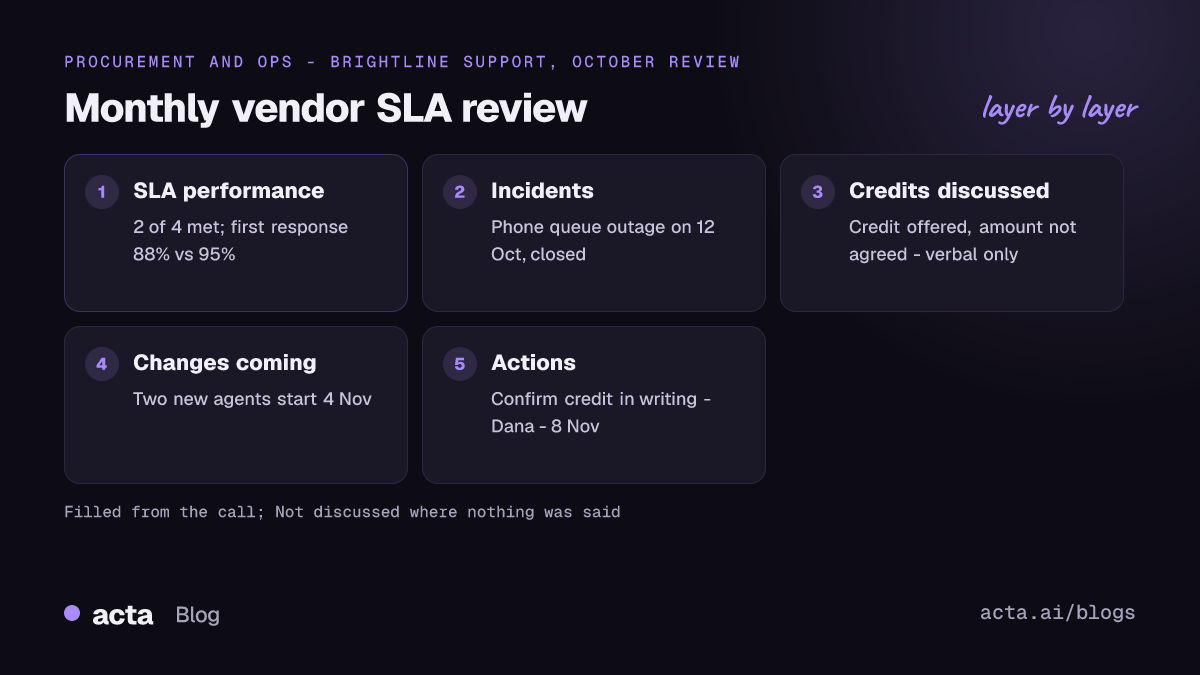
Monthly vendor SLA review: Brightline Support, October
In short: Two of four SLAs met. First-response time missed after a staffing gap. Vendor offered a service credit verbally; Dana to confirm in writing.
SLA performance: First response within 1 hour, target 95%, actual 88%, not met, "two agents left mid-month". Resolution within 1 day, target 90%, actual 91%, met. Customer satisfaction, target 4.5, actual 4.6, met. Ticket backlog under 50, actual 73, not met.
Incidents this period: Phone queue outage on 12 Oct, about two hours, customers could not call in, carrier fault stated, closed.
Service credits or penalties discussed: Marco (vendor) offered a credit for the missed first-response target; amount not agreed. Verbal only.
Changes coming: Two new agents start 4 Nov. Our new returns policy goes live 15 Nov; vendor needs scripts.
Actions: Confirm credit in writing (Dana, 8 Nov). Send returns policy scripts (Priya, 6 Nov). Share backlog recovery plan (Marco, 7 Nov). Review carrier contract (Unassigned).
That last unassigned action is the one to chase. Someone said the carrier contract needs a look, and nobody owns it.
Mistakes that make vendor reviews toothless
These are the patterns I see most when supplier reviews stop changing anything.
- Using the vendor's deck as the notes. Their slides show what they want to show. Your template should record what you measured and what you asked.
- A new SLA table layout every month. Fix the rows. A trend is only visible if the measures stay put.
- Credits mentioned, never confirmed. Mark them verbal only and assign someone to get them in writing.
- Actions only for your side. The vendor's commitments belong in the checklist too, with their name and a date.
- No link between reviews. Carry open issues forward until they close. Our guide to decision logs from meetings shows one way to keep them.
Vendors usually expect review calls to be recorded, but ask anyway; our guide on recording meetings with AI and consent covers what to say. If the supplier's security policy rejects meeting bots, Acta's desktop app records from your own computer instead.
Where Acta fits: it records the review, transcribes it with speaker names and fills your vendor template from what was said, including the hedges. You still decide whether to keep the supplier. For the same review pattern pointed at your own clients, see our client review meeting notes templates, and for internal metrics meetings, KPI review meeting reports.
Frequently asked questions
What should a vendor review meeting template include?
An SLA table with target and actual for each measure, incidents and their status, commercial points such as credits or pricing, upcoming changes, risks, and actions for both sides with owners and dates. Pre-renewal reviews add a table of contract terms showing current, proposed and agreed.
How often should you hold a supplier review meeting?
Match it to the supplier's importance. Critical service suppliers often get a monthly review, strategic suppliers a quarterly one, and lower-risk vendors an annual check. Public-sector procurement guides vary on exact frequency, so set a cadence in the contract and stick to it.
What is a vendor scorecard?
A vendor scorecard is a short, repeated set of measures you rate a supplier on each period, such as service levels, quality, responsiveness and commercial terms. In a review meeting template, the scorecard becomes a table with the same rows every time, so trends show up without digging.
What is the difference between an SLA review and a vendor performance review?
An SLA review checks contracted service levels: did the vendor hit its targets? A vendor performance review is broader and adds relationship, innovation, commercials and risk. Run SLA reviews monthly for critical services and fold their results into a quarterly performance review.
Should I record vendor review meetings?
Recording helps you capture figures and commitments exactly, especially verbal offers like service credits. Tell the vendor at the start and follow your company's policy on recording. Treat the notes as a draft until both sides confirm any commercial points in writing.
Set up your vendor review routine
Start with your most critical supplier. One good monthly review is worth more than seven templates nobody runs.
- Tier your vendors: list suppliers by how much a failure would hurt and pick a cadence for each tier.
- Fix the SLA rows: agree the measures with each vendor and keep them identical every meeting.
- Use the right layout: monthly SLA review for critical services, quarterly review for strategic suppliers, pre-renewal review before notice periods.
- Write down verbal offers: mark them verbal only and assign someone to confirm.
- Carry issues forward: keep open items on the list until they close.
For vendor calls in Google Meet, Teams or Zoom in the browser, the Acta Chrome extension records without adding a bot.
Found this useful? Share it with your team.