A QBR notes template records what the customer said during the review: which goals they consider met, how adoption is going in their words, the risks they raised, any expansion signals, and what they asked you for. Your deck already holds what you presented. Below are six copy-ready layouts for different segments and situations, each with sections and formats you can build as a custom template.
Use Cases 10 min read
QBR Notes Template: 6 Layouts for Customer Success Reviews
Six copy-ready QBR and EBR notes layouts with a goals vs outcomes table, risks in the customer's words, and separate checklists for asks and commitments.
By Sarma BKP, Founder & CEO, Acta · Updated
This is for customer success managers and account managers who run quarterly business reviews (QBRs) or executive business reviews (EBRs). It covers the notes side; if you need help running the meeting itself, start with our guide on how to run a QBR customers value. If your reviews are mostly one-way presentations with no discussion, a template won't find much to record, and that's a deck problem rather than a notes problem.
Key takeaways
- Build the goals section as a table (Goal | Target | Outcome the customer reported | Evidence quote). It's the single most useful part of QBR notes.
- Record risks and asks in the customer's words, with who said them. A VP's offhand complaint matters more than the agenda item it interrupted.
- Use separate templates for enterprise EBRs, standard QBRs and scaled reviews. Executive meetings need fewer, sharper sections.
- Split follow-ups into two checklists: what the customer asked for and what you committed to. Mixing them is how promises get lost.
- Keep each layout to 5-7 sections and run it only on matching meetings.
Table of contents
- A QBR notes template records what the customer agreed, not what you presented
- Six sections cover most customer success QBRs
- Segment changes the layout more than industry does
- At-risk and expansion reviews need their own templates
- Build this as a custom template in Acta
- QBR notes fail when they copy the deck
- Frequently asked questions
- Set up your QBR notes before the next review cycle
A QBR notes template records what the customer agreed, not what you presented
Gainsight's guide to quarterly business reviews describes the QBR as a strategic meeting held every three months with the customer, used to show progress, understand changing needs and plan what comes next. The middle part, understanding changing needs, is where your notes earn their keep. Slides show your view of the quarter; the conversation tells you theirs.
So the quarterly business review notes that matter are the reactions. Did the customer's VP agree that onboarding time dropped, or did she say "that's not what my team tells me"? Did anyone mention a budget review, a reorg or a competitor? Those lines decide the renewal, and they're usually said once, quickly, in the last ten minutes.
A template forces those lines into fixed places. Every review for every account ends up with the same sections, which also makes it possible to compare this quarter's review with last quarter's without rereading both.
Six sections cover most customer success QBRs
Almost every layout below is built from these six. Pick the ones that fit and drop the rest.
- Goals vs outcomes (Table: Goal | Target | Outcome the customer reported | Evidence quote). One row per goal discussed. If the customer didn't confirm an outcome, the row says so.
- Adoption and usage (Bullets): teams, workflows or features the customer mentioned using, or not using, and why.
- Risks and concerns (Bullets): each concern, who raised it, and whether it was resolved in the meeting.
- Expansion signals (Bullets): new teams, use cases, headcount growth or projects mentioned. Quote, don't interpret.
- Customer asks (Checklist: task, owner, due date): what they asked us to do.
- Our commitments (Checklist): what we promised, with owner and date.
Two smaller ones are worth adding for some accounts: Stakeholder changes (new or departing people, with roles) and Next quarter's priorities (Bullets, as the customer stated them). If your QBR agenda has a support review, add a short Support issues raised section too.
The split between asks and commitments looks fussy. It isn't. Asks are things the customer wants; commitments are things you said you'd deliver. Promises get dropped when the two are mixed together. Our post on tracking customer promises shows what happens next.
Segment changes the layout more than industry does
Gainsight's piece on running an executive business review draws the line well: EBRs are usually annual or twice a year, aimed at senior leaders, and focused on business outcomes, while QBRs are aimed at managers and users and look more at usage and tactical progress. Your notes should follow the same split.
| Template | Audience | Sections | Tone of notes |
|---|---|---|---|
| 1. Standard QBR | Managers, admins, power users | 6 | Detailed, operational |
| 2. Executive business review | Senior leaders, sponsor | 5 | Short, outcome-first |
| 3. Scaled review | Small accounts, one contact | 4 | Brief, action-led |
| 4. At-risk review | Sponsor and unhappy users | 6 | Exact quotes, no spin |
| 5. Expansion review | Sponsor plus new teams | 5 | Opportunity-focused |
| 6. Internal account review | Your own team | 5 | Candid, forecast-led |
1. Standard QBR notes template
When to use: mid-market and enterprise QBRs with day-to-day owners.
What should this report do? For customer quarterly business reviews: record goals and outcomes as the customer described them, adoption, risks, expansion signals, and follow-ups for both sides.
Sections: Goals vs outcomes (Table), Adoption and usage (Bullets), Risks and concerns (Bullets), Expansion signals (Bullets), Customer asks (Checklist), Our commitments (Checklist).
2. Executive business review template
When to use: annual or twice-yearly reviews with senior sponsors.
1. Business outcomes discussed (Table: Outcome | What the executive said | Quote).
2. Strategic priorities for next year (Bullets, in their words).
3. Concerns raised by executives (Bullets, with name and role).
4. Decisions and agreements (Bullets).
5. Follow-ups (Checklist).
Add an extra instruction: "Keep each section under five bullets." Executives read the first screen and stop.
3. Scaled review template
When to use: 20-30 minute check-ins with smaller accounts.
1. How it's going (Paragraph): the customer's own summary of the quarter.
2. Problems mentioned (Bullets).
3. Growth or change (Bullets): new users, teams or plans.
4. Next steps (Checklist).
At-risk and expansion reviews need their own templates
Some reviews aren't routine. A save meeting with an unhappy customer and an expansion conversation with a happy one need very different notes, and a standard QBR template will flatten both.
4. At-risk account review template
When to use: reviews where usage dropped, a sponsor left, or the customer has complained.
1. Complaints in their words (Table: Issue | Raised by | Quote | Severity as they described it).
2. Root causes mentioned (Bullets): what the customer thinks caused each problem.
3. Success criteria for recovery (Bullets): what would make them stay, as they stated it.
4. Renewal signals (Bullets): anything said about budget, alternatives or the renewal date.
5. Recovery plan (Checklist).
6. Stakeholder changes (Bullets).
Pair this with churn risk alerts from customer calls so warning signs from ordinary calls reach you before the review.
5. Expansion review template
When to use: reviews where new teams, use cases or seats are on the table.
1. Value delivered (Table: Goal | Outcome reported | Quote).
2. New opportunities (Table: Team or use case | Need | Sponsor | Timing).
3. Blockers (Bullets): budget cycles, approvals, competing projects.
4. Commercial points discussed (Bullets): seats, term, pricing, as said.
5. Next steps (Checklist).
When an expansion turns into a new sales cycle, hand it over with the discovery layout from our sales call notes template examples.
6. Internal account review template
When to use: your team's own prep or post-QBR meeting, where you discuss the account candidly.
1. Health as the team sees it (Paragraph). 2. Risks and evidence (Bullets). 3. Renewal and expansion outlook (Bullets). 4. Asks of other teams (Checklist: product, support, sales). 5. Prep for the customer QBR (Checklist).
Build this as a custom template in Acta
Custom templates are on Acta's paid plans; the 15-day free trial includes the built-in templates but not custom ones. Full details are in the custom templates help article, and the built-ins are on the templates page. Here's the standard QBR layout.
- Go to Templates in the sidebar, pick My templates, click + Create template.
- Name it "Customer QBR - standard".
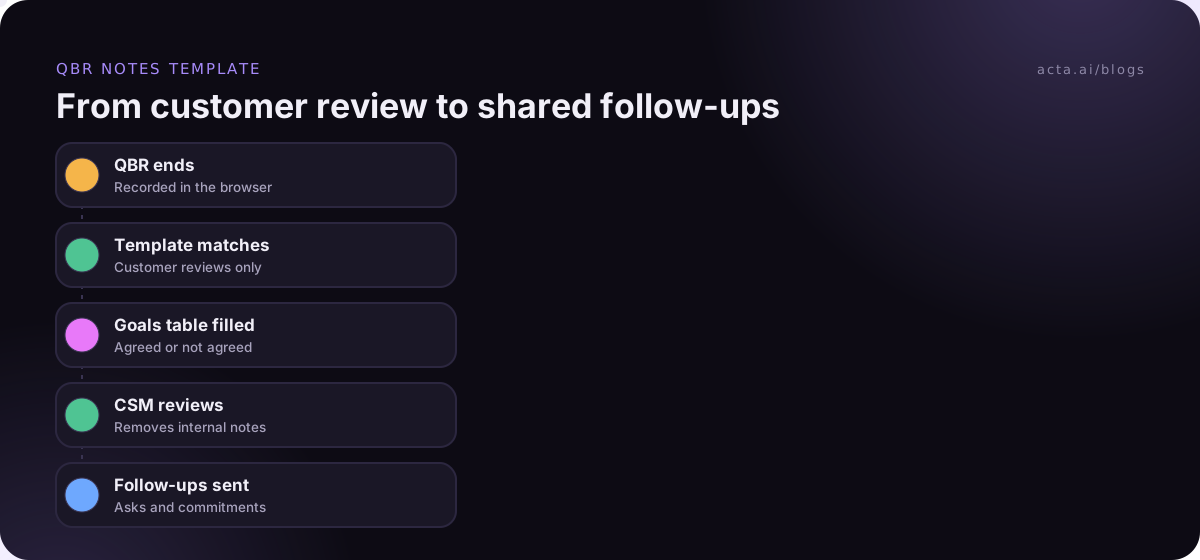
- Under Start from, choose Describe it, paste the description from template 1, and click Draft sections. Acta drafts 3-7 sections.
- Edit them to match: set Goals vs outcomes to Table with four columns (Goal, Target, Outcome reported, Evidence quote); set Customer asks and Our commitments to Checklist.
- Extra instructions: "Use the customer's own words. Don't count an outcome as achieved unless the customer agreed."
- Under When should Acta use it? pick Only matching meetings.
- Preview with Test on a past meeting and Run on this meeting, using last quarter's review. Then Save.
- Turn on Share with my team so every CSM can switch it on, while you stay the only editor.
Example output (illustration)
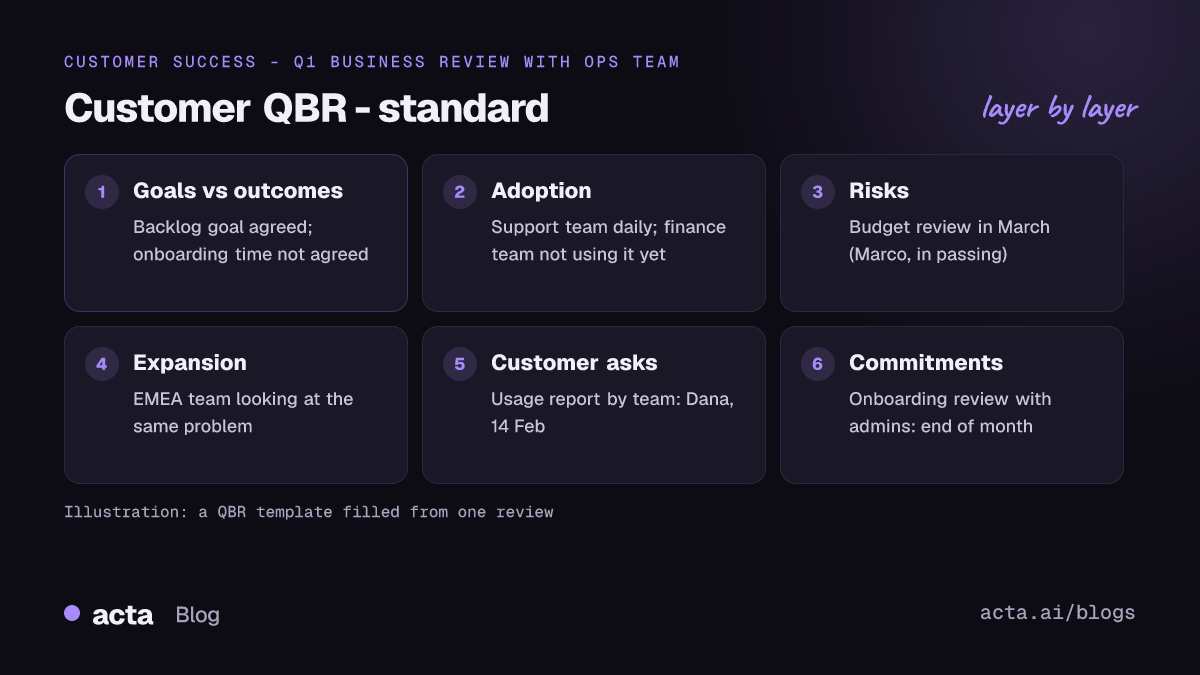
In short: Customer agrees ticket backlog is down but disputes onboarding time; new EMEA team may join in Q2; sponsor wants a usage report before renewal.
Goals vs outcomes: Cut ticket backlog | Under 200 open | "We're around 150 most weeks" (Priya, Ops lead) | Agreed. Faster onboarding | Two weeks | "Still closer to a month for us" (Marco, VP Support) | Not agreed.
Risks and concerns: Onboarding time (Marco). Budget review in March (Marco, mentioned in passing).
Expansion signals: "EMEA team is looking at the same problem" (Priya).
Customer asks: Usage report by team (Dana, 14 Feb). Intro call with EMEA lead (Unassigned).
Our commitments: Onboarding review with their admins (Dana, end of month).
That "Not agreed" row is the most valuable line in the report. Our customer QBR report post covers the built-in approach to account health if you want to compare.
QBR notes fail when they copy the deck
- Restating your slides. The deck is already saved. Notes that list "Reviewed usage dashboard" add nothing. Record the reaction.
- Treating your metrics as their outcomes. If the customer didn't agree a goal was met, the notes shouldn't say it was.
- Losing side comments. Budget reviews, reorgs and competitor names often come up in passing. Keep a Risks section that captures them with the speaker's name.
- Too many sections for an EBR. Executives won't read eight sections. Five, short.
- No owner on asks. A Checklist with owner and due date makes "Unassigned" visible before the customer notices.
Where Acta fits
Acta records QBRs on Zoom, Google Meet or Teams, runs matching templates, and keeps every review searchable, which helps when you need last quarter's promises. Customer executives don't always welcome a bot, so many CSMs record with the Chrome extension from their own browser. Tell attendees you're recording either way; see what to tell participants about recording. The customer success page shows the wider workflow.
Frequently asked questions
What should a QBR notes template include?
A goals vs outcomes table, adoption and usage notes, risks and concerns with who raised them, expansion signals, and two checklists: customer asks and your commitments. Add stakeholder changes and next quarter's priorities for larger accounts. Keep it to five to seven sections so it gets read after the meeting.
What is the difference between a QBR and an executive business review?
A QBR is usually quarterly, with managers and users, and focuses on usage and progress. An executive business review is usually annual or twice a year, with senior leaders, and focuses on business outcomes and strategy. Use a shorter, outcome-first notes template for EBRs.
How is a QBR template different from a QBR agenda?
A QBR agenda plans what you'll present and discuss. A QBR template for notes decides what you'll record from the conversation. They overlap, but the notes template should capture the customer's reactions, concerns and requests, which the agenda can't predict.
Who should take notes in a customer success QBR?
Not the person presenting. If a colleague can't join, record the meeting with the customer's agreement and let a template draft the notes, then have the CSM review them before sharing. The presenter's attention belongs on the customer, especially when concerns come up.
Should I share QBR notes with the customer?
Share a cleaned-up version: outcomes, agreed priorities and both checklists. Keep internal sections, such as renewal signals or the internal account review, for your own team. Sending the asks and commitments back within a day shows the customer you heard them.
Set up your QBR notes before the next review cycle
Review season is the wrong time to build templates. Set them up a few weeks before, test on last quarter's recordings, and start the cycle with notes ready.
- Choose your layouts: standard QBR plus one of EBR, scaled or at-risk, depending on your book.
- Build the goals table first: four columns, customer's words, "Not agreed" when they didn't agree.
- Split asks from commitments: two checklists, each with owner and due date.
- Test on last quarter's QBRs: compare the output with what you remember and fix vague sections.
- Share with your CS team: keep one owner so the template doesn't drift; our guide to standardizing meeting notes across a team covers the rollout.
Install the Acta Chrome extension before your next review and see how your QBR notes come out.
Found this useful? Share it with your team.