Meeting notes for Indian teams have to handle three languages at once
Take a 120-person software company headquartered in Bengaluru. Its sales team in Gurugram runs discovery calls in Hinglish. Its support desk in Chennai answers small-business customers in Tamil. Engineering, product and leadership work in English. On any given day the company holds meetings in at least three languages, and the decisions from all of them need to end up somewhere everyone can find.
That's the problem meeting notes for Indian teams have to solve. Two separate things are involved, and it helps to name them:
- The transcript language is what was spoken. A Tamil support call gives a Tamil transcript, in Tamil script. That's the evidence.
- The notes language is what the summary, decisions, action items and follow-up draft are written in. That's what people read and act on.
Get the first wrong and the transcript is garbage. Get the second wrong and half the company can't read the outcome. Most of this article is about setting both deliberately. For the general idea behind the split, the multilingual meeting notes explainer goes into more depth.
Six Indian languages are covered, in two tiers
Acta detects English, Hindi, French, Spanish and German automatically; ten more languages can be chosen in Settings. Of the 15, six are Indian. Hindi sits in the automatic tier, including Hindi-English mixes. The other five are in beta: they work, accuracy is still improving, and you must choose them yourself because Auto won't.
| Language | Tier | Transcript script | Notes options |
|---|
| Hindi and Hinglish | Auto | Devanagari | Hindi or English |
| Telugu | Beta, choose it | Telugu | Telugu or English |
| Tamil | Beta, choose it | Tamil | Tamil or English |
| Kannada | Beta, choose it | Kannada | Kannada or English |
| Marathi | Beta, choose it | Devanagari | Marathi or English |
| Bengali | Beta, choose it | Bengali | Bengali or English |
These are large languages. The 2011 Census's language table C-16 counts about 8.3 crore people with Marathi as their mother tongue, about 6.9 crore with Tamil and about 4.37 crore with Kannada. But not every Indian language is covered yet. Malayalam, Gujarati, Punjabi, Odia and Urdu aren't supported, so a Kochi team meeting in Malayalam or an Ahmedabad dealer call in Gujarati will need English notes taken another way for now.
A word on Bengali, since it gets less attention than the southern languages in most tooling discussions. For Bengali meeting transcription, a Kolkata distribution team or a Dhaka partner call can be set to Bengali (beta), giving a transcript in Bengali script and notes in Bengali or English. Treat it like the other beta languages: useful, but read before you forward.
Each person's setting decides how their meetings are processed
The language card lives in Settings > Meetings, just below "Add Acta Notetaker to my meeting invites". It has two fields: "Language spoken in meetings" (default English; Auto; or any of the 15, with beta ones marked "(beta)") and "Language for my notes" (Same as the meeting, or English). It's a personal setting, so the person whose Acta records the meeting is the one whose choice applies.
That has practical consequences for a mixed team:
- The Chennai support lead sets Tamil (beta) for speech and Same as the meeting for notes, because her team reads Tamil and the calls are in Tamil.
- The Gurugram sales manager leaves Auto on. Hindi and Hinglish are detected, and so is English when a call switches.
- The engineering manager leaves the default, English, and nothing changes for him.
The setting applies to new meetings only. After each meeting, a small chip next to the tabs shows the language, with a "Change language" link back to the card, and the meeting-notes email shows it with a short tip. Ask everyone to glance at that chip for the first week; it's the fastest way to catch a Telugu call that went through as English. The meeting languages help article shows each field, and setting up your team covers invites and roles.
English notes make the shared record easier across regions
English is the working language that most cross-region readers share, so when notes travel beyond the team that held the meeting, English notes usually make the record easier. Setting "Language for my notes" to English for a Hindi or Tamil meeting keeps the transcript in the spoken language and writes the summary, decisions, action items and follow-up draft in English. Quotes stay as spoken, so a customer's exact words in Tamil are preserved even in an English summary.
Use English notes when:
- The notes feed a CRM that national managers read. Acta's Salesforce, HubSpot and Zoho integration sends the report; English fields are easier to filter and review.
- Leadership reviews decisions across regions every Monday.
- An auditor, investor or client outside the region will read the record.
Keep native-language notes when the team that holds the meeting is the team that uses the notes: a Tamil support team's weekly review, a Marathi-speaking cooperative's committee, a Telugu field team in Guntur. Their notes are checked and corrected faster in the language they spoke.
Two things stay constant either way. Names, numbers, dates, amounts, product names and technical terms are kept as said. And report headings and the dashboard stay in English, which means a manager reading notes from five regions finds the decisions in the same place every time.
Regional client calls are where native-language transcripts pay off
A lot of Indian revenue is won in regional languages. A Jaipur distributor wants to negotiate in Hindi. A Coimbatore manufacturer's owner is more precise in Tamil. A Hyderabad hospital administrator switches to Telugu when the conversation turns to budget. If your rep has to translate in her head and type in English during the call, you lose both the rapport and the detail.
Set the call's language correctly and let the notes come out in English for the CRM. For Hindi and Hinglish, Auto handles it; the posts on Hindi meeting transcription and Hinglish transcription cover that ground. For a Tamil call, the rep switches to Tamil (beta) before the call; the Tamil meeting notes guide has a worked supplier-call example.
Two cautions. First, customers outside metros often won't want a bot joining a call. The Acta desktop app records the meeting's sound and your microphone from your own laptop, including WhatsApp and phone calls you take on it, and the Chrome extension does the same for Meet, Teams in the browser and the Zoom web client. Second, beta languages need a human check on the action items before they reach the customer: a wrong delivery date in a follow-up email costs more than the five minutes it takes to read it.
A playbook for a team that speaks Hindi, Tamil and English
Here's an illustrative operating playbook for the Bengaluru software company above. Adapt the names and meeting types to yours.
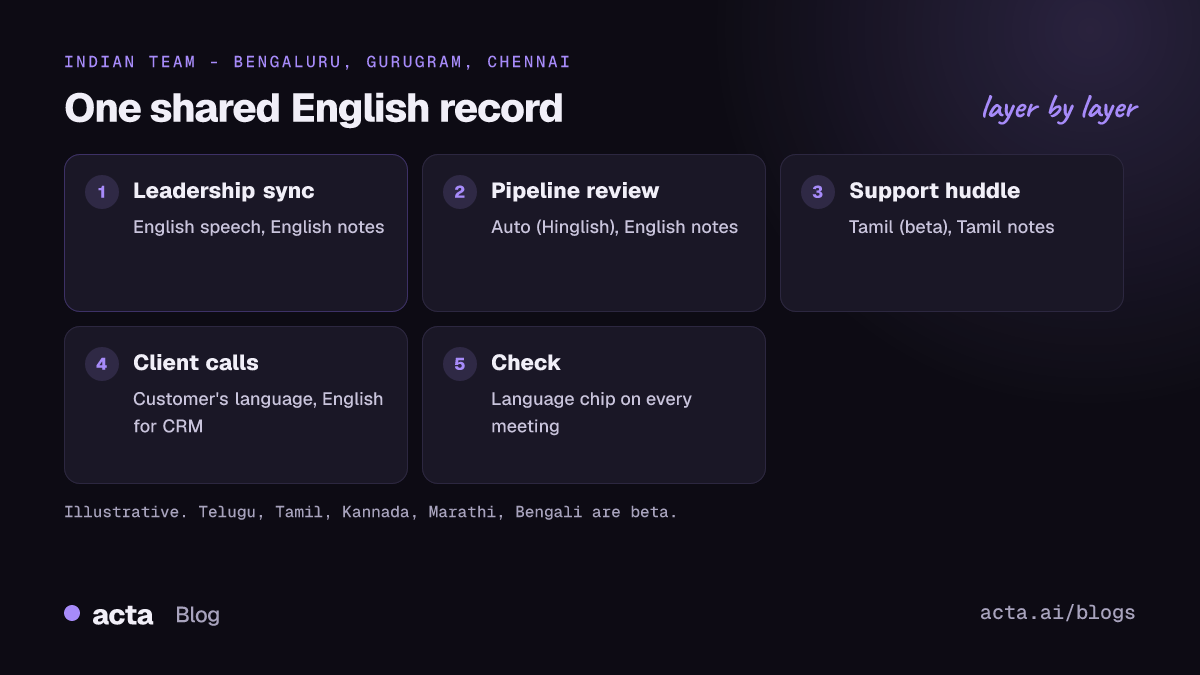
- List the recurring meetings and their language. Monday leadership sync: English. Sales pipeline review: Hinglish. Chennai support huddle: Tamil. Customer onboarding calls: whatever the customer speaks.
- Decide the notes language per meeting type. Leadership and pipeline review: English notes. Support huddle: Tamil notes for the team, plus an English summary of escalations from a separate weekly review.
- Assign the recorder. Whoever's Acta records the meeting owns the setting. Write it in the meeting description: "Recorder: Priya, Tamil."
- Check the chip for two weeks. Each recorder confirms the language chip on every meeting until it's habit.
- Route the outcomes. English action items go to Jira or the CRM; Tamil notes stay in the support team's channel.
- Ask across languages. The support lead asks OneChat in Tamil about last month's refund complaints; the CEO asks in English about the same meetings. Each gets an answer in the language they asked in.
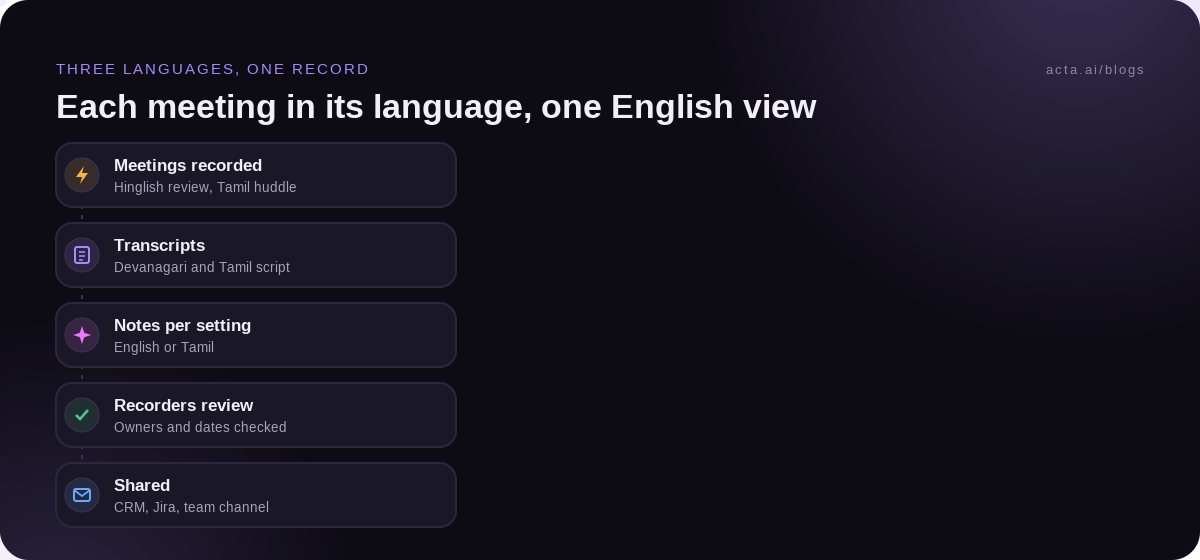
What a week looks like in practice: Rahul's Hinglish pipeline review comes back with English notes and three action items in HubSpot. Priya's Tamil huddle comes back in Tamil, and she fixes one product name before posting it. Marco, the product head in Bengaluru, reads the English escalation summary on Friday and never needs to open the Tamil transcript, though it's there if a quote is disputed.
Consent comes before the first recording
Recording a meeting means processing what people say, and in India that brings the Digital Personal Data Protection Act, 2023 into view. This section is general information, not legal advice. The government's DPDP Act and Rules overview on the Digital India portal summarises the law, and the press release on the notified DPDP Rules covers the rules MeitY issued in November 2025. For a meeting-specific walkthrough, read the DPDP Act meeting recording guide.
Whatever your obligations turn out to be, the courteous minimum is the same in every language: say at the start that the meeting is recorded and why, and give people a chance to object. Say it in the meeting's language, not just in English. A Tamil customer told "this call is being recorded for notes" in English may not take it in. The post on what to tell participants when recording with AI has wording to adapt, and the desktop app's "Copy notice" button pastes a recording notice into the meeting chat.
Five mistakes that break multilingual notes
- Leaving a beta-language meeting on Auto. Auto only picks among English, Hindi, French, Spanish and German. A Telugu or Bengali call on Auto comes back wrong.
- Setting Marathi meetings to Hindi. Both use Devanagari, but they're different languages. Choose Marathi.
- Expecting a third language. Notes come in the meeting's language or English. Acta won't turn a Tamil meeting into Hindi notes for a Delhi manager; English is the bridge.
- Treating a split meeting as one. One language per meeting. If half is Hindi and half is Tamil, record two sessions or pick the language of the decisions.
- Skipping the read-through. Beta languages are improving, not finished. Someone who attended should read decisions and owners before the notes leave the team.
How does this compare with the alternatives? Manual minutes in English, written by the most bilingual person in the room, work but cost that person an hour per meeting and lose the exact words. An English-only notetaker produces nothing usable for a Tamil call. Translating a transcript afterwards with a separate tool adds a step and still needs a check. Setting the language up front is less work than any of these.
Where Acta fits
Acta records meetings by bot, desktop app, Chrome extension, phone app or upload, transcribes them in the spoken language, and writes notes in that language or English. Hindi is automatic; the other Indian languages are beta and need a human check. Acta doesn't use customer data to train AI models.
Frequently asked questions
Which Indian languages can an AI notetaker transcribe?
Acta transcribes six Indian languages. Hindi, including Hinglish, is detected automatically. Telugu, Tamil, Kannada, Marathi and Bengali are beta languages you choose in Settings > Meetings > Language. Malayalam, Gujarati, Punjabi, Odia and Urdu are not supported yet. In total Acta covers 15 languages, five automatic and ten in beta.
Does it work with Hindi and English mixed?
Yes. Hindi-English mixing, often called Hinglish, is the supported mix and is detected on Auto. The transcript keeps the conversation as spoken, and you can have notes in Hindi or English. Other mixes, such as Tamil with English, aren't a separate mode: choose the language that carries the meeting and check mixed passages.
Can each person on a team use a different meeting language?
Yes. The language card sits in each person's Settings > Meetings, so a Chennai support lead can record in Tamil while a Delhi sales manager uses Auto for Hinglish. The setting of whoever records a meeting applies, and it affects new meetings only. The language chip on each meeting page confirms which language was used.
Should a multilingual team keep its notes in English?
For anything read across regions, usually yes: leadership updates, CRM records and cross-team decisions are easier to share in English. Keep native-language notes when the team that held the meeting is the one that uses them. With English notes, the transcript and quotes stay in the spoken language, so nothing said is lost.
Can AI transcribe Bengali meetings?
Yes. Acta supports Bengali as a beta language. Choose Bengali in Settings before the meeting, since Auto won't detect it. The transcript comes back in Bengali script, with notes in Bengali or English. As with other beta languages, accuracy is still improving, so read names, amounts and decisions before sharing.
Agree a language policy your team will follow
A one-page policy beats a clever setup nobody remembers. Cover these points:
- Map the meetings: every recurring meeting, its spoken language and its notes language.
- Name the recorders: one person per meeting who owns the language setting.
- Default to English for shared records: leadership, CRM and cross-team decisions.
- Keep a human check for beta languages: decisions and owners read before notes leave the team.
- Announce every recording: in the meeting's language, at the start.
To try it with your own team, install the Acta desktop app, set each recorder's language in Settings, and run one week of meetings through the playbook above.