Tamil meeting notes pay off where decisions happen in Tamil
Tamil is one of India's largest languages. The 2011 Census counted roughly 6.9 crore people whose mother tongue is Tamil, according to the Registrar General's language table C-16. It is also one of Singapore's four official languages under the constitution, alongside English, Malay and Mandarin, as the University of Ottawa's summary of Singapore's language law sets out. Those numbers explain why so many business conversations never switch to English at all.
You see it in particular kinds of meeting. A pump manufacturer in Coimbatore talks to its foundry suppliers in Tamil. A Tiruppur garment exporter's production head runs the morning floor meeting in Tamil, then writes an English email to the buyer in Europe. A Chennai hospital's admin team settles roster changes in Tamil because half the support staff are more comfortable in it. A family-run jewellery business in Madurai holds its monthly stock review at the kitchen table. In every one of these, the meeting itself works fine. The problem starts the next morning, when someone asks "what did we agree on the price?" and three people remember three different numbers.
That is the job Tamil meeting notes do: a written record of who said they'd do what, in a language the people involved can read and check. If the readers are all Tamil speakers, the notes can stay in Tamil. If they include a buyer in Germany or a finance team in Bengaluru, English notes make more sense. Most teams need both at different times, which is why the choice is a setting and not a fixed rule.
Set Tamil in Acta before the meeting starts
Acta detects English, Hindi, French, Spanish and German automatically; ten more languages, including Tamil, can be chosen in Settings. Those ten are marked beta, which means they work but accuracy is still improving. If you came here looking for Tamil voice to text for meetings, this setting is the whole trick. Here is the setup, using the labels you'll see on screen:
- Open the Acta dashboard and go to Settings, then Meetings.
- Find the Language card, just below "Add Acta Notetaker to my meeting invites".
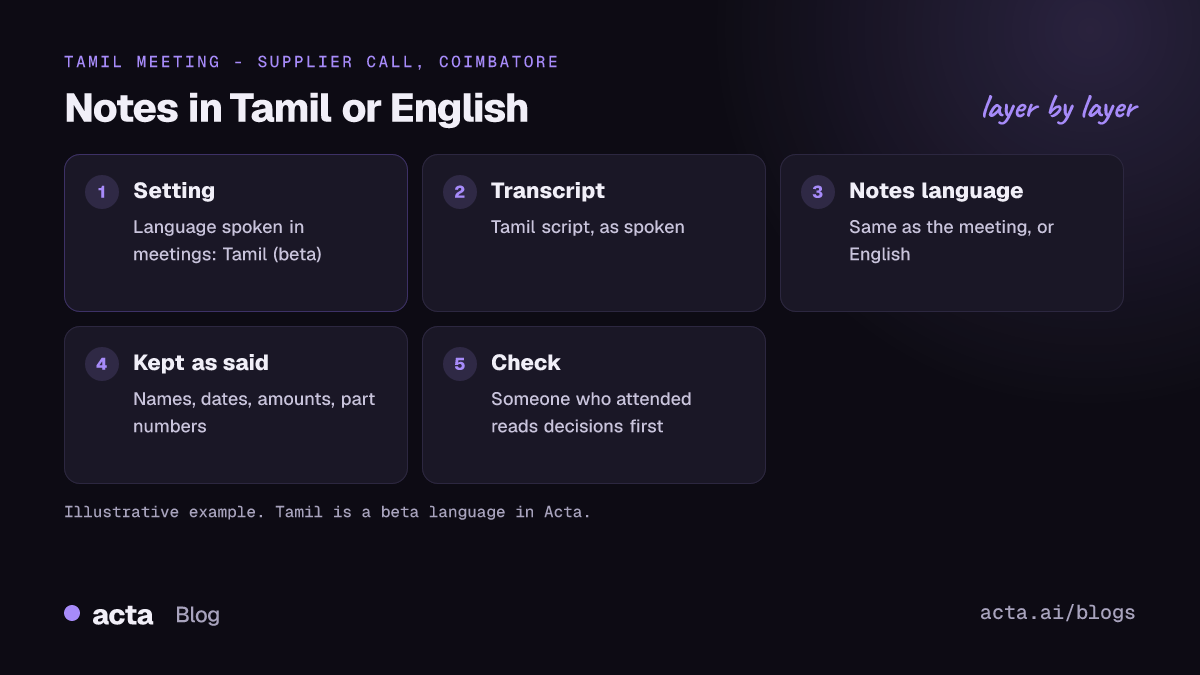
- Under "Language spoken in meetings", change the default English to Tamil (beta). Don't use Auto for Tamil: Auto never picks a beta language.
- Under "Language for my notes", choose Same as the meeting for Tamil notes, or English for English notes from the Tamil conversation.
- Record the next meeting the way you normally do: the meeting bot for Zoom, Google Meet or Teams, the desktop app, the Chrome extension, the mobile app, or an uploaded recording. All of them follow the setting.
After the call, the meeting page shows a small language chip next to the tabs, with a "Change language" link back to the same card. The meeting-notes email shows the language too. If you see "English" on the chip for a meeting that was plainly in Tamil, the setting wasn't saved before the call; fix it for the next one, because past meetings stay as they were. The meeting languages help article has screenshots of each step.
One habit worth building: if your week mixes English client calls and Tamil internal meetings, switch the setting on the morning of the Tamil meeting and switch it back afterwards. It takes thirty seconds and saves you a garbled transcript.
Tamil notes suit the room, English notes suit everyone outside it
Whatever you pick for notes, the transcript stays in the language that was spoken, in Tamil script. The choice only changes the summary, decisions, action items, report templates and the follow-up email draft. Acta doesn't translate notes into a third language, so it's Tamil or English and nothing else.
| Situation | Notes language | Why |
|---|
| Floor meeting, all Tamil speakers | Same as the meeting | Supervisors read and correct it in the language they spoke |
| Supplier call, results go to a buyer abroad | English | The buyer reads the decisions; quotes stay in Tamil in the transcript |
| Family business stock review | Same as the meeting | Elders who ran the meeting can check the figures |
| Regional sales review feeding a national CRM | English | CRM fields and dashboards are read by non-Tamil managers |
My rule of thumb: ask who will open the notes a month from now. If it's the same people who were in the meeting, keep Tamil. If it's someone who has to approve, audit or act on it without having been there, choose English. When you pick English for a Tamil meeting, the quotes in the notes stay as they were spoken, so you don't lose the exact words when a dispute comes up later.
The report section headings, such as "In short" and "Key quotes", stay in English whichever language you pick, and so does the dashboard. That surprises people the first time. It's deliberate: the structure stays the same across every language, so a manager who reads English notes from Chennai and Tamil notes from Coimbatore finds decisions in the same place.
Tanglish is normal, so plan for English words inside Tamil sentences
Very few office conversations in Chennai are pure Tamil. A line like "நாளைக்கு client call இருக்கு" (there's a client call tomorrow) is ordinary, and so are "GST", "PO", "dispatch" and "follow up" in the middle of a Tamil sentence. You should know how that interacts with the language setting.
Acta handles one language per meeting. Hindi mixed with English is the supported mix; Tamil mixed with English is not a separate mode. In practice, choose Tamil when Tamil carries the conversation and English words appear inside it. Product names, technical terms, names, numbers and amounts are kept as said and not translated. How English words inside Tamil sentences are written in the transcript is one of the things the beta is still improving, so read those lines first when you check a transcript.
If a meeting is really two meetings, say a 20-minute English update for the Singapore office followed by a 40-minute Tamil discussion among the Chennai team, consider recording them separately. You get a clean English transcript for the first and a clean Tamil one for the second, instead of one transcript that does neither well. The older guide on transcribing meetings in other languages covers more ways to split mixed-language calls.
A worked example: a Coimbatore supplier call
Here's an illustrative example, not a real customer. A pump maker's purchase head, Senthil, calls a casting supplier, Kavitha, about a delayed order. The call runs 25 minutes in Tamil, on Google Meet, with Acta's notetaker in the call. The notes language is set to Same as the meeting.
A few lines of what the Tamil decisions section might look like, with an English gloss for each:
டெலிவரி தேதி மார்ச் 10 என முடிவு செய்யப்பட்டது. (The delivery date was decided as 10 March.)
கவிதா புதிய விலையை அனுப்புவார். (Kavitha will send the new price.)
அடுத்த கூட்டம் வெள்ளிக்கிழமை. (The next meeting is on Friday.)
Notice what stays fixed: "மார்ச் 10" keeps the date as said, and if Kavitha had quoted "₹1,840 per piece", that figure would appear exactly so. The action item carries her name as owner.
Now say Senthil's MD in Pune wants the outcome. Switch the notes language to English before the next call with the same supplier, and the notes for that meeting come back like this:
Decisions: Delivery of the 500 castings moves to 10 March. Price revision to be confirmed in writing.
Action items: Kavitha to send the revised price by Wednesday. Senthil to update the production plan once the price is confirmed.
Key quote: kept in Tamil, as spoken.
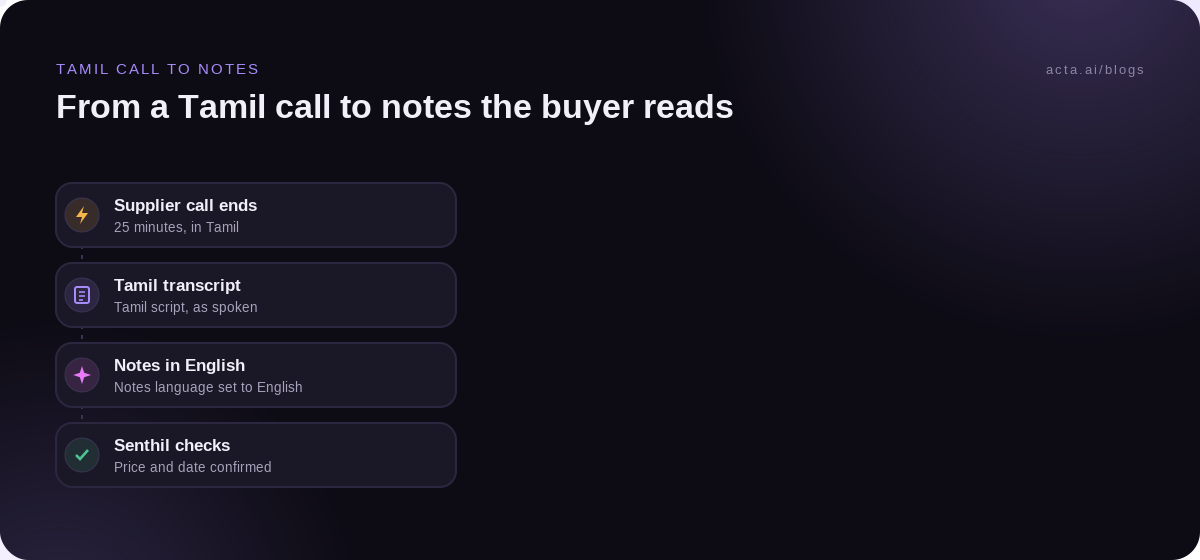
The flow is the same whichever language you pick. Only the language of the summary changes, and the Tamil transcript is always there underneath if someone wants to check a word. If you have a follow-up to send, the follow-up email draft comes in the notes language, so a Tamil-notes meeting gives you a Tamil draft you can send on WhatsApp or email without retyping.
Clean audio matters more than any setting
Tamil transcription in beta is less forgiving of bad audio than English. The same few habits make most of the difference:
- Get people off speakerphone. A phone on a desk in a busy shop floor picks up the compressor more than the people. A cheap wired headset helps more than anything else on this list.
- Say numbers clearly once. Tamil speakers often switch between "ஐநூறு" and "five hundred" for the same figure. Agree on one when the number matters, and repeat it at the end.
- Say who owns what. "Kavitha, நீங்க Wednesday-க்குள்ள அனுப்புங்க" gives the summary a clear owner; "someone will send it" does not.
- Avoid crosstalk. When three people answer at once, every transcript suffers. The guide to accents, noise and crosstalk has more fixes.
Pick the recording method that fits the meeting. For a Zoom or Teams desktop call with a supplier who won't want a bot joining, the Acta desktop app records the meeting's sound and your microphone from your own computer, and it also works for a WhatsApp call: press Record. For a meeting around a table, the mobile app records in the room. Whichever you use, tell people the call is being recorded; this guide on consent and what to tell participants covers what to say.
Know the beta limits before Tamil notes become your record
Be honest with your team about what beta means, because the people who rely on the notes need to know when to double-check them.
- Accuracy is still improving. Expect to correct some words, especially technical terms, place names and fast speech. Read the decisions and action items before you forward them.
- No auto-detection. Tamil has to be chosen. A Tamil meeting on Auto or on English will come back wrong, and you'll need the setting fixed for the next meeting.
- Speaker names can be missing. If speaker labels aren't available, you still get the Tamil transcript, without names against each line. Add owners to action items by hand if needed.
- Headings and menus stay in English. The structure is fixed; the content is Tamil.
- Related languages aren't covered. Malayalam, common in the same Gulf offices as Tamil, isn't supported yet. Don't set a Malayalam meeting to Tamil and hope.
None of these stop Tamil notes from being useful. They just mean the notes are a first draft that someone who was in the meeting should glance at before it goes out. That's a five-minute job, against the half hour it takes to write minutes from memory.
You can also ask questions about the meeting in Tamil. Ask Acta answers questions about one meeting, and OneChat answers across meetings; both reply in the language you ask in. "விலை பற்றி என்ன முடிவு?" (what was decided on price?) gets a Tamil answer with the source.
Where Acta fits
Acta records the call, writes a Tamil-script transcript and produces notes in Tamil or English, with action items and a follow-up draft. Tamil is in beta, so treat the output as a draft to check. Acta doesn't use customer data to train AI models.
Frequently asked questions
Can AI transcribe Tamil meetings?
Yes. Acta transcribes Tamil meetings into Tamil script once you choose Tamil (beta) under Settings > Meetings > Language. Tamil isn't detected automatically, so it has to be selected before the call. Accuracy is still improving in beta, so check names, numbers and technical terms before you share the notes with anyone who wasn't there.
Can I get English notes from a Tamil meeting?
Yes. Set "Language for my notes" to English. The transcript stays in Tamil, while the summary, decisions, action items and follow-up email draft come in English. Quotes remain as spoken, in Tamil. This works well when a buyer, head office or auditor needs the outcome but doesn't read Tamil.
Does Acta detect Tamil automatically?
No. Auto detects only English, Hindi, French, Spanish and German. Tamil is one of ten beta languages you pick yourself, alongside Telugu, Kannada, Marathi, Bengali and others. If a Tamil meeting is left on Auto, the transcript will be wrong, so choose Tamil before the next Tamil call. Past meetings keep their original setting.
What happens to English words in a Tamil meeting?
Names, numbers, amounts, dates, product names and technical terms are kept as said rather than translated. Tamil-English mixing is common, and how English words inside Tamil sentences are written is still improving in beta. Choose Tamil when Tamil carries the conversation, and read mixed lines first when you check the transcript.
Can I record a Tamil call on WhatsApp or a phone?
Yes, if you use the Acta desktop app on Windows or Mac: start the call and press Record, and it captures the call's sound and your microphone. For a face-to-face meeting, use the mobile app. You can also upload a recording afterwards. Every method follows the Tamil language setting, and you should tell people you're recording.
Are Tamil meeting notes good enough for formal minutes?
They're a strong first draft, not a finished record. Because Tamil is in beta, have someone who attended read the decisions and action items before they're filed or sent. For board or legal minutes, keep that review step permanent, and keep the Tamil transcript alongside the notes so anyone can check the original words.
Decide how your team will run Tamil meetings
A small amount of agreement up front saves a lot of rework. Before the next Tamil meeting, settle these:
- Pick the language owner: one person switches the setting to Tamil for Tamil meetings and back afterwards.
- Agree the notes language per meeting type: Tamil for internal reviews, English for anything that leaves the team.
- Name a checker: someone who attended reads the decisions and action items before they go out.
- Fix the audio: headsets for remote calls, one phone in the middle of the table for in-person meetings.
- Tell participants: a one-line notice at the start that the meeting is being recorded and why.
When you're ready to try it on a call in your browser, add the Acta Chrome extension, set Tamil in Settings, and record your next Tamil meeting.