A risk register is a living list of what could go wrong
A risk register is a record of identified risks and what you're doing about each one. That's the whole idea. A risk is something that hasn't happened yet but might, and would hurt an objective if it did: a deadline, a budget, a customer commitment, a regulatory obligation. The register is where those possibilities stop living in people's heads and start living somewhere everyone can read.
The idea comes from formal risk management, but you don't need a framework to use one. ISO 31000:2018, the international guideline on risk management, describes a process of identifying, analysing, evaluating, treating, monitoring and communicating risk, and says it can be used by any organisation regardless of size or sector. It isn't a certification standard; it's guidance. As of November 2026, the ISO 31000 page lists the 2018 edition as reviewed and confirmed in 2023. In the UK public sector, HM Treasury's Orange Book plays a similar role and is the reference most government bodies use. A risk register is the working document that sits underneath either of them.
So the honest answer to "what is a risk register for?" is accountability. It should be living, changing after every meeting where something new comes up, and shared with the people doing the work, not only the sponsor. A register that only the project manager opens once a month is a compliance artefact.
What a good risk statement looks like
Write each risk as cause, event and effect. "Supplier" is not a risk. "Because our only packaging supplier is moving factories in March, deliveries may slip by two to three weeks, which would delay the spring launch" is. The cause tells you where to act, the event what to watch for, and the effect how much to care.
Eight columns cover what most teams need
You can find a risk register template with thirty columns. Don't start there. These eight carry almost all the value, and every extra column is one more thing people leave blank.
| Column | What goes in it | Common slip |
|---|
| Risk | Cause, event, effect in one or two sentences | One-word labels like "budget" |
| Likelihood | 1-5, using your written scale | Gut feel with no definitions |
| Impact | 1-5, on the objective it threatens | Rating impact on everything at once |
| Score | Likelihood times impact (1-25) | Overriding the score by hand |
| Owner | One named person | "Ops team" or "TBC" |
| Mitigation | The specific action, with a due date | "Monitor closely" |
| Status | Open, mitigating, closed | Rows that stay open forever |
| Review date | When the owner next reports back | No date, so no review |
The risk owner is the person who watches the risk and makes sure the mitigation happens. They don't have to do the work themselves, but they answer for it. If you can't name an owner, you've found your first problem: either the risk sits between two teams and needs escalating, or it isn't real enough to keep.
A risk register example: five risks on a website relaunch
Here's a filled-in risk register example. The company is illustrative: Fenwick Supply, a 60-person B2B distributor, is relaunching its ordering website in 12 weeks. The project lead, Priya (also illustrative), runs a weekly project meeting with IT, sales, finance and an external agency. After the first two meetings, the register has five rows.
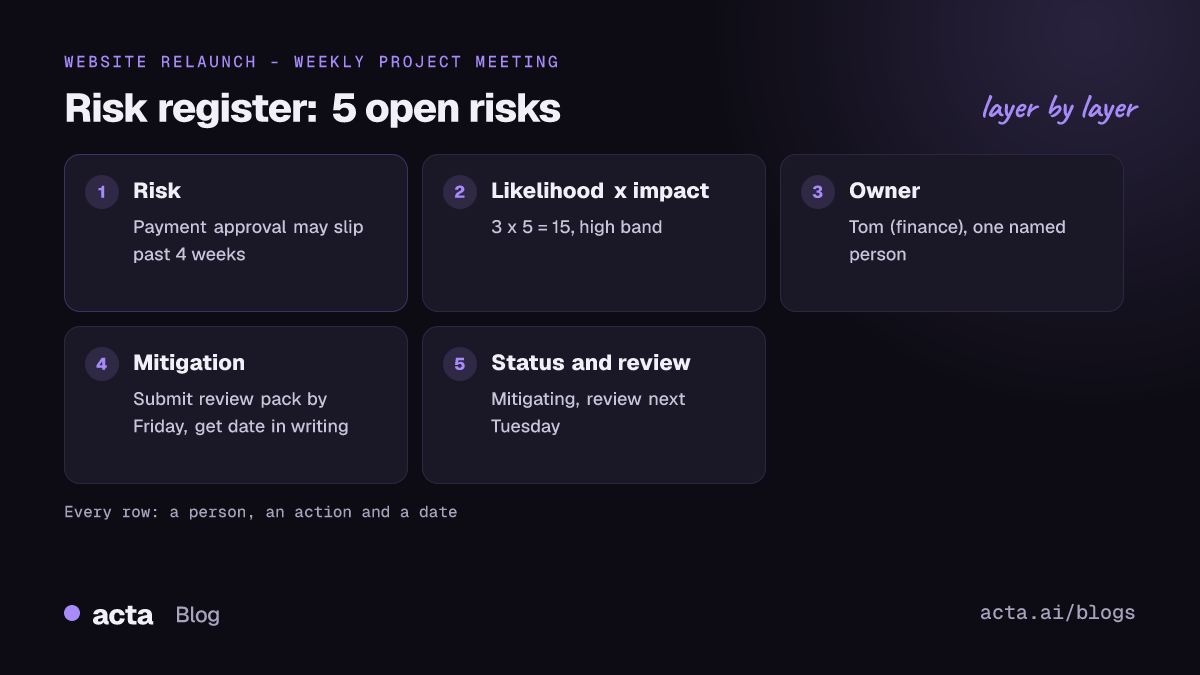
- R1. Payment gateway approval: Because the new payment provider needs a compliance review of our checkout, approval may take longer than four weeks, delaying launch. Likelihood 3, impact 5, score 15. Owner: Tom (finance). Mitigation: submit the review pack by Friday and ask the provider for a target date in writing. Status: mitigating. Review: next Tuesday.
- R2. Product data quality: Because roughly a third of product records lack weights, shipping costs may calculate wrongly at checkout, causing failed orders. Likelihood 4, impact 3, score 12. Owner: Aisha (catalogue). Mitigation: weekly clean-up target of 200 records; block launch if fewer than 95% are complete. Status: open. Review: weekly.
- R3. Agency developer availability: Because the agency's lead developer is shared with another client, sprint capacity may drop in weeks 6-8. Likelihood 2, impact 4, score 8. Owner: Priya. Mitigation: agree named backup in the statement of work. Status: open. Review: in two weeks.
- R4. Sales team adoption: Because reps still take phone orders, customers may not be pushed to the new site, so online order share stays flat. Likelihood 3, impact 2, score 6. Owner: Daniel (sales). Mitigation: two training sessions and a rep incentive in launch month. Status: open. Review: monthly.
- R5. Old site redirects: Because old product URLs will change, search traffic may drop after launch. Likelihood 2, impact 2, score 4. Owner: agency SEO lead. Mitigation: redirect map signed off before go-live. Status: open. Review: monthly.
R1 and R2 now get airtime every week; R5 gets a glance once a month. Nobody argues about whether redirects matter more than the payment gateway, because the scores settled it, and every row has a person and a date.
For sector-specific versions, see how a site team builds a construction risk register from site meetings and how planners keep an event planning risk register for vendor no-shows. The columns are the same; the risks and review rhythm differ.
Score risks with likelihood times impact, then agree the bands
The standard tool is a risk matrix: likelihood on one axis, impact on the other, each rated 1 to 5. Multiply them and you get a score from 1 to 25. The University of Cambridge, for example, describes a 5 x 5 impact and likelihood scale with combined scores from 1 to 25 in its risk management documentation. Organisations then group scores into bands. Coventry City Council's risk template rates each factor 1-5, multiplies them, and treats 1-5 as green and 6-14 as amber, with the top band red. Your bands can differ; what matters is that they're written down.
Write one line per level before you rate anything; skipping this is why scoring meetings drag. A workable starting point:
- Likelihood 1-5: 1 rare (hard to imagine this year), 2 unlikely, 3 possible (could go either way), 4 likely (more likely than not), 5 almost certain (already showing signs).
- Impact 1-5: 1 negligible (absorbed in normal work), 2 minor (a few days' slip or small cost), 3 moderate (milestone moves or budget line overruns), 4 major (launch date or key customer at risk), 5 severe (project fails, legal exposure or serious financial loss).
Tie impact to your actual objectives. For a project, "major" might mean a slip of more than four weeks or a 10% cost overrun. For a sales team, it might mean losing a named account. Concrete thresholds stop the loudest person in the room from setting the score.
Score the risk as it stands today, not after the mitigation you hope to finish. When two people disagree by more than one point, don't average: ask what each knows that the other doesn't.
Review cadence should match how fast a risk can move
There's no single correct frequency. A large organisation's strategic register may only need formal review a few times a year; Cambridge says its senior leadership team reviews the University register at least twice a year, according to its page on risk management at Cambridge. A product launch can't wait six months. Match the cadence to the score and to how quickly the situation can change.
- High (red) risks: review every week in the regular project or team meeting. The owner gives a one-line update and confirms the next action.
- Medium (amber) risks: review every two to four weeks, or sooner if a trigger fires.
- Low (green) risks: check monthly; close them when they're no longer plausible.
- The whole register: a full pass at least quarterly, and at every phase gate, to add risks nobody has raised and retire stale ones.

Make the review part of a meeting that already exists; a separate "risk meeting" is the first thing cancelled. Five minutes at the end of the weekly project meeting, walking only red and new rows, beats a monthly hour nobody attends. If your team runs colour-coded status reviews, the RAG meeting guide shows where risks fit into that agenda.
A risk register is not an issue log or a RAID log
People mix these up constantly, and it matters because the actions differ. A risk might happen. An issue has happened. When R1 above turns into "the payment provider has rejected our checkout", it moves from the risk register to the issue log, and the question changes from "how do we stop this?" to "how do we fix this?".
- Risk register: future events, scored on likelihood and impact, managed with mitigation.
- Issue log: current problems, ranked by urgency, managed with resolution actions and deadlines.
- RAID log: one document with four sections (risks, assumptions, issues, dependencies). Common in project and programme work where the same group owns all four.
- Decision log: what was decided, by whom and why. Mitigations agreed in a meeting are decisions, so it helps to keep the two linked; see building a decision log and RACI from meetings.
For a small team, a RAID log in one spreadsheet is fine, as long as issues and risks stay in their own sections.
Most risk registers fail in the same six ways
I've seen far more dead risk registers than useful ones. The failures repeat.
- Written once, never opened again. The register is built for a kickoff or a funding gate and then ignored. Fix: put the red rows on the weekly meeting agenda, permanently.
- Vague risks. "Resourcing" and "scope creep" are categories, not risks. Fix: rewrite every row as cause, event, effect.
- Owners who are teams. "IT" can't be chased. Fix: one name per row, agreed with that person in the room.
- Mitigation that isn't an action. "Monitor" and "keep an eye on" mean nothing will happen. Fix: a verb, a deliverable and a date.
- Nothing ever closes. Registers that only grow become unreadable. Fix: close risks that have passed, been mitigated or no longer apply, and keep closed rows in a separate tab.
- Risks raised in meetings never reach the register. Someone says "I'm worried the vendor won't hit March" and everyone nods. It isn't written down, so it isn't owned. This is the most common failure, and the subject of the next section.
Meetings are where risks surface, so capture them there
Very few risks arrive as a formal submission. They come out sideways in a status call ("we might lose the developer in week six"), a supplier review, a client check-in or a one-to-one. The person saying it often doesn't call it a risk, and the meeting moves on. There are seven project risks that hide in everyday conversations worth training your ear for.
Build the capture into how you close meetings:
- In the last five minutes, ask: "Did anything come up today that could hurt the date, the budget or a customer?"
- For each item, agree a one-line risk statement, a rough score and an owner before people leave.
- Within 24 hours, the owner or the note-taker adds the row and sends the update with the meeting notes. The habit of ending a meeting with owners and deadlines covers the same ground for action items.
- When a later meeting changes the picture, update the existing row rather than adding a duplicate.
Having a transcript makes step 3 far more reliable, because you can check exactly what was said and who said it. If you record calls for this, tell participants and follow your local rules; our guide on recording meetings with consent covers what to say. Where meeting bots aren't welcome, a desktop recorder captures Zoom, Teams or any other call from your own computer, recording only the meeting's sound and your microphone, never your screen.
Where Acta fits
Acta's Risk Registry reads your recorded meetings for risks and updates after each new one, showing each risk with mitigation, owner, date, impact level and status, and marking whether a mitigation was agreed in a meeting or only suggested. A risk raised again later stays one row with the newest details, and you can jump to the moment it was discussed. It's included in the 15-day free trial and in Pro; you can also ask OneChat which risks came up across a set of meetings.
Frequently asked questions
What is a risk register in simple terms?
A risk register is a list of things that could go wrong, kept in one place. Each row says what the risk is, how likely it is, how bad it would be, who owns it, what's being done about it, its status and when it will be reviewed. It helps a team decide which threats to act on now and which to watch.
What should a risk register template include?
A practical risk register template needs eight columns: risk statement, likelihood (1-5), impact (1-5), score, owner, mitigation, status and review date. Optional extras include category, date raised, early-warning trigger and residual score. Start with the eight and add columns only when someone will use them to make a decision.
How do you calculate a risk score?
Multiply likelihood by impact. On a 1-5 scale for each, scores run from 1 to 25. Group them into bands, for example 1-5 low, 6-14 medium and the highest band high, and write down what each likelihood and impact level means so different people rate the same risk the same way.
Who owns the risk register?
The project manager or team lead usually owns the register as a document and runs the reviews. Each individual risk has its own risk owner: one named person who monitors it and makes sure the mitigation happens. Owners should agree to the role in the meeting where the risk is raised, not discover it later.
How often should a risk register be updated?
Update it whenever a meeting raises or changes a risk, ideally within a day. Review high risks weekly, medium risks every two to four weeks and low risks monthly, with a full pass at least quarterly and at every phase gate. Strategic registers in large organisations are often formally reviewed less often, such as twice a year.
Set up your first risk register this week
You don't need software or a framework to start. You need a sheet, eight columns and one meeting where the team agrees how to score. Use this checklist:
- Write the scales: one line for each likelihood and impact level, tied to your real dates and budget.
- Seed the register: spend 30 minutes with the team listing risks as cause, event, effect; aim for 8-15 rows, not 50.
- Name owners in the room: one person per risk, who agrees to it before the meeting ends.
- Put red rows on the agenda: a standing five-minute slot in the weekly meeting, owner updates only.
- Capture from every meeting: close each meeting by asking what new risks came up, and update the register within a day.
If you want risks from your calls captured without a bot joining, try the Acta Chrome extension or desktop app on the 15-day free trial.