Events are won or lost in the vendor coordination meeting
An event company's calendar is full of meetings that look alike from outside. For a wedding there is the first client meeting with the family (often with four decision-makers who disagree), the venue recce, design and decor presentations, the vendor coordination meeting from about T-30 onwards, the production meeting where the run of show is built, and the final walkthrough a day or two before. Corporate events add a client briefing, a creative presentation, rehearsals and a debrief. Each one produces commitments from people you do not employ: decorators, caterers, sound and light crews, generator suppliers, artists, transport operators.
That is what makes event vendor management different from managing your own team. You cannot see a vendor's diary. You hear about their other bookings only when someone says it out loud: "he's also doing the Udaipur wedding that weekend", "the caterer wants 50% before they'll block the date", "the generator is coming from Ajmer, it should be fine". Those are the sentences that predict a no-show.
Safety regulators think about events the same way. The UK Health and Safety Executive's event safety guidance treats risk assessment as the main tool for building a safety plan, and says planning should be proportionate to the size of the event and the risk. Its page on managing an event advises checking contractors' competence and passing risk findings on to them. A good event risk assessment for safety and a good vendor risk register share one habit: write it down, give it an owner, tell the people affected.
A lighting crew double-booked for the sangeet
An illustrative case. Saffron Lane Events is a 28-person wedding and corporate events company in Jaipur. Nandini Rathore is the founder, Kabir Shah the lead wedding planner, Imran Qureshi manages vendors and production, and Ritu Agarwal handles the client family. In February they ran a 450-guest wedding over two days at a heritage hotel: mehendi on the lawn, a sangeet in the courtyard, the wedding the next evening.
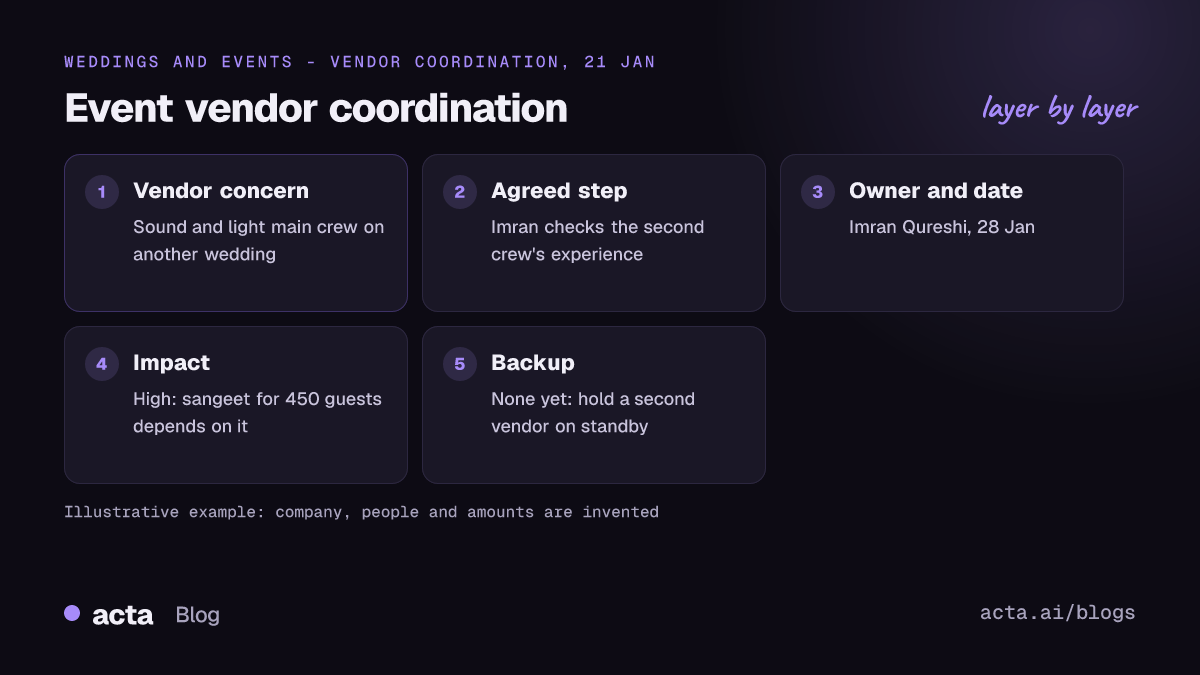
At the vendor coordination meeting on 21 January, 24 days out, Imran went through the list. On sound and lighting he said: "Shekhar's main crew is on the Udaipur wedding that weekend. He says his second crew will do our sangeet, same rig." Kabir asked if that crew had done a courtyard this size; Imran said he would check. The meeting moved on to the caterer's tasting date.
Nobody checked. On 11 February, two days before the sangeet, Shekhar called: the Udaipur event had extended, the second crew was being sent there to cover, and he could offer two technicians and a smaller rig. Imran found a replacement crew in Jaipur at about 2.5 times the original rate, roughly Rs 1.4 lakh extra. The rig arrived late, the sangeet started 70 minutes behind the run of show, and the bride's father asked Nandini, in front of guests, what had happened. The honest answer was that the risk had been said aloud in a meeting 21 days earlier.
An event planning meeting risk register needs five fields per vendor
A register works when every row answers the same five questions: what could go wrong, what is the backup, who owns it, by when, and how bad would it be. Add a status (Open, Mitigating or Closed) and you have something you can review in five minutes at a production meeting. Here is what Saffron Lane's register for the February wedding should have looked like after 21 January:
| Risk | Backup or mitigation | Owner | Impact | Status |
|---|
| Sound and light: main crew on another wedding; second crew untested in a large courtyard | Confirm second crew by name; hold a second vendor on standby | Imran, by 28 Jan | High | Open |
| Generator travelling from Ajmer on event day | Arrive the evening before; local backup number | Imran, by 5 Feb | High | Mitigating |
| Caterer will not block date without 50% advance | Client pays advance by 25 Jan | Ritu, by 25 Jan | Medium | Closed |
| Mehendi artists: only 6 confirmed for 120 guests | Add 2 artists from the decor vendor's list | Kabir, by 1 Feb | Medium | Open |
| Rain on the mehendi lawn | Hotel's banquet hall held as wet-weather option | Kabir, by 7 Feb | Low | Mitigating |
Most event firms keep a wedding vendor checklist already, listing who is booked and what has been paid. The register is different: it lists what might fail. Both matter, and the second is the one usually missing.
Acta can write the meeting half. The built-in Property walkthrough template suits a venue recce, Vendor review suits the post-season sit-down with a regular supplier, and Incident post-mortem turns a debrief like the sangeet one into a timeline with causes. For the coordination meeting itself, a custom template on a paid plan (up to 10 per person, 12 sections each; see the custom templates guide) works well:
Template name: Event vendor coordination
What should this report do? For wedding and event meetings that go through vendors: record each vendor's status, any concern about their availability, crew, equipment or payment, and the backup plans agreed.
1. Vendor status (Table: Vendor | Service | Confirmed for | Load-in time | Contact on the day)
2. Concerns raised about vendors (Bullets, in the speaker's words)
3. Backup plans agreed (Table: Vendor | Backup | Who activates it)
4. Client changes that affect vendors (Bullets)
5. Next steps (Checklist: task, owner, due date)
When should Acta use it? Only matching meetings.
The Risk Registry turns a passing remark into an owned risk
Acta's Risk Registry tab, in My meetings, reads your meetings for risks and updates after each new one; a badge shows "Updated after every meeting" and the last meeting it read. Like the Action items and Decision log views, it is per person: Nandini's registry comes from the meetings she recorded or that her team shared with her in the workspace. That is why sharing matters. If Imran records the vendor meeting and keeps it private, Nandini's registry never sees the sangeet risk.
After the 21 January meeting, with the meeting shared, Nandini's registry would carry this row:
Risk: Sangeet sound and light relies on vendor's second crew; main crew on another wedding · Mitigation: Agreed, Imran to check the second crew's experience · Owner: Imran Qureshi · Date: 28 Jan · Impact: High · Status: Open · Tag: New
The mitigation is tagged Agreed because Imran said it in the meeting, and the tag plays that moment. Where nobody proposed a fix, the registry shows a Suggested mitigation, which is Acta's idea and not yet agreed, or "None yet". On 29 January, with nothing done, the row would show the date as overdue and raise the Fix is overdue card at the top of the screen, with buttons to Change date, Mark closed or See history. A second card type, High · no owner, would have caught the generator risk if nobody had taken it.
How an event team gets the most from it:
- Group by Owner before the T-14 production meeting, so each person walks through their own open risks.
- Use the chips at the top ("N high", "N no owner") as the first agenda item.
- Close risks in the meeting where they are solved; they then sit under "Closed · solved in a meeting or closed by you" with their history.
A risk raised again later stays one row with the newest details, tagged Getting worse if it is.
Action items, decisions and OneChat on the same wedding
The register sits beside the other Outcomes views. In Outcomes > Action items, Imran's row would read: "Check the second crew's experience with large courtyards · Owner: Imran Qureshi · Vendor coordination, 21 Jan · Due 28 Jan · Overdue 3 days". The Decision log would hold: "Sangeet moves from lawn to courtyard · Status: Active · Decided by: the bride's mother · Owner: Kabir Shah · Discussed in 3 meetings". And OneChat, which answers across meetings with sources, would answer Nandini's Monday question:
Question: Which vendors for the February wedding have mentioned other bookings or crew problems, and has anyone followed up?
Answer: Two. Sound and light: Imran said on 21 January that Shekhar's main crew is on the Udaipur wedding and a second crew will do the sangeet; there is no later mention of the second crew being confirmed. Generator: on 21 January the supplier was said to be travelling from Ajmer on the day; on 30 January Imran confirmed it will arrive the evening before.
Found in: Vendor coordination, 21 Jan (00:14:36); Production meeting, 30 Jan (00:08:51)
Each source opens the recording at that moment. For the broader idea of finding risks in ordinary conversation, project risks hiding in everyday conversations is a good companion read.
Vendors confirm in writing after every coordination call
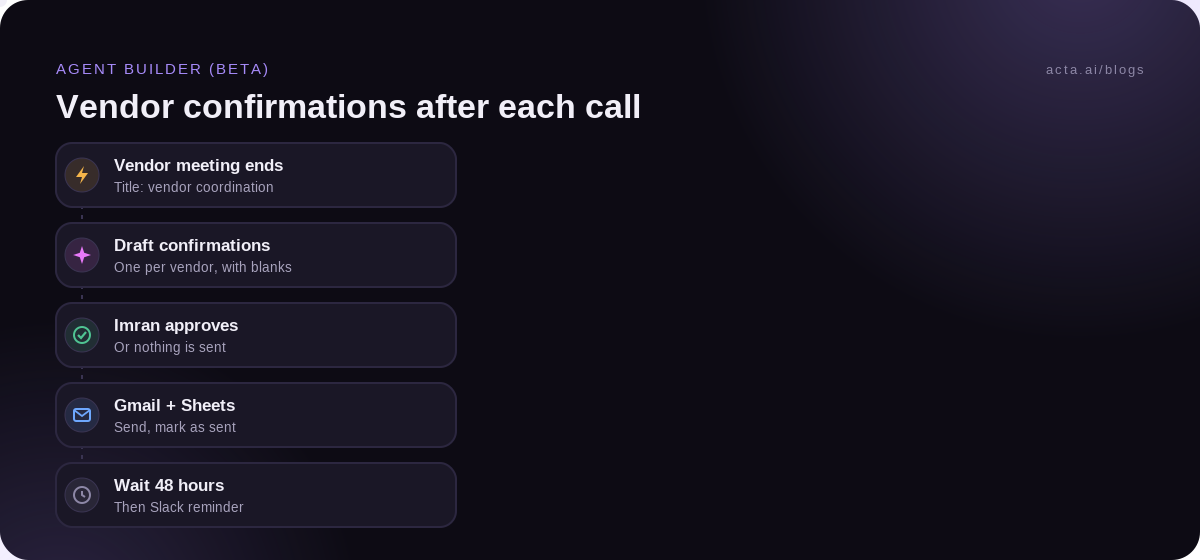
The cheapest protection against a no-show is making the vendor restate the commitment in writing. If Shekhar had received an email on 21 January saying "You confirmed your second crew, led by ___, for the sangeet on 13 Feb, load-in 2 pm", the gap in that sentence would have surfaced the same day. Agent Builder (beta) can write those emails after every coordination meeting. A vendor manager can set this up in an afternoon:
- Start: "When a meeting ends", only when the title contains "vendor coordination".
- Acta data step: get the meeting's notes and the Event vendor coordination report.
- For each vendor in the report, run an AI step: "Write a short confirmation email restating the date, service, load-in time, crew size or crew lead, power needs and on-the-day contact as said in the meeting. Where something was not said, leave a blank and ask the vendor to fill it."
- Human approval: Imran, as the agent's owner, approves or rejects each email in the Approvals tab or by email. No answer within 24 hours means nothing is sent.
- Gmail: send each approved email from the company's events mailbox.
- Google Sheets: update the vendor's row in the event sheet to "Confirmation sent" with the date.
- Wait 48 hours, then Slack: message Imran listing the vendors whose confirmations he should check for replies.
Run it with Test on the 21 January recording first; in a test, emails are only shown and nothing is sent. The blanks are the point: an email that says "crew lead: ___" tells you which commitments were vague. The steps guide explains each step type, including Wait and For each. Keep the approval step even after weeks of good drafts; a confirmation with the wrong date is worse than none.
Planners can adopt it between two event weekends
Event teams are rarely in the office at the same time, so keep roles simple. The lead planner records client meetings; many happen in person at the family's home or the venue, where the mobile app works well. The vendor manager records vendor coordination and production meetings. Corporate leads record client briefings on Teams or Zoom with the Acta desktop app, which records from their own laptop with no bot in the call. Tell families and vendors you record planning meetings so nothing is missed; our guide to recording meetings with AI and what to tell participants covers consent in general terms (not legal advice).
Set up the workspace in Settings > Workspace with "Invite people" (Owner, Admin and Member roles). Meetings are private by default; agree that every vendor coordination and production meeting is shared with the workspace the same day. The team setup guide shows how.
- Monday and Tuesday of a quiet week: build the Event vendor coordination template and test it on one past meeting.
- Rest of week 1: record every meeting for one upcoming event; share each one.
- Week 2, Monday: the founder opens the Risk Registry grouped by Owner and assigns every High risk without an owner.
- Week 2, midweek: build the confirmation agent, test it, turn it on for that event only.
- Week 2, Friday: at the T-7 production meeting, review open High risks and close or escalate each one.
Mistakes to avoid: keeping vendor meetings private, which leaves the founder's register blank; writing "vendor confirmed" when only the date was confirmed, not the crew; treating the register as a company-wide record when each person has their own view; and dropping the register in the final week, when it matters most. For running the meeting itself well, ending a meeting with clear owners and deadlines is a useful habit to borrow.
Acta records planning, vendor and production meetings, then writes notes, action items, decisions and a Risk Registry that updates after each one, and you can ask OneChat across all of them. Outcomes, the Risk Registry and OneChat are included in the 15-day trial and in Pro. The Acta page for event management companies has the setup in one place.
Frequently asked questions
What is an event planning meeting risk register?
It is a list of the risks raised in an event's client, vendor and production meetings, each with a backup or mitigation, an owner, a target date, an impact level and a status. It differs from a booking checklist, which records who is booked, because it records what might fail and who will act if it does.
How do you plan for a vendor no-show at a wedding?
Identify vendors whose failure would stop the event, usually sound, lighting, power, catering and transport. For each, name a backup vendor and the person who will call them, agreed at least 14 days out. Ask every critical vendor to confirm crew, load-in time and on-the-day contact in writing after the coordination meeting.
What should a contingency plan for events include?
A contingency plan for events should cover vendor failure, weather, power, guest numbers and timing slips. For each: the trigger that activates it, the backup, who decides, and who carries it out. Keep it with the run of show so the on-site team can act without phoning the office at a busy moment.
Who should own risks in a small event company?
The person closest to the vendor or task should own each risk, usually the vendor manager or lead planner, and the founder should review every High risk weekly. In Acta each person's Risk Registry comes from the meetings they recorded or that were shared with them, so share vendor meetings with the workspace.
Can we use this for corporate events as well as weddings?
Yes. Corporate events have the same vendor risks plus client approvals, speaker changes and brand sign-offs. Keep one template for vendor coordination, record client briefings and production meetings, and group the Risk Registry by project when a weekend has several events sharing crews or equipment.
Make your next event's register before T-21
The sangeet did not need more vendors or more meetings. It needed one sentence turned into a row with an owner. Before your next event:
- Record the vendor meeting: every coordination call from T-30, shared with the workspace.
- Write risks as rows: risk, backup, owner, date, impact, status.
- Name the backups: every High-impact vendor has one by T-14.
- Get it in writing: vendors confirm crew, load-in and contact after each call.
- Review by owner: at T-14 and T-7, close or escalate each open High risk.
Record your next vendor coordination meeting with the desktop app or the Acta Chrome extension, and build the register for one event during the 15-day free trial.