Site risks are spoken long before they are written
A contractor's week has a familiar rhythm. The morning site huddle or toolbox talk sets the day's gangs and safety points. The weekly site coordination meeting brings the project manager, site engineers, the planning engineer, MEP and waterproofing subcontractors, and sometimes the architect's representative around the site office table. The OAC meeting with the owner and architect handles drawings, variations and the client's worries. Then there is the subcontractor coordination meeting, the RA bill review, and the walk-through before a pour.
Risks surface in all of them, but casually. A foreman mentions that the rebar supplier "is acting funny about credit". The MEP subcontractor says sleeves drawings are still not approved. Someone looks at the calendar and says the basement must be sealed before the rains. Each remark is heard, nodded at, and lost. The site meeting minutes, if anyone writes them, list progress percentages and pour dates. Risks rarely make it in because they were not on the agenda.
That is the gap in construction risk management at mid-size firms. Large developers have a risk manager. A 150-person contractor has a planning engineer who is also doing billing, and the register in the project file was last opened at kick-off. For common minute formats, our construction meeting minutes templates cover site and OAC meetings; this guide is about the risks those minutes miss.
A monsoon warning was said once in April and never logged
An illustrative story; the firm, people and figures are invented. Patil & Sons Constructions has 160 people and is building a G+6 commercial block with a single basement for a private client on the outskirts of Pune. The contract has a completion date and a delay clause the client's PM, Farida, mentions often.
Mid-April, site coordination meeting. Excavation is done; raft work is starting. Joseph, the waterproofing subcontractor, says: "If the retaining wall and membrane aren't finished by the last week of May, the rains will fill this pit, and we'll lose a month." Anand, the project manager, agrees and moves on to the RA bill. Nobody writes it down as a risk. Nobody books dewatering pumps.
Early May. The retaining wall slips by ten days because shuttering material is late. At the next meeting Joseph repeats the warning, more sharply: "We're now cutting it very close." Again, progress dominates the meeting.
Late May. In mid-May 2026, the India Meteorological Department said the southwest monsoon was likely to set in over Kerala around 26 May, as reported by Business Today and Scroll. Forecasts move, and pre-monsoon showers do not wait for the official onset. In our story, heavy rain in early June floods the half-sealed basement. Two hired pumps arrive four days later. The site loses three weeks, the client's PM asks for a revised programme, and Anand spends a month negotiating an extension of time.
Joseph raised the risk twice. A register built from those two meetings would have had one row with a High impact, flagged "Getting worse" in May, and no owner. That single unowned row is the whole story.
A risk register example that a site team will read
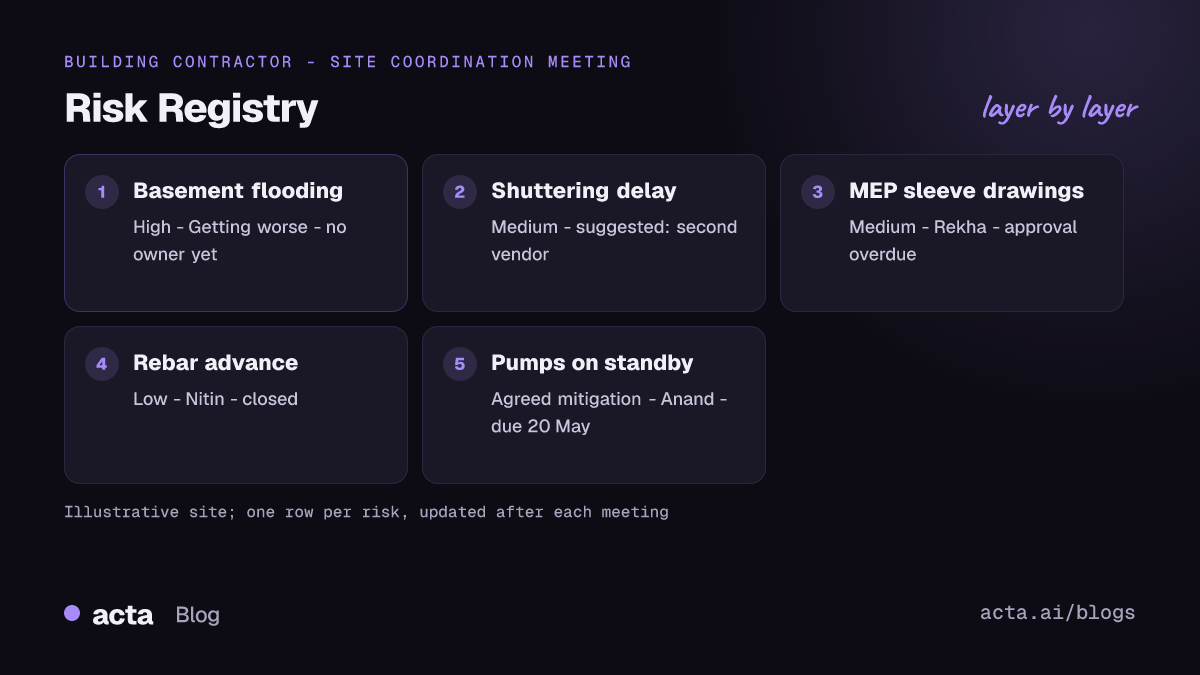
Site teams ignore registers with fifteen columns. Six are enough, and they match what Acta's Risk Registry shows: Risk, Mitigation, Owner, Date, Impact and Status. Here is a risk register example for the Patil & Sons site, written the way it should have looked in early May:
| Risk | Mitigation | Owner | Date | Impact | Status |
|---|
| Basement floods if retaining wall and membrane are not done before the rains | Agreed: book two 10 HP dewatering pumps on standby; add Sunday shift for shuttering | Anand | 20 May | High | Mitigating |
| Shuttering plywood delivery late by 10 days | Suggested: hire from second vendor in Chakan | No owner | None yet | Medium | Open |
| MEP sleeve drawings not approved; slab pour may need core cutting later | Agreed: architect to approve by Friday | Rekha (planning) | 9 May · overdue | Medium | Open |
| Rebar supplier asking for advance payment | Agreed: release part payment against RA bill 4 | Nitin (purchase) | 12 May | Low | Closed |
Rules that make this register usable: one sentence per risk, stating the consequence ("basement floods") not just the cause ("rain"); a mitigation with a verb; a real person, not "contractor"; a date. Impact as High, Medium or Low is enough at site level. Probability scores look rigorous on paper and are guessed in practice.
Acta's Risk Registry builds the construction risk register from site meetings
With Acta, the site engineer records the weekly site coordination meeting on the Acta mobile app in the site office, and Anand records the OAC meeting on Teams with the desktop app, with no bot in the call. After each meeting Acta writes notes, decisions and action items, then reads the meeting for risks and updates the Risk Registry tab under My meetings. The badge says when it was last updated and from which meeting.
Here is how the April and May warnings would have appeared. After the April meeting, a new row: Risk "Basement may flood if waterproofing is not complete before the monsoon", Impact High, Mitigation "None yet", Owner "No owner". Because it is High and unowned, the attention card High · no owner sits at the top of the tab with an Assign owner button. After the early-May meeting, Joseph's sharper line does not create a second row; the same row gets the newest details and a Getting worse tag, and its History shows both meetings, each with the quote and a play button.
When Anand finally agrees to book pumps, the mitigation changes to "Book two dewatering pumps on standby", tagged Agreed, because it was decided in a meeting with an owner and date. Until then, Acta may offer its own idea tagged Suggested, clearly marked as not agreed. If the pump booking date passes without the risk moving, the Fix is overdue card appears. When a later meeting says the membrane is complete, the status shows Closed as "suggested", because Acta thinks it was solved, and Anand confirms Closed himself.
For a firm running several sites, group the table by Project / customer and use the chips ("3 high", "2 no owner") to see where to look first. Search works across sites: type "basement" or "shuttering". This is Anand's register, built from the meetings he recorded and the ones his site engineers shared with him in the workspace. Each engineer has their own. If a site's meetings are not shared, their risks never reach Anand's view.
Two built-in report templates fit alongside: Project status for the weekly meeting and Property walkthrough for pre-pour inspections. On a paid plan, a custom template shaped for site coordination is worth ten minutes:
Template name: Site coordination meeting
What should this report do? For weekly site coordination meetings on building projects: progress against the look-ahead, risks raised, pending drawings and RFIs, and subcontractor commitments.
Sections: 1. Look-ahead status (Table: Activity, Planned, Actual, Constraint). 2. Risks raised (Table: Risk, Impact, Mitigation, Owner). 3. Drawings and RFIs pending (Table: Item, With whom, Needed by). 4. Subcontractor commitments (Checklist: task, owner, due date). 5. Weather and site conditions (Bullets). 6. Client instructions (Bullets).
When should Acta use it? Only matching meetings.
Decisions, actions and questions close the loop
A register lists risks; it does not book pumps. In Outcomes > Action items, the agreed mitigation becomes a row: "Book two 10 HP dewatering pumps on standby", owner Nitin, due 20 May, later "Overdue 3 days". The Overdue tile is the one the PM should look at each Monday. If you turn on the Auto follow-up email for "Due or overdue" items, Nitin gets a reminder each weekday until it is done.
The Decision log holds the calls that change the programme. "Pour the basement raft in two halves to start waterproofing on the east side first" appears as Active, decided by Anand, owner Mahesh (formwork), with its linked actions. If the next meeting goes back to a single pour, the card shows Reversed and keeps the history. For more on spotting risks hidden in ordinary talk, see seven project risks hiding in everyday conversations.
When Farida asks for a revised programme and an explanation, Anand opens OneChat: "When was the monsoon risk to the basement first raised, and what did we agree?" The answer lists the April and May mentions, the pump decision and its late booking, with Found in pointing to the two site coordination meetings. It is an uncomfortable answer, but an honest one, and it helps when discussing an extension of time.
A post-meeting risk alert agent with approval
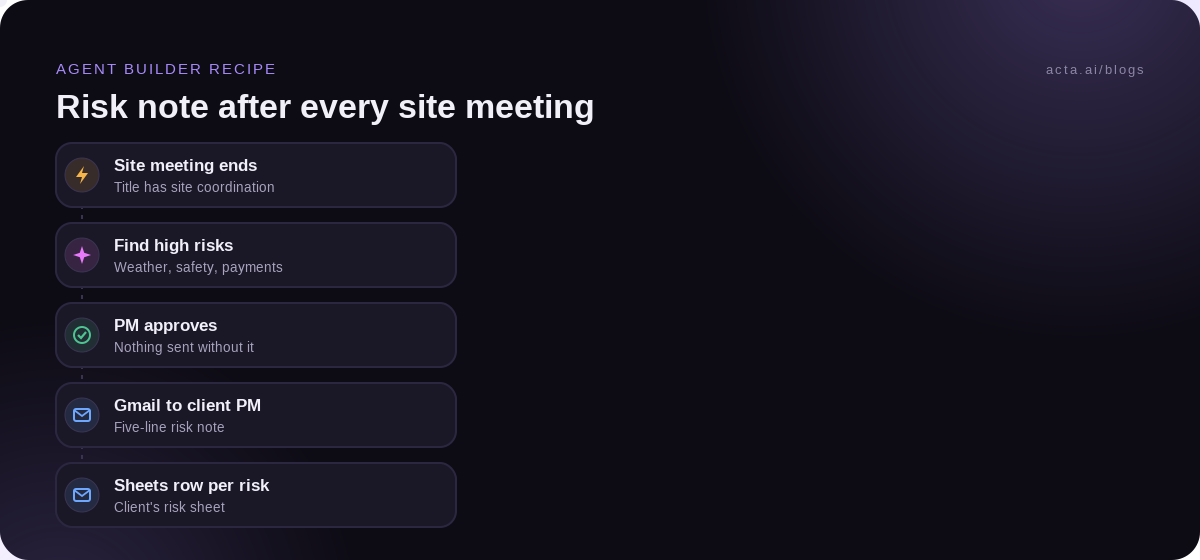
The Risk Registry updates itself. What it will not do is tell the client's PM or your directors. Agent Builder (beta) can send a short risk note after each site meeting, with you approving it first. A planning engineer can build this in an afternoon:
- In Agent Builder, click New agent, describe "after each site coordination meeting, send me a risk summary to approve", and review the AI draft, or start from blank.
- Trigger: When a meeting ends, with the filter "title contains site coordination".
- Acta data: get the meeting's notes and action items.
- AI: list the risks raised in this meeting, mark any that sound High (weather, safety, structural, payment), and write a five-line note with owner and date for each.
- If / else: if no High risks were found, stop; otherwise continue.
- Human approval: the PM gets Approve and Reject in the Approvals tab and by email. No answer within 24 hours means nothing is sent.
- Action: Gmail, send to the client's PM and your director.
- Action: Google Sheets, add a row per risk to the client's shared risk sheet, if the contract asks for one.
- Test on a past meeting with Run test, where nothing is sent and approvals pass by themselves, then Turn on. The test and turn-on guide walks through it.
Keep the agent's note short. A client PM reads five lines; nobody reads a forwarded transcript.
A two-week rollout across your live sites
A contractor with 50 to 200 staff typically adds the project managers, site engineers at each live site, the planning engineer and one person in purchase to the workspace: often six to twelve seats. Labour and subcontractor staff stay outside it; a foreman named on an action item can still get it in the daily Auto follow-up email. Set up the workspace in Settings > Workspace, invite people, and agree one rule: site coordination and OAC meetings are shared with Everyone in the workspace; commercial negotiations stay private.
Week 1, one site. Pick the site with the nearest critical milestone. Tell attendees at the start of the site coordination meeting that it is recorded and what for. Record it; at the end, the PM asks "any risks we haven't written down?" and lets people answer. On Friday, open the Risk Registry together, assign owners to every High row, and mark anything wrong as closed.
Week 2, all sites. Add the other sites' coordination meetings and the OAC meeting. Turn on Auto follow-up for due or overdue items. Build the custom template. Test the risk alert agent on two past meetings and switch it on only if the notes read well.
Mistakes to avoid: recording on a phone placed next to a running mixer; letting the register become the planning engineer's private file; using the register as blame evidence against subcontractors (they will stop raising risks); and recording without telling people. Our guide on recording consent is general information, not legal advice. See the construction contractors page for other site examples.
Acta records site and online meetings and keeps a Risk Registry, Decision log, Action items and OneChat, all included in the 15-day trial and Pro. It reads what was said; if nobody mentions the rain, it will not either.
Frequently asked questions
How often should a contractor update the site risk register?
After every site coordination and OAC meeting, because that is when risks change. A register updated monthly misses the risk raised in week two and repeated in week three. With Acta the Risk Registry updates after each recorded meeting, and the PM spends five minutes on Friday assigning owners and dates.
Does Acta replace the risk schedule in our contract?
No. The contract's risk allocation and any formal register the client requires stay with your QS and project director. Acta's Risk Registry is a working list of risks raised in meetings. Many contractors copy the High rows into the client's format each month.
Can subcontractors see our risk register?
Only people in your workspace can open shared meetings, and each person's Risk Registry is built from the meetings they recorded or that were shared with them. Subcontractors outside the workspace do not see it. Share specific risks with them through the agent's approved email or your usual reports.
Will Acta understand site meetings in Hindi or Marathi?
Hindi, including Hindi-English mixing, is detected automatically when the meeting language is Auto. Marathi is a beta language you choose in Settings; it works, and accuracy is still improving. Clear audio matters more than language: record in the site office, not next to a running mixer.
What is the best way to run a subcontractor coordination meeting?
Keep it to commitments: what each trade will finish by when, what they need from others, and what could stop them. Close each item by naming the person and the date. Record it, share it with the workspace, and the commitments become action items and the blockers become rows in the Risk Registry.
Set up the register before your next site meeting
You do not need a risk workshop. You need the next site coordination meeting recorded and five minutes on Friday.
- Ask the risk question: end each meeting with "anything that could stop us in the next six weeks?"
- Own the High rows: no High risk stays without an owner past 48 hours.
- Watch the trend: treat "Getting worse" as a reason to act this week.
- Share site meetings: so the PM's register includes every site.
- Approve before sending: keep the human approval in the client risk note.
Record your next OAC call with the Acta desktop app and start a 15-day trial on Acta pricing, or book a demo for a multi-site setup.