Quick answer: Meeting automation for small teams works best when you start with three things: a meeting recap posted to your team channel, a follow-up email drafted after client calls that waits for approval, and a Monday digest of overdue action items. Give each one a single owner, name them clearly, keep approval on anything external, and skip the rest until those run smoothly.
You're eight people. Maybe fifteen. Nobody's job title has "ops" in it, and the person who set up your tools is also the person who closes deals, runs payroll, or ships the product.
That changes what automation should look like. You don't need a 14-step workflow. You need a few small things that keep working when nobody's watching, and that someone can fix in ten minutes when they don't. Here's what we'd set up first, what we'd leave alone, and what a normal week looks like once it's running.

What should a small team automate first?
Look at what happens after your meetings and ask: what gets forgotten? For most small teams it's the same three things. Notes nobody shares, follow-ups that go out a day late, and action items that quietly die.
1. A recap in your team channel after every internal meeting
This one barely counts as automation. In Acta it's an integration setting, not an agent: meeting notes post to a Slack channel automatically. You choose what goes in (Summary, Decisions, Action items, Key takeaways), optionally filter by title, and each post has an "Open in Acta" button.
Set it for your weekly team sync and your product meeting. Skip it for 1:1s. Takes two minutes. Our guide to Slack meeting recap automation has the details if you want an agent version with more control.
2. A follow-up email after client calls, with your OK
The highest-value one for anyone who talks to customers. After a call with "Client call" in the title, Acta Agent Builder drafts a short email with what was agreed and who does what by when. The run then pauses for approval. You read it, fix a line, approve, and Gmail sends it.
The approval matters more in a small team, not less. Nobody else is going to catch a weird email before the client sees it. We walk through it in how to automate meeting follow-up emails.
3. A Monday digest of overdue action items
Small teams don't have a project manager chasing people. So let a scheduled agent do the polite chasing.
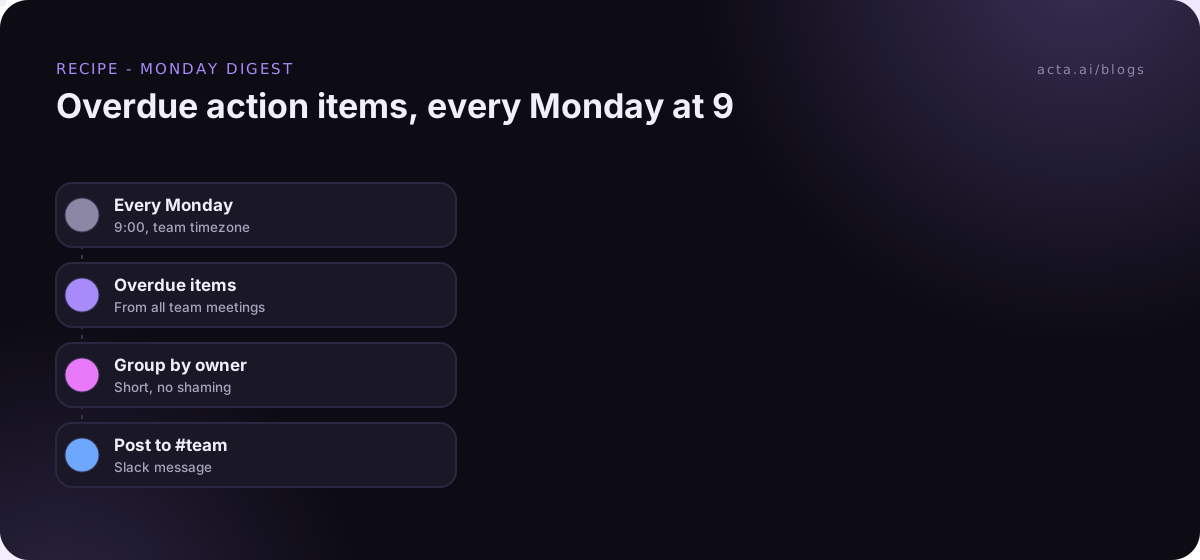
Every Monday at 9:00, it pulls overdue action items from your meetings, groups them by owner, and posts one message to #team. No names in bold, no shaming. Just "here's what's open". People fix their own items surprisingly fast when the list is visible.
If your action items live in Jira or a CRM too, read how to sync meeting action items to Jira, HubSpot and Salesforce before you build a second copy of the same list.
What shouldn't a small team automate yet?
This is where most small teams waste their first month. Here's what not to automate, at least for now:
- Anything that happens monthly. If you do it twelve times a year, do it by hand. The automation will break between runs and nobody will remember how it works.
- Long chains across five apps. Meeting to CRM to Sheets to Slack to email. Every link is a place to break, and you have nobody to watch it.
- Anything nobody owns. If you can't say who fixes it, don't build it.
- Customer-facing sends without approval. Not yet. Maybe not ever.
- Social posts. Acta can make LinkedIn or newsletter drafts from a meeting, but it never posts them, and I think that's right for a small brand.
- CRM notes before you agree on what goes in them. Automating a messy process gets you a faster mess.
Anthropic's guide on building effective agents makes a similar point from the engineering side: start with the simplest setup that works and add complexity only when the simple version falls short. With nobody on your team watching the plumbing full time, that advice counts double.
How do you keep automation for small teams maintainable?
The automations themselves are rarely the problem. What hurts is the day the person who built them is on holiday and the Monday digest stops. A few rules keep that from turning into a mystery:
- One owner per agent. Put their name in the agent's name. "Monday overdue digest - Priya".
- A naming pattern. What it does, who it's for, who owns it. "Client follow-up - sales - Marco". You'll thank yourself at agent number six.
- Approval on anything external. Internal Slack posts can run on their own. Anything a client, candidate or partner sees goes through a person.
- One sandbox channel. Make a #agent-sandbox in Slack. New agents post there first, and tests go there too.
- Team connections, not personal ones, where you can. If an agent runs on Marco's Gmail, it stops when Marco leaves.
- Write the "why" down. One sentence in the description. "Exists because we kept missing follow-ups after demos."
Two features in Acta help here without any extra effort. Each time you turn an agent on it saves a version, so a bad edit can be rolled back. And History shows what every step did on every run, so whoever's covering can see what happened without asking the owner. If you're unsure where to put a person in the loop, our post on human approval in automation covers it, including how long approvals wait before they expire (and nothing gets sent if they do).
What does a realistic weekly routine look like?
Here's an example week for a ten-person team running the three automations above plus one prep brief. Names are made up.
- Monday 9:00. The overdue digest lands in #team. Dana sees two of her items from last Tuesday and closes one before standup.
- Monday 11:00. Weekly team sync. Once the summary is ready, the recap with decisions and action items is in #team.
- Tuesday and Wednesday. Marco has four client calls. Four follow-up drafts appear in his Approvals inbox. He edits one, approves all four between calls.
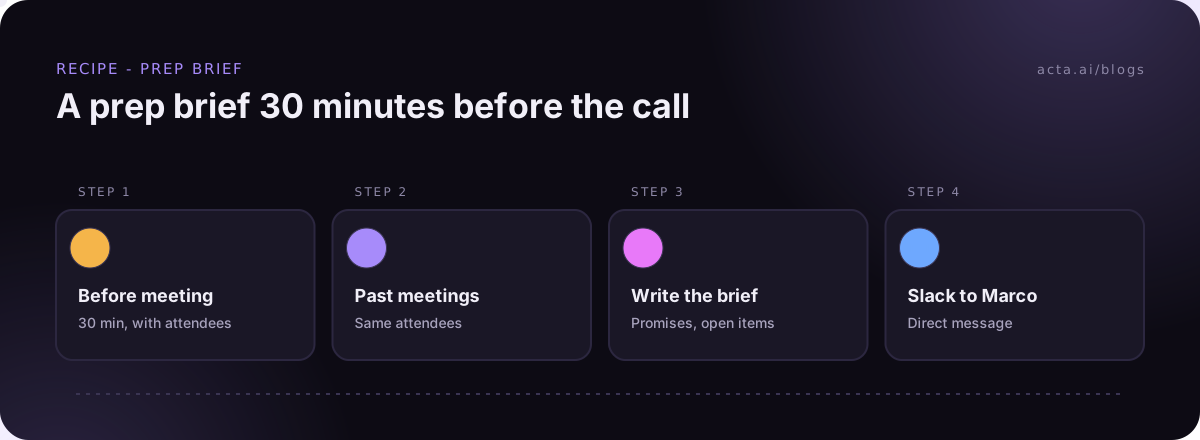
- Thursday 2:30. A prep brief arrives 30 minutes before the quarterly check-in with a client, with what was promised last time.
- Friday 4:00. Priya, who owns the agents, spends ten minutes in History. One follow-up draft was rejected; she reads why and tightens the AI instruction.
That's it. No dashboard, no weekly automation meeting. If it starts needing more than that, you've built too much.
How much should a small team spend on meeting automation?
I won't pretend there's a magic number. But here's how I'd think about it.
- Count hours, not features. If the follow-up drafts save Marco 20 minutes after each of his ten weekly calls, that's real time back every week. Compare that to the cost, not to a feature list.
- Watch per-action pricing. General automation tools often bill by usage. Zapier, for example, counts tasks, and a task is an action a Zap completes. A "post a recap after every meeting" Zap for a busy team can use more of them than you'd guess.
- Don't stack tools. A meeting recorder plus Zapier plus an AI subscription plus a Slack bot is four bills and four places to break. If the automation starts from a meeting, doing it where the meeting data already lives is usually cheaper and simpler.
- Try before you commit. Acta has a free 15-day trial, which is enough to run all three automations for two weeks and see if they stick. Plans and what they include are on the pricing page.
Do you still need Zapier or Make?
Maybe. Be honest about what you already have.
If you've got Zaps or Make scenarios running for non-meeting stuff (form leads into a sheet, invoices into accounting), keep them. They're good at that. And Acta Agent Builder can hand off to them with "Send to a Zap" or "Send to a scenario" if you want a meeting to kick off something you've already built.
Where I'd not use a general tool is the meeting part itself. Getting a transcript out, finding the action items, matching owners, writing the email, all of that is plumbing you'd have to build and then maintain. And maintenance is exactly what a small team doesn't have time for. Our Zapier vs Make vs n8n comparison is useful if you're choosing a general tool anyway.
How do you get started this week?
- Day 1: Get your meetings into Acta. Calendar bot for Zoom, Meet and Teams, or the desktop app or Chrome extension if you'd rather not have a bot. Tell people they're being recorded, and get consent where the law requires it. Our guide on recording consent and what to tell participants covers the wording.
- Day 2: Turn on the Slack recap for your team sync.
- Day 3: Build the client follow-up agent with approval. Test it on last week's calls first.
- Day 5: Add the Monday digest.
- Week 2: Live with it. Fix what annoys you. Don't add anything new, even when someone in standup says "ooh, could it also...". Write that down for week three.
If you've never built an agent before, follow our guide to build your first AI agent. You can also browse ready-made agents by team on the Acta agents page.
Frequently asked questions
What is the best meeting automation for small teams?
A follow-up email drafted after client calls, with approval before sending. It saves the most time and catches the most dropped balls.
Do we need an ops person to run automations?
No, but you need one owner per automation. Keep it to a few agents, name them clearly, and spend ten minutes a week in History.
Should small business automation send emails to customers on its own?
I wouldn't. Keep a human approval step on anything external. If nobody approves before it expires, nothing goes out.
How many automations should a small team start with?
Three, at most. Get those running for two weeks before adding a fourth.
Can we try it before paying?
Yes. Acta has a free 15-day trial.
Want to set up your first three this week? Start your free Acta trial.