Quick answer: Zapier vs Make vs n8n mostly comes down to who builds and how you want to pay. Zapier is the easiest to pick up and bills per task (each successful action). Make is visual, handles branching well and bills in credits. n8n bills per workflow run on its cloud plans and is free to self-host if someone on your team can run a server.
I've built the same handful of workflows in all three: post a meeting recap to Slack, push notes into a CRM, open tickets from action items. They all work. Where they differ is how they bill you, how much you need to know before you start, and where your data lives.
So this isn't a "which is best" post. Zapier vs Make vs n8n is really a question of which fits your team. Pricing facts below are as of November 2026 and come from the vendors' own pages where I could find them. Plans change often, so check before you buy.
Zapier vs Make vs n8n: the short version
- Zapier if non-technical people will build and own the automations, and you want the gentlest setup.
- Make if you like seeing the whole flow on a canvas and your workflows branch, loop or juggle lots of data per run.
- n8n if you have a developer (or a very technical ops person), want to self-host, or run long workflows that would get pricey when every step counts.
And if most of what you automate starts with a meeting, you may not need any of them for that part. More on that further down.
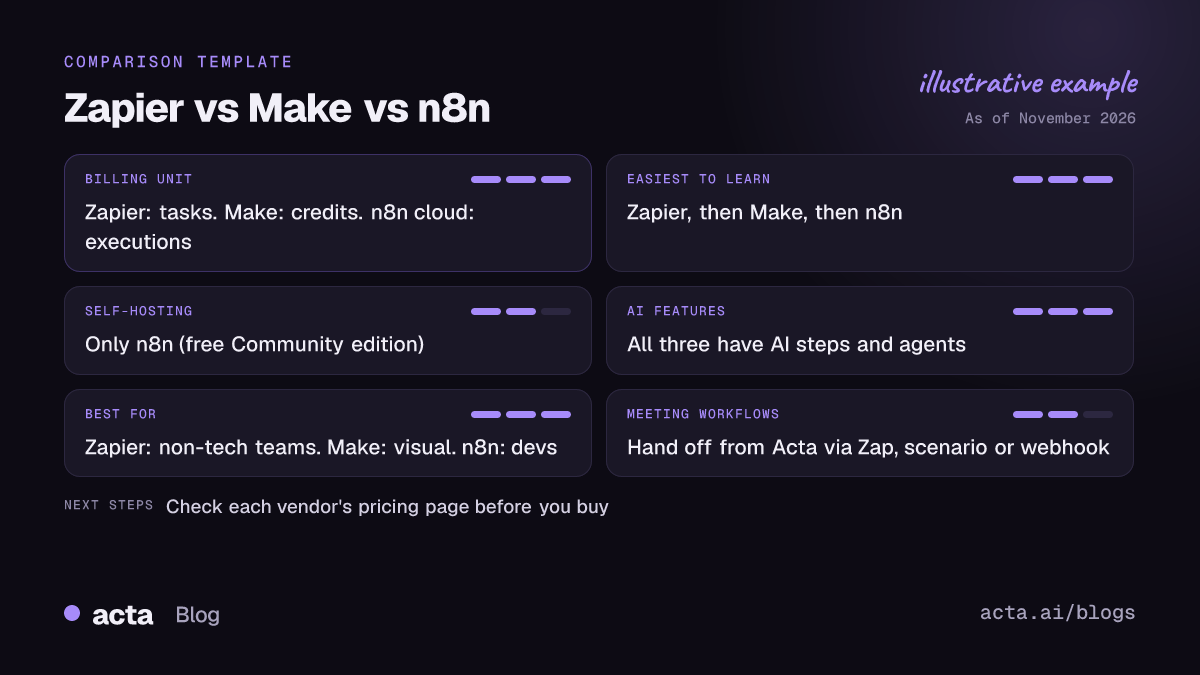
How do Zapier, Make and n8n charge you?
This is the part people get wrong most often, because the three tools count usage in completely different units. Same workflow, three different bills.
Zapier: tasks
Zapier's help centre says a task is any successful action that runs in a Zap. The trigger itself doesn't use a task, and failed or halted steps don't either (see how Zapier measures task usage). So a Zap that fires on "meeting ended", then posts to Slack and adds a CRM note, uses two tasks per meeting.
A few details that matter as of November 2026, per Zapier's help pages:
- Each successful Zapier MCP tool call costs two tasks.
- AI by Zapier steps are priced by the model tier you pick.
- Zapier Agents don't use tasks at all. They draw on a separate activity quota.
Third-party pricing round-ups I found this session agree that Zapier has a free plan with 100 tasks a month, limited to two-step Zaps. They disagree on paid plan prices, so I won't quote them. Look at Zapier's pricing page on the day you buy.
Make: credits (formerly operations)
Make switched its billing unit from operations to credits in August 2025. According to Make's help page on credits, an operation is one module run, and by default one operation costs one credit. AI features are the exception: depending on token usage, one AI operation can cost a fraction of a credit or several.
The catch is bundles. If a trigger returns five new rows, every module after it runs five times. That's how a long scenario can quietly eat a month of credits. Several reviews put Make's free plan at 1,000 credits a month with two active scenarios, as of November 2026.
n8n: executions
n8n's pricing page says cloud plans are based on monthly workflow executions, regardless of complexity. One run is one execution, whether it has three nodes or thirty. When I checked in November 2026 it listed the Starter plan at 20 euros a month, billed annually.
That's the big structural difference. With Zapier and Make, a longer workflow costs more per run. With n8n cloud, it doesn't.
So which is cheapest?
Honestly, it depends on the shape of your workflows, which is why the "Make vs Zapier pricing" debate never ends. A rough rule I use:
- Few runs, few steps: they're all cheap. Pick on ease.
- Lots of steps per run: n8n's per-execution model usually wins, and Make tends to beat Zapier.
- Lots of runs with one or two steps: the gap shrinks. Compare your actual numbers.
Before you compare, write down one real workflow, count its steps, and multiply by how often it runs in a month. Ten minutes with a pencil beats an hour of pricing pages.
Which one is easiest to learn?
Zapier. It's not close. You pick a trigger, pick an action, map a few fields, and you're live. The editor reads top to bottom like a recipe, which is exactly what a sales ops or CS lead wants on a Thursday afternoon.
Make sits in the middle. The canvas is lovely once it clicks, and seeing routers and iterators laid out visually makes complex flows easier to reason about. But you'll need to understand bundles, arrays and mapping before you trust it. Give a new builder a day or two.
n8n has the steepest curve. It's built for people who are comfortable with JSON, expressions and the odd bit of JavaScript. That's also its strength: when the visual nodes run out, you can write code instead of hunting for a workaround. If nobody on your team enjoys that kind of thing, I'd skip it.
Can you self-host Zapier, Make or n8n?
Only n8n. Zapier and Make are cloud-only.
n8n's installation docs cover npm, Docker and Kubernetes, and an install without a licence key runs the free Community edition. So "is n8n free?" Yes, the self-hosted Community edition is, but you pay for the server and for whoever keeps it patched. The docs themselves warn that self-hosting takes server and container skills and suggest n8n Cloud if you don't have them.
Why would you bother? Usually one of three reasons: your security team wants workflow data on your own infrastructure, you run a huge volume of executions, or you want to tinker with the internals. If none of those apply, the cloud version saves you a lot of pager duty.
What AI features does each one have?
All three now let you drop an AI model into the middle of a workflow and build agents that pick their own tools. The details differ.
- Zapier has AI steps inside Zaps, Zapier Agents (which run on their own activity quota, not tasks) and Zapier MCP, which lets an AI assistant call Zapier actions.
- Make has Make AI Agents. Its help docs describe using scenarios as tools that an agent can call on demand.
- n8n has an AI Agent node: you attach a chat model and one or more tools, and the agent decides which to call. It's the most flexible of the three and the most hands-on.
My opinion: the AI features are less of a deciding factor than they look in launch posts. The hard part of an AI workflow is rarely the model step. It's getting clean input in and making sure nothing embarrassing goes out. Which brings us to meetings.
How many apps does each connect to?
Zapier has long been the one people pick for catalogue breadth, and its own blog has marked milestones as the directory grew. Make and n8n both connect to the usual suspects (Slack, Google Workspace, HubSpot, Salesforce, Jira, Notion) and both have generic HTTP and webhook modules for anything else.
I'm not going to quote app counts. Every vendor publishes a number, the numbers move every quarter, and the ones I found this session were either old or third-party. More useful: list the five apps you actually need and check each tool's directory for the specific triggers and actions you want. "Supports HubSpot" can mean anything from full coverage to one action.
Which is the best automation tool for meetings?
Here's where I'll be upfront about a bias: I work on a meeting tool. So take this with that in mind.
When you build a meeting workflow in Zapier, Make or n8n, the meeting data has to come from somewhere. Usually that's a notetaker with a "transcript ready" trigger. Then you map its fields, add an AI step to turn a transcript into something useful, and send the result on. It works, but every link in that chain is a place for things to drift: a field gets renamed, a connection expires, the trigger fires before the summary exists. We wrote up the trade-offs in stitching a recorder to Zapier vs using a meeting agent.
A meeting-native tool starts from the other end. Acta already has the transcript with speakers, the action items with owners and due dates, and the decisions, so the workflow doesn't need to rebuild them. Acta Agent Builder (new) lets you trigger on things like "meeting ended", "action item overdue" or "decision changed", run an AI step, pause for approval, and send to Slack, Gmail, Jira, HubSpot and others. You can see the agents on the Acta agents page.
But you don't have to pick one side. If your team already lives in Zapier, Make or n8n, Acta can hand the meeting part off to them:
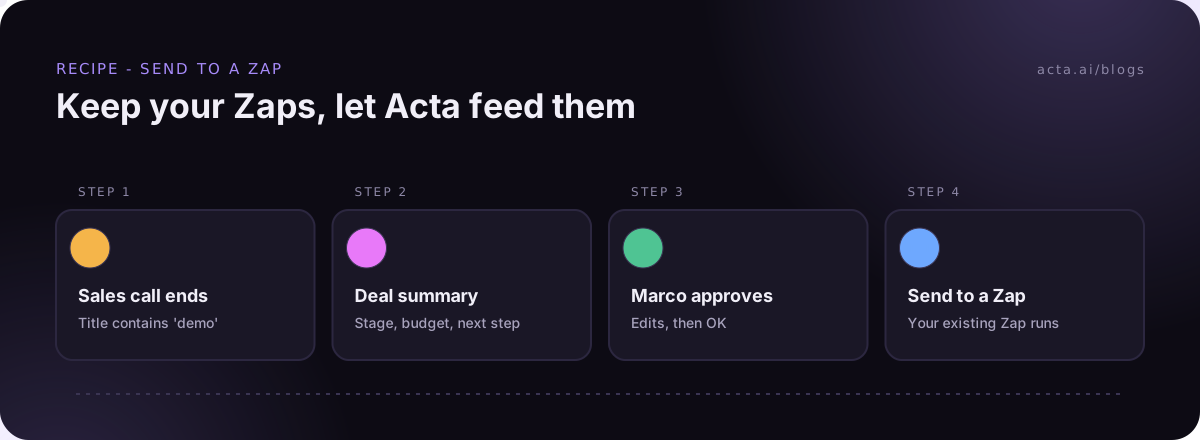
- Zapier: the "Send to a Zap" step passes meeting data into an existing Zap.
- Make: "Send to a scenario" does the same for a Make scenario.
- n8n: a Webhook step sends JSON (optionally signed) to an n8n Webhook node.
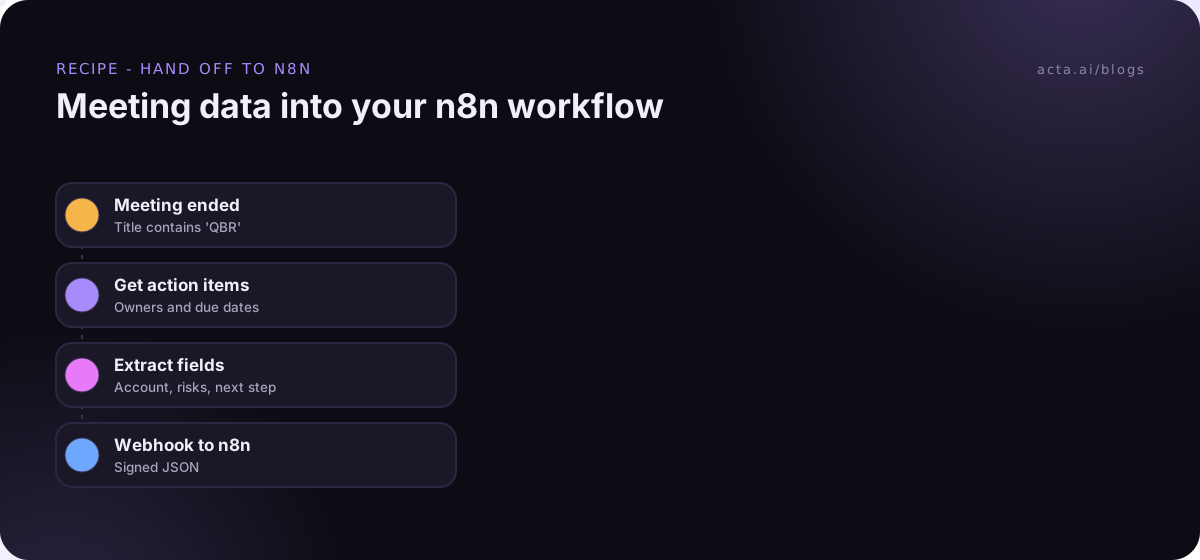
Here's an example. Your CS lead, Dana, already has a big n8n workflow that updates account health in your data warehouse. She doesn't want to rebuild it. So the Acta agent fires when any meeting with "QBR" in the title ends, pulls the action items and risks, and posts a tidy JSON payload to her n8n webhook. n8n does the rest, and nobody rebuilds anything.
One note if your workflows start from recorded calls: get consent where the law requires it. Our guide on whether it's legal to record meetings with AI covers what to tell participants.
We've also compared Acta head to head with each of these tools if you want more detail: Acta Agent Builder vs Zapier, Acta Agent Builder vs Make and Acta Agent Builder vs n8n.
Who should pick something else?
Every tool here has a reader it's wrong for. Be honest about which one you are.
- Skip Zapier if your workflows are long and run constantly. You'll feel the per-task billing. Also skip it if you need data to stay on your own servers.
- Skip Make if the people building automations won't learn how bundles and mapping work. A half-understood scenario is worse than none.
- Skip n8n if nobody on the team is comfortable with JSON or running infrastructure. The cloud plan helps, but you'll still hit expressions sooner or later.
- Skip a meeting-native tool like Acta for anything that doesn't start with a conversation. Syncing Stripe to your accounting tool isn't a meeting problem. Use one of the three.
And if you're looking for a Zapier alternative purely to save money, run the pencil test above first. Plenty of teams switch, spend a month rebuilding, and save less than they hoped.
Frequently asked questions
Is n8n free?
The self-hosted Community edition has no licence fee. You still pay for hosting and your own time. n8n Cloud is paid and billed per workflow execution.
n8n vs Zapier: which is better for beginners?
Zapier. Its step-by-step editor is easier for non-technical people. n8n is more powerful but expects comfort with JSON and expressions.
Is Make cheaper than Zapier?
Often, for multi-step workflows, because Make bills per module run in credits. But it depends on how many steps and runs you have, so count a real workflow before deciding.
Can I use Acta with Zapier, Make or n8n?
Yes. Acta Agent Builder can send meeting data to a Zap, to a Make scenario, or to any webhook, including n8n's.
Which tool is best for meeting follow-ups?
If the workflow starts with a meeting, a meeting-native tool saves you the transcript-to-data plumbing. For everything else, pick whichever of the three fits your team's skills.
If you want to see the meeting side for yourself, Acta has a free 15-day trial.