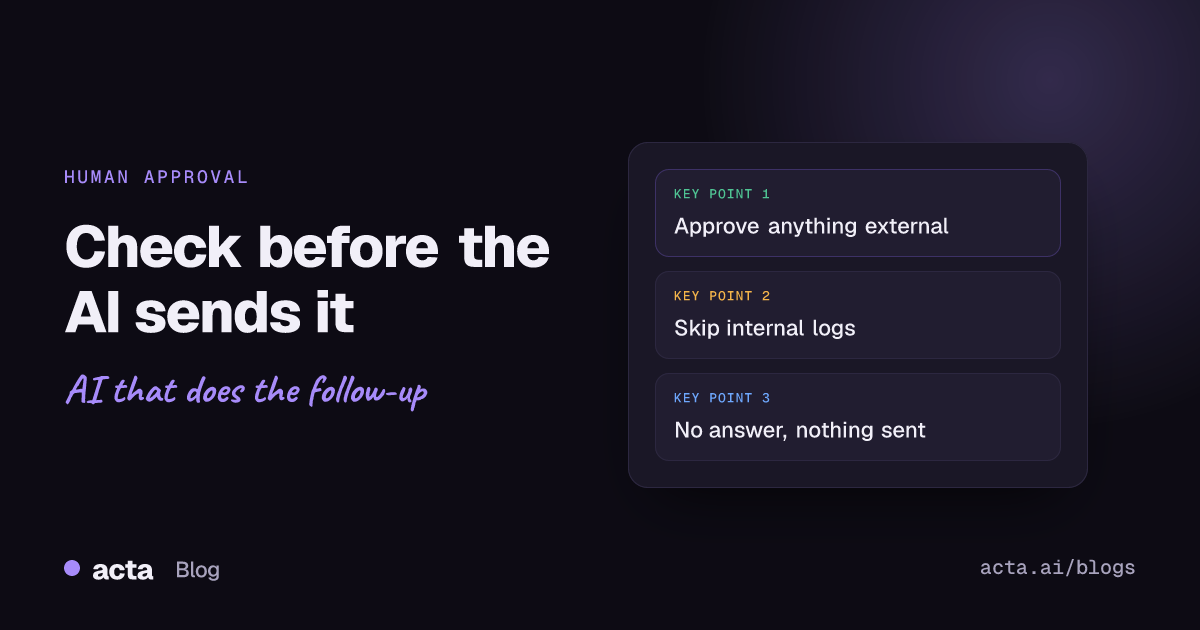
Quick answer: Human approval in automation means the workflow pauses before a risky step so a person can read, edit, and approve or reject what's about to happen. Use it for anything external, anything involving money and anything a customer will see. Skip it for internal logs and team recaps. In Acta, if nobody approves before the request expires, nothing is sent.
Here's an example (made up, but we see versions of it a lot). An AI follow-up after a renewal call told the customer "as discussed, we'll extend your trial by 30 days at no cost". Nobody had discussed that. The customer had asked about it, and the account manager had said she'd check. The model heard the question and wrote the answer it guessed the customer wanted.
It went out at 4:12 on a Friday. Fixing it took a week and an awkward call with finance.
A ten-second look from the account manager would have caught it. That's the whole argument for an approval step.
The point of human approval in automation is to put a person exactly where a mistake gets expensive, and nowhere else. Most steps in a meeting workflow are boring and safe. One or two aren't. The job is to find those one or two and put a checkpoint in front of them, which is what the rest of this post is about.
Why does human approval in automation matter?
AI steps are good at writing plausible text. Plausible isn't the same as correct. The failures I see most often fall into three buckets.
Wrong recipient
The automation grabs every attendee email from the calendar invite. That includes the customer's lawyer who joined for ten minutes, or the partner your rep forwarded the invite to. Now your internal pricing notes are in their inbox.
Made-up commitments
Like the trial extension above. Summaries compress conversations, and compression loses the difference between "we'll look into it" and "we'll do it". In a recap for your own team, that's a nuisance. In a customer email, it's a promise.
Wrong tone
The call was tense. The customer was upset about an outage. The AI writes "Great chatting today!" A human would never send that. An automation will, cheerfully, every time.
Security folks have a name for the broader problem. OWASP's entry on excessive agency describes AI systems that have more functionality, permissions or autonomy than they need. Putting a person in front of the risky actions cuts the autonomy part down to size. We cover the security side in more depth in why AI-generated output is untrusted input.
Which steps need an approval step, and which don't?
Approval everywhere sounds safe. It isn't. People start clicking "approve" without reading, and you're back where you started, only slower. So be picky.
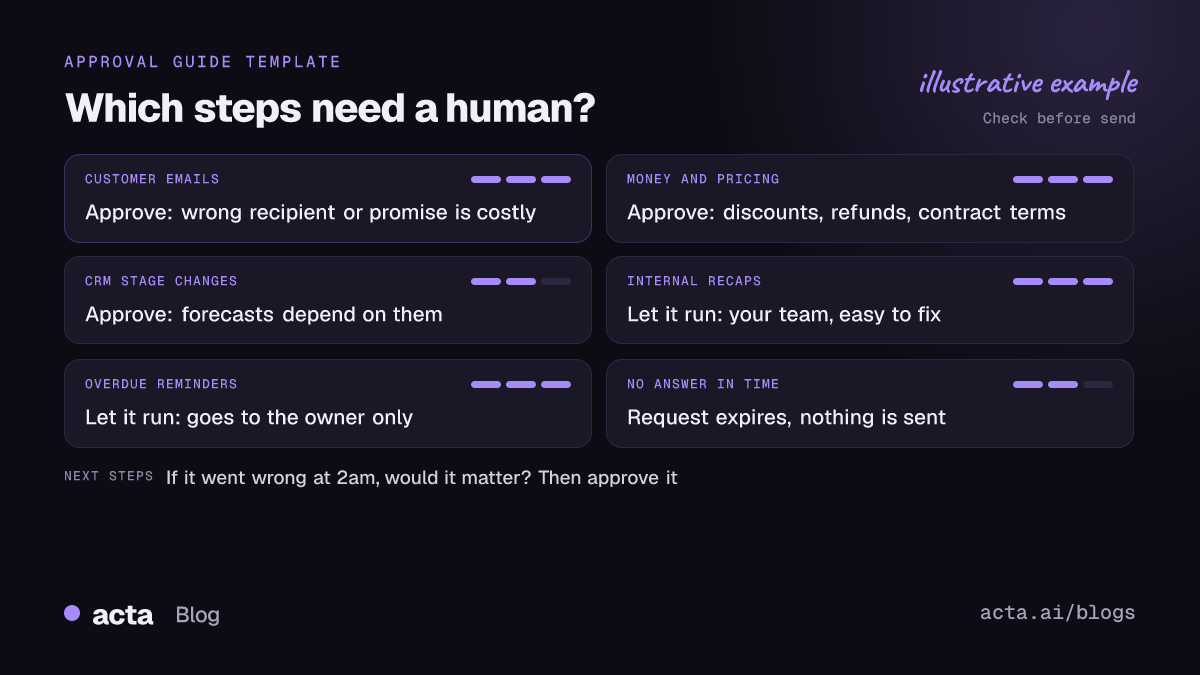
Put a human check before:
- Anything that leaves your company: customer emails, partner updates, replies on a support ticket.
- Anything involving money: discounts, refunds, pricing, contract terms.
- CRM updates a forecast depends on, like a deal note that changes the stage.
- Anything about a person's performance or a candidate's assessment.
- Anything that's hard to undo. You can delete a Slack message. You can't unsend an email.
Let these run on their own:
- Recaps posted to your own team's Slack channel.
- Rows added to an internal tracking sheet.
- Reminders to the owner of an overdue action item.
- Drafts that land somewhere a human has to send them anyway.
The test I use: if this went wrong at 2am and nobody noticed until Monday, would it matter? If yes, add approval.
How does the approval step work in Acta?
Acta Agent Builder (new) has a human approval step you can drop anywhere in an agent. Here's what happens when a run reaches it:
- The run pauses and the request shows up in the Approvals inbox.
- The approver sees exactly what's about to be sent, and can edit the text.
- They approve or reject. Approve, and the run carries on with the edited version. Reject, and it stops.
- Optionally, the approver gets an email with Approve and Reject buttons, so they don't need to open Acta for a quick yes.
- If nobody answers before the request expires (24 hours by default, up to 7 days), nothing is sent.
That last point matters more than it looks. Some tools treat silence as consent and send anyway. I think that's backwards. If the approver is on holiday, the right outcome is that the email doesn't go out, not that it goes out unchecked.
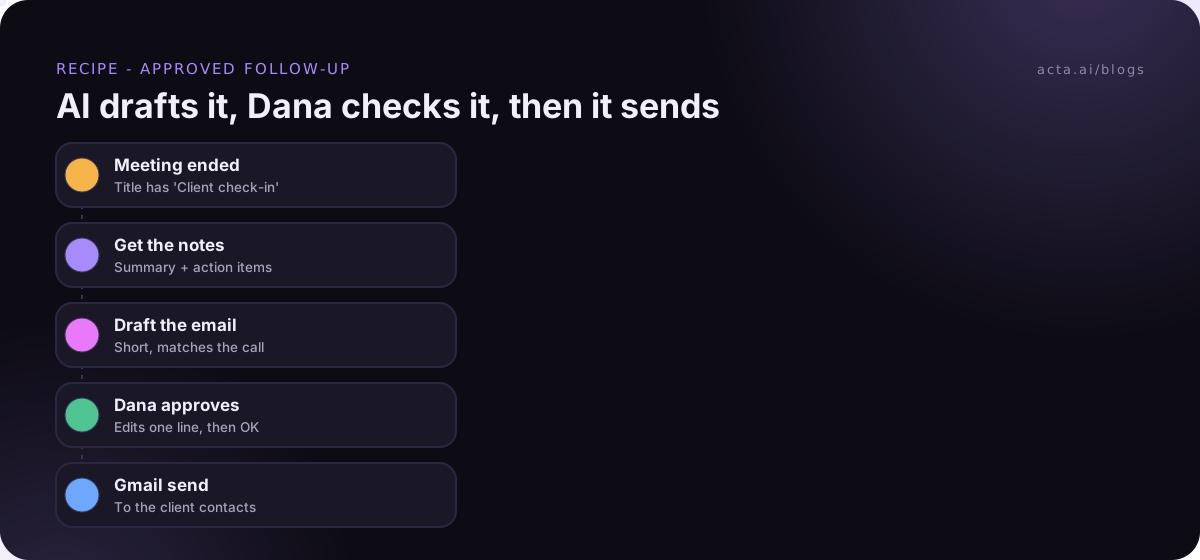
Example: your account manager, Dana, finishes a call titled "Client check-in". The agent pulls the summary and action items, drafts a follow-up, and pauses. Dana gets the email with Approve and Reject buttons, sees "we'll extend your trial", deletes it, writes "I'll confirm the trial question by Wednesday", and approves. Gmail sends her version. Total time: under a minute. For the full recipe, see how to automate meeting follow-up emails.
What approval workflow patterns actually work?
You don't have to choose between "approve everything" and "approve nothing". These three patterns cover most cases.
Approve every run
For high-stakes actions that change every time: customer follow-ups, CRM notes on big deals, support replies. The approval step sits right before the send. Simple, slow-ish, safe. Our post on updating the CRM after a sales call uses this one.
Approve at first, then let it run
For a new automation you don't trust yet. Keep the approval step on for the first couple of weeks. Read every output. When you've approved twenty in a row without editing a word, remove the step and turn the agent back on. Each turn-on saves a version, so if things go sideways you can restore the one with approval in it.
I like this pattern a lot. It's how you build trust in an automation instead of hoping for it.
Approve only the risky branch
For automations where most runs are harmless but some aren't. Add an If/else step, and only send the risky branch to a human.
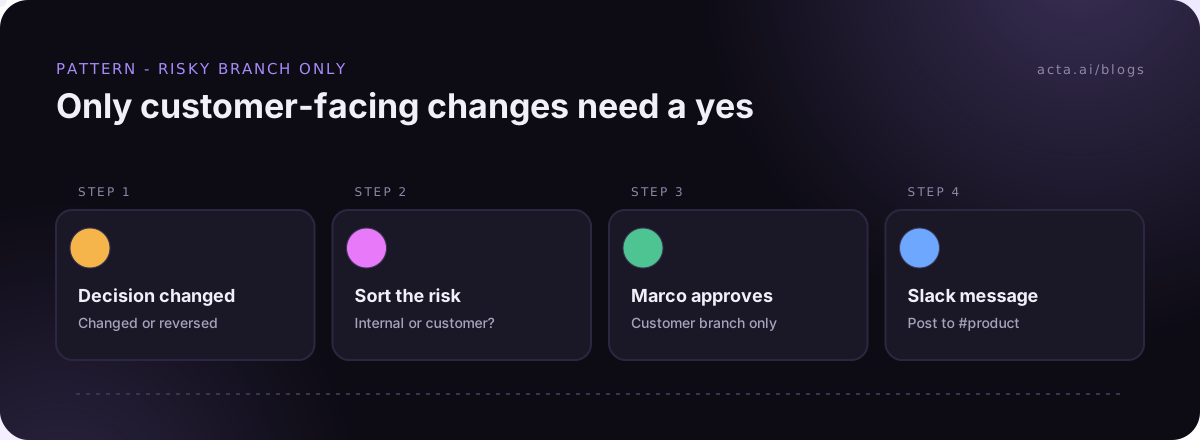
Example: an agent fires on "Decision changed or reversed". An AI step sorts it: internal only, or does it affect a customer? Internal changes go straight to #product as a Slack message. Customer-facing ones (a delayed launch, a changed price) go to an approval step first, so your head of CS, Marco, can decide how and whether to tell anyone.
How do you stop people rubber-stamping approvals?
This is the part most approval setups get wrong. If approvers see ten requests a day and nine are fine, they stop reading the tenth. The risk frameworks call this automation bias, and the NIST AI Risk Management Framework is a good starting point if you want to read about managing AI risk properly. My practical tips:
- Fewer, better requests. Use the risky-branch pattern so approvers only see what deserves a look.
- Route to the right person. The account manager approves her customer's email, not a shared ops inbox.
- Show the source. Put the meeting name and the relevant action items in the approval text, so the approver can check claims against what was said.
- Make editing easy. If fixing one sentence means rejecting and rewriting, people will approve the slightly wrong version. In Acta they edit in place.
- Watch the reject rate. Never rejected or edited? Either the automation is great and you can drop the step, or nobody's reading.
What should the approver actually check?
Give your approvers a short list. Mine is five questions:
- Is it going to the right people, and only them?
- Does it promise anything we didn't agree to?
- Are names, dates and numbers right?
- Does the tone match how the call actually went?
- Is there anything internal in there that the reader shouldn't see?
Thirty seconds, most of the time. That's the deal you're making: thirty seconds of a human in exchange for the automation doing the other ten minutes.
Can you check an automation before it ever sends anything?
Yes, and you should do this before you even think about approvals. In Acta Agent Builder, test runs show what would be sent without sending it. You can test a single step, send a test to your own Slack channel or email, and use "Check setup" to catch missing settings. The History view then shows what every step did on real runs. More in how to test an automation without sending anything.
For social posts, there's a different safety net: the "Drafts to copy" step writes LinkedIn, X, blog or newsletter drafts but never posts them. A human has to copy and publish, which for anything with your company's name on it is how I'd want it anyway.
You can see what else agents can do, approval included, on the Acta agents page. And if you're hunting for a first automation to put this on, our list of meeting automation ideas flags which ones need a check before send.
Frequently asked questions
What is human-in-the-loop automation?
It's an automation that pauses at set points for a person to review or approve before it continues. The person can usually edit what the automation produced.
What happens if nobody approves in time?
In Acta, the request expires (24 hours by default, up to 7 days) and nothing is sent. The run just stops.
Can I approve from my email?
Yes, if you turn it on. The approver gets an email with Approve and Reject buttons. To edit the text first, open the request in the Approvals inbox.
Does every AI automation need human approval?
No. Internal recaps, reminders and logs are usually fine on their own. Keep approval for things that go outside your team, involve money or are hard to undo.
Can I add approval only for some runs?
Yes. Put an If/else step before it, and send only the risky branch to the approval step.
See which plans include Acta Agent Builder on the pricing page, and try it free for 15 days.