Agents ask more of a model than chat does
A chat reply is one shot: if it is a bit off, you rephrase. An agent loops. It reads a goal, picks a tool, fills in arguments that must match a schema, reads the tool's output, and decides the next step, often five to fifteen times per task. Every loop resends the growing conversation, so context and tokens climb with each step.
That loop exposes weaknesses a chat test hides. A model that writes fine prose may still invent a tool name, put a string where an integer goes, or call the same search three times because it lost track of what it already found. Errors also compound. Simple arithmetic shows why: a model that gets each step right 95% of the time finishes a ten-step task cleanly about 60% of the time, and a 90% model about 35% of the time. Those are illustrative numbers, not measurements, but the shape holds: long chains punish small per-step error rates.
The practical lesson for local models for AI agents is to shorten the chain. Give the local model fewer, sharper tools, do deterministic work in code, and ask it for one decision at a time rather than a whole plan.
When people say "this local model can't do tools", one of three layers is usually at fault.
The model. It has to be trained to emit tool calls. Check the model card for tool or function calling support; community fine-tunes often lose it. Our guide on reading a Hugging Face model card shows where to look.
The chat template. Tools are injected into the prompt in a model-specific format, and the model's reply must be parsed back out. If the template is wrong, a capable model gets garbage and returns garbage.
The server. Each local runner handles this differently, as of November 2026:
- Ollama tool calling: you pass a tools list to the chat API and the model replies with tool calls, for models that support them. Ollama has supported streaming with tool calls since May 2025; its docs say to collect the streamed tool calls, run the tools, and send results back in the next request.
- llama.cpp: the function-calling docs say to start llama-server with --jinja to enable OpenAI-style tools. Some models need a --chat-template-file override, and you can check whether a tool-aware template loaded by looking at the server's /props endpoint. The same doc warns that extreme KV cache quantization (for example -ctk q4_0) can substantially degrade tool calling.
- vLLM: the tool calling docs require --enable-auto-tool-choice together with a --tool-call-parser that matches the model family, such as hermes or llama3_json.
These are the commands as the official docs show them:
llama-server --jinja -m your-model.gguf
vllm serve meta-llama/Llama-3.1-8B-Instruct --enable-auto-tool-choice --tool-call-parser llama3_json
The vLLM docs' Llama 3.1 example also passes a chat template from vLLM's examples folder; copy the full command from the page for your version. And note the llama.cpp warning about KV quantization: people often squeeze memory with aggressive cache settings, then blame the model for bad tool calls. If you are short on memory, drop to a smaller model or a gentler weight quantization first (our GGUF quantization guide covers the trade-offs).
Context length is the quiet failure for local agents
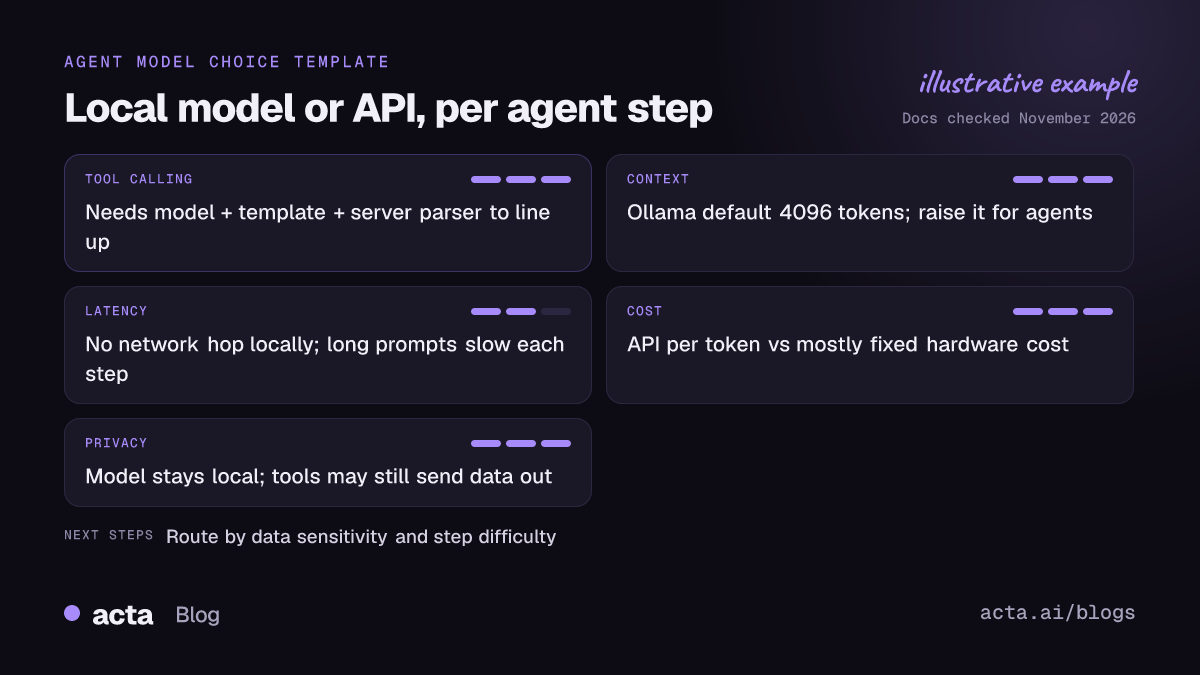
Ollama's FAQ says it uses a 4096-token context window by default, overridable with the OLLAMA_CONTEXT_LENGTH environment variable or num_ctx per model or request. An agent's system prompt plus five tool definitions plus one web page of tool output can pass 4,096 tokens before the second step. When the conversation is longer than the window, the model cannot see the earliest content, which is often the original goal. The agent then drifts or repeats itself, and nothing errors.
Set the window deliberately when you start the server:
OLLAMA_CONTEXT_LENGTH=8192 ollama serve
Bigger is not free. The KV cache grows with context length, so a 32K window on the same model needs noticeably more memory than 4K, and prompt processing gets slower as the window fills. The arithmetic for weights is parameters times bits per weight divided by eight (an 8B model at 4 bits is roughly 4 GB before cache and overhead); see LLM model size explained for the rest.
Agent design helps more than raw window size. Summarize tool outputs before they go back into the conversation, keep only the last few steps verbatim, and store long documents outside the prompt so the agent retrieves only the part it needs.
Latency and cost flip with volume
Latency for an agent is the sum of every step, so per-step speed matters more than in chat. A local model avoids network round trips and rate limits, and a small model on a decent GPU can answer simple routing or extraction steps quickly. But a large local model on modest hardware can be slow to process long prompts, and agents send long prompts on every step. Measure time per full task, not tokens per second on a short prompt.
Cost has a different shape on each side. An API bills per token, and agents resend context each step, so costs scale with steps times context. Provider prompt caching can cut that bill; our sibling piece on prompt caching across OpenAI, Anthropic and Gemini explains how. Local costs are hardware, power and the time someone spends keeping the server healthy, mostly fixed whether you run ten tasks or ten thousand.
So the local llm vs api for agents decision on cost depends on volume and utilization. A GPU that sits idle most of the day is expensive per task; one that runs a steady queue of extraction jobs can be cheap. Do the sums with your own token counts and your provider's current price page, not someone else's chart.
Privacy is the strongest reason to run local
The clearest case for local models is data that should not leave your network: customer records, contracts, health notes, source code under strict terms. A model on your own machine means prompts and outputs never reach a third-party API.
Two caveats. First, the agent's tools may still call outside services, so data can leave through a web search or a SaaS API even when the model is local. Map every tool's destination. Second, local does not mean safe: prompt injection through a document or web page works the same on a local model, and a local agent with write access can still do damage. We cover the options in private AI agents: 9 ways to run them.
Self-hosting breaks down in five predictable places
- Long multi-step plans: open-ended tasks with many tools and no fixed path are where hosted frontier models usually hold up better in practice. Keep these on an API or break them into fixed steps.
- Concurrency: Ollama and llama.cpp are built for one machine. Serving a team needs an engine like vLLM, GPUs sized for peak load, and monitoring. See vLLM vs SGLang vs TGI and which local runner fits.
- Template and parser drift: a new model release may need a new parser or template before tool calls work. Pin versions and test before you upgrade.
- Large contexts: memory for a long KV cache adds up fast, and long prompts slow every step.
- Operations: someone owns updates, restarts, GPU drivers and capacity. If nobody does, the agent goes down quietly.

Hybrid LLM routing gives you most of both
Hybrid llm routing means each agent step goes to the model that fits it. The simplest setup uses one client library for both sides. Ollama's OpenAI compatibility docs list a local endpoint at http://localhost:11434/v1 whose chat completions support tools and tool_choice; llama.cpp and vLLM expose OpenAI-style endpoints too. Point the same code at a different base URL and model name, and you have switched.
Route on rules you can explain:
| Agent step | Default route | Why |
|---|
| Classify or route a request | Local | Short prompt, one decision, high volume |
| Extract fields from private documents | Local | Data stays in-house; output is checkable |
| Summarize one document | Local if it fits the window | Bounded task; falls back when too long |
| Plan a multi-tool task | API | Long chains punish small error rates |
| Write the customer-facing reply | API, with approval | Quality and tone matter most here |
A gateway can enforce the rules. LiteLLM's fallback docs describe general fallbacks plus context_window_fallbacks that move a request to a bigger-context model when the first one overflows; its docs note that enable_pre_call_checks must be on for that context check to happen before the call. Never let a privacy rule be a fallback casualty: if a step is marked local-only, an outage should fail the step, not quietly send it to an API.
Public leaderboards help you shortlist. The Berkeley Function Calling Leaderboard from UC Berkeley tests tool calling, with multi-turn tasks added in v3 and agentic evaluation in v4. Use it to pick two or three candidates, then test on your own tools, because your schemas, your data and your prompts are what the agent will see.
- Collect 30 to 50 real tasks from logs or by hand, each with the tool calls a good run makes.
- Run every candidate, local and API, with the same tools, template and settings you will use in production.
- Score tool choice, argument validity against the schema, whether the task finished, and steps taken.
- Read ten failures by hand. A wrong tool name and a slightly off argument need different fixes.
- Re-run after every model, template or server upgrade.
For tooling to automate this, see LLM evaluation tools compared, and for the framework side, LangGraph vs CrewAI vs OpenAI Agents SDK.
If the agent's raw material is meetings, Acta is a hosted service rather than a local one, so be clear about that trade-off. It does not use customer data to train AI models, and its MCP connector lets an assistant read your transcripts, decisions and action items without you building ingestion.
Frequently asked questions
What is the best local model for tool calling?
There is no single best local model for tool calling; results depend on your tools, template and server. Shortlist two or three models whose cards say they were trained for tool use, check the Berkeley Function Calling Leaderboard, then run your own 30-task test with the exact server settings you will deploy.
Can Ollama do tool calling for agents?
Yes. As of November 2026, Ollama tool calling works through its chat API and its OpenAI-compatible endpoint at localhost:11434/v1, for models that support tools, and streaming with tool calls is supported. Raise the context window above the 4096-token default before running agents, or long tool outputs will push the goal out of view.
How much context does a local agent need?
Add up the system prompt, tool definitions, the longest tool output you expect and a few steps of history. For most agents with real tool outputs, the total lands well above Ollama's 4096-token default. Larger windows cost memory and speed, so summarize tool outputs and trim old steps instead of maxing the window.
Is a local LLM vs API cheaper for agents?
It depends on volume and utilization. APIs bill per token, and agents resend context each step, so heavy agent use gets expensive. Local hardware is a mostly fixed cost that pays off only when it stays busy. Compare cost per finished task with your own numbers and the provider's current price page.
Are local agents private by default?
The model is, but the agent may not be. Prompts stay on your machine, yet tools such as web search, CRMs or email still send data outside. Map every tool's destination, log tool calls, and apply the same prompt-injection defences you would use with a hosted model.
Decide what runs local, step by step
Treat the agent as a set of steps, not one model choice, and decide per step.
- List the steps: write down each decision the agent makes and each tool it calls.
- Tag sensitive data: mark steps that touch data which must not leave your network as local-only.
- Size the context: measure the largest prompt per step and set the server window to fit.
- Test on your tools: run 30+ real tasks per candidate and read the failures.
- Route with a fallback policy: one client, explicit rules, and no silent fallback for local-only steps.
If meeting transcripts feed your agent, the Acta desktop app captures calls on Windows and Mac without a bot joining (read the consent basics for recording first), and you can try it with a 15-day free trial.