LoRA vs QLoRA comes down to one question: does the base model fit on your GPU in 16-bit? If it does, train a LoRA adapter on the full-precision model. If it doesn't, QLoRA loads the frozen base in 4-bit and trains the same kind of adapter, so a model that needed several GPUs fits on one. Full fine-tuning, which updates every weight, is for teams with large datasets and multi-GPU budgets. Often the right answer is no fine-tuning at all.
This is the decision guide, not the tutorial. It covers what each method actually trains, the memory arithmetic you can do on a napkin, what the papers say about quality, and the cases where prompting or retrieval beats any kind of training. If you already know you need an adapter and want working code end to end, skip to the config section and then to your framework's docs. If your problem is "the model doesn't know our documents", read the section on when not to fine-tune first.
Key takeaways
- Memory rule of thumb (arithmetic, before activations): full fine-tuning with mixed-precision AdamW needs about 18 bytes per parameter, LoRA about 2 bytes per parameter for the frozen bf16 base, QLoRA about 0.5 bytes per parameter for the 4-bit base.
- For an 8B model that is roughly 144 GB, 16 GB and 4 GB of weights and optimizer state, which is why QLoRA fits a 24 GB card and full fine-tuning does not.
- The QLoRA paper reports matching 16-bit full fine-tuning and 16-bit LoRA on its benchmarks; later work shows LoRA can trail full fine-tuning on code and maths unless rank, target layers and learning rate are set well.
- Apply adapters to all linear layers, not only attention, and tune the learning rate before you blame the rank.
- Try prompting and retrieval first. Fine-tune for format, tone and narrow skills, not for facts that change every week.
Table of contents
- LoRA, QLoRA and full fine-tuning train different things
- The memory math settles most LoRA vs QLoRA decisions
- Quality gaps are smaller than the memory gaps
- The difference between LoRA and QLoRA in daily work
- Full fine-tuning earns its cost in a few cases
- When not to fine-tune at all
- A QLoRA config you can copy
- Frequently asked questions
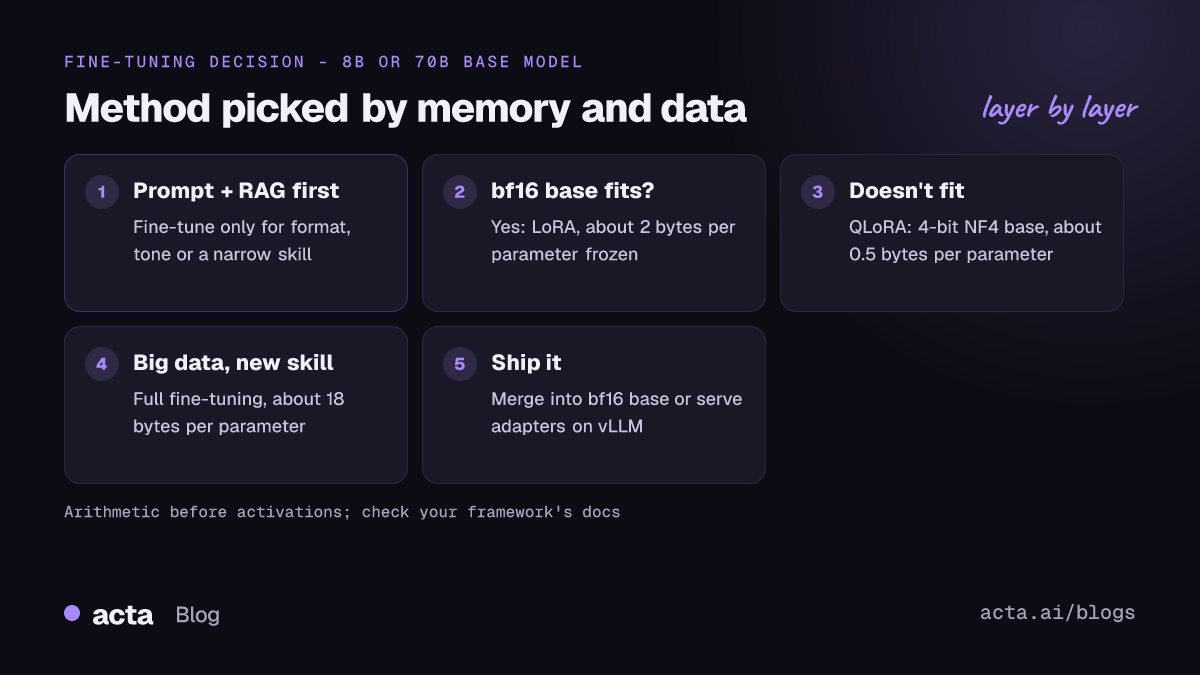
- Choose your fine-tuning method in five checks
LoRA, QLoRA and full fine-tuning train different things
Full fine-tuning updates every weight in the model. You need the weights, a gradient for every weight and the optimizer's state for every weight in memory at once. The result is a complete new checkpoint the same size as the original.
LoRA (Low-Rank Adaptation) freezes the original weights and adds two small matrices next to selected layers. Their product is a low-rank update to the frozen weight, and only those small matrices are trained. The original LoRA paper from Microsoft reported that on GPT-3 this cut trainable parameters by about 10,000 times and GPU memory needs by about three times compared with full fine-tuning, with no added inference latency once the update is merged. The output is an adapter file, usually tens to hundreds of megabytes, that sits on top of the unchanged base model.
QLoRA is LoRA on top of a quantized base. The QLoRA paper (Dettmers et al., 2023) freezes the base model in 4-bit and backpropagates through it into LoRA adapters. It added three pieces: the 4-bit NormalFloat (NF4) data type, double quantization (quantizing the quantization constants to save more memory) and paged optimizers to absorb memory spikes. Its headline claim was fine-tuning a 65B model on a single 48 GB GPU while keeping 16-bit fine-tuning task performance.
So the comparison is less "three methods" than two axes. Do you train all weights or an adapter? If an adapter, is the frozen base held in 16-bit or 4-bit? Keep those two questions separate and most of the confusion goes away.
The memory math settles most LoRA vs QLoRA decisions
You can estimate memory before you rent a GPU. The Hugging Face Transformers guide to model memory anatomy puts mixed-precision training with AdamW at about 18 bytes per parameter: 6 for the weights (a half-precision copy plus an fp32 master copy), 4 for fp32 gradients and 8 for Adam's two optimizer states. Activations come on top and grow with batch size and sequence length.
For adapters the base weights are frozen, so they need no gradients and no optimizer state. In bf16 that is 2 bytes per parameter. In 4-bit it is about half a byte, plus a little for quantization constants. The adapter itself is small. A LoRA update to a 4096 x 4096 weight with rank 16 adds 16 x (4096 + 4096) = 131,072 trainable parameters, against 16.8 million in the frozen weight: under 1%. Even with full optimizer state, the adapter's share is a rounding error next to the base.
| Method | What sits in GPU memory | 8B model (arithmetic) | 70B model (arithmetic) |
|---|---|---|---|
| Full fine-tuning | Weights + gradients + Adam states, ~18 bytes/param | ~144 GB | ~1,260 GB |
| LoRA | Frozen bf16 base, ~2 bytes/param, + small adapter | ~16 GB | ~140 GB |
| QLoRA | Frozen 4-bit base, ~0.5 bytes/param, + small adapter | ~4 GB | ~35 GB |
These are napkin numbers, labelled as arithmetic, not measurements. Add activation memory, the CUDA context and framework overhead, which together can be several gigabytes and grow fast with long sequences. Gradient checkpointing trades compute for activation memory and is worth switching on for any adapter run near the limit.
Read the table as a fit test. An 8B model with LoRA needs 16 GB before activations, so a 24 GB card is tight but workable with short sequences, while QLoRA leaves plenty of room. A 70B model with LoRA needs multiple 80 GB GPUs; with QLoRA it fits one 48 GB card, which matches the QLoRA paper's 65B claim. Full fine-tuning of either is a cluster job. If you want the background on 4-bit formats, the GGUF quantization explainer covers the inference side, which uses different formats from the bitsandbytes NF4 used in training.
Quality gaps are smaller than the memory gaps
The QLoRA authors reported that 4-bit QLoRA matched both 16-bit LoRA and 16-bit full fine-tuning on the benchmarks in their paper. That is a strong result, but it is one paper, with instruction-tuning tasks and its own hyperparameters. Treat it as "QLoRA doesn't automatically cost you quality", not as a guarantee for your task.
The more useful counterweight is LoRA Learns Less and Forgets Less (Biderman et al., 2024). On code and maths, the authors found LoRA trailed full fine-tuning under common low-rank settings, and full fine-tuning learned weight updates with a rank 10 to 100 times higher than typical LoRA configs. The flip side is in the title: LoRA kept more of the base model's performance on tasks outside the target domain. They also found LoRA especially sensitive to learning rate, and that the choice of target modules mattered more than rank.
Thinking Machines' LoRA Without Regret (September 2025) argues LoRA can match full fine-tuning in most post-training settings if you get a few details right: apply it to all layers, especially the MLP layers rather than only attention; give it enough rank for the dataset size; and use a higher learning rate than you would for full fine-tuning. When the dataset is larger than the adapter can absorb, LoRA falls behind.
My reading of the three: for instruction tuning, tone, output format and narrow classification-style tasks with thousands to tens of thousands of examples, a well-configured LoRA or QLoRA run gets you where you need to go. For teaching a model a large new skill from a big dataset, expect full fine-tuning to pull ahead. Whatever you pick, measure on a held-out set you wrote before training, not on vibes.
The difference between LoRA and QLoRA in daily work
Memory is the headline, but a few practical points decide the lora vs qlora question once both fit.
Step speed
QLoRA stores weights in 4-bit and dequantizes them to the compute dtype (bf16 in the usual config) for each forward and backward pass. That extra work means a QLoRA step is usually slower than the same LoRA step on a GPU that can hold the bf16 model. If LoRA fits, it is the simpler and quicker loop. If it doesn't, QLoRA's slower steps beat not training at all.
Merging and serving
To merge a LoRA adapter into the base for deployment, PEFT's merge_and_unload() folds the adapter weights in and returns a standalone model. With QLoRA, the adapter was trained against a 4-bit base, but you usually want to ship a 16-bit or separately quantized model. The common pattern is to load the base in bf16, attach the adapter, merge, then quantize the merged model for inference. Check outputs after the merge; small numeric differences between the 4-bit training base and the 16-bit merge base are expected.
You don't have to merge. vLLM's LoRA docs describe serving several adapters on one base model: start the server with --enable-lora and --lora-modules, and clients pick an adapter by putting its name in the request's model field. For a team with three or four narrow adapters on one base, that beats running three or four merged copies. The local runner comparison covers where vLLM fits against desktop tools.
Hardware support
The 4-bit path depends on bitsandbytes, so check its docs and PEFT's for your exact GPU platform before planning a QLoRA run. Plain LoRA in bf16 has fewer dependencies and runs wherever PyTorch training does.

Full fine-tuning earns its cost in a few cases
Most "lora vs full fine-tuning" debates end in LoRA for practical reasons. Full fine-tuning still wins in a few situations, and it's worth knowing which ones.
- Large datasets that teach a new skill. Continued pre-training on a new language or a big code corpus is where the research above shows the clearest gap.
- Small models. Full fine-tuning a 1B to 3B model costs a fraction of a 70B LoRA run. If a small model is good enough after training, full fine-tuning it can be the cheapest good result.
- You are building a base for others. Labs releasing instruction-tuned checkpoints usually train all weights.
- LoRA has plateaued after tuning. If you have swept learning rate, raised rank and targeted all linear layers, and the held-out score still sits well below target, the adapter may lack capacity.
The costs are real. Each run produces a full checkpoint, so ten experiments on a 70B model is ten 140 GB files in bf16. You need multi-GPU sharding (FSDP or DeepSpeed ZeRO) for anything large; the guide to scaling training with Accelerate covers that setup. And full fine-tuning forgets more of what the base model knew, which shows up as worse general behaviour outside your task.
When not to fine-tune at all
Most teams that ask about LoRA vs QLoRA would be better served by neither. Fine-tuning changes behaviour: format, tone, the shape of the output, a narrow skill. It is a poor way to add facts, and a bad way to add facts that change.
Work through these before you build a training set:
- Write a better prompt with examples. Five good examples in the prompt often get you most of the formatting win.
- Add retrieval if the problem is knowledge. If the model needs your policies, tickets or meeting history, retrieval keeps answers current and citable. The RAG vs fine-tuning vs prompting comparison works through this decision for one concrete use case, and the RAG architecture guide shows the build.
- Try a bigger or newer model. A stronger base with a good prompt often beats a fine-tuned smaller one, and costs no training.
- Fine-tune only when the above stalls and you have at least a few hundred clean, representative examples plus a held-out test set.
A concrete case: a team wants summaries of its sales calls in a fixed layout. That is a format problem with a knowledge component (who said what). A prompt with the template plus the transcript usually gets there; fine-tuning only helps if the layout is unusual and the prompt keeps drifting. If the source data is meeting transcripts anyway, an off-the-shelf meeting assistant may make the whole project unnecessary. Acta, for instance, produces summaries, decisions and action items from Zoom, Meet and Teams calls, including bot-free capture through its desktop app, and it does not use customer data to train AI models. Whether that fits depends on how custom your output really needs to be.
A QLoRA config you can copy
The PEFT quantization guide recommends NF4 for 4-bit training, double quantization, a bf16 compute dtype and targeting all linear layers. This is the shape of that setup with Transformers and PEFT; check argument names against the versions you install, as of November 2026.
from transformers import AutoModelForCausalLM, BitsAndBytesConfig
from peft import LoraConfig, get_peft_model, prepare_model_for_kbit_training
import torch
bnb = BitsAndBytesConfig(load_in_4bit=True, bnb_4bit_quant_type="nf4", bnb_4bit_use_double_quant=True, bnb_4bit_compute_dtype=torch.bfloat16)
model = AutoModelForCausalLM.from_pretrained(BASE_MODEL, quantization_config=bnb)
model = prepare_model_for_kbit_training(model)
config = LoraConfig(r=16, lora_alpha=32, lora_dropout=0.05, target_modules="all-linear", task_type="CAUSAL_LM")
model = get_peft_model(model, config)
For plain LoRA, drop the quantization config and prepare_model_for_kbit_training, and load the model with torch_dtype=torch.bfloat16. Everything else stays the same, which is the point: switching between LoRA and QLoRA is a loading decision, not a rewrite.
Starting values that are reasonable, not magic: rank 16, alpha 32, all linear layers, a learning rate higher than you would use for full fine-tuning, and a short sweep over learning rate before touching rank. Log evaluation loss on a held-out split every few hundred steps. For a full walk-through of loading, training and saving, our earlier hands-on guide covers PEFT with bitsandbytes on one GPU; for checking the result before you ship it, see evaluating and shipping models with Lighteval and safetensors and the comparison of LLM evaluation tools.
Frequently asked questions
Is QLoRA worse than LoRA?
Not by default. The QLoRA paper reported matching 16-bit LoRA and full fine-tuning on its benchmarks. In practice QLoRA steps are slower because weights are dequantized on the fly, and results can differ slightly by task. If the bf16 model fits on your GPU, use LoRA for speed and simplicity; if it doesn't, QLoRA is the sensible choice rather than a compromise.
What are the QLoRA memory requirements for an 8B or 70B model?
As arithmetic, the 4-bit base needs about half a byte per parameter: roughly 4 GB for 8B and 35 GB for 70B, before activations, adapter state and framework overhead. By that arithmetic an 8B QLoRA run should fit a 16 to 24 GB card with modest sequence lengths, and the QLoRA paper fit a 65B model on one 48 GB GPU.
How do I merge a LoRA adapter into the base model?
To merge LoRA adapter weights, load the base model in 16-bit, attach the adapter with PEFT, call merge_and_unload() and save the returned model. For a QLoRA adapter, merge into a bf16 copy of the base rather than the 4-bit one, then quantize the merged model for inference. Test outputs after merging, or serve the adapter unmerged with vLLM instead.
What rank should I use for LoRA?
Start at 8 to 16 for format, tone and narrow tasks, applied to all linear layers. Research from Biderman et al. found target modules and learning rate mattered more than rank, so sweep learning rate first. Raise rank when you have a large dataset and the held-out score plateaus, since an adapter that is too small for the data underfits.
Should I fine-tune or use RAG for company knowledge?
Use retrieval for knowledge, especially knowledge that changes, and fine-tuning for behaviour such as output format, tone or a narrow skill. Retrieval keeps answers current and lets you cite the source document. Many production systems combine both: a lightly tuned model for format, fed by retrieval for facts.
Choose your fine-tuning method in five checks
Run through these in order before you book GPU time. Each one either settles the decision or moves you to the next.
- Rule out training: try a stronger prompt with examples and, for knowledge gaps, retrieval. Fine-tune only if those stall.
- Do the memory arithmetic: parameters x 2 bytes for LoRA, x 0.5 for QLoRA, x 18 for full fine-tuning, then add headroom for activations.
- Pick the cheapest method that fits: LoRA if the bf16 base fits, QLoRA if it doesn't, full fine-tuning only with a large dataset, a small model or a proven LoRA plateau.
- Configure for quality: all linear layers, a learning-rate sweep, and a held-out test set written before training.
- Plan deployment early: decide between merging and serving adapters on one base, and test outputs after whichever you choose.
And if the data you were about to train on is your team's meetings, it may be quicker to try the Acta desktop app or the Chrome extension on a few calls first.