Each framework starts from a different mental model
LangGraph's repo calls it a low-level orchestration framework for long-running, stateful agents. You define a state object, add nodes (functions or model calls), and connect them with edges, including conditional ones. Nothing happens that you did not wire. That is the whole appeal and the whole cost: you write more code up front, and you can read exactly what the agent is allowed to do next. LangChain also ships Deep Agents, a higher-level package built on LangGraph, if you want batteries included.
CrewAI describes itself as a lean Python framework built from scratch, independent of LangChain. Its docs split the world into two pieces. A Flow is a structured, event-driven workflow that manages state and decides what runs next. A Crew is a team of autonomous agents, each with its own role and goal, that collaborates on a task the Flow hands it. The docs are blunt about production: start with a Flow, and use a Crew inside a Flow step when you need autonomy for a specific, complex task.
The OpenAI Agents SDK sells itself on having very few abstractions. You get an Agent (instructions, model, tools), a Runner that loops until the agent produces a final answer, handoffs to pass control to another agent, guardrails that check input and output, sessions for conversation history, and built-in tracing. OpenAI calls it the production-ready upgrade of its earlier Swarm experiment, and it ships for Python and TypeScript.
Put simply: in LangGraph you write the loop; in the Agents SDK the Runner is the loop; in CrewAI the Flow is the loop and the Crew is a sub-loop you mostly configure.
State and durability separate LangGraph from the rest
LangGraph's documentation lists durable execution, persistence, streaming and human-in-the-loop as its core features. In practice you compile the graph with a checkpointer and pass a thread ID on each run. The framework then saves state after each step, so a process restart picks up where it stopped instead of re-running the expensive part. The docs tell you to wrap side effects and non-deterministic calls in tasks, so a resumed run does not send the same email twice.
LangGraph separates two kinds of memory. Checkpointers hold a thread's state for conversation continuity, approvals, time travel and fault tolerance. Stores hold facts that must outlive one thread, such as a user's preferences. Time travel lets you fork from an earlier checkpoint to replay a different branch.
CrewAI's Flows hold structured state and route between steps, and its memory system has been rebuilt: current docs describe a single Memory class with remember, recall and forget, enabled on a crew with memory=True and stored in LanceDB under ./.crewai/memory by default. Older tutorials talk about separate short-term, long-term and entity memory, so check which version a guide was written for before copying it. For a deeper look at the options, see our sibling piece on how AI agents remember across sessions.
The OpenAI Agents SDK handles state at two levels. Sessions keep conversation history across runs automatically, with SQLite, Redis and MongoDB options in the docs and room for your own class. Within a run, a paused state can be serialized and resumed later, even in another process. What the SDK does not give you is a step-by-step workflow checkpoint of a multi-stage pipeline; if you need that, you build it or put the SDK inside something that has it.
Rule of thumb: if losing a half-finished run would cost money or trust (a refund flow, a CRM update), weight LangGraph's persistence heavily. If a failed run can simply restart, the other two are fine.

Multi-agent designs differ more than the demos suggest
CrewAI's multi-agent model is the most opinionated. Per the CrewAI processes docs, a Crew runs a sequential process by default, where each task's output feeds the next as context. Switch to hierarchical and a manager agent assigns tasks based on agent capabilities, reviews outputs and checks completion; the docs require you to set either manager_llm or manager_agent. Hierarchical adds a planning model, so more calls and more ways to wander; use it only when task order cannot be fixed in advance.
The OpenAI Agents SDK offers two patterns. With a handoff, the receiving agent gets the conversation history and takes over, which suits triage: a front-desk agent passes a billing question to a billing agent. With agents as tools, a manager agent calls specialists like functions and keeps control of the final answer. The docs compare these directly. My view: start with agents-as-tools, because one agent stays accountable for the reply and your traces stay readable.
LangGraph has no built-in notion of "roles". Multi-agent setups are just graphs: subgraphs for each specialist, routing edges between them, and Command objects to jump between graphs. LangChain's own migration guide now recommends a subagents pattern, where a subagent is wrapped as a tool, in place of the older langgraph-supervisor package. You control who talks to whom, at the cost of writing that wiring.
A practical warning that applies to all three: most "multi-agent" demos would work better as one agent with five good tools. Split into separate agents when the instructions conflict (a strict compliance reviewer and a friendly drafter) or when permissions must differ, not because the org chart has three boxes.
Human approval works best when the run can pause and resume
Agents that send emails or update CRMs need a human checkpoint. The question is whether the framework can stop mid-run, wait for hours, and continue without holding a process open.
LangGraph does this with the interrupt function inside a node. Execution pauses, state goes to the checkpointer, and you resume later with a Command carrying the reviewer's answer, optionally with edited state. One caveat from the docs: code in the node before the interrupt runs again on resume, so keep side effects after the approval or inside tasks.
The OpenAI Agents SDK marks tools with needs_approval, either a boolean or a function that decides per call. When a call needs approval, the run returns interruptions; you capture the state with to_state(), call approve or reject on each pending item, and run again with that state. The state serializes to a string or JSON, so a web app can store it and resume after a manager clicks Approve. The TypeScript guide recommends keeping those snapshots on the server, not in the browser.
CrewAI's docs include a guide on human feedback in Flows. For long waits, design the Flow so the approval is its own step with persisted state, rather than blocking inside a crew task.
Whichever framework you use, write approvals as a policy, not a prompt. "Ask before sending anything to a customer" belongs in code that gates the send tool. We cover patterns for this in human approval in automation, and the security side, what happens when a chatbot can take action, in AI agents and MCP security.
Observability decides where your traces live
Most agent bugs show up in traces: the model picked the wrong tool on turn four, or ignored a tool error.
The OpenAI Agents SDK traces by default in Python, recording model calls, tool calls, handoffs and guardrails as spans, and uploads them to the OpenAI Traces dashboard. You can switch it off with the environment variable OPENAI_AGENTS_DISABLE_TRACING=1, with set_tracing_disabled(True), or per run in RunConfig, and you can add your own trace processor. The TypeScript guide notes tracing is unavailable for organizations under OpenAI's Zero Data Retention policy. Settle this with your security team before the pilot.
LangGraph pairs with LangSmith: set LANGSMITH_TRACING=true and an API key, and runs show up as nested traces. The docs also describe an OpenTelemetry route and selective tracing for individual calls. Setting LANGSMITH_TRACING=false keeps data on your server. LangSmith is a hosted LangChain product; check its pricing page, because plans change.
CrewAI documents integrations with Langfuse, Arize Phoenix, MLflow, Langtrace and others, mostly via OpenTelemetry instrumentation, plus its own tracing through the CrewAI AMP platform after crewai login.
Tracing is half the job; you also need replayable test cases (see LLM evaluation tools compared).
Model choice and lock-in matter less than they look
The common complaint about the OpenAI Agents SDK is lock-in. The official repo and PyPI page say it works with the OpenAI Responses and Chat Completions APIs and with 100+ other LLMs, so you can point it at other providers. The catch is features: hosted tools such as HostedMCPTool run inside OpenAI's Responses API, and default tracing goes to OpenAI. For MCP servers you host yourself, MCPServerStdio and the HTTP variants run tool calls locally, support approvals, and work in a VPC.
CrewAI uses native SDK integrations for major providers and LiteLLM as a fallback for the rest, installed as an extra. Its docs show a local Ollama model as an option. A newer CrewAI guide on running without LiteLLM recommends native integrations or the OpenAI-compatible route for local servers.
LangGraph does not care which model a node calls. You can use LangChain's model wrappers or call any SDK directly inside a node. That makes it the easiest of the three for mixing a local model for routing with a frontier API for hard reasoning, a setup we discuss in local models for AI agents.
On licences, the LangGraph repo lists MIT. Check each project's licence file before you commit; for these three, licence is unlikely to be the deciding factor. The real lock-in is your orchestration code. Keep tool functions, prompts and evaluation sets outside framework-specific classes, and a migration becomes a rewrite of the wiring, not of the product.
AutoGen is in maintenance mode, and AG2 is a separate project
If you searched "autogen maintenance mode", here is the status as of November 2026. Microsoft's AutoGen repository says the project is in maintenance mode: contributions are limited to bug fixes, security patches and documentation, and Microsoft is not providing new features or support. The README tells new users to start with Microsoft Agent Framework, which it calls the enterprise-ready successor to AutoGen.
AG2 is a different thing. It describes itself as "formerly AutoGen", is run by its own community at ag2ai, and its v1.0 release moved to a new protocol-driven framework, with the classic ConversableAgent and GroupChat API living on in a separate ag2-classic repository in maintenance mode. If you have old AutoGen code, pin it and plan a move rather than extend it.
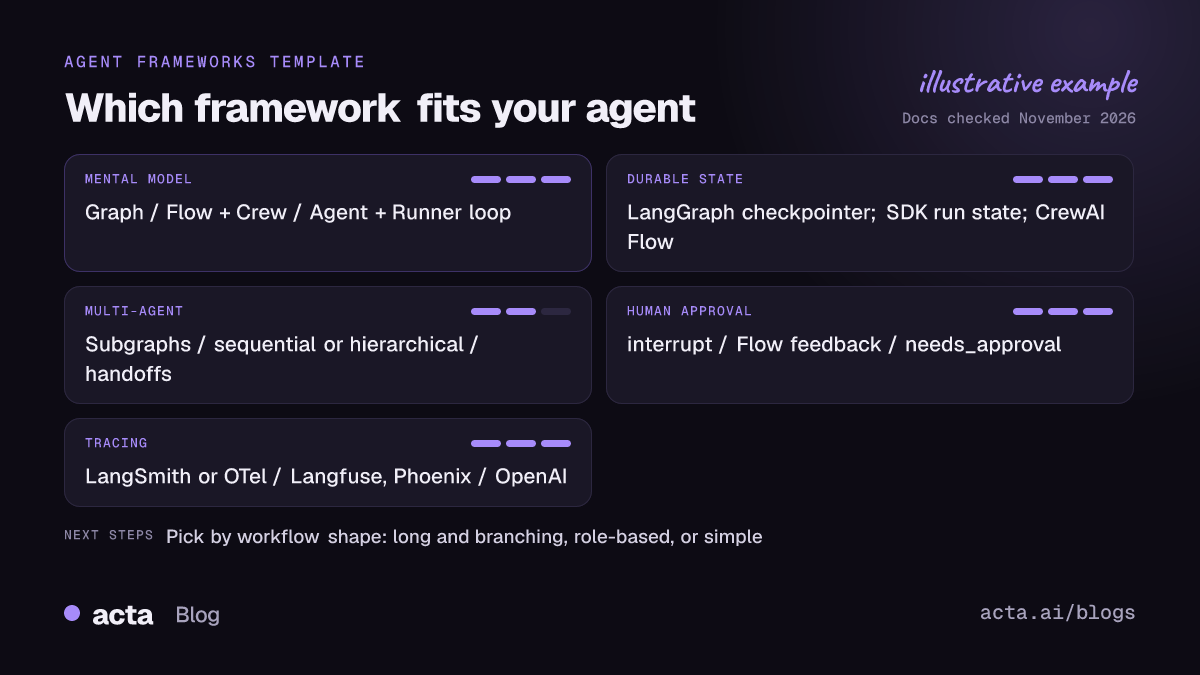
LangGraph vs CrewAI vs OpenAI Agents SDK: the decision table
Here is the short version of the langgraph vs crewai vs openai agents sdk choice, based on the official docs as of November 2026.
| Question | LangGraph | CrewAI | OpenAI Agents SDK |
|---|
| Mental model | Explicit graph of nodes and edges | Flow owns state; Crew of role-based agents | Agent plus Runner loop |
| Durable runs | Checkpointer and thread ID | Flow state; check persistence options | Serializable run state; sessions |
| Multi-agent | Subgraphs, subagents as tools | Sequential or hierarchical process | Handoffs or agents as tools |
| Human approval | interrupt and Command resume | Human feedback in Flows | needs_approval, approve or reject |
| Tracing | LangSmith or OpenTelemetry | Langfuse, Phoenix, MLflow, AMP | On by default to OpenAI; configurable |
| Install | pip install -U langgraph | pip install crewai | pip install openai-agents |
Pick LangGraph if the agent runs long, branches, needs approvals that may wait overnight, or must resume after failure. This is the right pick for the langgraph vs crewai question whenever correctness beats speed of writing.
Pick CrewAI if your workflow maps cleanly to roles and steps a business person can read, and you want a Flow plus a small Crew for the fuzzy middle. On crewai vs openai agents sdk, CrewAI wins when the process has many stages; the SDK wins when it is one conversation with tools.
Pick the OpenAI Agents SDK if you want the least framework, you are fine with OpenAI's tracing or will configure your own, and the job is a single assistant with tools and maybe a handoff. On openai agents sdk vs langgraph, start with the SDK and move only if you hit the durability wall.
There is no single best ai agent framework; there is the one whose failure modes you can live with. If the agent's input is your team's meetings, Acta's MCP connector gives Claude or ChatGPT read access to transcripts, action items and decisions, and Agent Builder (in beta) runs follow-ups with a human approval step without you writing orchestration code.
Frequently asked questions
Is LangGraph better than CrewAI for production?
For long-running or approval-heavy agents, LangGraph usually fits better because its checkpointer and thread ID give durable execution and resumable interrupts out of the box. CrewAI is production-capable too; its own docs say to start production apps with a Flow and call a Crew for autonomous sub-tasks. Pick on workflow shape, not on popularity.
Can the OpenAI Agents SDK use non-OpenAI models?
Yes. The official repo says it supports the OpenAI Responses and Chat Completions APIs and 100+ other LLMs. Some features stay tied to OpenAI: hosted tools run in the Responses API, and default tracing uploads to the OpenAI dashboard. Disable tracing or add your own processor if traces must stay elsewhere.
Is AutoGen still maintained?
Microsoft's AutoGen repo says it is in maintenance mode as of November 2026: only bug fixes, security patches and documentation, with new users pointed to Microsoft Agent Framework. AG2, which calls itself "formerly AutoGen", is a separate community project with its own roadmap and a classic API in maintenance.
Do I need an agent framework at all?
Not always. A single model call with two or three tools and a retry loop is often 100 lines of plain code and easier to debug. Reach for a framework when you need durable state, human approvals that wait, several cooperating agents, or tracing you do not want to build yourself.
Can I combine LangGraph with CrewAI or the Agents SDK?
Yes, because a LangGraph node can call any Python code. Teams sometimes run a CrewAI crew or an Agents SDK agent inside one node and let LangGraph own state, retries and approvals. It works, but you now debug two frameworks, so only do it when one piece is already built.
Choose a framework with a one-week spike
Build the same small agent in your top two candidates and compare what hurts.
- Pick one real workflow: a task with at least one tool that writes somewhere, one approval, and one likely failure.
- Write tools framework-free: plain typed functions you can import into any of the three.
- Force a crash mid-run: kill the process after step two and see what resuming costs you.
- Read the traces cold: ask a teammate to find why a run went wrong using only the trace view.
- Check where data goes: list every place prompts, tool outputs and traces are stored by default.
If your agents work from meeting notes, the Acta desktop app captures Zoom, Teams and other calls without a bot (see what to tell participants before you record), so the transcripts your agent reads are there when the call ends.