Prompt caching lets an LLM provider reuse the work it already did on the start of your prompt, so repeated requests that share a long, identical prefix come back faster and bill those tokens at a lower rate. OpenAI caches automatically, Anthropic asks you to mark what to cache with cache_control (or switch on its automatic mode), and Gemini combines best-effort implicit caching with explicit cache objects on some models.
This guide compares the three as of November 2026, using only each vendor's own documentation, and ends with a prompt layout that keeps the cache hitting. It is for people building chat assistants, agents, document Q&A or batch jobs on hosted APIs. If your prompts are short or never repeat, caching won't help much and you can skip it.
Key takeaways
- All three providers cache a prefix: the match has to be identical from the first token up to the cache point, so stable content goes first and anything that changes goes last.
- OpenAI turns caching on by default; GPT-5.6 and later add explicit breakpoints and a 30-minute or 12-hour minimum lifetime via prompt_cache_options.
- Anthropic gives you up to 4 breakpoints, a 5-minute default TTL that refreshes on each hit, and an optional 1-hour TTL at a higher write price.
- Gemini's implicit caching is on by default for 2.5 and newer models but has no guaranteed lifetime; explicit caches default to a 1-hour TTL and aren't offered on every model.
- Check the usage fields on every response (cached_tokens, cache_read_input_tokens, cached_content_token_count) before you assume the cache is working.
Table of contents
- Prompt caching reuses the prefix, not the answer
- OpenAI prompt caching is automatic, with optional breakpoints
- Anthropic prompt caching is driven by cache_control
- Gemini context caching splits into implicit and explicit
- The three providers side by side
- Order the prompt so the cache keeps hitting
- Usage fields tell you whether the cache hit
- Frequently asked questions
- Choose a caching setup for your workload
Prompt caching reuses the prefix, not the answer
A model reads your prompt before it writes anything. For a long prompt, that reading step is a large share of the time and cost of a request. Prompt caching keeps the internal state the model built while reading a prefix, so the next request that starts with exactly the same tokens can skip that part. It does not cache answers. Two requests with the same prefix and different questions still get two different, freshly generated replies.
The word that matters is prefix. Caches match from the first token forward and stop at the first difference. If your system prompt starts with today's date, every request differs at token five and nothing after it can be reused. If the date sits at the very end, everything before it can be served from cache. Anthropic's docs put it bluntly: cache hits need "100 percent identical prompt segments".
Where it pays off is predictable: a long system prompt or tool list sent on every call, a document or transcript you ask many questions about, a multi-turn chat where each turn resends the whole history, and agent loops that call the model dozens of times with the same instructions. A 60-page contract with ten follow-up questions is the textbook case. So is an agent with forty tool definitions.
It pays off less for one-shot prompts, prompts under the provider's minimum length, and traffic so sparse that the cache expires between requests. Keep that last point in mind; time-to-live (TTL) is where the providers differ most.
OpenAI prompt caching is automatic, with optional breakpoints
OpenAI prompt caching is on by default for supported models, so you get it without changing code. According to OpenAI's prompt caching guide (as of November 2026), the minimum cacheable prefix is 1,024 tokens for GPT-5.6 and later; for earlier models it varies by model between 1,024 and 2,048 tokens, so a prompt only just over 1,024 tokens may not cache consistently. Tokens in OpenAI's own hidden system content don't count toward that minimum.
Older models: retention policies
For GPT-5.5 and earlier, the setting to know is prompt_cache_retention. The in-memory policy generally keeps a prefix alive for about 5 to 10 minutes of inactivity, up to an hour. The extended "24h" policy can hold cached state in GPU-local storage for up to 24 hours. Which one is the default has changed between model versions, so set it explicitly if your traffic pattern depends on it.
GPT-5.6 and later: breakpoints and a minimum lifetime
Newer models replace prompt_cache_retention with prompt_cache_options. Its ttl field sets a minimum cache lifetime: "30m" by default, or "12h". OpenAI says the 12-hour option is not a deletion deadline, and entries may be kept longer. You can also set mode to "explicit" and place prompt_cache_breakpoint on specific content blocks; in that mode a request without breakpoints does no caching at all. Each request can create up to four cache writes, and an implicit breakpoint uses one of those slots.
Cache writes now show up as their own cost line on these models. The guide's worked example prices 30-minute writes at 1.25x the ordinary input rate, 12-hour writes at 2.5x, and cached reads at 0.1x. Treat those as the guide's example and confirm rates for your model on OpenAI's pricing page, since plans change.
My take: on OpenAI, start with the default automatic behaviour and only move to explicit mode when diagnostics show you're paying for writes you never read back.
Anthropic prompt caching is driven by cache_control
Anthropic prompt caching is the most hands-on of the three, and the most predictable. You mark a cache point by adding cache_control to a content block. The cached prefix covers tools, then system, then messages, in that order, up to and including the marked block. You can set up to 4 breakpoints in one request, which is handy when you have a stable tool list, a slower-changing system prompt and a growing conversation.
There is also an automatic mode: put a single cache_control field at the top level of the request and the API places the breakpoint on the last cacheable block, moving it forward as the conversation grows. Per Anthropic's prompt caching docs (as of November 2026), this automatic mode is not available on Amazon Bedrock, which returns an error for a top-level cache_control.
Here is the explicit form, taken from the docs, with the optional 1-hour TTL:
{ "type": "text", "text": "...", "cache_control": { "type": "ephemeral", "ttl": "1h" } }
Leave out ttl and you get the default 5-minute lifetime, which is refreshed at no extra cost each time the cached content is used. That refresh matters: a busy chatbot hitting the same system prompt every minute keeps it warm all day on the 5-minute TTL.
The pricing multipliers are stated plainly in the docs: 5-minute writes cost 1.25x the base input price, 1-hour writes 2x, and reads 0.1x on most models, with lower read multipliers on some newer ones. Minimum cacheable length depends on the model, from 512 tokens on the newest models up to 4,096 on some older ones; shorter prompts simply aren't cached, even when marked.
Two traps to know. Changing tool definitions invalidates the whole cache, because tools sit at the front of the prefix. And each breakpoint looks back at most 20 blocks for an earlier cache entry, so a long agent loop that never moves its breakpoint can drift out of reach.
Gemini context caching splits into implicit and explicit
Google calls the feature context caching, and Gemini context caching comes in two forms. Implicit caching is enabled by default for Gemini 2.5 and newer models. You configure nothing, you can't set a TTL, and hits are best-effort rather than guaranteed. Google's tips are the same prefix rules as everywhere else: put large, common content at the start of the prompt and send requests with a similar prefix close together in time.
Explicit caching means creating a cache object yourself (say, a long PDF set plus a system instruction), then referencing it in later requests. If you don't set a TTL, it defaults to one hour, and you can update it later. Per Google's context caching docs (as of November 2026), explicit caching isn't supported in the Interactions API or for Gemini 4 Argon onward; on supported Gemini 3 and 2.5 models you use it through the generateContent API.
The minimums in Google's table are higher than OpenAI's: 2,048 tokens for Gemini 2.5 Flash and 2.5 Pro, and 4,096 for the Gemini 3.x models listed. Developers on Google's forum report first hits appearing somewhat above the documented minimum, so don't design around a prompt that sits right at the line.
Explicit caches can also carry a charge for as long as they're kept, so a one-hour cache you query twice may not pay for itself. Check Google's pricing page for how cached content is billed before you commit to long TTLs.

The three providers side by side
This table summarises the vendor docs as of November 2026. Model names and minimums move quickly; recheck before you build on a specific number.
| Question | OpenAI | Anthropic | Gemini |
|---|---|---|---|
| On by default? | Yes, automatic | No; mark blocks or use top-level automatic mode | Implicit yes (2.5+); explicit is opt-in |
| You choose the cache point? | GPT-5.6+: explicit mode with breakpoints | Yes, up to 4 breakpoints | Explicit cache object, supported models only |
| Lifetime | In-memory or 24h (older); 30m or 12h minimum (GPT-5.6+) | 5 min default, refreshed on use; 1h option | Implicit: no guarantee; explicit: 1h default, settable |
| Minimum prefix | 1,024 (GPT-5.6+); 1,024-2,048 earlier | 512 to 4,096 depending on model | 2,048 (2.5) or 4,096 (3.x) for implicit |
| Where hits show | cached_tokens, cache_write_tokens | cache_read_input_tokens, cache_creation_input_tokens | cached_content_token_count in usage metadata |
Verdicts. Pick OpenAI's defaults if you want caching for free with no code changes and can live with less control. Pick Anthropic's explicit breakpoints if you want to know exactly what is cached and for how long, which suits agents with big tool lists. Pick Gemini explicit caches when you'll ask many questions over the same large file set within an hour on a model that supports them; otherwise rely on implicit caching and treat any hit as a bonus.
Order the prompt so the cache keeps hitting
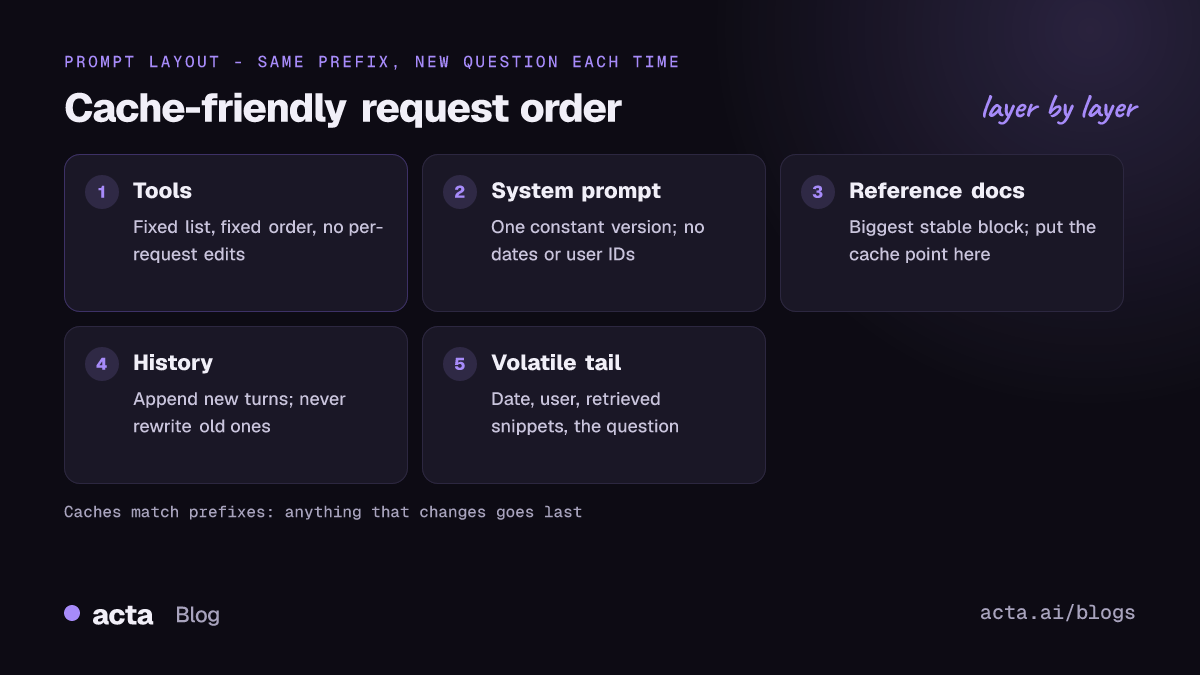
The layout below works on all three providers, because all three match prefixes. Build every request in this order:
- Tool or function definitions. Keep them in a fixed order and don't regenerate descriptions per request. Sort them alphabetically if your code builds the list from a dictionary.
- System instructions. One version, stored as a constant. No timestamps, user names or request IDs here.
- Shared reference material. The contract, the codebase summary, the meeting transcript, the few-shot examples. Put the biggest stable block here.
- Conversation history. Append new turns; don't rewrite or summarise earlier turns on every request, because that changes the prefix.
- The volatile tail. Today's date, the user's name, retrieved snippets that change per question, and the question itself.
A copyable template for a document Q&A request:
[tools: fixed list, fixed order]
[system: "You answer questions about the attached agreement. Quote the clause you rely on."]
[document: full agreement text, identical bytes every time] <- cache point here
[user: "Today is 26 Nov 2026. Question: what is the notice period for termination?"]
A worked example: a support bot with a 6,000-token system prompt and twelve tool definitions. Version one started the system prompt with "Current time: 14:02:37". Every request missed. Moving the time into the final user message made the whole tools-plus-system prefix identical across users, so the cache could serve it on every request after the first, until the TTL lapsed.
Common mistakes I see: serialising JSON with unstable key order, injecting a random request ID into the system prompt for tracing, putting retrieved RAG chunks above the instructions, and switching models mid-conversation (a cache built for one model doesn't serve another). Images count too; on Anthropic, adding or removing images invalidates the message cache.
Usage fields tell you whether the cache hit
Don't guess. Every provider reports cached tokens in the response, and the numbers tell you whether your layout works.
- OpenAI: usage.input_tokens_details.cached_tokens on the Responses API (prompt_tokens_details on Chat Completions), plus cache_write_tokens on newer models. OpenAI also documents a prompt_cache_diagnostics field that gives a reason when it detects a miss.
- Anthropic: cache_creation_input_tokens (written this request), cache_read_input_tokens (served from cache) and input_tokens (everything after the last breakpoint). Total input is the sum of the three.
- Gemini: cached_content_token_count in usage_metadata for generateContent; the Interactions API reports cached tokens in its usage object.
Log these per request and chart the ratio of cached to total input tokens. If the ratio drops after a deploy, someone changed the prefix. On Anthropic, a pattern of large cache_creation_input_tokens and zero reads usually means requests arrive further apart than the TTL, so either move to the 1-hour TTL or accept that this workload doesn't cache well.
Prompt caching is also a reason to think about what sits in those prefixes. Cached content is still your data held by the provider for a period, and OpenAI's extended retention keeps state in GPU-local storage. If the prefix holds customer or employee data, read our notes on AI data leakage and context and weigh it against running an open model yourself.
The classic repeated-prefix workload is asking many questions about the same long document, and meeting transcripts are a good example. Acta's OneChat answers questions across your meetings with sources, and if you want to query those notes from Claude or ChatGPT there is an MCP connector. If you're building your own pipeline instead, the RAG over meeting transcripts guide covers the retrieval side, and our comparison of long context vs RAG explains when to cache a whole document and when to retrieve chunks.
Frequently asked questions
Does prompt caching change the model's answers?
No. Prompt caching stores the model's processed state for an identical prompt prefix, not its output. The model still generates a new reply for every request, and the reply should be the same as it would have been without the cache. What changes is speed and the price of the cached input tokens, according to OpenAI, Anthropic and Google's docs as of November 2026.
What is the prompt caching minimum tokens for each provider?
As of November 2026: OpenAI needs 1,024 tokens for GPT-5.6 and later and 1,024 to 2,048 for earlier models. Anthropic ranges from 512 to 4,096 tokens depending on the Claude model. Gemini's implicit caching lists 2,048 tokens for 2.5 Flash and Pro and 4,096 for Gemini 3.x models. Shorter prefixes are not cached at all.
Is implicit caching enough, or should I create explicit caches?
Implicit caching is enough for busy chat traffic where the same prefix arrives every few seconds. Explicit control is worth it when savings must be predictable, such as a large document queried throughout an hour, or an agent whose tool list you want pinned. On Gemini, check how explicit caches are billed and whether your model supports them, then test both.
How long does a cached prompt last?
It depends on the provider and settings. Anthropic defaults to 5 minutes, refreshed on each use, with a 1-hour option. OpenAI's in-memory policy typically lasts 5 to 10 minutes of inactivity, with 24h retention on older models and 30m or 12h minimum lifetimes on GPT-5.6 and later. Gemini explicit caches default to one hour.
Why am I not getting cache hits?
Usually the prefix changes between requests: a timestamp or user ID near the top, tools in a different order, unstable JSON key order, or edited history. Other causes are a prompt under the minimum length, requests spaced further apart than the TTL, or a model switch. Check the cached-token usage field on each response to confirm.
Choose a caching setup for your workload
Run through this list before you ship anything that sends long prompts repeatedly.
- Measure the prefix: count the tokens that are identical across requests; if it's under the provider's minimum, caching won't apply.
- Move the volatile parts: dates, names, IDs and retrieved snippets go at the end of the prompt.
- Match TTL to traffic: busy endpoints are fine on short TTLs; hourly batch jobs need 1-hour or longer lifetimes.
- Pin what matters: use cache_control on Anthropic, explicit mode on GPT-5.6+, or an explicit Gemini cache when savings must be predictable.
- Log the usage fields: track cached versus total input tokens per request and alert when the ratio drops.
If the long documents you query are your own calls, Acta's desktop app turns Zoom, Teams and other calls into transcripts and notes without a bot joining, ready to question in OneChat.