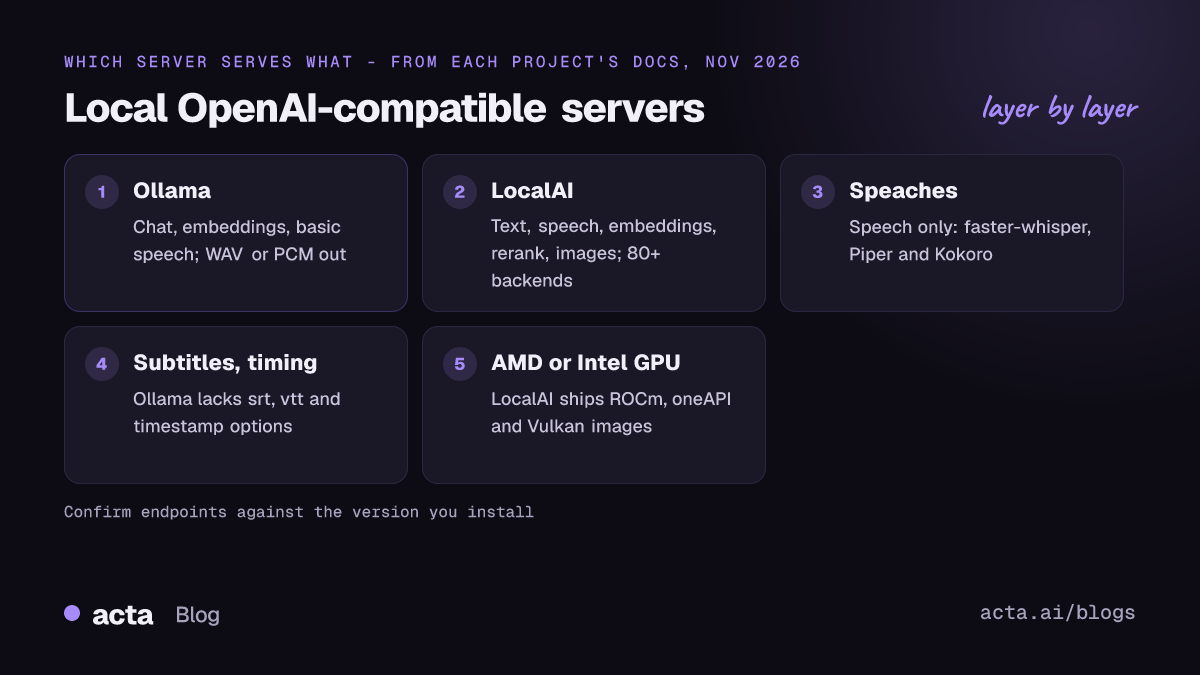
LocalAI vs Ollama is a question of scope. Ollama is the simplest way to serve chat and embedding models, and recent versions add OpenAI-style speech and transcription endpoints. LocalAI is the all-in-one server: text, speech, embeddings, reranking, images and more behind one OpenAI-compatible API, with over 80 swappable backends. Speaches does only speech-to-text and text-to-speech, on faster-whisper, Piper and Kokoro. Most teams end up with Ollama plus Speaches, or LocalAI alone.
This guide is for anyone building a local stack where an app needs to chat, transcribe audio, speak answers and embed documents without sending data to a cloud API. It compares the three servers on the endpoints they expose, the modalities they serve, the GPUs they support and the work it takes to run them, using each project's own docs and README as of November 2026. If you only need a chat model on a laptop, skip this and read our Ollama vs LM Studio vs llama.cpp vs vLLM comparison instead.
Key takeaways
- Ollama serves /v1/chat/completions, /v1/embeddings, /v1/responses and, in the v0.40 series, /v1/audio/speech, /v1/audio/transcriptions and /v1/audio/translations; its speech output is WAV or PCM only, and transcription returns JSON or text, not SRT or VTT.
- LocalAI (MIT, v5.0.0 as of November 2026) covers text, vision, speech to text, text to speech, embeddings, reranking, images, video and sound in the OpenAI and Anthropic API formats, and pulls each backend as its own image only when a model needs it.
- Speaches (MIT) calls itself "Ollama, but for TTS/STT models": faster-whisper for transcription, Piper and Kokoro for speech, streaming transcription over SSE, and models that load on request and unload when idle.
- GPU support: Ollama covers NVIDIA (compute capability 5.0+), AMD via ROCm v7, Vulkan and Apple Metal; LocalAI covers CUDA 12 and 13, ROCm, Intel oneAPI, Metal, Vulkan and Jetson; Speaches ships CUDA and CPU images.
- Pick by how many model types you need and who maintains the box: one service with many backends is fewer containers but more moving parts inside each.
Table of contents
- One OpenAI-compatible API is the real goal
- LocalAI vs Ollama vs Speaches at a glance
- Ollama now covers chat, embeddings and basic speech
- LocalAI serves almost every modality from one process
- Speaches does speech and nothing else, on purpose
- GPU support decides more than features do
- Three stacks that work in practice
- Frequently asked questions
- Choose your local AI server
One OpenAI-compatible API is the real goal
Most apps that use AI already speak the OpenAI API. The client libraries, agent frameworks and chat front ends all expect a base URL and a key, then call /v1/chat/completions for text, /v1/embeddings for vectors, /v1/audio/transcriptions for speech to text and /v1/audio/speech for text to speech. An OpenAI compatible API on your own hardware means you swap the base URL and keep the code.
The catch is that "OpenAI-compatible" is not a single standard. Each server supports a subset of endpoints and a subset of fields on each endpoint. A transcription call that asks for srt output, or word timestamps, can work against one server and fail against another. So the useful comparison is not "which is faster" but "which endpoints and fields does my app call, and which server answers all of them".
Write that list before you install anything. A voice assistant needs transcription, chat and speech. A meeting-notes pipeline needs transcription with timestamps, chat for summaries and embeddings for search. A RAG app over documents needs chat and embeddings, and maybe a reranker. That list picks the server for you.
LocalAI vs Ollama vs Speaches at a glance
The table summarises each project's docs and README as of November 2026. Endpoints change between releases, so confirm against the version you install.
| Area | Ollama | LocalAI | Speaches |
|---|---|---|---|
| Licence | MIT | MIT (name and logo excluded) | MIT |
| Chat and completions | Yes, plus stateless Responses | Yes, OpenAI and Anthropic formats | No language models |
| Embeddings | Yes, /api/embed and /v1/embeddings | Yes, plus a reranker | No |
| Speech to text | Yes, with models that accept audio; JSON or text output | Yes, whisper.cpp and other backends | Yes, faster-whisper, streamed over SSE |
| Text to speech | Yes, WAV or PCM, e.g. Phonon (English) | Yes, Piper and others, ElevenLabs-compatible too | Yes, Piper and Kokoro |
| Also serves | Vision via chat | Images, video, sound, VAD, speech-to-speech | Speech-to-speech API |
| Default port | 11434 | 8080 | 8000 |
Read the table as a scope chart, not a scoreboard. Ollama's speech support is new and narrow; LocalAI's is broad but you configure it per backend; Speaches is deep on one job.
Ollama now covers chat, embeddings and basic speech
Ollama runs models on llama.cpp and exposes its own REST API on port 11434 plus an OpenAI layer under /v1. The OpenAI compatibility page lists chat completions, completions, models, embeddings, a stateless Responses endpoint and three audio endpoints. The client needs an API key value, but the local server ignores it, so api_key="ollama" is the convention in its examples.
Embeddings are the quiet strength. ollama pull embeddinggemma, then call /api/embed with a string or an array of strings; the docs note that the native endpoint returns L2-normalised vectors and recommend using the same embedding model for indexing and querying. That makes Ollama a solid local embeddings server for a RAG prototype, with nothing else to run.
The audio side arrived in the v0.40 releases. Ollama text to speech works through /v1/audio/speech with speech models such as Phonon, which the docs describe as Gradium's 31M English checkpoint with named voices like Zoey, Easton and Freya. Output is WAV (the default) or raw PCM, 16-bit mono at 24 kHz; MP3, Opus, AAC and FLAC aren't supported, and speed accepts only 1. Input is capped at 4,096 characters per request. You can even pipe a chat model into it: ollama run gemma4 --hidethinking "Tell me a fun fact about owls in two sentences." | ollama run phonon.
Ollama speech to text works through /v1/audio/transcriptions with models that accept audio input. The docs list WAV files up to 512 MB and two hours, a language hint, streaming over server-sent events and three output formats: json, text and verbose_json. They also list what's missing: no srt or vtt, and no timestamp_granularities. Long audio is split at pauses into pieces the model can take at once (30 seconds for current models, per the docs) and transcribed piece by piece.
That's enough for voice commands and short clips. It's not yet what you want for subtitles or for meeting transcripts that need word-level timing. For those, keep a dedicated speech server next to Ollama.
LocalAI serves almost every modality from one process
LocalAI's README describes it as a server that runs open models for chat, images, speech and video, with an API that speaks both the OpenAI and Anthropic formats. The capability list is long: text generation on llama.cpp, transformers and vLLM; vision; audio to text; text to audio, including ElevenLabs-compatible speech and sound generation; voice activity detection with Silero-VAD; a speech-to-speech API; image and video generation; embeddings and a reranker.
The design choice that makes this manageable is the backend gallery. LocalAI has more than 80 backends, and each one is its own image, pulled only when a model needs it. You install a Whisper model and LocalAI fetches the matching speech backend; you install a GGUF chat model and it fetches llama.cpp for your GPU. Models come from its own gallery, Hugging Face or even Ollama's registry:
local-ai run gemma-4-e2b-it-qat-q4_0
local-ai run huggingface://TheBloke/phi-2-GGUF/phi-2.Q8_0.gguf
local-ai run ollama://gemma:2b
It also brings things Ollama leaves to other tools: a web UI with chats and agents, MCP support, API key auth with user quotas and roles, a distributed mode on PostgreSQL and NATS, and peer-to-peer model sharding. That makes LocalAI the strongest Ollama alternative when you want one service for a whole team rather than one model server per job.
The trade-off is surface area. A single process that handles twenty model types has more configuration, more backend images and more ways for an upgrade to change behaviour. Pin the image tag in production, and test each endpoint your app uses after every upgrade. The container install from the README is:
curl -fsSL https://localai.io/install/docker-compose.yaml -o docker-compose.yaml
docker compose up -d
Then open http://localhost:8080 and install models from the web UI. For NVIDIA, swap the image to a tag such as localai/localai:latest-gpu-nvidia-cuda-12 and add --gpus all, as the README shows.
Speaches does speech and nothing else, on purpose
Speaches is an OpenAI API-compatible server for transcription, translation and speech generation. Its README says it aims to be "Ollama, but for TTS/STT models". Transcription runs on faster-whisper, and speech runs on Piper and Kokoro. Transcripts stream over SSE as the audio is processed, models load when a request names them and unload after a period of inactivity, and it runs on GPU or CPU.
That focus makes it a good local Whisper server. You download a model through its CLI, then call the standard endpoint:
uvx speaches-cli model download Systran/faster-distil-whisper-small.en
curl -s "http://localhost:8000/v1/audio/transcriptions" -F "file=@audio.wav" -F "model=Systran/faster-distil-whisper-small.en"
For speech, the docs use speaches-ai/Kokoro-82M-v1.0-ONNX with a voice such as af_heart, and MP3 and WAV output both work; Opus and AAC don't. Because it's built on faster-whisper, the Whisper model family you already know applies, from small English-only models for a CPU box to larger multilingual ones on a GPU.
What Speaches doesn't do is host language models or embeddings. You pair it with Ollama, vLLM or LocalAI for text. That's the point: speech models and LLMs have different memory profiles and update cycles, and keeping them in separate containers means one can restart without taking down the other. Installation is Docker Compose with a CUDA or CPU override file, or a single docker run of ghcr.io/speaches-ai/speaches:latest-cuda or :latest-cpu on port 8000.
If transcript quality is your main worry, the server matters less than the audio. Our guide to transcription accuracy with accents, noise and crosstalk covers what actually moves the needle.
GPU support decides more than features do
Before you compare features, check that the server can use your card. Ollama's hardware page lists NVIDIA GPUs with compute capability 5.0 and newer on driver 550 or later (cards from 5.0 to 6.2 need driver 570 or later), AMD Radeon and Instinct cards through ROCm v7 on Linux and a shorter list on Windows, Apple GPUs through Metal, and extra Windows and Linux coverage through Vulkan, which is on by default when the backend is installed. For unsupported AMD cards on Linux, HSA_OVERRIDE_GFX_VERSION lets you try a close target.
LocalAI lists NVIDIA (CUDA 12 and 13), AMD ROCm, Intel oneAPI/SYCL, Apple Silicon (Metal), Vulkan and NVIDIA Jetson, and it says no GPU is required. Each GPU family has its own image tag, and LocalAI detects your GPU and downloads the matching backend.
Speaches publishes CUDA and CPU images; its compose files reserve NVIDIA GPUs through Docker's device settings. There's no AMD or Intel image listed in its install docs, so on those cards, LocalAI is the safer speech server.
Memory is the other constraint. Running a chat model and a Whisper model on the same 12 GB card means both have to fit at once, or one gets unloaded. A rough rule for the language model alone is parameters x bits per weight / 8: an 8B model at 4-bit is about 8 x 4 / 8 = 4 GB of weights before context. Our explainer on GGUF quantization covers how to pick the file, and the guide to running an LLM on CPU covers boxes with no GPU at all.
Three stacks that work in practice
Ollama alone, for chat, embeddings and light voice
Choose this when your app is mostly text, you want a RAG prototype with local embeddings, and voice is limited to short commands or read-aloud answers in English. One service, one port, nothing to glue. Revisit when you need subtitles, timestamps or non-English speech output.
Ollama plus Speaches, for serious transcription
Choose this when transcription quality and timing matter: meeting audio, interviews, podcasts. Ollama handles chat and embeddings; Speaches handles speech to text and text to speech with faster-whisper and Kokoro. Two containers, two base URLs, and each can be upgraded or restarted alone. This is the stack I'd start with for a local meeting-notes pipeline.
LocalAI alone, for a shared team server
Choose this when several apps need many model types, you want user roles and quotas on the API, you run AMD or Intel GPUs, or you want images and reranking on the same endpoint. Pin versions, keep a smoke test for each endpoint, and give one person ownership of the box.

If you're putting a chat UI in front of any of these, our comparison of Open WebUI vs LibreChat vs AnythingLLM covers the front-end side.
Where Acta fits
If the audio you want to transcribe is your team's meetings, building the pipeline is optional. Acta records Zoom, Google Meet and Teams with a bot or without one through the desktop app, and returns transcripts with speaker names, summaries, decisions and action items with owners. It doesn't use customer data to train AI models. Whatever you use, read what to tell participants about recording first, and see our on-premises meeting assistant guide if everything must stay in-house.
Frequently asked questions
What is the difference between LocalAI and Ollama?
Ollama is a focused model server built on llama.cpp: chat, embeddings and, since the v0.40 releases, basic speech endpoints. LocalAI is a broader server with more than 80 backends that covers text, speech, embeddings, reranking, images, video and sound through OpenAI- and Anthropic-style APIs, plus user roles and a web UI. Ollama is simpler; LocalAI covers more.
Does Ollama support text to speech and speech to text?
Yes, as of November 2026. Ollama text to speech uses /v1/audio/speech with speech models such as Phonon (English), returning WAV or PCM only. Speech to text uses /v1/audio/transcriptions with audio-capable models, returning JSON, text or verbose JSON, without SRT, VTT or timestamp granularities. For subtitles or word timing, use a dedicated server.
What is the best local Whisper server?
For a focused local Whisper server, Speaches is the simplest choice: OpenAI-compatible endpoints on faster-whisper, streaming transcripts over SSE, and models that load on demand and unload when idle. LocalAI is the better choice if you also need other model types or run AMD or Intel GPUs, since it ships images for those.
Can one local server handle chat, speech and a local embeddings server role?
LocalAI can: it serves chat, speech to text, text to speech, embeddings and a reranker from one API. Ollama also serves all four, but its speech endpoints are narrower. Speaches cannot, since it serves speech only. Many teams still split speech and text into two containers so each can restart and upgrade independently.
Is LocalAI a good Ollama alternative on AMD GPUs?
Often, yes. LocalAI ships separate images for AMD ROCm, Intel oneAPI and Vulkan, and detects the GPU to pick a backend. Ollama also supports many AMD cards through ROCm v7 and Vulkan, so check your exact card on Ollama's hardware list first; if it's missing, LocalAI is the next thing to try.
Choose your local AI server
You can settle localai vs ollama, and whether to add Speaches, with a one-page checklist and an afternoon of testing.
- List your endpoints: write down every OpenAI endpoint and field your app calls, including output formats like srt and timestamp options.
- Check your GPU: confirm the card on Ollama's hardware page or LocalAI's image list before comparing anything else.
- Test transcription on your audio: run the same five recordings through each candidate and read the transcripts, not just the speed.
- Decide on one or two services: one LocalAI container is fewer things to run; Ollama plus Speaches is easier to debug.
- Pin and smoke-test: pin image tags and keep a script that calls each endpoint after every upgrade.
If meetings are the audio you care about, try Acta's desktop app or Chrome extension on the 15-day free trial alongside your local stack and compare the notes.