The LLM evaluation tools most teams shortlist are promptfoo, DeepEval, Ragas, LangSmith and Braintrust, and they don't all do the same job. promptfoo and DeepEval are open-source test runners you put in CI. Ragas is a library of retrieval and answer metrics for RAG. LangSmith and Braintrust are hosted platforms that add datasets, experiment history, tracing and scoring of production traffic. Most teams need one runner, and a platform only once several people review results.
This comparison is for engineers and leads who own an LLM feature and need to stop shipping prompt changes on gut feel. It covers what each tool tests, how tests are written, how each fits a CI pipeline, and whether you can run it without sending data to a vendor, with facts taken from each project's own docs and repository as of November 2026. It does not rank model benchmarks; if you are comparing base models on public leaderboards, a benchmark suite like Lighteval is the better fit.
Key takeaways
- Start with 30 to 50 hand-written test cases from real user inputs; the tool matters less than having a fixed test set you rerun on every change.
- Pick promptfoo if you think in YAML and want prompt or model comparisons plus red teaming; pick DeepEval if your team already writes pytest.
- Add Ragas metrics (faithfulness, answer relevancy, context precision, context recall) when the app retrieves documents, whichever runner you use.
- LangSmith and Braintrust earn their place when several people review results or you score live traffic; self-hosting either requires an Enterprise plan.
- Gate pull requests on cheap deterministic checks and a small LLM-judged set; run the large suite nightly.
Table of contents
- LLM evaluation tools test four different things
- The five LLM evaluation tools at a glance
- promptfoo suits config-driven comparisons and red teaming
- DeepEval brings pytest-style tests to model outputs
- Ragas is the specialist for retrieval metrics
- LangSmith and Braintrust are platforms, not just libraries
- Run LLM evals in CI with a small gated suite
- Pick the tool by your stack and your failure modes
- Frequently asked questions
- Set up your first evaluation suite
LLM evaluation tools test four different things
An LLM evaluation tool runs your application against a set of inputs and scores the outputs, so you can tell whether a prompt, model or retrieval change made things better or worse. That sounds like unit testing, and partly it is. The difference is that many of the checks are fuzzy, so the scoring itself needs care.
The checks fall into four groups, and the tools cover them unevenly:
- Deterministic assertions. Does the output contain a string, parse as JSON, match a schema, stay under a length? Cheap, fast and exact. Every tool here does these, and they should be most of your suite.
- Model-graded checks. An LLM judge scores the output against a rubric: is it relevant, polite, free of invented facts? Useful for subjective quality, but each check costs a model call and the judge can be wrong.
- Retrieval metrics. For RAG, separate questions: did the retriever find the right chunks, and does the answer stick to them? This is Ragas' home ground, and DeepEval has its own versions.
- Adversarial testing. Prompt injection, jailbreaks, data leakage. promptfoo puts the most weight here.
Then there is the question of when tests run. Offline evaluation runs a fixed dataset before release, like a test suite. Online evaluation scores a sample of production traffic after release, to catch drift. The open-source runners are built for offline; the hosted platforms do both.
The five LLM evaluation tools at a glance
| Tool | Best at | How you write tests | CI fit | Licence and hosting |
|---|---|---|---|---|
| promptfoo | Prompt and model comparisons, red teaming | YAML config, CLI | GitHub Action; JSON, HTML, JUnit output | MIT, runs locally; now part of OpenAI |
| DeepEval | General app testing with built-in metrics | Python, pytest-style | deepeval test run in any CI | Apache 2.0; optional Confident AI platform |
| Ragas | RAG retrieval and faithfulness metrics | Python library | Call from your own test code | Open source (Apache-2.0 per its repo listing) |
| LangSmith | Tracing plus offline and online evals | Python or TypeScript SDK, UI | pytest and Vitest/Jest integrations | Hosted; self-hosted on Enterprise |
| Braintrust | Experiments, scoring, PR comparisons | Eval() in Python or TypeScript | GitHub Action, bt eval CLI | Hosted; self-hosted data plane on Enterprise |
Checked on 26 November 2026 against each project's docs; plans and licences change, so confirm on each vendor's page.
Two of these are things you install and own (promptfoo, DeepEval), one is a metrics library you call from either (Ragas), and two are services you log into (LangSmith, Braintrust). That split matters more than any feature list. A runner is free and private but leaves history, review and dashboards to you. A platform solves those and adds a vendor, a bill and a data-handling question.
promptfoo suits config-driven comparisons and red teaming
promptfoo describes itself as a tool for evaluating and red-teaming LLM apps: automated evals, vulnerability scanning and side-by-side comparison across providers including OpenAI, Anthropic, Azure, Bedrock and Ollama. You describe prompts, providers and test cases in a promptfooconfig.yaml file and run it from the command line. The quick start is npx promptfoo@latest init followed by npx promptfoo eval, which produces a matrix of every prompt against every model and test.
A small config looks like this (flow-style YAML, so it survives copy and paste):
prompts: ["Summarise this support ticket in one sentence: {{ticket}}"]
providers: ["YOUR_PROVIDER_ID"]
tests: [{vars: {ticket: "Charged twice for order 1182, wants a refund."}, assert: [{type: contains, value: "refund"}, {type: llm-rubric, value: "One sentence. Does not invent details."}]}]
The contains check is deterministic. llm-rubric is promptfoo's general-purpose model-graded assertion, which asks a judge model whether the output meets your criteria. Use the first kind wherever you can and the second where you must.
For CI, promptfoo's CI/CD guide shows the eval as a pipeline step with JSON, HTML and JUnit output, and there is a GitHub Action that posts a before-and-after view of prompt changes. The ownership news matters for planning: OpenAI announced it would acquire promptfoo in March 2026, and the project's README now says promptfoo is part of OpenAI and remains open source under the MIT licence. Nothing stops you using it with other providers today, but watch where the roadmap goes.
Pick promptfoo if your evaluations are mostly "which prompt or which model is better on these cases", if non-Python teammates need to add tests, or if security testing of an agent is on your list.
DeepEval brings pytest-style tests to model outputs
DeepEval, from Confident AI, is an Apache 2.0 Python framework that its README compares to pytest, specialised for testing LLM outputs. You build test cases from inputs and your app's outputs, attach metrics, and assert. It ships metrics for answer relevancy, faithfulness, hallucination, bias and toxicity, plus G-Eval, a criteria-based LLM-as-judge metric for anything custom.
from deepeval import assert_test
from deepeval.test_case import LLMTestCase
from deepeval.metrics import AnswerRelevancyMetric
def test_refund_reply(): assert_test(LLMTestCase(input=Q, actual_output=my_app(Q)), [AnswerRelevancyMetric(threshold=0.7)])
Run it with deepeval test run test_support.py. The DeepEval CI/CD docs show exactly that command in a GitHub Actions workflow, and say to use assert_test() inside test functions rather than evaluate(). It works without an account; Confident AI, the commercial platform, adds dashboards, hosted datasets and shared reports if you want them.
So, promptfoo vs DeepEval? They overlap more than they differ. promptfoo is config-first and strongest at comparing prompts and models side by side; DeepEval is code-first and strongest when tests need real application logic, fixtures and the rest of your Python test suite. If your repo already has a tests folder full of pytest, DeepEval will feel native. If your prompts live in config and product people edit them, promptfoo will.
Ragas is the specialist for retrieval metrics
Ragas (pip install ragas) is an open-source toolkit for evaluating LLM applications, best known for RAG metrics. Its core four split the pipeline in two: context precision and context recall score the retriever (did the useful chunks come back, and near the top?), while faithfulness and answer relevancy score the generator (is every claim supported by the retrieved context, and does the answer address the question?). Faithfulness is roughly the share of the answer's claims that the context supports. It also generates synthetic test questions from your documents, which helps when you have no labelled set yet.
Two practical notes from the Ragas repository. The project now lives under the vibrantlabsai organisation, and older tutorials point at the previous explodinggradients path. The API has changed a lot since the early 0.1 releases, so check the version a tutorial was written for before copying code. And it collects anonymous usage telemetry by default; set RAGAS_DO_NOT_TRACK=true to opt out.
Ragas vs DeepEval is mostly a scope question. DeepEval includes its own RAG metrics alongside general ones and a test runner. Ragas is a metrics library, so you call it from pytest, a notebook or a promptfoo custom check. If retrieval quality is your main risk, Ragas' metrics are purpose-built for it; if you want one framework for everything, DeepEval's built-ins may be enough. Our walk-through on how to evaluate a meeting RAG system applies these metric ideas to a concrete corpus, with a labelled question set and hallucination checks.
LangSmith and Braintrust are platforms, not just libraries
Once more than one person looks at evaluation results, a spreadsheet of JSON outputs stops working. You want stored datasets, a history of experiments, side-by-side diffs, human review, and scores on live traffic. That is what the two hosted tools sell.
LangSmith evaluation
LangSmith, from the LangChain team, combines tracing with evaluation. Its evaluation docs distinguish offline evaluation, run against curated datasets before deployment like unit tests, from online evaluation, which scores production traffic to detect quality drift. Offline evals run from the Python or TypeScript SDK or in the UI; there are pytest and Vitest/Jest integrations for CI. As of November 2026, LangChain's pricing page lists a free Developer plan for one seat, a Plus plan at $39 per seat per month, and Enterprise at custom pricing; self-hosted and bring-your-own-cloud deployments are Enterprise-only. Check the pricing page, plans change.
Braintrust
Braintrust centres on experiments. You write evals with Eval() from its SDK and score them with autoevals, an open-source library of scorers for Python and TypeScript that includes model-graded checks such as factuality. For CI, the Braintrust CI docs describe a GitHub Action that runs evals on every pull request and posts the results as a comment, and the bt eval CLI for other CI systems. Its hybrid deployment keeps the data plane (logs, datasets) in your own cloud while Braintrust hosts the web app; self-hosted and BYOC deployments require an Enterprise plan.
The honest trade-off: both save you building review tooling, and both mean your prompts, outputs and possibly user inputs sit in a vendor's system unless you pay for the self-hosted tier. For apps that handle sensitive text, that decision belongs with whoever owns data protection, not only with engineering. The post on securing RAG pipelines covers the adjacent risks.
Run LLM evals in CI with a small gated suite
The common failure with llm evals in CI is a suite so slow and expensive that people turn it off. Split it instead.
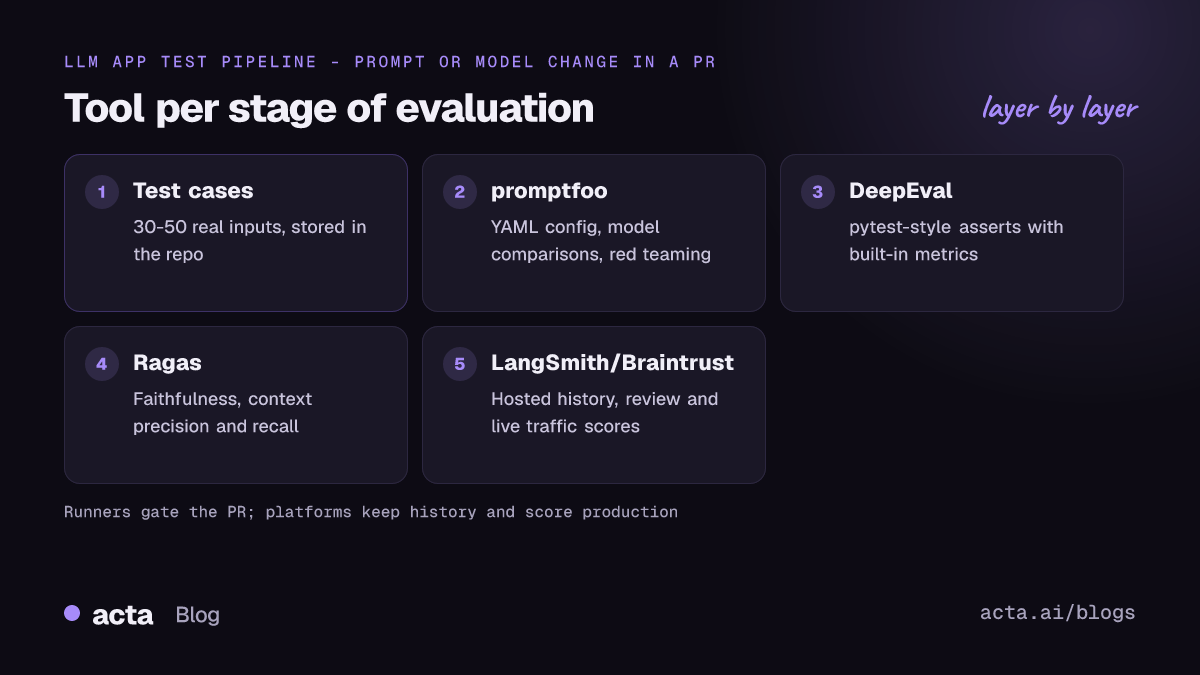
- Write 30 to 50 cases from real traffic. Include the boring majority and the five inputs that broke things last quarter. Store them in the repo.
- Make most checks deterministic. JSON validity, required fields, banned phrases, length limits, a citation present. These run in seconds and never flake.
- Add a small judged set. Ten to twenty cases scored by an LLM judge for relevance or faithfulness, with a threshold. Pin the judge model so scores are comparable between runs.
- Gate pull requests on that pair. Fail the build on any deterministic failure or on a judged score below threshold.
- Run the full suite nightly. Hundreds of cases, red-team probes, retrieval metrics over the whole corpus. Review the diff each morning instead of blocking merges on it.
- Feed failures back. Every production bug becomes a new test case before the fix merges.
All five tools can sit in that pipeline. promptfoo and DeepEval run in the CI job itself; Ragas runs inside either; LangSmith and Braintrust run from the SDK in CI and store results for comparison over time. Budget for the judge calls: twenty judged cases on every push adds up across a busy repo, which is another reason to keep the gated set small.

Pick the tool by your stack and your failure modes
- Pick promptfoo if you compare prompts and models often, want config files that non-Python teammates can edit, or need red teaming for an agent. Keep an eye on its direction under OpenAI.
- Pick DeepEval if your team lives in pytest and wants one open source llm evaluation framework covering general, RAG and custom metrics, with an optional hosted dashboard later.
- Add Ragas if your app retrieves documents and you need to tell a retrieval miss from a generation error. It slots into either runner.
- Pick LangSmith if you already trace with LangChain or LangGraph and want online evaluation on production traffic in the same place.
- Pick Braintrust if experiment comparison and PR-level result diffs are the main need, and a hybrid deployment with your own data plane suits your data rules.
Small team, one LLM feature, no budget: DeepEval or promptfoo plus Ragas metrics, results committed as JSON, reviewed in pull requests. That setup covers a lot of ground before a platform is worth paying for. For model-level checks before you ship weights rather than prompts, see evaluating and shipping models with Lighteval; if you fine-tuned the model yourself, the LoRA vs QLoRA decision guide covers the training side.
A note on meeting data, since that is what we work on. Question answering over meeting transcripts is a RAG problem where faithfulness matters most: an answer that invents a decision is worse than no answer. Acta's OneChat answers only from your meetings, files and links and shows where each answer was found, which is the property a faithfulness metric checks for. If you are building your own version, the guide to verifiable citations from transcripts is a good companion to these tools.
Frequently asked questions
What is the best open source LLM evaluation tool?
There is no single best one. promptfoo (MIT) is strongest for config-driven prompt and model comparisons and red teaming. DeepEval (Apache 2.0) is strongest for pytest-style application tests with built-in metrics. Ragas is the specialist for RAG metrics and works alongside either. Pick by how your team writes tests and what fails most often.
Is promptfoo still open source after the OpenAI acquisition?
Yes, according to the project's README as of November 2026, which says promptfoo is now part of OpenAI and remains open source under the MIT licence. promptfoo's own announcement says the team will keep maintaining the open-source suite and supporting a range of providers and models. You can still run it locally against other providers, including local models through Ollama.
What is the difference between Ragas and DeepEval?
Ragas is a metrics library focused on RAG: context precision and recall for retrieval, faithfulness and answer relevancy for generation, plus synthetic test generation. DeepEval is a full test framework with a pytest-style runner and a wider set of metrics, including its own RAG metrics. Many teams call Ragas metrics from inside a DeepEval or pytest suite.
Do I need LangSmith or Braintrust if I already use DeepEval?
Not at first. A runner in CI with results stored in the repo covers one team and one feature. Add a platform when several people need to review outputs, you want experiment history and side-by-side diffs, or you need to score live production traffic. Both offer self-hosted options only on Enterprise plans.
How many test cases do I need for LLM evals?
Start with 30 to 50 cases drawn from real inputs, including past failures, and grow from there. A small, representative set that runs on every pull request catches more regressions than a large one that runs rarely. Add every production bug as a new case, and keep a larger nightly suite for broad coverage.
Set up your first evaluation suite
You can have a working gate in an afternoon. Do these in order.
- Collect cases: pull 30 to 50 real inputs, including known failures, and write the expected properties for each.
- Choose a runner: promptfoo for config and model comparisons, DeepEval for pytest-style code tests.
- Split the checks: deterministic assertions first, a small LLM-judged set second, retrieval metrics if you use RAG.
- Wire up CI: gate pull requests on the fast set, run the full suite nightly, and pin the judge model.
- Decide on a platform later: add LangSmith or Braintrust when review, history or online scoring becomes the bottleneck.
If your test data comes from meetings, the Acta desktop app or the Chrome extension gives you transcripts and notes without a bot in the call, so you can build that question set from real conversations.