An interview scorecard template lists the competencies you're hiring for and, for each one, the question asked, the candidate's evidence in their own words, and any concern. The interviewer still makes the rating. Built as a custom template, it turns each recorded interview into the same evidence table, so interviewers rate from what was said instead of from memory. Below are six role-specific layouts you can copy.
Use Cases 10 min read
Interview Scorecard Template: 6 Role Examples Built From the Call
Six interview scorecard layouts by role, built around a competency evidence table in the candidate's words, with ratings left to the interviewer.
By Sarma BKP, Founder & CEO, Acta · Updated
This is for hiring managers, recruiters and interviewers who run several interviews per role and want comparable notes. One opinion up front: the AI should gather evidence, not score candidates. Every layout here keeps the rating and the hire or no-hire call with a person. If you hire once a year for a role nobody else interviews for, a simple notes page may be all you need.
Key takeaways
- Score 4-6 competencies per role. More than that and interviewers start rating on gut feel because they can't hold it all.
- Build the core as a table: Competency | Question asked | Evidence (candidate's words) | Concern. Every other section is secondary.
- Let the template collect evidence and leave the rating and recommendation to the interviewer, written after reading the evidence.
- Tell the template to ignore anything unrelated to the job, such as family, age or health, so it never lands in the notes.
- Use the same template for every candidate in a role; change it between hiring rounds, never in the middle of one.
Table of contents
- An interview scorecard template separates evidence from judgement
- Pick four to six competencies per role
- The core layout is a competency table plus three short sections
- Role-specific scorecards change the competencies, not the shape
- Fair scorecards ask for evidence and ignore everything else
- Build this as a custom template in Acta
- Frequently asked questions
- Set up your scorecard before the first interview of the round
An interview scorecard template separates evidence from judgement
A paper interview evaluation form usually mixes two things: what the candidate said and what the interviewer thought of it. By the time the debrief comes round, those have blurred. The interviewer remembers "strong on stakeholder management" but not the example that earned it, and the next interviewer remembers the opposite.
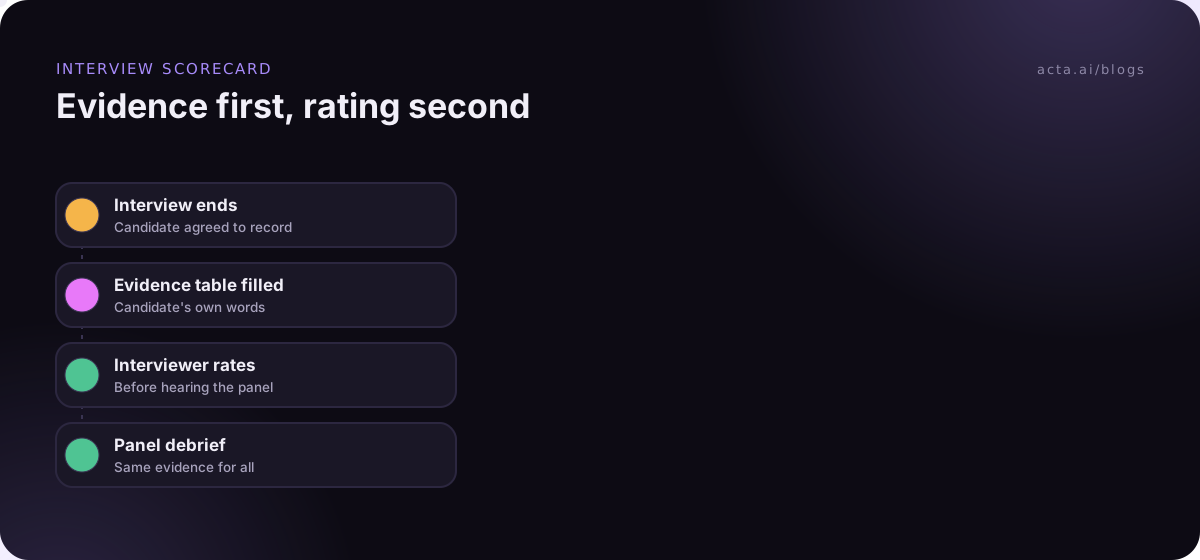
A candidate scorecard built from the interview transcript fixes the first half. The evidence column is filled from what the candidate actually said, with quotes. The interviewer then reads it and writes the rating. That order matters: you're judging the answer, not your recollection of the answer, and the debrief can point at the same text.
If you already use automated drafts, our post on interview scorecard automation covers the workflow. This post is about the template itself: which sections, which formats, and how they change by role.
Pick four to six competencies per role
The U.S. Office of Personnel Management's structured interviews guidance is a good grounding here. It centres on job-related questions tied to defined competencies, with the same rating scales applied to every candidate. Its FAQ on selecting competencies to assess ties them to a job analysis rather than to a generic list.
In practice, four to six competencies per interview is enough. Write each as something observable: "Breaks a vague problem into steps" rather than "Problem solving". The template uses the competency name to find evidence, so a concrete name gets better results.
Write the questions too, one or two per competency. Behavioural questions ("Tell me about a time you...") and situational ones ("What would you do if...") both work. If interviewers ask different questions, the evidence column still fills, but comparing candidates gets harder. Our structured interviews guide for hiring managers covers writing them.
The core layout is a competency table plus three short sections
Every layout below uses this shape. Change the competencies; keep the sections.
- Competency evidence (Table: Competency | Question asked | Evidence in the candidate's words | Concern). One row per competency. If a competency wasn't covered, the row says "Not discussed".
- Role-specific checks (Bullets): must-haves like a licence, a language, a tool or availability, only if discussed.
- Concerns to probe (Bullets): gaps, contradictions or unanswered questions, for the next interviewer.
- Candidate's questions (Bullets): what they asked and how it was answered. Useful signal, and helps the recruiter follow up.
- Next steps (Checklist: task, owner, due date).
Where does the rating go? In your applicant tracking system or scorecard form, written by the interviewer. OPM publishes generic rating scales for structured interviews you can adapt, with example answers at each level. An interview rating scale with anchored examples beats a bare 1-5.
Role-specific scorecards change the competencies, not the shape
| Role | Example competencies | Extra section |
|---|---|---|
| 1. Software engineer | Problem breakdown, code quality reasoning, debugging, collaboration | Technical exercise walkthrough |
| 2. Account executive | Discovery questioning, handling objections, pipeline discipline, resilience | Role-play notes |
| 3. Customer support | Empathy under pressure, clear explanations, prioritising, learning a product | Scenario answers |
| 4. People manager | Giving feedback, hiring judgement, handling conflict, setting goals | Examples of team outcomes |
| 5. Recruiter phone screen | Motivation, relevant experience, logistics | Logistics table |
| 6. Graduate or intern | Learning speed, teamwork, communication, initiative | Projects discussed |
1. Software engineer interview
What should this report do? For software engineering interviews: record evidence for each competency in the candidate's words, how they approached the technical exercise, concerns to probe, and the candidate's questions. Do not rate the candidate.
Sections: Competency evidence (Table), Technical exercise walkthrough (Bullets: approach, trade-offs mentioned, where they got stuck, hints given), Concerns to probe (Bullets), Candidate's questions (Bullets), Next steps (Checklist).
The "hints given" line matters. Without it, a solution that needed three nudges reads the same as one that didn't.
2. Account executive interview
Sections: Competency evidence (Table), Role-play notes (Bullets: questions they asked the "buyer", how they handled the objection, how they closed), Numbers mentioned (Bullets: quota, attainment, deal sizes, exactly as the candidate said them), Concerns to probe (Bullets), Next steps (Checklist).
3. Customer support interview
Sections: Competency evidence (Table), Scenario answers (Table: Scenario | What they said they'd do | Quote), Concerns to probe (Bullets), Candidate's questions (Bullets).
4. People manager interview
Sections: Competency evidence (Table), Team outcomes described (Bullets: situation, what they did, result, in their words), Concerns to probe (Bullets), Candidate's questions (Bullets), Next steps (Checklist).
5. Recruiter phone screen
Sections: Motivation (Paragraph, in their words), Relevant experience (Bullets), Logistics (Table: Item | What the candidate said, with rows for notice period, location or remote preference, and work authorisation if discussed), Candidate's questions (Bullets), Next steps (Checklist).
Leave pay out of the template unless your HR team has confirmed what you may ask about it where you hire. This is general information, not legal advice.
6. Graduate or intern interview
Sections: Competency evidence (Table), Projects discussed (Table: Project | Their role | What they learned), Concerns to probe (Bullets), Candidate's questions (Bullets).
Fair scorecards ask for evidence and ignore everything else
A transcript catches everything, including small talk. If a candidate mentions their kids, a health issue or where their parents are from, it doesn't belong in a hiring record. Add an extra instruction to every interview template: "Only record information relevant to the job competencies. Ignore personal details such as family, age, health, religion or nationality." Then check the first few reports to make sure it holds.
A few more rules I'd put in every hiring scorecard:
- No AI ratings. Leave the rating to the interviewer. The template's description should say "Do not rate the candidate".
- Quotes over adjectives. "Confident" and "articulate" are the words bias hides in. Ask for what the candidate said.
- Same template for the whole round. Changing sections halfway means the first and last candidates were measured differently.
- Rate before the debrief. Each interviewer writes their rating before hearing the others. Our guides on reducing bias in interview notes and running an interview debrief go further.
Recording interviews also needs the candidate's agreement. Tell them before the interview starts and why; our post on recording job interviews covers the details, and the general guide to recording meetings with AI and consent covers the law in broad terms.
Build this as a custom template in Acta
Custom templates are a paid-plan feature; the 15-day free trial includes Acta's built-in templates, including the Hiring group, but not custom ones. The custom templates help article has the details.
- Open Templates in the sidebar, select My templates, click + Create template.
- Name it by role and round: "Backend engineer - technical interview".
- Under Start from, choose Describe it, paste the description from layout 1, and click Draft sections.
- Set Competency evidence to Table with four columns (Competency, Question asked, Evidence, Concern). In the section's instruction, list your competencies by name.
- Add extra instructions: "Use the candidate's own words. Do not rate. Ignore personal details unrelated to the job."
- Under When should Acta use it?, pick Only matching meetings so it runs on interviews for this role only.
- Use Test on a past meeting and Run on this meeting on a previous interview. Nothing is saved or sent. Then Save.
- Turn on Share with my team so the whole panel uses the same version; only you can edit it.
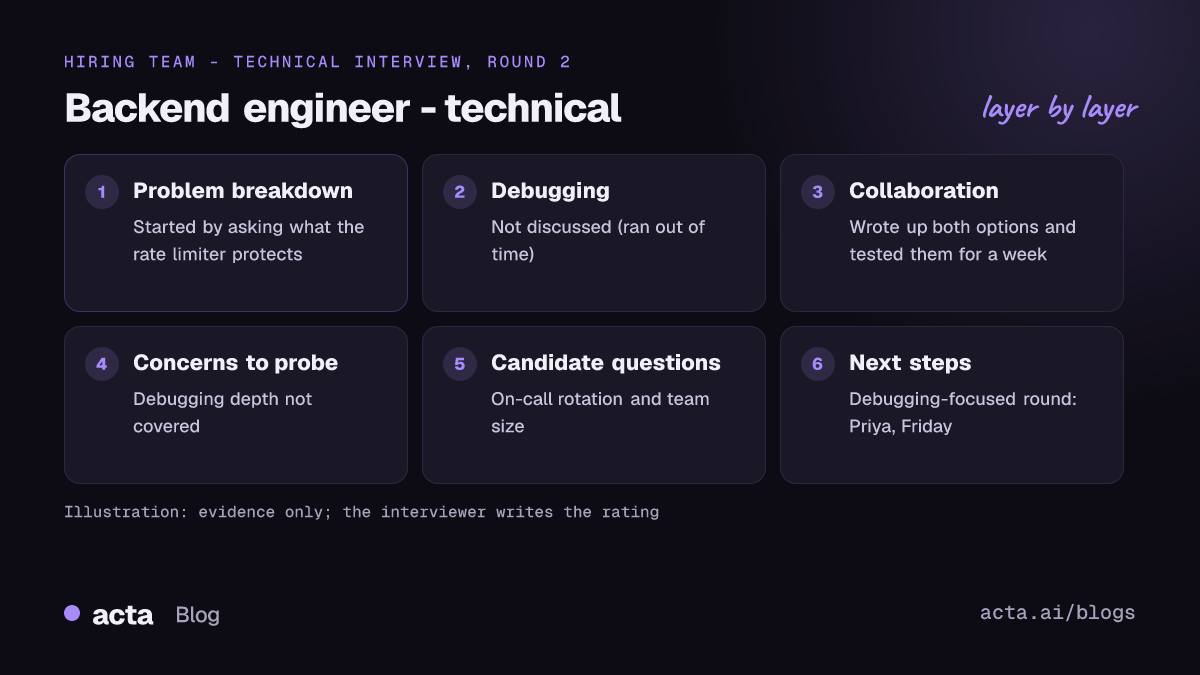
Example output (illustration)
In short: Candidate covered 3 of 4 competencies with specific examples; debugging question ran out of time; asked about on-call rotation.
Competency evidence: Problem breakdown | "Design a rate limiter" | "I'd start by asking what we're protecting: the API or the database" | None noted. Debugging | "Walk me through a hard bug" | Not discussed (ran out of time) | Probe next round. Collaboration | "Disagreement with a teammate" | "I wrote up both options and we tested them for a week" | None noted.
Technical exercise: Chose a token bucket; mentioned Redis; needed one hint on clock drift.
Concerns to probe: Debugging depth not covered.
Candidate's questions: On-call rotation and team size (answered by Dana).
Next steps: Schedule debugging-focused round (Priya, Friday).
The report also carries key quotes and a confidence rating, and appears in the meeting's Templates tab as "Your template". If you'd rather try a different shape of interview report, our post on candidate assessment reports shows another approach.
Where Acta fits
Acta records interviews on Zoom, Google Meet and Teams and runs the template that matches each one. A notetaker bot joining an interview can feel odd to candidates, so interviewers often use the desktop app, which records from their own computer with nothing added to the call. The hiring page shows how recruiting teams use it.
Frequently asked questions
What should an interview scorecard template include?
Four to six job-related competencies, the question asked for each, the candidate's evidence in their own words, and any concern. Add short sections for role-specific checks, concerns to probe in later rounds, the candidate's questions, and next steps. Keep the rating and recommendation as separate fields the interviewer fills in.
Should AI rate interview candidates?
I wouldn't let it. Use AI to collect and organise evidence from the transcript, then have the interviewer rate against your scale. That keeps the judgement with a person who can explain it, and it makes the evidence easy to check in the debrief.
What is the difference between a scorecard and an interview evaluation form?
An interview evaluation form is often a general rating sheet: overall impression, strengths, weaknesses. A scorecard is tied to specific competencies for the role, with evidence for each. Scorecards make candidates comparable; general forms mostly record impressions.
How many competencies should a structured interview cover?
Four to six is a workable range for a single interview. Spread the rest across other rounds so each interviewer has time to get real evidence. Too many competencies in one hour produces thin evidence and gut-feel ratings.
Can I use one scorecard template for every role?
Use one shape for every role (competency table, concerns, candidate questions, next steps) but a separate template per role with its own competencies. Acta allows up to 10 custom templates per person, so a hiring manager covering a few roles has room.
Set up your scorecard before the first interview of the round
The best time to build the template is before the first candidate, so everyone in the round is measured the same way.
- Define the competencies: four to six, written as observable behaviours, from the job's real requirements.
- Write the questions: one or two per competency, used with every candidate.
- Build the evidence table: Competency, Question asked, Evidence, Concern.
- Add the fairness instruction: no ratings, no personal details, candidate's own words.
- Test and share: preview on a past interview, then share with the panel; for more on matching templates to meetings, see automatic meeting templates by meeting type.
Download the Acta desktop app before your next interview round and see what your scorecard looks like filled in.
Found this useful? Share it with your team.