An investor meeting notes template is a fixed set of sections you fill after every pitch, update call or board prep session: the questions investors asked, the concerns behind them, the numbers you quoted, what you promised to send, and the next step. Use a different layout for each meeting type, keep each to five to seven sections, and write the follow-ups as tasks with an owner and a date.
Use Cases 12 min read
Investor Meeting Notes Template: Pitch, Update and Board Prep
Three investor meeting notes layouts for pitches, update calls and board prep, with the sections, formats and a filled-in example you can copy into a custom template.
By Sarma BKP, Founder & CEO, Acta · Updated
This guide is for founders running a raise and for the operators and investors on the other side of the table. It gives you three copy-ready layouts, shows how to set them up as custom templates in Acta, and walks through a filled-in example. If you only meet one investor a quarter, a shared doc with five headings will do. The templates pay off once you are taking ten or more investor calls a month and start mixing up who asked what.
Key takeaways
- Run three layouts, not one: pitch meetings, investor update calls and board prep each need different sections.
- Put "Questions asked" and "Concerns raised" near the top of a pitch template. They are the most useful notes you will take in a raise.
- Record every number you say out loud in a metrics table with columns for metric, value quoted and period, so your story stays consistent across investors.
- Write follow-ups as a checklist with task, owner and due date. "Send deck" with no date is how warm leads go cold.
- Keep each template to 5-7 sections. Acta allows up to 12, but long templates produce long reports nobody rereads.
Table of contents
- Good investor notes record questions, numbers and promises
- A pitch meeting template puts objections first
- Investor update calls need a metrics table
- Board prep notes work backwards from decisions
- Build this investor meeting notes template in Acta
- A filled-in example from a seed pitch
- Five mistakes that make investor notes useless
- Frequently asked questions
- Pick the investor template you need first
Good investor notes record questions, numbers and promises
Most founders take investor notes the way they take any meeting notes: a few lines about how it went and a vague next step. That is fine for a team sync. It falls apart in a raise, where you might speak to twenty funds in three weeks and each one remembers exactly what you told them.
Good founder investor meeting notes answer four things. What did they ask, in their words? What were they worried about, even if they didn't say it directly? What numbers did we give them? What did we promise, and by when? Everything else, including your impression of the partner and whether the call "went well", is secondary.
The questions matter because they repeat. If three funds ask about net revenue retention in the first ten minutes, your deck is missing a slide. The numbers matter because investors talk to each other, and a churn figure that drifts from 3% to 4% between calls looks careless at best. The promises matter because the follow-up email is often where a first meeting becomes a second one.
I'd add one more section most people skip: what the investor told you about themselves. Fund stage, cheque size, partnership process, how long their decisions take. You will forget it, and you will need it when you sort your pipeline.
A pitch meeting template puts objections first
Pitch meeting notes exist to help you win the next meeting, so lead with what stands between you and it. Here is the layout I use, in order, with the format for each section.
Pitch meeting notes
1. Investor and fund context (Bullets): who attended, their role, fund stage, cheque size, how they make decisions, any timeline they mentioned.
2. Questions asked (Table: Question | Who asked | Our answer | Good enough?): every question in the investor's own words.
3. Concerns raised (Bullets): doubts stated or implied, such as market size, competition, team gaps, pricing.
4. Metrics we quoted (Table: Metric | Value | Period): every number said out loud by either side.
5. What they liked (Bullets): the parts of the story that landed.
6. Follow-ups (Checklist: task, owner, due date): materials promised, intros offered, data room access.
7. Next step and signal (Paragraph): the agreed next meeting, and how interested they seemed based on what they said.
The "Good enough?" column in the questions table is the one that pays off. After the call, mark any answer that wobbled. Those become the slides you add and the lines you rehearse. If you use Acta's built-in Dealflow memo on the investor side, the founder version above is roughly its mirror image, and our post on dealflow memos from founder pitch meetings shows what investors are writing about you.
Use this template for first meetings and partner meetings. For a final partnership meeting, add a section called "Diligence requests" in checklist format, because that is where the list of things to send gets long.
Investor update calls need a metrics table
Once the money is in, investor calls change shape. You are no longer selling; you are reporting, asking for help and managing expectations. A monthly or quarterly update call with your lead investor needs fewer sections and a much stricter metrics record.
Most written updates already follow a familiar pattern. Visible's summary of Y Combinator's advice on asks, metrics and a recap is a fair version of it, and the same skeleton works for the call notes. Matching the two means your notes can feed next month's investor update template directly.
Investor update call notes
1. Recap (Paragraph): the three or four sentences you would put at the top of the written update.
2. Metrics discussed (Table: Metric | This period | Last period | Comment): revenue, burn, runway, headcount, whatever you report every time.
3. Wins and setbacks (Bullets): what went well and what didn't, as stated on the call.
4. Asks and offers (Table: Ask | Investor response | Owner): intros, hiring help, advice requested, and what the investor offered.
5. Investor concerns (Bullets): anything they pushed on.
6. Follow-ups (Checklist: task, owner, due date).
Keep the metrics table identical from call to call. Same rows, same order. When you compare three months of notes, you want to see burn moving, not hunt for it in prose. If a metric wasn't covered, the report should say so rather than guess, which is exactly how Acta handles empty sections (more on that below).
For more on cadence and structure, TechCrunch's guide to writing your monthly investor update is a good companion to these call notes.
Board prep notes work backwards from decisions
Board meeting prep happens in two kinds of meetings: the internal session where the leadership team agrees what goes in the deck, and the pre-calls with individual directors to avoid surprises in the room. Both produce the same thing: a list of decisions the board needs to make and the positions people are likely to take.
Board prep notes
1. Decisions needed from the board (Table: Decision | Recommendation | Owner | Status): approvals, budget sign-offs, option grants, strategic calls.
2. Director views heard (Table: Director | Topic | View expressed): from pre-calls, in their words.
3. Open questions to answer before the meeting (Bullets).
4. Materials to prepare (Checklist: task, owner, due date).
5. Risks to raise proactively (Bullets).
Don't confuse board prep notes with board minutes. Minutes record what the board resolved; prep notes record what you plan to bring and what you heard in advance. Our guide to startup board meeting minutes covers the formal side, including what not to write down.
Here is how the three layouts compare at a glance.
| Meeting | Lead section | Key table | Sections |
|---|---|---|---|
| Pitch meeting | Questions asked | Question, who asked, answer, good enough? | 7 |
| Investor update call | Recap | Metric, this period, last period, comment | 6 |
| Board prep | Decisions needed | Decision, recommendation, owner, status | 5 |
Build this investor meeting notes template in Acta
You can keep these layouts in a doc and fill them by hand, but the questions table is tedious to write while you are pitching. Acta's custom templates fill the sections from the meeting transcript instead. Custom templates are a paid-plan feature; they aren't part of the 15-day free trial. Here is the pitch version, step by step, using the labels you will see on screen. The custom templates help article covers every option in more detail.
- Open the Acta dashboard and click Templates in the sidebar. Choose the My templates filter, then + Create template.
- Type a Template name, such as "Investor pitch notes".
- Under Start from, pick Describe it. In "What should this report do?" write: "For founder pitch meetings with investors: list the investor's questions in their own words with our answers, concerns they raised, every metric quoted, what we promised to send, and the agreed next step." Click Draft sections. Acta drafts three to seven sections you can change.
- Edit the sections to match the layout above. Set "Questions asked" and "Metrics we quoted" to Table and name the columns (up to six per table). Set "Follow-ups" to Checklist, which gives you task, owner and due date. Use the move up and down controls to put the questions first.
- Add extra instructions, for example: "Use the investor's own words for questions. Quote numbers exactly as said."
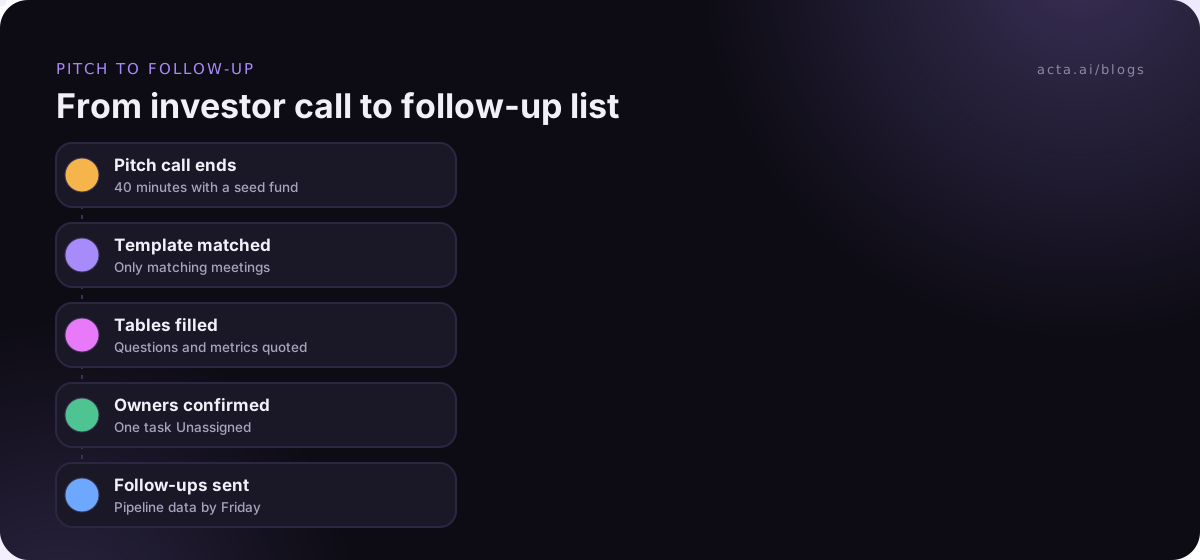
- Under When should Acta use it?, choose Only matching meetings. Acta checks each meeting against your description and runs the template only on investor pitches, not on your Tuesday standup.
- In the preview panel, use Test on a past meeting, pick a recent investor call and click Run on this meeting. Nothing is saved or sent. Fix the sections that come out thin, then click Save.
Repeat with Blank or Describe it for the update call and board prep layouts. You can keep up to 10 custom templates, with up to 12 sections each. If your co-founder takes investor calls too, switch on Share with my team; they can turn the template on, and only you can edit it. Investors can start from the built-in Portfolio check-in instead and click Customize, which copies its sections into the builder and leaves the original untouched. The report templates page lists the built-ins by role, and the investors page shows the investor-side set.
After the meeting, the report appears in the meeting's Templates tab labelled "Your template", with Copy, Download and Push to CRM, and it is emailed like other template reports. Every report includes an "In short" summary, a confidence rating and key quotes. Sections the call never covered say "Not discussed", and tasks with no clear owner say "Unassigned".
A filled-in example from a seed pitch
Here is an illustration of what the pitch template produces after a 40-minute first meeting. The company, fund and people are invented.
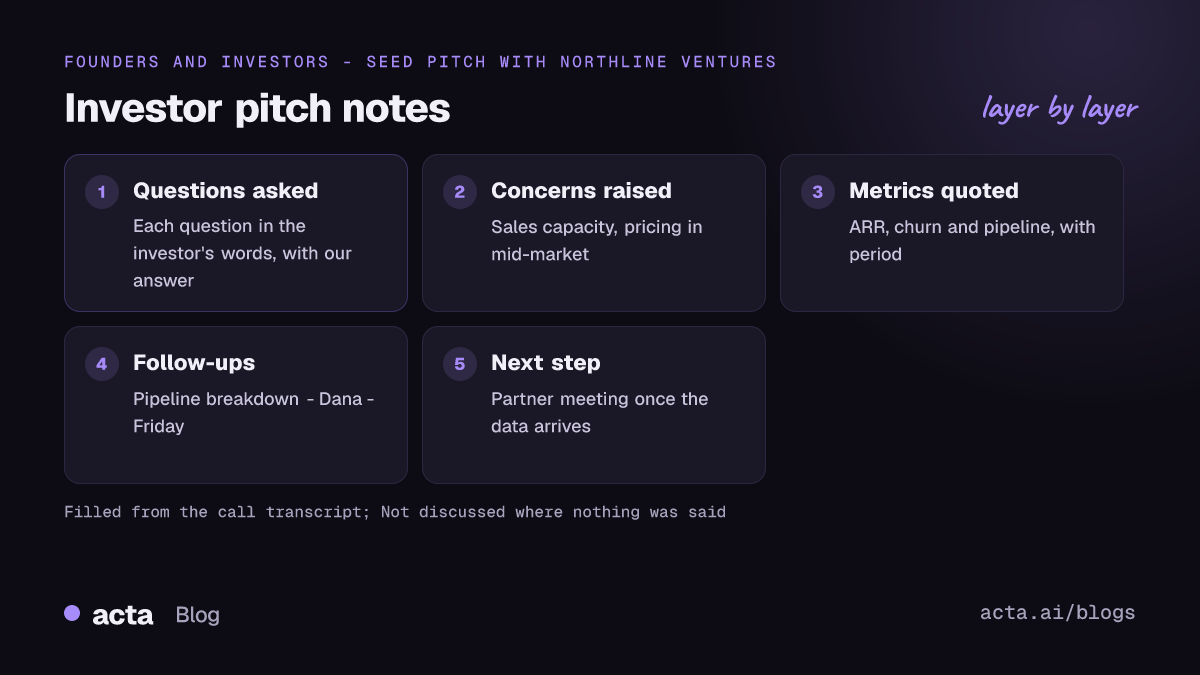
Investor pitch notes: Northline Ventures, first meeting
In short: Priya Shah (partner) and Marco Bell (associate) liked the retention story but pushed on enterprise sales capacity. Next step is a partner meeting if the pipeline data holds up.
Investor and fund context: Seed and Series A fund; typical first cheque discussed as "around a million"; decisions go through a Monday partner meeting.
Questions asked: "How much of your revenue comes from the top three customers?" (Priya; we said under 30%; good enough: yes). "Who closes enterprise deals today?" (Marco; we said the CEO; good enough: no, needs a hiring plan).
Concerns raised: Founder-led sales won't scale past ten enterprise deals a year. Unsure the mid-market segment will pay the current price.
Metrics we quoted: ARR, $420k, October. Logo churn, 2% monthly, last six months. Pipeline, 14 qualified enterprise deals, current quarter.
Follow-ups: Send pipeline breakdown by stage (Dana, Friday). Share sales hiring plan (CEO, next Wednesday). Intro to a reference customer (Unassigned).
Next step and signal: Marco to book a partner meeting once the pipeline data arrives. Priya said "this is close to what we look for."
Notice the "Unassigned" on the reference intro. That is a real gap the template surfaced: someone said it would happen, and nobody owned it. Fix it before the call is cold.
Five mistakes that make investor notes useless
I've seen founders keep beautiful notes that never helped them. These are the usual reasons.
- Writing impressions instead of words. "They seemed keen" tells you nothing next month. "Priya said this is close to what we look for" does.
- One template for every investor meeting. A pitch and a portfolio update share almost nothing. Splitting them is the single biggest improvement.
- No metrics record. If you can't say which number you gave which fund, you will eventually give two different ones.
- Follow-ups without dates. Your investor follow-up should be a checklist with owners. Otherwise "we'll send that over" becomes a week of silence.
- Too many sections. Twelve sections looks thorough and reads badly. Start with five, add one only when you keep wanting it.
If you record these calls, tell the investor at the start. Most expect it now, but asking is basic courtesy and in some places a legal requirement; our guide on recording meetings with AI and consent covers what to say. If a bot in the call feels wrong for a first meeting, Acta's desktop app records from your own computer with nothing joining the call.
Where Acta fits: it records the call, writes the transcript with speaker names, and fills your investor template from what was said. It won't judge your pitch for you, and it won't invent a number nobody mentioned. For the client-facing version of the same idea, see our client review meeting notes templates.
Frequently asked questions
What should be in an investor meeting notes template?
At minimum: investor context, questions asked in their words, concerns raised, metrics quoted, follow-ups with owners and dates, and the agreed next step. Pitch meetings lead with questions and concerns. Update calls lead with a recap and a metrics table. Board prep leads with the decisions you need the board to make.
How do I take pitch meeting notes while I'm presenting?
You mostly can't, which is why founders bring a co-founder to take notes or record the call. If you record, tell the investor first. A custom template can then fill the questions and metrics tables from the transcript, so you review notes after the call instead of typing them during it.
Is an investor update template the same as investor call notes?
No. The written investor update template goes out to all investors on a schedule. Call notes record one conversation with one investor. They work best when they share the same structure, recap, metrics and asks, so last month's call notes become raw material for next month's update.
Can investors use the same approach for founder calls?
Yes. Investors can start from Acta's built-in Dealflow memo or Portfolio check-in and click Customize to adapt them. The questions flip: instead of what the investor asked, you record what the founder claimed, the risks you see and the diligence you still need.
How many sections should a board meeting prep template have?
Five is plenty: decisions needed, director views, open questions, materials to prepare and risks to raise. Keep the decisions table at the top. If the prep session wanders into operational detail, that belongs in a separate status template rather than in your board prep notes.
Pick the investor template you need first
Don't build all three on day one. Start with the meeting you have most of this month, run it on two or three real calls, then adjust.
- Raising now: build the pitch template first and make "Questions asked" a table with a "Good enough?" column.
- Post-raise: build the update call template and lock the rows of your metrics table.
- Board in two weeks: build board prep and run it on the internal prep session and each director pre-call.
- Test before trusting: use Test on a past meeting on a real call and fix thin sections before you save.
- Share deliberately: share with co-founders who take investor calls, and keep editing rights with one person.
To capture investor calls without a bot in the room, install the Acta Chrome extension for browser meetings or compare plans on the pricing page.
Found this useful? Share it with your team.