Quick answer: To automate an interview scorecard, record the interview with the candidate's consent, let an AI draft the evidence for each competency from the transcript, and send that draft to the interviewer to edit and rate before anything reaches the recruiter. The AI collects quotes. The interviewer owns the rating, the recommendation and the hiring call.
Most interview scorecards aren't written right after the interview. They're written at 6:40 pm, after three more meetings, from a page of half-legible notes and a general feeling about the person. That's what this post fixes. Not the hiring decision itself, which should stay with people, but the slow, memory-based paperwork around it.
Below: what a good scorecard contains, why they arrive late and skewed, and a recipe that drafts one from the recording and hands it to the interviewer for approval.
Why does the interview scorecard always get written late?
Because writing it well is hard, and nothing forces it to happen while the interview is fresh. A proper scorecard asks for evidence per competency. Evidence means remembering what the candidate said about the migration project in minute 22, not that they "seemed strong on systems."
So people put it off. And the later it gets written, the more it drifts:
- Memory fills the gaps. By the next day you remember the confident answer and forget the vague one that followed it.
- The debrief leaks in. If you hear the hiring manager say "I loved her" before you write yours, your scorecard will quietly agree.
- Ratings come before evidence. People pick a number, then write a sentence to justify it. That's backwards.
- Recruiters chase. Your recruiter, Dana, ends up sending three nudges per candidate just to close the loop.
Some applicant tracking systems already work on the second problem. Greenhouse, for example, doesn't let interviewers see each other's scorecards (hiring managers can), according to its Scorecards FAQ. Good. But it doesn't help with the blank page at 6:40 pm.
What goes in a good interview scorecard?
Keep it boring and consistent. Google's re:Work team describes structured interviewing as asking the same questions, grading answers on the same scale and deciding against qualifications agreed in advance, and it calls its scoring tools rubrics (see the re:Work guide to structured interviewing). Your scorecard is that rubric, filled in for one candidate.
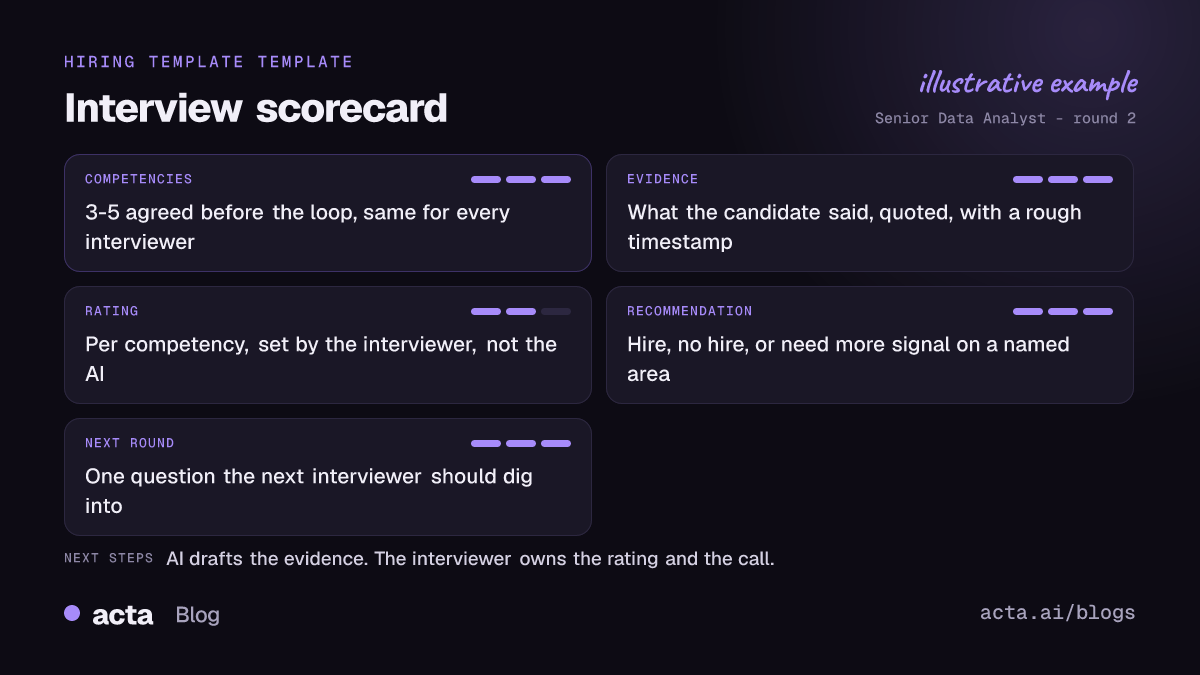
I'd build every interview scorecard from four parts:
- Competencies. Three to five per interview, agreed before the loop starts. "Stakeholder management" and "SQL depth" are competencies. "Culture fit" isn't. It's where bias hides.
- Evidence. What the candidate said or did, close to their words, with a rough timestamp. This is the part people skip, and it's the part an AI can draft well.
- Rating. One per competency, on your team's scale, with a written definition of each level.
- Recommendation. Hire, no hire, or "need more signal on X." Plus the one question the next interviewer should dig into.
That's the whole interview scorecard template. You don't need a 20-field form. Long forms get skimmed, by the person filling them in and by the person reading them.
What should AI do in a candidate assessment, and what should it never do?
I'd be strict here. An AI is good at one job: going back through a 45-minute transcript and pulling out what the candidate said that relates to each competency. That's clerical work, and it's exactly the work interviewers skip.
It should not:
- pick the rating;
- make the hire or no-hire call;
- rank candidates against each other;
- comment on tone, accent, confidence or anything that isn't the content of an answer.
Rules on automated decisions in hiring differ by country and state, and some are strict. You don't want software making selection decisions, and honestly you don't want it nudging them either. My preference is to have the draft leave the rating and recommendation empty so the interviewer has to fill them in. If the AI suggests a number, people anchor on it. Every time.
Acta has a candidate assessment template that drafts the evidence side from the interview: competencies, quotes, strengths, concerns and follow-up questions. There's a full example in candidate assessment reports from every interview. Treat it as notes for the interviewer, not a verdict.
Do you need the candidate's consent to record an interview?
Ask every time. Recording laws vary: some places require everyone on the call to agree, and even where one-party consent is legal, recording a candidate without telling them is a bad look for your employer brand. Put a line in the invite ("We record interviews so your interviewer can focus on you instead of typing; tell us if you'd rather we didn't") and say it again at the start of the call.
If a candidate says no, don't record, and don't hold it against them. The interviewer takes notes the old way. Our post on whether it's legal to record meetings with AI covers consent rules and what to tell people.
On the Acta side, the meeting bot joins interviews from your calendar for Zoom, Google Meet and Teams. If a visible bot feels awkward in an interview, the desktop app records without one (you still tell the candidate). And people only see meetings they have access to, so an interview isn't open to the whole company.
How to automate interview scorecards, step by step
Here's the agent I'd build in Acta Agent Builder. One trigger, five steps.
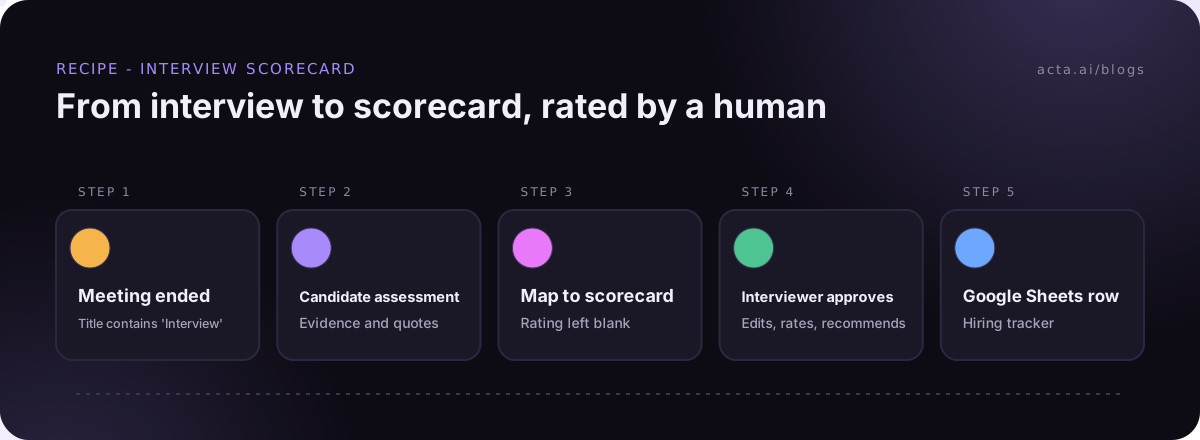
- Trigger: Meeting ended. Add the filter "title contains Interview" so it fires on interviews and not on your Tuesday team sync. If your calendar titles are a mess ("Chat w/ Sam", "Sam - round 2"), fix the naming first. It's the most common reason this kind of automation misfires.
- Acta data: the template result. Pull the candidate assessment for that meeting. (Or start from the "Meeting template result ready" trigger instead, which fires when the report is done.)
- AI step: shape it into your scorecard. Give it your exact competencies and format, and tell it to leave Rating and Recommendation blank. Something like: "Map the evidence to these four competencies. Quote the candidate. Do not rate. Do not recommend."
- Human approval: the interviewer. The run pauses in the Approvals inbox. The interviewer opens the draft, fixes what's wrong, adds ratings and a recommendation, and approves. You can turn on an email with Approve and Reject buttons. If nobody answers before it expires (24 hours by default, up to 7 days), nothing is sent.
- Google Sheets: add a row. Candidate, role, round, interviewer, ratings, recommendation. One row per interview.
- Gmail: tell the recruiter. A short email to Dana with the approved scorecard. A Slack message to her works just as well.
About that 24-hour expiry: I'd leave it at the default. If an interviewer can't approve a scorecard within a day, the expired run is the signal your recruiter needs to go chase.
What the recruiter gets
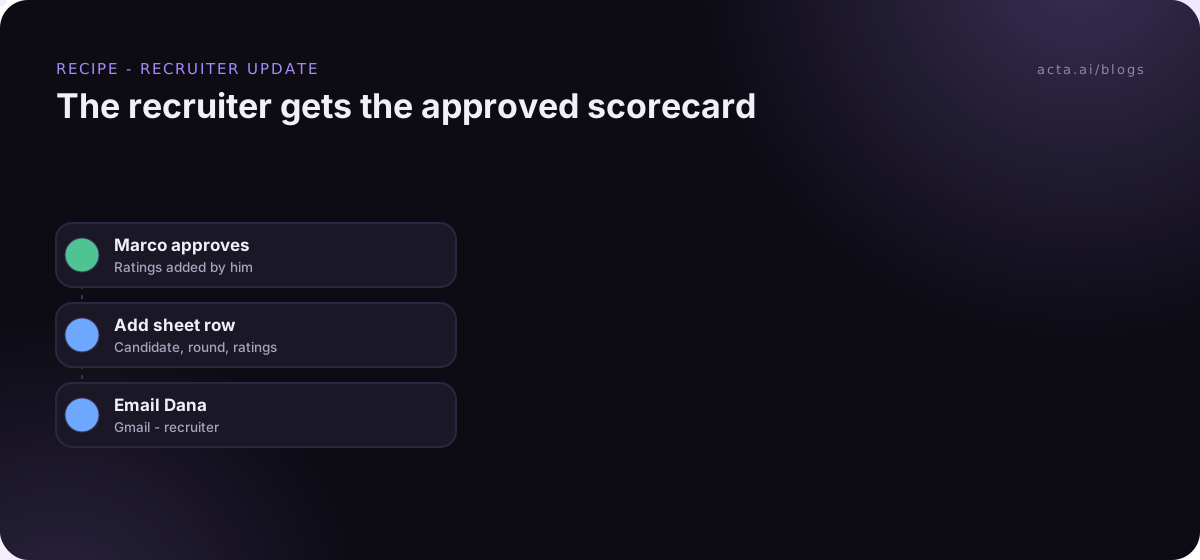
An illustrative example (made-up candidate) of the email after Marco approves his round-2 scorecard:
Scorecard: Sam Okafor, Senior Data Analyst, round 2 (Marco)
SQL depth: 4/5. Walked through rewriting the weekly revenue query with window functions; explained why the old join double-counted refunds.
Stakeholder management: 3/5. Good story about pushing back on a VP's dashboard request; vaguer on how the disagreement ended.
Recommendation: Hire, pending round 3. Next interviewer: ask how Sam handled the refund fix with the finance team.
Notice what's in there. Evidence first, then a human rating. Marco wrote the numbers and the recommendation. The AI wrote the parts nobody wants to type out from memory.
How do you test it before it goes near a candidate?
Don't turn it on and hope. Run it against an old interview first (a mock one with a colleague is ideal):
- Use a test run. It shows what each step would send without sending it.
- Send the test output to your own email or a private Slack channel, not to Dana.
- Click "Check setup." It flags missing settings and app connections, like a Google Sheet you forgot to connect.
- Read the AI step's draft critically. Did it invent evidence? Did it sneak in a rating? If yes, tighten the instruction.
Every time you turn the agent on, Acta saves a version, so if a tweak goes wrong you can restore the last one. And History shows what every step did on every run, which is handy when an interviewer says "I never got the approval."
How to write interview feedback the interviewer will actually stand behind
Automation gets you a draft. The feedback is still the interviewer's. A few habits make the difference:
- Edit the evidence, don't just approve it. If the draft quotes something out of context, fix it. Your name is on this.
- Rate against the definition, not the other candidates. "Meets the bar for senior" beats "better than the last one."
- Write the concern plainly. "Couldn't explain the tradeoff between X and Y" is useful. "Not sure about him" isn't.
- Give the next round a job. One specific question to probe. That's what turns a stack of scorecards into a loop.
And keep the debrief after the scorecards are in. That's the whole point of writing them separately.
Who should skip this and do it another way?
Not every team needs an agent for this.
- You hire twice a year. Just use the candidate assessment report in Acta after each interview and paste it into your hiring scorecard by hand. No automation needed.
- Your ATS is the system of record and you want everything in it. Agent Builder doesn't have a built-in action for applicant tracking systems. You could send the approved scorecard out through a webhook or Zapier's "Send to a Zap" step and let your existing Zap handle the ATS side, but test that path carefully.
- Candidates in your market rarely agree to recording. Then this recipe doesn't apply. A good written rubric and a 10-minute calendar block after each interview will do more than any tool.
If you're running a few loops a month, though, I'd set it up. The hiring page shows the wider set of recruiting templates, and human approval in automation goes deeper on approval steps if you're building others.
Frequently asked questions
Can AI fill in an interview scorecard on its own?
It can draft the evidence, but it shouldn't rate or recommend. Leave those fields blank in the draft and make the interviewer fill them in before approving.
What's the best interview scorecard template?
The simplest one your team will actually use: three to five competencies, evidence for each, a defined rating scale and a recommendation. Keep it the same across every interviewer for the role.
Does the candidate need to know the interview is recorded?
Yes. Tell them in the invite and at the start of the call, and don't record if they say no. Some places legally require everyone's consent.
Can the scorecard go straight into our ATS?
Not with a built-in Acta action. You can send it out through a webhook or a Zapier step, or keep a shared Google Sheet and copy it over.
What happens if the interviewer never approves?
The approval expires (24 hours by default, up to 7 days) and nothing is sent. History shows the expired run, so the recruiter knows whom to chase.
Want to try it on your next interview loop? Start a free 15-day Acta trial.