Hindi interview transcription is about quotes, not minutes
A meeting transcript is mostly raw material for a summary. An interview transcript is different: it's the evidence. A reporter's story, a researcher's finding or a recruiter's hiring note all rest on what one person actually said, and a single softened word can change the meaning. "Hamein loan nahin mila" (we didn't get the loan) and "abhi tak nahin mila" (we haven't got it yet) are very different claims in a story about a credit scheme.
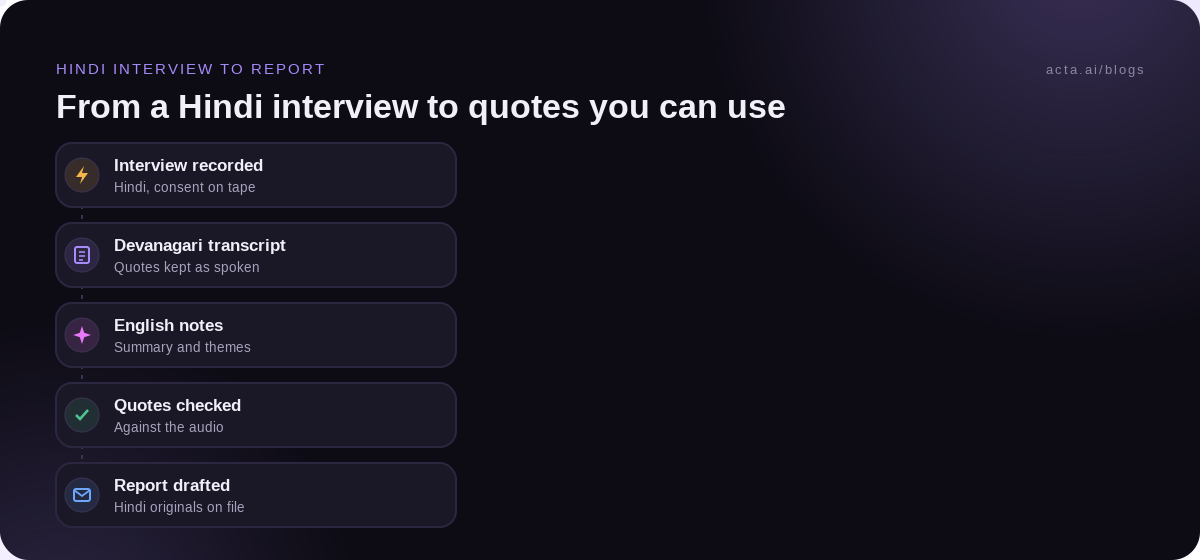
That's why the transcript has to stay in the language the person spoke. Acta writes Hindi in Devanagari and keeps quotes as spoken, even when you ask for English notes. Summaries and themes can be in English for your editor or donor; the words in quotation marks stay Hindi until you decide how to render them.
The second difference is volume. A research project might involve 30 interviews of 45 minutes each. Nobody reads 22 hours of transcript cover to cover twice. You need a short English summary per interview to find the right passages, and a reliable transcript to quote from once you've found them. The qualitative interview transcription guide covers coding and conventions; this post covers the Hindi-specific parts.
If what you need is a summary of a Hindi team meeting rather than an interview, the Hindi meeting summary guide is the better fit, since it deals with decisions and action items.
Set the language before the first interview
The language setting applies to new recordings, not old ones, so do this once before fieldwork begins. Everyone on the team who records interviews needs to set it on their own account.
- Open the Acta dashboard and go to Settings, then Meetings.
- Find the Language card, just below "Add Acta Notetaker to my meeting invites".
- Under "Language spoken in meetings", choose Hindi, or Auto if your interviews switch between Hindi and English-only sessions. The default is English, so don't skip this.
- Under "Language for my notes", choose Same as the meeting for Hindi notes, or English if your report is in English.
- After the first interview, open its page and check the small language chip next to the tabs. If it doesn't say Hindi, use the "Change language" link and record a short test.
Acta detects English, Hindi, French, Spanish and German automatically; ten more languages can be chosen in Settings, marked as beta. Hindi is one of the five automatic ones, so Hinglish interviews (Hindi sentences full of English words like "salary", "form" or "online") are handled under Hindi with no separate option. The meeting languages help article lists all 15.
A practical tip from fieldwork: if you interview in Hindi but write in English, pick English notes from day one. It's easier to scan 30 English summaries for themes than to switch settings halfway through a project and end up with a mix.
Ask for consent on tape, in the language of the interview
Ask before you press record, then ask again once the recording is running so the answer is in the transcript. Do it in Hindi if that's the interview language. A consent form in English that a respondent signed without reading carefully is weak evidence; a spoken exchange in their own language is clear.
A short script that works:
"Kya main yeh baatcheet record kar sakta hoon? Yeh sirf is report ke liye hai."
Gloss: May I record this conversation? It is only for this report. (A woman interviewer says "sakti hoon".)
Then say what happens to the recording: who sees it, whether names will be used, how to withdraw. Researchers usually have an ethics protocol that sets this; follow it, and use the recording as a second record, not a replacement for the protocol.
This is general information, not legal advice. The rules depend on where you are and what you're doing with the data. For India, the DPDP Act guide to meeting recording covers notice and consent in more depth, and the general guide to recording meetings with AI explains what to tell participants. For job interviews specifically, read recording job interviews: consent and best practice.
Choose the capture method that fits where the interview happens
Interviews happen in odd places: a courtyard, a tea stall, a WhatsApp call, a Zoom link sent by an HR team. Acta's language setting works the same way whichever method you use, so pick the one that suits the setting:
| Where the interview happens | How to capture it | Watch out for |
|---|
| In person, in a village or office | Acta mobile app on your phone | Fans, traffic and children nearby |
| Recorded earlier on a voice recorder | Upload the file to Acta | Language must be set before uploading |
| Phone or WhatsApp call from a laptop | Desktop app, press Record | Speakerphone echo |
| Google Meet or Teams in the browser | Chrome extension | Tell the person you're recording |
| Zoom or Teams desktop app | Desktop app or meeting bot | A bot joining can unsettle a nervous source |
For sensitive interviews, the bot matters. A notetaker appearing in the participant list changes how people talk. The Acta desktop app records the call's sound and your microphone from your own computer, never the screen, so nothing extra joins. In a browser call, the Chrome extension does the same for Google Meet, Teams in the browser and the Zoom web client. Either way, you still tell the person you're recording.
For in-person work, put the phone flat on a table between you, about an arm's length from the speaker, and switch it to airplane mode with recording allowed so calls don't cut in. If you're interviewing a group, sit them closer together rather than moving the phone around.
Worked example: a self-help group interview near Jaipur
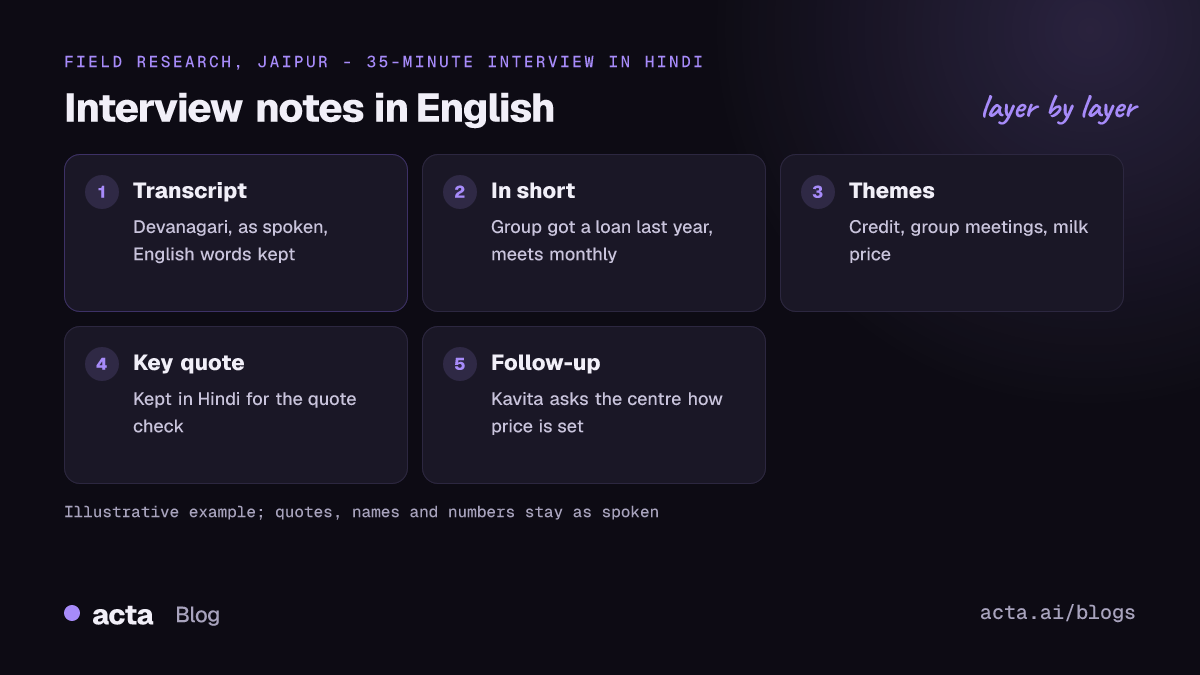
This is an illustrative example. An NGO researcher, Kavita, interviews a member of a women's self-help group about a dairy collection centre. The interview is 35 minutes, mostly Hindi with English words like "loan" and "meeting". It's recorded on the mobile app with Hindi as the spoken language and English notes, because the report goes to an English-speaking funder.
A few lines of the transcript (illustrative):
पिछले साल हमें लोन मिला था।
Gloss: Last year we got a loan.
दूध का दाम कम है।
Gloss: The milk price is low.
हम हर महीने मीटिंग करते हैं।
Gloss: We hold a meeting every month.
In this example, "लोन" (loan) and "मीटिंग" (meeting) are English words inside Hindi sentences, kept as they were spoken. The English notes for the same interview look like this:
In short: The group received a loan last year and meets monthly. The respondent's main concern is the milk price paid at the collection centre.
Themes: access to credit; regular group meetings; price paid for milk.
Key quotes: "दूध का दाम कम है।"
Follow-up: Kavita to ask the centre manager how the price is set.
The headings stay in English, as all Acta report headings do. The quote stays in Hindi. For the funder report, Kavita writes her own English rendering ("The milk price is low") and keeps the Devanagari original in a footnote or an appendix. If a reader later questions the translation, she can point to the exact line and the timestamp in the audio.
When she has all 30 interviews, she uses OneChat to ask across them: "Which respondents mentioned the milk price?" OneChat answers in the language you ask in, with sources pointing back to each interview, so the English question returns an English answer and the links take her to the Hindi lines.
Check every published quote against the audio
No transcript, from a person or a machine, should go straight into print. The SPJ Code of Ethics asks journalists to verify information before releasing it and to use original sources whenever possible; for an interview, the original source is the recording. SPJ has been revising its code in 2026, so check the current text, but the duty to verify isn't new. The same habit protects researchers and recruiters.
A workflow that takes a few minutes per quote:
- Mark the candidates. From the English notes, list the quotes you might use. Don't check what you won't publish.
- Find each line. Search the transcript for a distinctive Hindi or English word in the quote.
- Listen to ten seconds either side. Context changes meaning more often than a wrong word does. Check whether a sentence was a question, a joke, or someone else's view being repeated.
- Fix the Devanagari if needed. Names of villages, schemes and people are the most common errors. Correct them against your field notes.
- Write your translation. Keep it close to the original. Mark anything you added in square brackets.
- File the pair. Save the Hindi original, your English version and the timestamp together, so an editor or reviewer can check it.
If you're working with a translator, give them the Devanagari text and the audio, not just the text. Tone matters in Hindi: "acha" can mean "good", "I see" or "really?" depending on how it's said.
For more on checking a transcript before publication, see how journalists transcribe interviews accurately.
Hiring screens in Hindi need English notes and Hindi evidence
Recruiters in Indore, Lucknow or Noida often screen candidates for customer-support, field-sales or logistics roles in Hindi, because that's the language the job uses. The hiring manager in Bengaluru or Gurugram usually wants an English write-up. That's the same split as the research case: English notes, Hindi transcript.
Set the notes language to English and run a report template that matches the role. Acta has 40 built-in templates and you can build your own; both follow the notes language. The candidate's answers stay quoted as spoken, which helps fairness. If the panel disagrees later about whether a candidate "explained the refund process clearly", they can read the actual Hindi answer instead of someone's paraphrase. The interview notes page for hiring teams shows how scorecards are drafted. Written evidence beats a panel's impressions.
One thing to avoid: don't mark a candidate down on the transcript's spelling. If a Devanagari word looks odd, that's the transcript, not the candidate.
The limits that matter for interview work
Be clear with your team about what this setup does and doesn't do before you rely on it.
- One language per interview. Hindi with English mixed in is supported. A respondent who switches into Marwari or Bhojpuri for long stretches will produce weaker text in those passages, because those aren't among the 15 languages.
- No translation of quotes. English notes give you an English summary and themes, but quotes stay in Hindi. Translation for publication is your job.
- No third notes language. Notes come in Hindi or English. A Tamil-speaking colleague reading Hindi interviews gets English.
- Speaker names may be missing. If speaker labels aren't available, the transcript still comes back in Hindi. Label "interviewer" and "respondent" yourself if your method needs it.
- Proper nouns need checking. Village names, scheme names and family names are where errors cluster.
- Audio decides quality. A noisy courtyard hurts more than any setting can fix. The guide to accents, noise and crosstalk has practical fixes.
Numbers, dates and names are kept as said. If a farmer says "dhai lakh", the notes keep lakh rather than converting it to 250,000, so the figure you quote matches the tape.
Where Acta fits
Acta transcribes Hindi and Hinglish interviews in Devanagari, keeps quotes as spoken, and writes interview notes in Hindi or English, whether you record on a phone, a laptop or upload a file. It doesn't replace your consent process or your own quote check.
Frequently asked questions
Can AI transcribe a Hindi interview?
Yes. Acta transcribes Hindi interviews in Devanagari, including interviews that mix Hindi and English. Set "Language spoken in meetings" to Hindi or Auto, record with the mobile app, desktop app or Chrome extension, or upload an existing recording. Check names and any quote you plan to publish against the audio, as you would with any transcript.
Can I get an English transcript of a Hindi interview?
Not a translated transcript. The transcript stays in Hindi, as spoken, in Devanagari. If you choose English as the notes language, the summary, themes and follow-ups come in English while quotes remain in Hindi. For an English report, translate the quotes you use yourself and keep the originals on file.
Does Hindi interview transcription work with Hinglish?
Yes. Hindi-English mixing is handled as Hindi, and Auto detects it. English words inside Hindi sentences, such as "loan", "salary" or "online", are kept in the transcript as spoken. Long English-only passages inside a Hindi interview can come out less cleanly, so check quotes from those parts against the audio.
How do I transcribe a Hindi interview recorded on my phone?
Either record it in the Acta mobile app, or upload the audio file afterwards. Set Hindi (or Auto) under Settings, Meetings, Language before you upload, because the setting applies to new recordings only. The transcript arrives in Devanagari with notes in Hindi or English, depending on your notes setting.
Are quotes changed when notes are in English?
No. Quotes are kept exactly as spoken, in Hindi, even when the summary and themes are in English. Names, numbers, dates and amounts such as lakh or crore are kept as said too. This is deliberate: it lets you check every quote against the audio and write your own translation.
Which Indian languages besides Hindi can be transcribed?
Acta supports 15 languages in total. Among Indian languages, Hindi is detected automatically, while Telugu, Tamil, Kannada, Marathi and Bengali are in beta and must be chosen by name in Settings. Gujarati, Punjabi, Malayalam, Odia and Urdu are not supported yet.
Decide your workflow before the fieldwork starts
Settle these before the first interview, not after the twentieth:
- Set the language on every recorder's account: Hindi or Auto for speech, and one agreed notes language for the whole project.
- Write the consent script in Hindi: read it on tape at the start of every interview.
- Choose one capture method per setting: phone for the field, desktop app for calls, upload for older recordings.
- Agree the quote check: who listens back, where the Hindi originals and translations are filed, and how timestamps are recorded.
- Keep a names list: villages, schemes and people, spelled the way you'll publish them.
To try it on your next interview, install the Acta desktop app or start a 15-day free trial.