A Hindi meeting summary is a different job from transcription
A transcript tells you what everyone said, line by line, in Devanagari. A summary tells you what the meeting decided, who's doing what, and by when. Most people searching for Hindi meeting minutes actually want the second thing. Nobody forwards a 40-minute transcript to the regional head; they forward six lines and a task list.
The two are linked, because the summary is only as good as the transcript under it. If you're still sorting out the transcript side (mixed Hindi and English, accents, which tool to use), start with the Hindi meeting transcription guide for the transcript itself, and the earlier post on Hinglish transcription for mixed meetings. This post assumes the transcript is decent and asks: what do you do with it?
There's also a language question the transcript doesn't raise. A transcript has to be in Hindi, because that's what people spoke. A summary doesn't. It can be in Hindi for the team that held the meeting, or in English for everyone else. That choice is the core of this guide.
Both choices have deep roots. Hindi is one of the 22 languages in the Constitution's Eighth Schedule, and English remains the working language of a lot of Indian business, so plenty of organisations already keep records in both. The history of the Eighth Schedule shows how that list has grown since 1950. A notes tool that forces one or the other doesn't fit how these teams work.
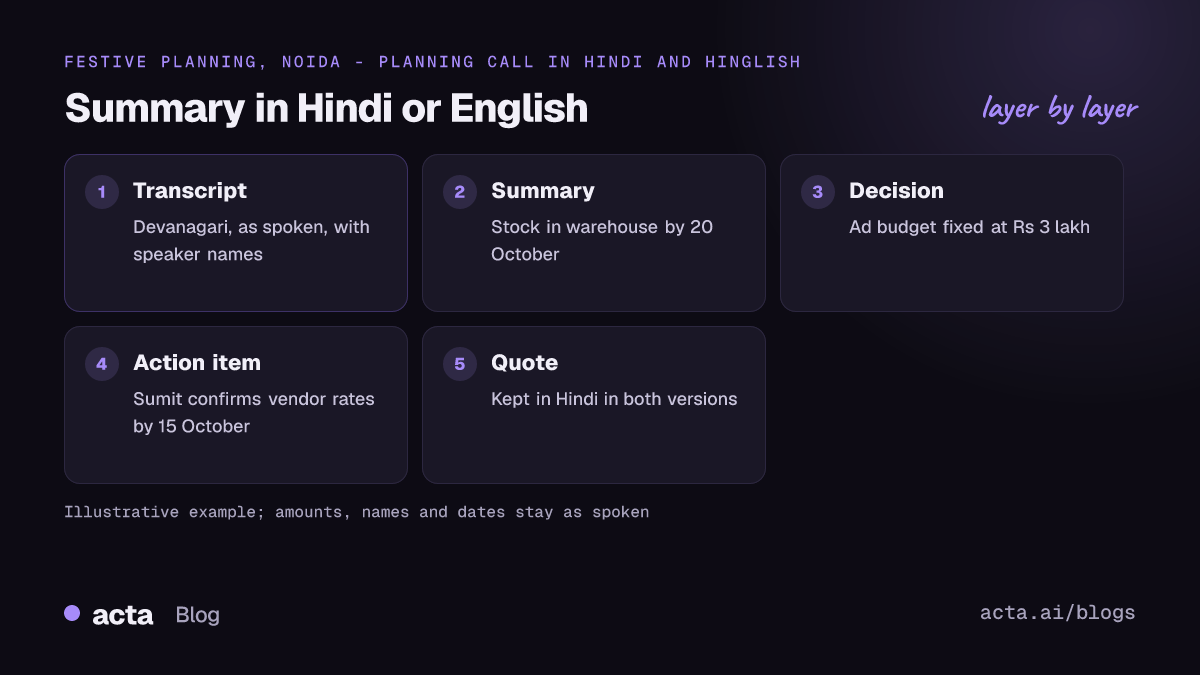
Five things come out of every Hindi meeting
Once a Hindi meeting is processed, Acta produces the following, all written in your chosen notes language:
- Summary: a short account of what was discussed and concluded, under headings like "In short".
- Decisions: each thing the group agreed, as a separate line, so you can find it later.
- Action items with owners: who committed to what, with any date mentioned.
- Report templates: any of the 40 built-in templates, or your own custom ones, run on the meeting.
- Follow-up email draft: a draft you can edit and send to attendees or the client.
The transcript sits alongside these in Devanagari, as spoken, with speaker names where available. Questions work in either language too: ask Acta about a Hindi meeting in English and you get an English answer, or ask in Hindi and get Hindi. The guide to reading your meeting notes explains each tab.
What you don't get is a third language. Notes are in Hindi or English. If a Chennai colleague wants Tamil notes from a Hindi meeting, that isn't an option; English is the shared fallback.
Pick Hindi notes for the room, English notes for the record
The decision is mostly about who reads the notes, not who spoke. A few common situations:
| Situation | Notes language | Why |
|---|
| Weekly team meeting, all Hindi speakers | Hindi | Readers were in the room; nothing lost |
| Dealer or distributor call feeding a CRM | English | CRM fields and reports are in English |
| Review read by a manager in another region | English | Shared working language across offices |
| Panchayat, school or NGO committee meeting | Hindi | Members expect minutes in Hindi |
| Client call where the client gets the follow-up | Match the client | Send what they'll actually read |
My own rule: if anyone who regularly reads the notes struggles with Devanagari, choose English. Otherwise keep Hindi. Hindi notes keep phrasing the team will recognise, and English notes can flatten things like politeness or hedging ("देखते हैं" carries a softer meaning than "we'll check").
Because "Language for my notes" is a personal setting, a sales rep in Kanpur can get Hindi notes from their dealer calls while their manager in Gurugram, recording a different set of meetings, gets English. If both need the same meeting in different languages, the person whose account records it decides; the other can ask Acta questions in their own language.
Set up Hindi or English notes in four steps
- In the Acta dashboard, open Settings and click Meetings.
- On the Language card (under "Add Acta Notetaker to my meeting invites"), set Language spoken in meetings to Hindi, or to Auto if your meetings switch between Hindi and English, French, Spanish or German.
- Set Language for my notes to Same as the meeting for Hindi notes, or English for English notes.
- Record the next meeting. Its page shows a language chip next to the tabs; if it doesn't say Hindi, click Change language and fix the setting for next time.
The setting affects new meetings only, so last week's meeting won't change. It works however you capture the call: the notetaker bot in Zoom, Google Meet or Teams, the desktop app for the Zoom or Teams apps and anything else with sound, the mobile app for in-person meetings, or an upload. If you're recording people who aren't used to it, tell them first; the article on recording consent has wording you can adapt. For teams in India, the DPDP Act recording guide covers the privacy side. Full option details are in the meeting languages help article.
Owners, dates and amounts come through as they were said
The parts of a summary that cause trouble later are the specifics: who, when, how much. Acta keeps names, numbers, dates, amounts, formulas, product names and technical terms as spoken. In practice that means:
- Money: "तीन लाख" or "₹3 lakh" stays in lakh. It isn't turned into 300,000 or into dollars, in Hindi notes or English ones.
- Names: "सुमित" in a Hindi summary, "Sumit" in an English one. Check the spelling matches your CRM or HR system the first time.
- Dates: the date said is the date written. If someone said "15 अक्टूबर तक", the English action item reads "by 15 October".
- Product and technical terms: SKU codes, GST, "invoice", "dispatch" and brand names stay as they are, which is how Hinglish speakers use them anyway.
Quotes follow the same logic. An English summary of a Hindi meeting still quotes people in Hindi. That's deliberate: a translated quote stops being evidence. If the supplier said "इस बार देर नहीं होगी", the record should show those words, and the English summary around it explains what they mean.
One honest caution: an AI summary can attach a task to the wrong person when two people talk over each other, or when someone says "मैं देख लूँगा" without being clearly identifiable. The owner is only as clear as the conversation. Ask people to name owners out loud at the end ("तो सुमित रेट कन्फ़र्म करेंगे, ठीक है?") and the action items get far more reliable.
A filled example in Hindi and in English
This is an illustrative example. A Noida-based home-goods brand holds its festive-season planning call in Hindi with plenty of English words. Here's how the notes could look with Hindi selected:
In short: दिवाली सेल का स्टॉक 20 अक्टूबर तक गोदाम में पहुँचना चाहिए। विज्ञापन बजट ₹3 लाख तय हुआ।
Decisions: विज्ञापन बजट ₹3 लाख रहेगा। नए पैकेजिंग वेंडर को ट्रायल ऑर्डर दिया जाएगा।
Action items: सुमित: 15 अक्टूबर तक वेंडर से रेट कन्फ़र्म करेंगे। नेहा: 9 अक्टूबर तक इंस्टाग्राम कैंपेन का ड्राफ़्ट भेजेंगी।
Key quotes: "पिछली बार स्टॉक देर से आया था, इस बार ऐसा नहीं होना चाहिए।"
And the same meeting with English selected:
In short: Diwali sale stock must reach the warehouse by 20 October. The ad budget was fixed at ₹3 lakh.
Decisions: Ad budget stays at ₹3 lakh. A trial order goes to the new packaging vendor.
Action items: Sumit to confirm rates with the vendor by 15 October. Neha to send the Instagram campaign draft by 9 October.
Key quotes: "पिछली बार स्टॉक देर से आया था, इस बार ऐसा नहीं होना चाहिए।" (Last time the stock came late; that shouldn't happen this time.)
Compare them line by line. The headings are English in both. The amount, dates and names match exactly. The quote stays in Hindi in both versions; the gloss in brackets is ours, added for readers of this article. The Hindi version reads naturally to the people in the room, while the English version is the one you'd paste into a weekly report for head office.
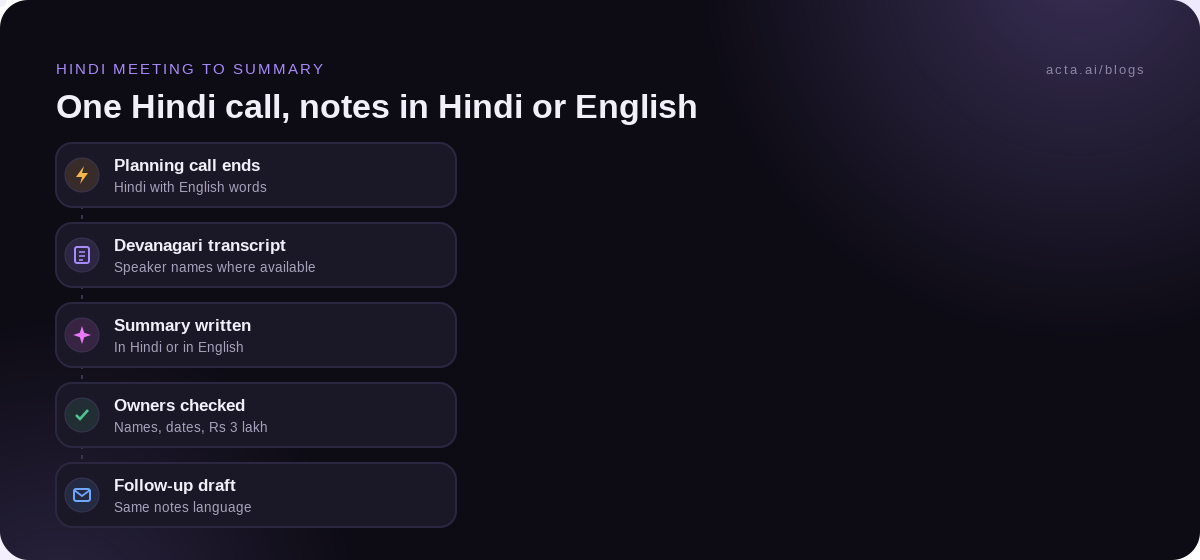
Report templates follow the notes language
Summaries are the default, but many teams lean on structured reports: a sales qualification report, a one-on-one recap, a project status update. Acta's report templates (40 built in) and any custom template you build are written in the notes language. Run a project update template on a Hindi meeting with Hindi notes and the content arrives in Hindi under English section headings; switch to English notes and the same template comes back in English.
This is where English notes earn their place for many Indian teams. A dealer-visit report that feeds Salesforce, HubSpot or Zoho through the CRM integration is easier to search and report on when every record is in one language. A Hindi version is fine for the field team's own reading, but a sales ops analyst filtering 200 records in English won't find "भुगतान" when searching for "payment".
The follow-up email draft also uses the notes language. For a Hindi-speaking client, Hindi notes give you a Hindi draft you can tidy and send. For a mixed group, English is usually safer. Either way, read it before sending: a draft is a draft.
Review a Hindi summary before you forward it
For the first week or two, give each Hindi summary a short review. These are the mistakes I see most often:
- Leaving the language on English: English is the default. A Hindi meeting recorded on English produces a poor transcript and a worse summary. Set Hindi or Auto first.
- Trusting owners blindly: check that each action item's owner is the person who actually agreed to it.
- Missing the English parts of Hinglish: Hinglish is supported, but a stretch of rapid English inside a Hindi meeting can come through less cleanly. Skim for dropped numbers.
- Expecting old meetings to change: switching to English notes today won't rewrite last month's Hindi summaries.
- Forgetting the room: echoey halls and speakerphones hurt any language. The accuracy guide for accents and noise covers fixes.
Once a team trusts its summaries, the review drops to a glance at the action items. That's the point to stop checking every line.
Where Acta fits
Acta transcribes Hindi and Hinglish meetings in Devanagari and writes the summary, decisions, action items, templates and email draft in Hindi or English. For browser meetings in Google Meet or Teams, the Chrome extension records without a bot joining the call.
Frequently asked questions
Can AI summarise a Hindi meeting?
Yes. Acta transcribes Hindi meetings, including Hindi-English mixes, and writes a summary with decisions and action items. Set "Language spoken in meetings" to Hindi or Auto, then choose Hindi or English for the notes. Hindi notes are written in Devanagari; English notes keep names, dates, amounts and quotes exactly as spoken in the meeting.
Can I get English notes from a Hindi meeting?
Yes. Choose English under "Language for my notes". The transcript stays in Hindi, in Devanagari, as it was spoken. The summary, decisions, action items, report templates and follow-up email draft are written in English, while quotes remain in Hindi. This suits teams whose managers, clients or CRM work in English.
Does it work with Hindi and English mixed?
Yes. Hindi-English mixing, or Hinglish, is supported as part of Hindi, and Auto detects it. English words used inside Hindi sentences, such as "invoice", "dispatch" or product names, are kept as said. Long stretches of fast English inside a mostly Hindi meeting can come through less cleanly, so skim the numbers in those parts.
How do I write Hindi meeting minutes from a recording?
Upload the recording to Acta, or record the meeting live with the spoken language set to Hindi. Acta produces a Devanagari transcript plus a summary, decisions and action items you can use as minutes. For formal minutes, run a report template, check owners, dates and amounts against what was said, then share the result.
Are lakh and crore converted in English notes?
No. Amounts are kept as spoken. If someone says ₹3 lakh or 2 crore, the English notes say ₹3 lakh or 2 crore, not 300,000 or 20 million. Dates, names, product codes and technical terms are also left as they were said, so the numbers in the notes match the meeting.
Choose the notes language for each kind of meeting
Settle this once per team rather than meeting by meeting:
- Map your readers: list who reads each recurring meeting's notes and whether they read Devanagari comfortably.
- Default the team meetings to Hindi: internal Hindi meetings read best in Hindi.
- Send CRM and head-office records in English: one language makes search and reporting work.
- Name owners out loud: end each meeting by restating who does what by when.
- Check the chip: make sure each meeting page says Hindi before you trust the summary.
To try it on your next Hindi call, install the Acta desktop app and start the 15-day free trial.