Qualitative interview transcription is turning recorded research interviews into written text you can analyse, using conventions you set before the first interview: how verbatim to be, how to mark pauses, overlaps and inaudible passages, and how to de-identify participants. Most researchers now use an automatic first draft, then correct it against the audio, anonymise it and format it for coding software.
Use Cases 11 min read
Qualitative Interview Transcription: Methods, Conventions and Coding
How to transcribe research interviews: verbatim or intelligent verbatim, a conventions page, de-identification, AI versus human transcription, and formatting for coding software.
By Sarma BKP, Founder & CEO, Acta · Updated
This guide is for PhD students, UX and market researchers, and anyone running semi-structured interviews for thematic or similar analysis. It isn't for conversation analysis, where detailed notation such as Jefferson's changes the whole job, and it doesn't replace your ethics board's rules on data handling. Where those rules and this guide differ, follow your board. If you interview for publication rather than research, our guide on how journalists transcribe interviews fits better.
Key takeaways
- Decide your transcription style (verbatim, intelligent verbatim or detailed notation) before interview one, and write it on a single page.
- Correct every automatic transcript against the audio. A full check usually takes longer than the interview itself; plan for it.
- De-identify as you transcribe: pseudonyms in square brackets, a separate anonymisation log, and watch for combinations of details that identify someone.
- Check that your consent form and ethics approval cover the transcription method you use, especially a cloud service.
- Format transcripts for your coding tool from the start: consistent speaker labels, timestamps and one file per interview.
Table of contents
- Qualitative interview transcription is part of the analysis
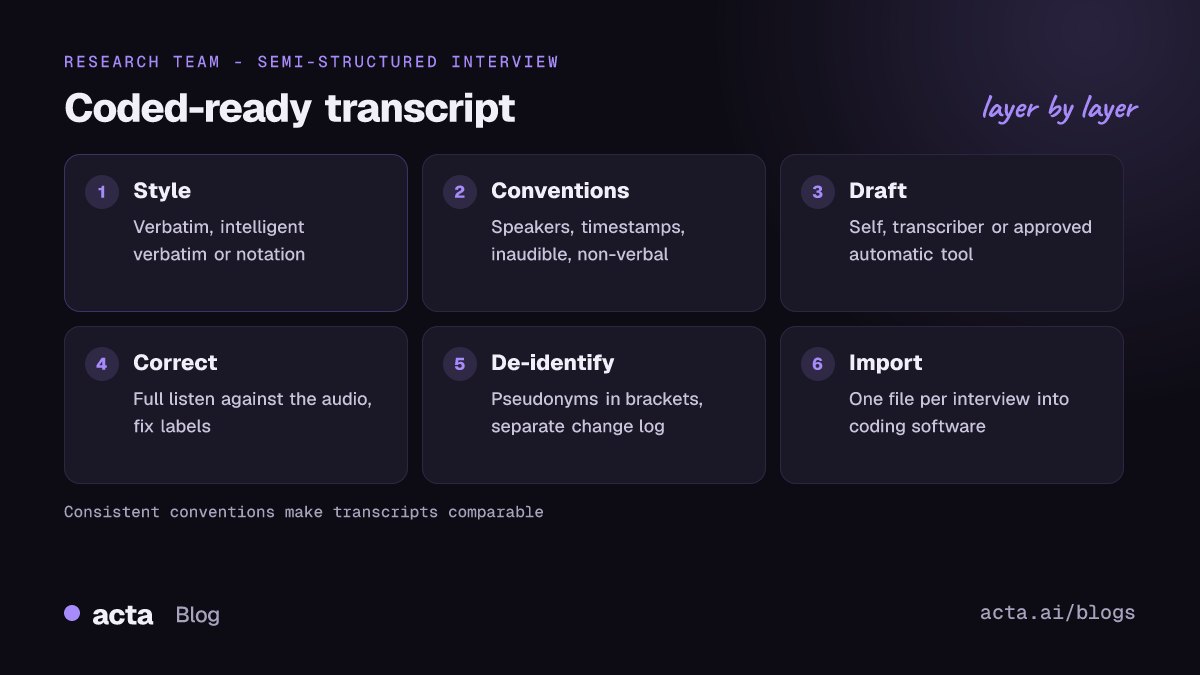
- Choose a transcription style before the first interview
- Write down your conventions on one page
- De-identify participants while you transcribe
- AI, human or self-transcription depends on ethics, budget and immersion
- Transcribe each interview in seven steps
- Use this transcript template and filled example
- Avoid the mistakes that cost you at the coding stage
- Frequently asked questions
- Plan your transcription before recruiting participants
Qualitative interview transcription is part of the analysis
It's tempting to treat transcription as clerical work you outsource so the "real" analysis can start. Most qualitative methods texts disagree. Every transcript involves choices: whether to keep a false start, how to show a long pause, whether "yeah, no" is agreement. Those choices shape what you can see later.
Braun and Clarke's widely cited paper on thematic analysis in psychology puts transcription inside the first phase, familiarisation with the data, alongside reading and rereading and noting initial ideas. That's why many supervisors ask students to transcribe at least some interviews themselves, or to correct automatic drafts closely rather than skim them.
So the aim isn't the fastest possible text. It's a faithful, consistent, de-identified record that you've listened to closely enough to start noticing patterns.
Choose a transcription style before the first interview
The level of detail should match your method. A thematic analysis of experiences rarely needs pause lengths in tenths of a second; a conversation analysis can't do without them. Pick one style and use it for every interview in the study.
| Style | What it keeps | Fits |
|---|---|---|
| Verbatim | Every word, fillers, false starts, repetitions, laughter, pauses | Discourse analysis, narrative work, studies where hesitation matters |
| Intelligent (clean) verbatim | All meaningful words; drops most fillers and stutters | Thematic analysis, UX and market research, most applied studies |
| Detailed notation (e.g. Jefferson) | Overlaps, pause timing, intonation, emphasis | Conversation analysis |
If you aren't sure, intelligent verbatim with a few markers ([laughs], [long pause], [crosstalk]) is a sensible default for thematic work. You can always go back to the audio for a passage that turns out to matter, as long as your timestamps let you find it.
Write down your conventions on one page
Conventions drift, especially across a team or across months of fieldwork. A one-page guide fixes that. Copy and adapt this:
Transcription conventions: [Study name]
Speakers: I = interviewer; P07 = participant 7. Second interviewer: I2.
Timestamps: [hh:mm:ss] at the start of each speaker turn, or every 2 minutes in long turns.
Style: intelligent verbatim. Keep "like" and "you know" only when they carry meaning.
Inaudible: [inaudible 00:14:32]. Best guess: [unclear: the Leeds office? 00:15:10].
Non-verbal: [laughs], [sighs], [long pause], [crosstalk].
Emphasis: none marked, unless analysis requires it.
De-identification: names, places and employers replaced in square brackets, e.g. [colleague], [hospital in northern city]. Every change logged in the anonymisation log.
File name: StudyCode_P07_2026-11-04_v1 (v2 after correction, v3 after anonymisation).
Share it with anyone transcribing for you, human or not. If you're using an AI tool, the conventions also tell you what to fix in its output.
De-identify participants while you transcribe
De-identification is easier during transcription than after. The UK Data Service's guidance on anonymisation for text data makes several practical points. Disclosure risk in qualitative data often comes from combinations of contextual detail rather than one identifier. Over-anonymising strips meaning, while under-anonymising leaves people identifiable. Its training materials suggest marking edits in square brackets and keeping a log of every replacement, stored separately from the anonymised files.
In practice:
- Replace direct identifiers: names, email addresses, exact employers. Use pseudonyms or roles in brackets.
- Generalise indirect ones: "the only female surgeon at [hospital]" may identify someone even without a name. Generalise to "[a senior clinician]" if the detail isn't analytically important.
- Keep the log separate: original term, replacement, location in transcript. Store it with the same care as the raw audio.
- Don't anonymise the audio: keep the original recording under access control until your data management plan says to delete it.
If your study falls under data protection law such as the GDPR, the audio and the first draft transcript are personal data. Our GDPR checklist for AI note takers covers the questions to ask any tool vendor; your institution's data protection officer has the final word.
AI, human or self-transcription depends on ethics, budget and immersion
There are three routes, and many studies combine them.
Automatic transcription
Fast and inexpensive, and accurate enough on clear audio to be a useful first draft. Accuracy drops with accents, specialist vocabulary, overlapping speech and poor recordings, and some models can produce text that was never said. Researchers testing OpenAI's Whisper documented hallucinated phrases in a share of transcripts, more often where speakers had long pauses. That's a real risk in interviews about difficult topics, where silences are common. Correct every line against the audio.
Professional human transcription
Better on hard audio and conventions, slower and more expensive. A transcriber is still a third party who hears your participants, so the consent form and data processing agreement need to cover them.
Transcribing yourself
Slowest, and the deepest immersion. A practical compromise: let a tool produce the draft, then correct it yourself while listening. You get most of the familiarisation benefit in less time.
Whichever route you choose, check two things before the first interview. Does your consent form tell participants how recordings will be transcribed and by whom? And does your ethics approval cover that method? A cloud transcription service often needs to be named or described. If it isn't, ask your ethics committee before you upload anything.
Transcribe each interview in seven steps
Here's a workflow that holds up across a 20-interview study.
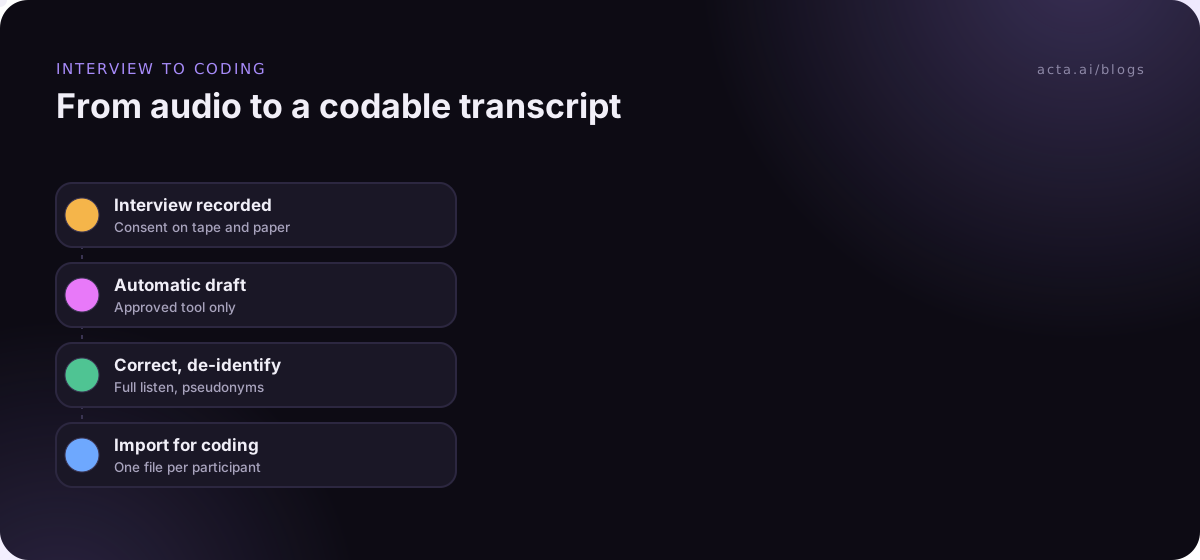
- Record cleanly. Use a dedicated recorder or phone close to the participant, plus a backup. For remote interviews, record from your computer so both voices come through clearly. Get consent on tape as well as on paper; our guide to recording consent and what to tell participants has wording ideas.
- Write a contact summary straight away. Five lines on setting, mood, surprises and early ideas. It's the start of your analysis, and it won't be in the transcript.
- Create the draft. Transcribe yourself, send to a transcriber, or run an approved tool. With Acta, for example, you can upload an MP3 or M4A recording and get back a transcript and summary.
- Correct against the audio. Listen to the whole interview at normal or slightly reduced speed, fixing words, speaker labels and timestamps. Mark anything you can't hear with [inaudible hh:mm:ss] rather than guessing.
- Apply your conventions. Convert to your chosen style, add non-verbal markers and label speakers consistently (I and P07, not "Speaker 1").
- De-identify and log. Replace identifiers in square brackets and record each change in the anonymisation log.
- Format and import. Save one file per interview with your naming scheme and import it into your analysis software.
On step 7: coding tools have their own rules. NVivo's help page on importing transcripts explains that timestamps in hh:mm:ss or mm:ss format can link text to the media, and that speaker names need timestamps alongside them (as of November 2026; check the help for your version). Settle the format before you transcribe 20 interviews in the wrong one.
Use this transcript template and filled example
Put a short header on every transcript so it can be understood without the rest of the project folder.
Header: Study code | Participant ID | Interview date | Mode (in person, video, phone) | Duration | Interviewer | Transcribed by and method | Corrected by and date | Anonymised (Y/N), log reference | Version
Body: [hh:mm:ss] Speaker: text, following the conventions page.
Filled example (an illustrative study on nurses' experience of night shifts):
NightShift_P07 | 4 Nov | Video | 52 min | Interviewer: AR | Draft: automatic, approved tool | Corrected: AR, 6 Nov | Anonymised: Y, log rows 41-49 | v3
[00:12:04] I: You mentioned the handover. What happens there?
[00:12:09] P07: Honestly, it depends who's on. With [charge nurse] it's thorough, fifteen minutes, every patient. Other nights it's, you know, [laughs] "they're all fine, see you tomorrow."
[00:12:31] I: And how does that feel?
[00:12:34] P07: [long pause] Scary, sometimes. You're the one holding it at three in the morning.
[00:12:48] P07: There was a night on [ward] when [inaudible 00:12:51] and nobody had told me about the fluids.
Notice the kept "you know" before the quoted handover: in intelligent verbatim it stays because it signals a shift into mimicry. The automatic draft had transcribed the long pause as silence and dropped "Scary, sometimes" into the next turn. Only the listen-through caught it.
Avoid the mistakes that cost you at the coding stage
Common mistakes
- Changing conventions halfway. If interview 12 uses a different style from interview 3, comparisons get shaky. Fix the conventions page first.
- Skimming the AI draft. Reading without listening misses wrong words that look plausible. Always listen.
- Anonymising too late. Exporting identifiable transcripts to a shared drive or coding project, then cleaning them, leaves copies behind.
- Losing timestamps. Without them you can't go back to the audio for tone, which you'll want when writing up.
- Generic speaker labels. "Speaker 2" across 20 files is meaningless at the coding stage. Use participant IDs.
Troubleshooting
- Overlapping speech: mark [crosstalk] and transcribe each voice separately at reduced speed. Speaker separation tools struggle here; see our post on speaker diarization for why.
- Strong accents or dialect: correct carefully and consider asking a colleague familiar with the dialect to check unclear passages. Our tips on accuracy with accents, noise and crosstalk help at the recording stage.
- Interviews in another language: decide whether you analyse in the original language or a translation, and record that decision in your methods. Check the tool's supported languages before relying on it; see transcribing other languages.
- Import errors in coding software: check timestamp format and file encoding first; those cause most problems.
Acta can produce the first draft in this workflow: it records remote interviews from your computer without a bot, in-person ones through the mobile app, or works from uploaded files, and returns a transcript with speaker names. Acta doesn't use customer data to train its AI models. Whether it fits your study is still a question for your ethics approval and data management plan.
Frequently asked questions
How long does qualitative interview transcription take?
Manual transcription takes several times the length of the recording, depending on audio quality and how detailed your style is. Correcting an automatic draft is quicker but still needs at least one full listen, usually longer than the interview itself. Budget time per interview before you set your fieldwork schedule.
Should qualitative interviews be transcribed verbatim?
Not always. Verbatim suits discourse and narrative analysis, where hesitations and repetitions carry meaning. Many thematic and applied studies use intelligent verbatim, which keeps every meaningful word but drops most fillers. Choose based on your method, state it in your methods section and apply it consistently.
Is it okay to use AI to transcribe research interviews?
Often yes, if your ethics approval and consent forms cover it and the tool's data handling meets your institution's rules. Check where audio is stored, who can access it and whether it's used for training. Then correct every transcript against the audio, because automatic tools make errors and occasionally add words never spoken.
What is the difference between anonymisation and pseudonymisation?
Pseudonymisation replaces identifiers with codes or false names, but someone with the key (your anonymisation log) can re-identify participants. Anonymisation removes or generalises details so that re-identification isn't reasonably possible. Most interview transcripts are pseudonymised; check how your data protection rules treat each.
Do I need to transcribe every interview in full?
Most qualitative analysis works from full transcripts, which lets you code systematically and quote accurately. Some rapid approaches work from detailed notes or partial transcripts. If you transcribe selectively, explain why in your methods and keep the audio so you can return to untranscribed sections.
Plan your transcription before recruiting participants
Transcription choices belong in your protocol, not in a panic after interview five. Settle these first:
- Pick a style: verbatim, intelligent verbatim or detailed notation, matched to your method.
- Write the conventions: one page covering speakers, timestamps, inaudible passages and file names.
- Clear the method: consent form and ethics approval name how transcripts are produced.
- Plan de-identification: pseudonyms in brackets, a separate log and rules for indirect identifiers.
- Test the import: run one pilot transcript through your coding software before fieldwork starts.
If you'd like to test an automatic first draft on a pilot interview, try the Acta desktop app during the 15-day free trial, with your ethics board's agreement.
Found this useful? Share it with your team.