A general agent covers breadth; a domain agent owns one job
An AI agent is software that takes a goal, decides on steps, uses tools to carry them out and checks the result. If that definition is new to you, our plain explanation of what an AI agent is covers the basics. The split this post cares about is scope.
A general-purpose AI agent is built to take whatever arrives. It has one long instruction set, access to many tools (search, email, files, calendar, a spreadsheet, maybe code), and it works out the plan fresh each time. Ask it to draft a policy, compare two vendors and book a meeting, and it will try all three. That flexibility is the point.
A domain agent, sometimes called a specialist agent, is built for one job inside one area of the business. A sales follow-up agent, an invoice-query agent and a risk-tracking agent are all domain agents. Each knows the vocabulary of its area, works from a fixed set of sources, has two to five tools, and produces the same shape of output every time. Domain specific AI agents trade range for predictability.
The line isn't about the underlying model. Both kinds often run on the same large model. What changes is the wrapping: the instructions, the context the agent is given, the tools it can call, the checks on its output and the person accountable for it.
Domain agents vs general agents, compared on six factors
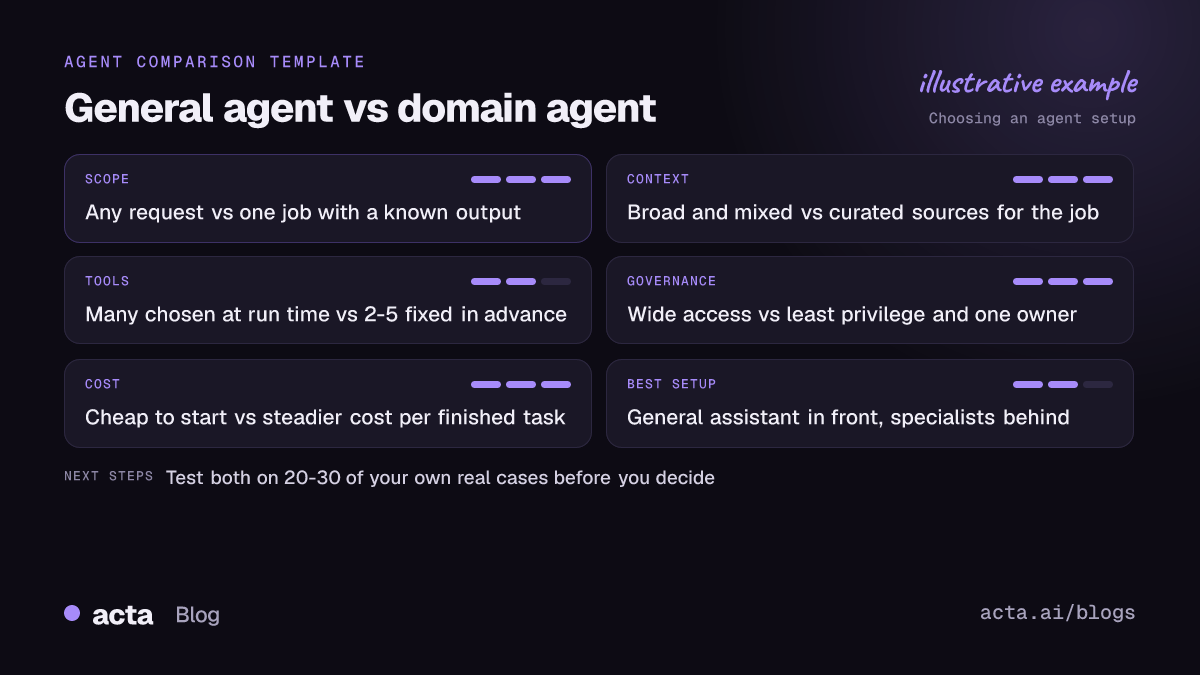
The table below is the short version. Each row gets its own section after it, because "it depends" is only useful when you know what it depends on.
| Factor | General agent | Domain agent |
|---|
| Scope | Any request, planned fresh each time | One job with a known output |
| Context | Broad, often long and mixed | Narrow, curated sources for that job |
| Tools | Many, chosen at run time | A few, fixed in advance |
| Governance | Hard to scope permissions tightly | Least-privilege access, clear owner |
| Cost per task | Low to set up, variable per run | More setup, steadier per run |
| Best for | Exploration, drafting, one-off questions | Repeatable work someone must check |
Read the table as a direction, not a verdict. A general agent with a good prompt and a single tool behaves a lot like a specialist. A specialist with vague instructions behaves like a weak generalist.
Accuracy depends on context more than on the model
When people say domain agents are "more accurate", what they usually mean is that the agent was given the right information and nothing else. Gartner made the same point in an April 2025 prediction that organisations will use small, task-specific AI models three times more than general-purpose large language models by 2027, noting that the response accuracy of general-purpose models declines for tasks that need specific business domain context.
You don't need a custom model to get that benefit. In practice, a domain agent's accuracy comes from three things:
- Curated sources. A contract-review agent reads the contract and your playbook, not the whole shared drive. Less noise means fewer confident answers built on the wrong document.
- A fixed output shape. If the output must have "Decision, Owner, Due date, Source", the agent can't drift into an essay, and a reviewer can spot a gap in seconds.
- Explicit rules for missing information. Tell it to write "Not discussed" or "Unassigned" rather than guess. General agents are usually tuned to be helpful, which is exactly when they fill gaps with plausible text.
A general agent can match this on any single task if you write the context and rules into the request. The difference shows on the hundredth run. The specialist has the rules baked in; the generalist depends on whoever is typing that day.
One honest caveat: nobody can give you a fair accuracy number for "general vs domain" in the abstract. It depends on your data, your prompts and how you score the output. Test both on 20-30 of your own real cases, scored against what a careful person would have written, before you trust any claim, including ours.
Tools are the part of an agent that does things: sends the email, creates the ticket, updates the CRM. The more tools an agent holds, the harder it is to say in advance what it might do. Google Cloud's architecture guide on choosing a design pattern for agentic AI systems notes that a single agent's performance can drop as it takes on more tools and more complex tasks, and that multi-agent designs need precise access controls for each specialised agent.
That is the governance case for specialists. A domain agent that drafts follow-up emails needs read access to meeting notes and draft access to email. It does not need to delete calendar events or edit a pricing sheet. When something goes wrong, you know which agent did it, which tools it had, and who owns it.
General agents make this harder. To be useful across many jobs they need broad access, and broad access is what turns a wrong guess into a wrong action. Our piece on AI agents and MCP security walks through what changes once a chatbot can act, and the risks of AI agents at work covers the controls to put around them.
Use these rules whichever type you run:
- Give each agent the smallest set of tools that finishes its job.
- Put a human approval step before anything external: emails to customers, CRM changes, posts.
- Log what each agent read and did, so you can explain an output weeks later.
- Name one owner per agent who decides when it changes.
If your organisation already uses a risk framework, the NIST AI Risk Management Framework is a voluntary reference that many teams map these controls onto.
Cost follows scope, not the label on the agent
General agents look cheaper at the start. There's one thing to set up, and it handles everything. The cost shows up later, in three places: longer prompts and more tool calls per request, more retries when the plan goes wrong, and more human time checking an output whose shape changes every run.
Domain agents cost more to set up. Someone has to write the instructions, choose the sources, define the output and test it. After that, each run tends to be shorter and more predictable, and checking it is quick because the reviewer knows where to look. Gartner's April 2025 release also notes that smaller task-specific models give quicker responses and use less computing power, which lowers running costs, though most business teams will see the bigger saving in review time rather than compute.
The useful measure is cost per finished task: model spend plus the minutes a person spends fixing or approving the result. A general agent that drafts a client recap in one call but needs ten minutes of edits is more expensive than a specialist that needs two calls and one minute of checking. Track both numbers for a month on a real workflow before you decide.
Don't build a specialist for something that happens twice a quarter. The setup won't pay back. Our guide to picking your first AI agent use case has a simple test for frequency and value.
Each type wins in a different kind of work
A general-purpose AI agent is the right call when:
- The question is new or one-off ("summarise what changed in our pricing discussions this year").
- Nobody can yet describe what a good answer looks like, so you can't build a template.
- The work crosses several areas and a wrong answer is cheap to catch.
- You are still learning which tasks repeat often enough to deserve their own agent.
Specialist AI agents are the right call when:
- The task repeats daily or weekly with the same shape of output.
- Someone outside the team will rely on the result: a customer, an auditor, a manager approving a deal.
- The agent needs write access to a system of record such as a CRM or ticket tracker.
- The area has its own vocabulary or rules (a sales method, a compliance check, a clinical note format) that a broad prompt keeps getting slightly wrong.
A quick test: write down the output you expect before you run the task. If you can write it as headings with blanks to fill, it's specialist work. If you can only describe it as "something useful", keep it with the generalist for now.
A general assistant routing to specialists is the setup that lasts
The debate about domain agents vs general agents mostly ends here: teams use a general assistant as the front door and let it hand work to specialists. The person asks one place; the router decides which specialist answers. This is usually called multi-agent orchestration, and the major agent frameworks document it.
OpenAI's guide to orchestration and handoffs describes a triage agent that hands a conversation to a specialist, and says handoffs fit best when the specialist should own the next response. Microsoft's handoff orchestration documentation describes the receiving agent taking full ownership of the task, with the conversation history so far. As of November 2026, Microsoft's Semantic Kernel documentation still marks its agent orchestration features as experimental, so check each vendor's page before you build on them.

A working router agent setup has four parts:
- The front door. A general assistant that understands the request and has a short description of each specialist.
- Specialist descriptions. One or two sentences per specialist saying what it handles and what it doesn't. Vague descriptions are the main reason requests land in the wrong place.
- A fallback. When no specialist fits, the general assistant answers itself and says so, rather than forcing the request on the nearest specialist.
- Sources on every answer. Each specialist returns where its answer came from, so the person can check it without asking again.
Start with one specialist behind the general assistant, not six. Add the next one when you see the same type of question arriving every week. The Google Cloud guide gives the same advice in its own words: if you're early in agent development, start with a single agent.
Five mistakes teams make when choosing
- Building specialists before the work is understood. If you can't describe the output, you'll keep rewriting the agent. Run the task with a general agent for a few weeks first and save the good outputs as your template.
- Giving the general agent every tool "just in case". Broad access is what turns an odd answer into an odd action. Keep write access with specialists that have an owner.
- Too many overlapping specialists. Two agents that both "handle customer questions" will confuse the router. Each specialist needs a boundary you can state in a sentence.
- Judging on a demo. Every agent looks good on the example it was built for. Test on your own messy cases, including the ones where the right answer is "this wasn't discussed".
- No one owns the agent. Agents drift as sources and processes change. Our post on why automations break covers the upkeep that keeps them reliable.
How Acta splits the work
Acta uses this pattern for meetings. OneChat takes any question across your meetings and sends questions about promises, follow-through, risks or decision history to a specialist for that job, and every answer shows the meetings it came from (the OneChat guide has examples). Role-specific report templates such as MEDDPICC deal reports or a client review act as narrow specialists after each call, and the Agent Builder, still in beta, lets you add approval steps before anything is sent. Meetings can be captured with a bot or with the desktop app, which records from your own computer and has a Copy notice button for the meeting chat; tell people you're recording, as our guide to recording meetings with AI and consent explains.
Frequently asked questions
What is the difference between a general agent and a domain agent?
A general agent takes any request and plans its steps from scratch, using a broad prompt and many tools. A domain agent does one job in one business area, with curated sources, a few fixed tools and a set output format. Both can run on the same model; the difference is scope, context, permissions and who owns the result.
Are domain specific AI agents more accurate than general ones?
Often, on their own job, because they get the right context and clear rules for missing information. Gartner noted in April 2025 that general-purpose models lose accuracy on tasks needing specific business domain context. There's no universal accuracy figure, though. Test both on 20-30 of your own real cases before deciding.
Do I need a custom model to build a specialist agent?
No. Most specialist agents in business teams use a general model with narrow instructions, selected sources, a fixed output template and limited tools. Fine-tuning or a smaller task-specific model can lower cost at high volume, but it's an optimisation to consider after the workflow is proven, not a starting requirement.
What is a router agent in multi-agent orchestration?
A router agent is a general assistant that reads each request and hands it to the specialist best suited to answer, falling back to answering itself when none fits. OpenAI and Microsoft both document this handoff pattern. It lets people ask in one place while specialists keep their narrow context and permissions.
When should a small team stick with one general agent?
Stick with one general agent while your requests are varied, rarely repeat and are cheap to check. Google Cloud's architecture guidance recommends starting with a single agent early on. Split off a specialist once a task repeats weekly, has a fixed output, or needs write access to a system like a CRM.
Choose the right agent mix for your team
You don't have to pick a side. Most teams get the best result from one general assistant and a small number of specialists behind it, added one at a time. Use this checklist before you build the next one:
- Write the output first: if you can't draft the headings of a good answer, keep the task with the general agent.
- Check the frequency: build a specialist only for work that repeats weekly or more.
- Limit the tools: list the two to five tools the job needs and grant nothing else.
- Add an approval step: anything that reaches a customer or a system of record waits for a person.
- Name an owner: one person reviews the agent's output monthly and decides when it changes.
If your specialists run on meeting content, start by capturing the calls themselves: the Acta Chrome extension records Google Meet, Microsoft Teams in the browser and the Zoom web client with no bot, and every account starts with a 15-day free trial.