Privacy & Security 9 min read
AI Agents and MCP Security: When a Chatbot Can Take Action
When an assistant can send email or prepare payments, the model cannot be the control. How to scope agent credentials, split tools, add approvals and enforce policy in code.
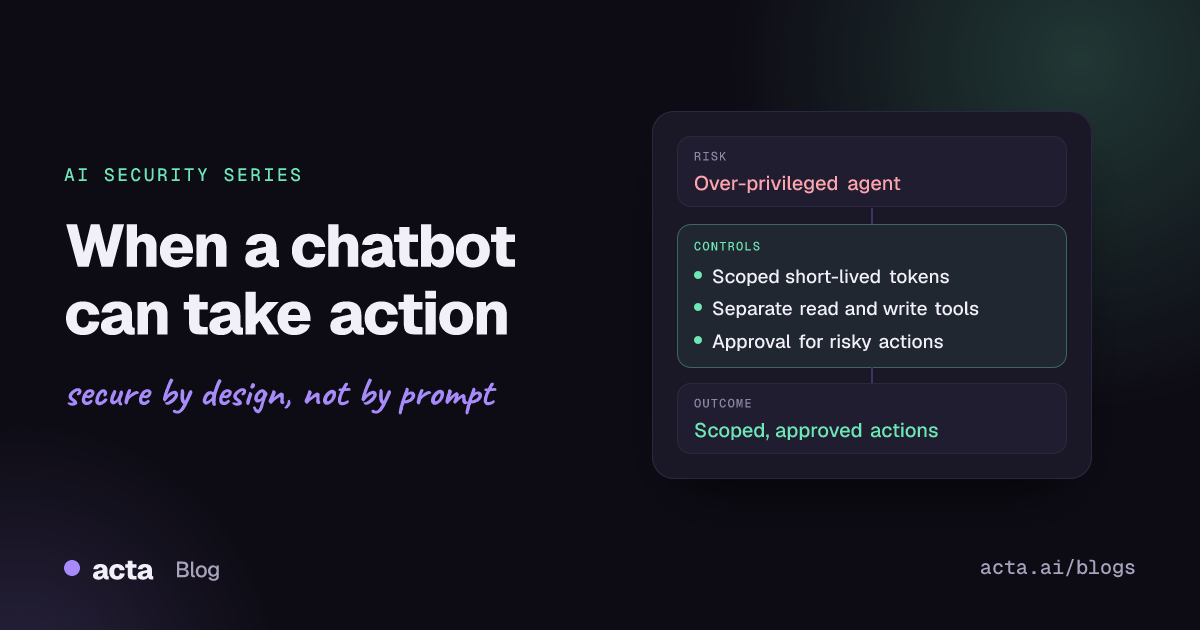
Quick answer: Once an AI assistant can send email, edit records or move money, the model's judgment stops being a safe place to enforce limits. Give each agent narrow, short-lived credentials that act in the user's context, split read tools from write tools, require human approval for sensitive actions, and check every tool call against policy in ordinary code before it runs.
Chat assistants that only answer questions can embarrass you. Assistants that act can cost you. Connecting a model to email, a CRM, a code runner or a payments API through function calling or the Model Context Protocol (MCP) turns every confusing document, hostile web page and badly written tool description into a possible instruction to do something real.
Example (invented companies): Northwind Supplies builds an invoice assistant for its accounts payable team. It reads incoming vendor invoices, matches them to purchase orders and prepares payments. To move quickly, the team connects it to the ERP through an MCP server that uses a single service account. That account can create, approve and release payments, because that is what the integration user already had. The assistant only ever needed to prepare a payment for a person to review. One week, a PDF invoice arrives with white-on-white text saying the vendor's bank details have changed and the payment is overdue and must be released today. The model has the tool to do exactly that, and nothing outside the model says no.
Why does tool access change the security model?
A model cannot reliably tell the difference between data and instructions. Text in an invoice, an email, a retrieved wiki page or a tool's own description all lands in the same context window as the system prompt. If any of that text can influence which tool gets called and with which arguments, then whoever can write that text has some influence over your systems.
That is why the OWASP GenAI Security Project now ranks Excessive Agency as LLM03 in its 2026 Top 10 for LLM Applications. The entry names three root causes: excessive functionality, excessive permissions and excessive autonomy. The Northwind assistant has all three.
How are teams handling agent security today?
Most teams start with controls they already trust:
- Identity and access management. The agent gets a service account or an API key, often an existing integration user, reviewed like any other non-human identity.
- Vendor and connector reviews. A security questionnaire for the model provider and for any SaaS connectors, plus a check that data stays in the agreed region.
- System prompt rules. Instructions such as "never release payments" or "ask before sending email".
- Guardrail filters. Prompt-injection classifiers on user input and content filters on output.
- Logging. Application logs and, sometimes, a transcript of the conversation.
Each of these is useful. Together they still leave the decisive question, "should this specific tool call run?", in the hands of the model.
What do current approaches miss?
The credential is broader than the task. Reusing an integration account means the agent inherits every permission that account ever needed. The 2026 OWASP entry calls out exactly this pattern: tools that act through a generic high-privilege identity instead of the requesting user's own permissions.
A system prompt is a request, not a control. Telling the model not to release payments works until an injected instruction is more persuasive. Our article on why a system prompt is not a security boundary covers this in depth.
Read and write live in one tool. A single "erp" tool that can query invoices and post payments means any successful injection during a harmless lookup can reach the write path.
Tool descriptions are trusted without review. The OWASP MCP Security Cheat Sheet describes tool poisoning: malicious instructions hidden in tool descriptions, parameter schemas or return values. It also describes servers that change their definitions after approval, and tool shadowing, where one server's description changes how the agent uses another server's tools. Most vendor reviews never look at tool metadata at all.
Approvals are vague. Where a confirmation step exists, it often shows "Run tool: erp?" rather than the payee, account and amount. People approve what they cannot see.
Logs record the chat, not the action. Without the tool name, full arguments, identity used and approval decision, you cannot reconstruct what happened after an incident.
How do you scope what an agent can do?
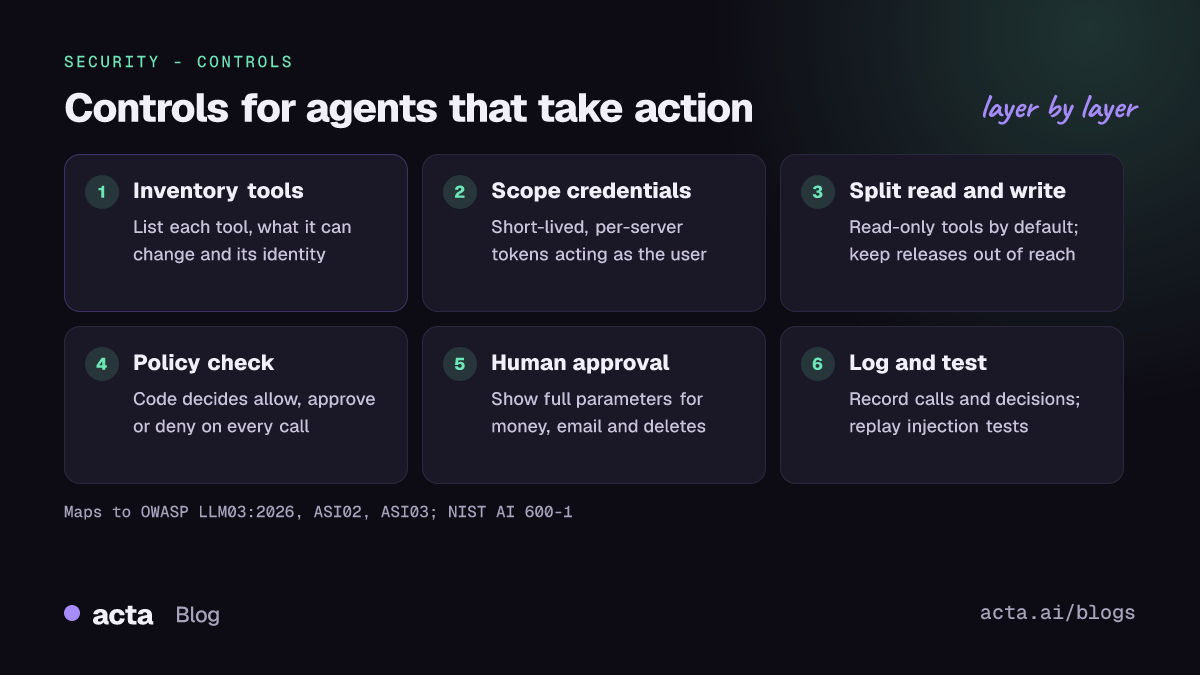
The principle is simple: the model proposes, deterministic code decides. In practice that means five layers.
1. Scoped credentials that act as the user
Give each tool the narrowest credential that does its job, issued for that server and short-lived. Where possible, execute in the requesting user's context so the agent can never do more than the person using it. The MCP cheat sheet warns against broad OAuth scopes and long-lived tokens, and the MCP project's own authorization security considerations say servers must validate that tokens were issued for them and must not pass client tokens through to upstream APIs.
2. Separate read tools from write tools
Split capabilities into small, single-purpose tools: invoices.search, purchase_orders.get, payments.prepare_draft. Back the read tools with read-only identities. Leave the most dangerous operations, such as releasing a payment or changing vendor bank details, out of the agent's toolset entirely and keep them in the ERP's normal approval workflow.
3. Human approval for sensitive actions, with full detail
Define which actions need a person: anything financial, external communication, deletion, permission changes and bulk updates. Show the full parameters, not a summary name. The MCP cheat sheet makes the same point and advises never auto-approving tool calls in multi-server setups.
4. Deterministic authorization on every call
Put a policy check between the agent and each tool. It should know who the user is, which tool is being called, the arguments and the risk tier, and it should return allow, require approval, or deny. OWASP calls this complete mediation: check every downstream request in code, not by asking the model. An illustrative policy for the invoice assistant:
tools:
  invoices.search:        { identity: user, scope: "erp.invoices.read", approval: none }
  purchase_orders.get:    { identity: user, scope: "erp.po.read",       approval: none }
  payments.prepare_draft: { identity: user, scope: "erp.payments.draft",
                            approval: none, max_amount: 25000,
                            payee_must_match: vendor_master }
  vendor.update_bank:     { exposed_to_agent: false }  # changed only in the ERP, with call-back verification
  payments.release:       { exposed_to_agent: false }  # released by finance in the ERP
  email.send_external:    { identity: user, scope: "mail.send", approval: required }
default: deny
With this policy in place, the hidden instruction in the Northwind invoice can, at worst, produce a draft whose payee does not match the vendor master. The policy check rejects it, and the draft never reaches a person who might approve it in a hurry.
5. Treat tool metadata and tool results as untrusted
Review tool descriptions and schemas before you approve a server, pin what you approved, and require a fresh review when it changes. Treat what tools return the same way you treat retrieved documents: as data that may contain instructions. Our guide to AI supply chain security covers pinning and change monitoring for connectors.
Recommendations
- Inventory every agent tool and its credential (platform team). For each tool, record what it can read, what it can change, which identity it uses and who owns it.
- Remove what the task does not need (feature owner). Drop unused tools, open-ended tools such as raw shell or raw SQL, and any write capability on a read-only workflow.
- Issue scoped, short-lived credentials per server (IAM team). Prefer acting as the signed-in user; avoid shared integration accounts and long-lived personal access tokens.
- Split read and write tools (engineering). Back read tools with read-only identities and keep irreversible operations out of the agent entirely where possible.
- Add a policy check in front of every tool call (AppSec and engineering). Default deny, with limits on amounts, recipients and record counts.
- Define approval tiers and show full parameters (business owner and security). Financial, external, destructive and permission-changing actions need a named human approver.
- Review and pin MCP server definitions (AppSec). Read tool descriptions and schemas before approval, sandbox local servers, and require re-approval when definitions change.
- Log every tool call with identity, arguments, policy decision and approver (platform team), and add rate limits so a manipulated agent cannot act hundreds of times before anyone notices.
- Test with realistic injection scenarios (security testing). Plant instructions in invoices, emails and tool results, then confirm the policy layer blocks the action rather than relying on the model to refuse. See continuous AI security testing.
How does this map to OWASP, NIST and the EU AI Act?
- OWASP Top 10 for LLM Applications 2026 (official publication, published August 2026): LLM03:2026 Excessive Agency is the core item (it was LLM06 in the 2025 list). LLM01:2026 Prompt Injection describes how the instructions get in, and LLM10:2026 Improper Output Handling covers model output passed to downstream systems without validation.
- OWASP Top 10 for Agentic Applications (2026 edition): the LLM03 entry notes that excessive agency shows up in agentic systems as ASI02 Tool Misuse and Exploitation, ASI03 Identity and Privilege Abuse and ASI08 (cascading failures). Poisoned or changed MCP servers fall under ASI04 Agentic Supply Chain Vulnerabilities.
- OWASP MCP Security Cheat Sheet: its best-practice sections on least privilege, tool description and schema integrity, human-in-the-loop for sensitive actions, and monitoring map directly onto the five layers above.
- NIST AI 600-1, the Generative AI Profile of the AI RMF: the relevant risk categories are Information Security, Human-AI Configuration and Value Chain and Component Integration. Use its suggested actions to assign owners under the Govern, Map, Measure and Manage functions.
- EU AI Act: if the agent is part of a high-risk system, Article 14 (human oversight) and Article 15 (accuracy, robustness and cybersecurity) of Regulation (EU) 2024/1689 apply. Approval steps and an audit trail of tool calls are practical evidence for both.
Where can you discuss and learn more?
- The OWASP GenAI Security Project's contributor page explains how to join its Slack workspace and working groups, including agentic security.
- The GitHub discussions for the LLM Top 10 are where practitioners propose changes and debate how risks such as excessive agency should be classified.
- The OWASP MCP Top 10 project is a separate community taxonomy of MCP-specific risks, and the MCP security best practices cover protocol-level issues such as confused deputy attacks on proxy servers.
Frequently asked questions
Is a well-written system prompt enough to stop an agent misusing tools?
No. A system prompt shapes behavior but cannot enforce it, because injected text competes with it inside the same context. Enforce limits in the credential, the tool design and a policy check that runs outside the model.
Should every tool call require human approval?
No. Approving everything trains people to click through. Let reversible, low-impact reads run automatically, and reserve approval for financial, external, destructive and permission-changing actions, with full parameters shown.
Are remote MCP servers riskier than local ones?
They carry different risks. Remote servers raise questions about authentication, token audience and data leaving your network. Local servers can run with your user's access to files, network and credentials, which is why the MCP cheat sheet recommends sandboxing them.
What should we log for agent actions?
For each tool call: the user, the agent, the tool and its version, full arguments, the identity used, the policy decision, any approver and the result. Redact secrets and personal data. Our article on AI audit trails goes into detail.
Acta builds AI agents on meeting data and treats these questions seriously; see our security page. Related in this series: securing RAG against poisoned documents.
Found this useful? Like it, share it or follow the blog.