Two operating models, one transcript
Both routes produce the same thing: timestamped text, maybe with speaker labels. What differs is who holds the audio, who pays for idle capacity and who gets paged.
With a cloud API, you upload a file or open a stream, and the provider runs its own models on its own hardware. You get features you'd otherwise build: speaker diarization, streaming results, language detection, sometimes redaction. In return the audio crosses into someone else's infrastructure, and you inherit their retention rules, their deprecation schedule and their file limits. OpenAI's speech-to-text guide, for example, caps uploads at 25 MB and tells you to compress or split longer recordings, and as of November 2026 it lists its older transcription models, whisper-1 included, as deprecated with a shutdown date in February 2027. Neither is a problem, but both are work you wouldn't have on your own server.
Self-hosting flips each of those. The open models (mostly Whisper variants, plus NVIDIA's Parakeet for English and European languages) run on hardware you control, so nothing leaves your network unless you send it. You pick the model version and keep it as long as you like. But diarization becomes a second pipeline (see WhisperX vs pyannote), streaming needs extra plumbing, and capacity planning is now your job.
Cloud speech APIs differ most in what they keep
Accuracy differences between big vendors are real but narrow on clean audio. The defaults for storing and reusing your audio differ far more, and most teams never read them. Here's what each provider's documentation says, as of November 2026; check the linked page before relying on any row.
| Provider | Training use of your audio | Retention, per its docs | Setting to check |
|---|
| OpenAI API | Not used unless you opt in | Abuse-monitoring logs up to 30 days by default; endpoint table lists retention per endpoint | Zero Data Retention, needs OpenAI approval |
| Google Cloud Speech-to-Text | Only if you enable data logging (per project) | Not logged by default; logged data is kept if you opt in | Data logging off (the default) |
| Amazon Transcribe | May be used to improve the service by default | Stored and used for improvement by default unless you opt out | AWS Organizations AI services opt-out policy |
| Deepgram | Model Improvement Program unless opted out | Opted-out requests kept only as long as processing needs | mip_opt_out=true on each request |
| AssemblyAI | Depends on your model-training setting | Completed transcripts kept for a default window; DELETE endpoint removes them early | Data controls and training opt-out |
A few details matter more than the table can show. OpenAI's data controls page says API data isn't used to train its models unless you explicitly opt in, and lists retention per endpoint, so look up the transcription row rather than assuming the chat defaults apply. Google's Speech-to-Text data usage FAQ says data logging is opt-in per project; when it's on, Google uses that audio to improve its products, and the logging page notes that logged data isn't deleted when you delete the project.
AWS is the one to watch. Its Amazon Transcribe opt-out page says you stop service-improvement use through an AWS Organizations AI services opt-out policy. If your team never set up AWS Organizations, check how that opt-out applies to your account before you send it audio. Deepgram's opt-out is per request: its Model Improvement Partnership Program page says to add mip_opt_out=true as a query parameter, which means one missed code path sends audio into the program. AssemblyAI's data retention and model training page covers both how long data is kept and whether it's used for training, and its docs describe a DELETE call for transcripts you no longer need.
The practical rule for speech-to-text API data retention: set the strictest option on day one, write down which one you chose, and add a test that fails if a request goes out without it. Privacy is a configuration, and configurations drift. Our guide on meeting data inside AI tools asks the same questions of the summarisation step.
A self-hosted Whisper server takes an afternoon to start
A self-hosted Whisper server has three layers, and most confusion online comes from mixing them up. The model is the weights (Whisper large-v3, a distilled Whisper, or Parakeet). The runtime is the code that runs them efficiently: faster-whisper on NVIDIA GPUs, whisper.cpp on CPUs, Macs and other GPUs. The API layer is what your apps call over HTTP.
For the API layer, two open-source options cover most teams. Both are MIT-licensed per their repositories.
Speaches: an OpenAI-compatible transcription server
Speaches describes itself as an OpenAI API-compatible server for transcription, translation and speech generation, with faster-whisper doing the speech-to-text. Its README lists GPU and CPU support, Docker Compose deployment, streaming transcription over server-sent events, and models that load on request and unload after a period of inactivity. From its installation docs, the CUDA setup is:
curl --silent --remote-name https://raw.githubusercontent.com/speaches-ai/speaches/master/compose.yaml
curl --silent --remote-name https://raw.githubusercontent.com/speaches-ai/speaches/master/compose.cuda.yaml
export COMPOSE_FILE=compose.cuda.yaml
docker compose up --detach
Then download a model with uvx speaches-cli model download Systran/faster-distil-whisper-small.en and send audio to /v1/audio/transcriptions on port 8000, exactly as you would to OpenAI. If you're weighing it against general-purpose local servers, our LocalAI vs Ollama vs Speaches comparison goes deeper.
whisper.cpp's whisper-server
whisper.cpp ships a small HTTP server. Its README lists Docker images for CPU, CUDA, Vulkan and others, and starting the server from the main image looks like this:
docker run -it --rm -p "8080:8080" -v $MODEL_PATH:/models ghcr.io/ggml-org/whisper.cpp:main whisper-server --host 0.0.0.0 -m /models/ggml-base.bin
You post files to /inference. Read the server README's warning before exposing it: the project says not to run it with administrative privileges and to keep it sandboxed, because it accepts file uploads and can call ffmpeg for conversions. Put it behind an authenticating reverse proxy, never straight on the internet.
My pick: Speaches if your apps already call the OpenAI SDK and you have an NVIDIA GPU; whisper-server if you're on CPUs, AMD or Intel graphics, or want a single binary with few dependencies.
Cost follows two different curves
Cloud speech APIs bill per unit of audio. Self-hosting bills you for capacity, whether you use it or not. The crossover depends on numbers only you have, so build the comparison yourself rather than trusting vendors' "self-hosting is expensive" posts.
For the API side, open each vendor's own pricing page (OpenAI, Deepgram, AssemblyAI, Google Cloud Speech-to-Text and Amazon Transcribe all publish one) and check four billing rules, not just the headline rate:
- Batch vs streaming: streaming is often priced differently from pre-recorded audio.
- Channels: some providers bill each audio channel separately, so stereo call recordings can count twice.
- Add-ons: diarization, redaction and summaries may be extra line items.
- Rounding and minimums: per-second vs per-minute billing matters for short clips like voicemails.
For the self-hosted side, the honest formula is: monthly cost = hardware (owned and amortised, or rented GPU hours) + engineer hours x loaded hourly rate + storage and monitoring. Engineer hours are the line people leave out: setup, then monthly driver and dependency updates, plus incidents.
To size hardware, use real numbers from the projects. faster-whisper's README benchmark transcribes 13 minutes of audio with large-v2 on an RTX 3070 Ti 8 GB in 16 seconds using int8 and batch size 8, with 4,500 MB of VRAM. As arithmetic, not a promise, that's roughly 49 minutes of audio per minute of GPU time on that card and that clip. A team producing 300 hours of calls a month would need well under an hour of GPU time a day at that rate, which is why a single modest GPU often covers a mid-sized company's batch transcription. Time your own files; your audio and settings will change the figure.
So is self-hosting Whisper cheaper? At low volume, almost never once you count engineering time. At steady, high volume on hardware you already own, often yes. In between, it's decided by whether privacy rules force you to self-host anyway.
Accuracy depends on your audio more than the vendor
The "Whisper vs Deepgram" posts in search results are mostly written by vendors, and each wins its own benchmark. Accuracy on your work depends on a few factors you can test in a week.
- Audio quality. Laptop mics in a meeting room, phone-line codecs and crosstalk hurt every engine. Separate channels per speaker help more than switching vendors. Our guide to accents, noise and crosstalk covers the fixes.
- Language and code-switching. Whisper models cover many languages; Parakeet v3 covers 25 European ones. Calls that switch languages mid-sentence break more systems than accents do.
- Vocabulary. Product names, drug names and ticker symbols. Check whether the API supports custom vocabulary or prompting, and whether the self-hosted runtime accepts an initial prompt (whisper-server has a --prompt option).
- Long-audio handling. Whisper hallucinates on long silences. Turn on voice activity detection: faster-whisper has vad_filter=True, whisper-server has --vad.
- Speaker labels. If you need "who said what", cloud APIs usually bundle diarization; self-hosted setups add a separate model.
Run the same 20 to 30 minutes of your hardest real audio through every candidate, with consent from the people on it, and have someone who was on the call mark the errors that matter: names, numbers, decisions. A public word error rate won't show "fifteen" becoming "fifty".
Self-hosting moves the operational work to you
An API vendor handles scaling, uptime and model upgrades. Self-host and they're yours, so name an owner for each of these:
- GPU drivers and CUDA versions. faster-whisper's README notes that recent ctranslate2 releases support only CUDA 12 and cuDNN 9, with pinned older versions as the workaround.
- Queueing and retries. One GPU serves a few requests at once. A Monday morning backlog of uploads needs a queue, not a timeout.
- Security. Authentication in front of the server, upload size limits, sandboxing for anything that runs ffmpeg, and audit logs of who submitted what.
- Retention. Self-hosting doesn't make audio disappear. Decide how long raw audio and transcripts live on your disks, and automate the deletion.
- Model updates. Pin versions and re-run your test set before switching.
Cloud APIs still need uploads, retries, keys and an eye on deprecations, as the OpenAI example shows. It's a shorter list, and it never includes a driver update breaking the GPU at 3 a.m.
If you go the self-hosted route for meeting audio, plan the whole pipeline, not just the speech model: summaries, search and access control. Our walkthrough of an on-premises AI meeting assistant covers those pieces.
Self-hosted transcription vs cloud API decision table
Find your situation in the left column.
| Your situation | Pick | Why |
|---|
| Audio must stay on your network by contract or regulation | Self-hosted | No third-party processing to justify |
| Under a few hundred hours a month, no GPU team | Cloud API | Per-minute billing beats idle hardware and on-call time |
| Steady high volume, GPUs already in the building | Self-hosted | Marginal cost of extra audio is close to zero |
| Live captions or voice agents | Cloud API | Low-latency streaming is built in; self-hosted streaming takes work |
| Need diarization and redaction tomorrow | Cloud API | Bundled features vs building two extra pipelines |
| Unusual languages or heavy jargon | Test both | Results depend on your audio, not on the category |
The hybrid is common and sensible: self-host for the sensitive queue (HR, legal, health), use a cloud API with strict data settings for everything else. Put both behind one internal endpoint, and an OpenAI-compatible transcription server like Speaches makes the switch a config change.
Where a meeting tool fits: if what you need is notes from calls rather than a transcription service to build on, a hosted product does the transcription for you. Acta runs its pipeline in the cloud on Google Cloud and AWS with data hosted in the United States, doesn't use customer data to train AI models, and lists on-premise deployment and custom data retention under its Enterprise plan; the details are on the security page. Its desktop app records the meeting's sound and your microphone from your own computer, with no bot in the call. Whatever tool captures the audio, tell people first; our guide to recording consent and what to tell participants covers the basics.

Frequently asked questions
Is self-hosting Whisper cheaper than a speech-to-text API?
Is self-hosting Whisper cheaper? Only at steady, high volume on hardware you already run. Low volume favours per-minute API billing because a self-hosted server costs GPU time and engineering hours whether or not audio arrives. Work it out with your own monthly audio hours, each vendor's pricing page, and a realistic estimate of maintenance time, as of November 2026.
Do cloud speech-to-text APIs train on my audio?
It depends on the provider and your settings. OpenAI says API data isn't used for training unless you opt in. Google uses audio only if you enable data logging. Amazon Transcribe and Deepgram may use content for improvement unless you opt out, through an AWS Organizations policy or the mip_opt_out parameter. Check each vendor's data page.
What is the best self-hosted Whisper server?
For teams with NVIDIA GPUs whose code already calls the OpenAI SDK, Speaches is the simplest: an OpenAI-compatible transcription server built on faster-whisper, deployed with Docker Compose. For CPUs, Macs or AMD and Intel graphics, whisper.cpp's whisper-server is lighter. Both are MIT-licensed. Neither does speaker diarization on its own the way cloud APIs do.
Is self-hosted transcription more accurate than a cloud API?
Not by default. Self-hosted transcription vs cloud API accuracy depends on your audio, languages and vocabulary more than on where the model runs. Some cloud models beat open Whisper on noisy calls; some don't. Test 20 to 30 minutes of your hardest real recordings through each option and count errors in names, numbers and decisions.
What is the difference between Whisper and Deepgram?
Whisper is an open model family from OpenAI that you can run yourself with runtimes like faster-whisper or whisper.cpp. Deepgram is a commercial speech platform offered as a cloud API, with self-hosted container deployments for customers who need them, per its docs. Whisper vs Deepgram is really self-managed open weights vs a vendor-managed service.
Choose where your audio gets transcribed
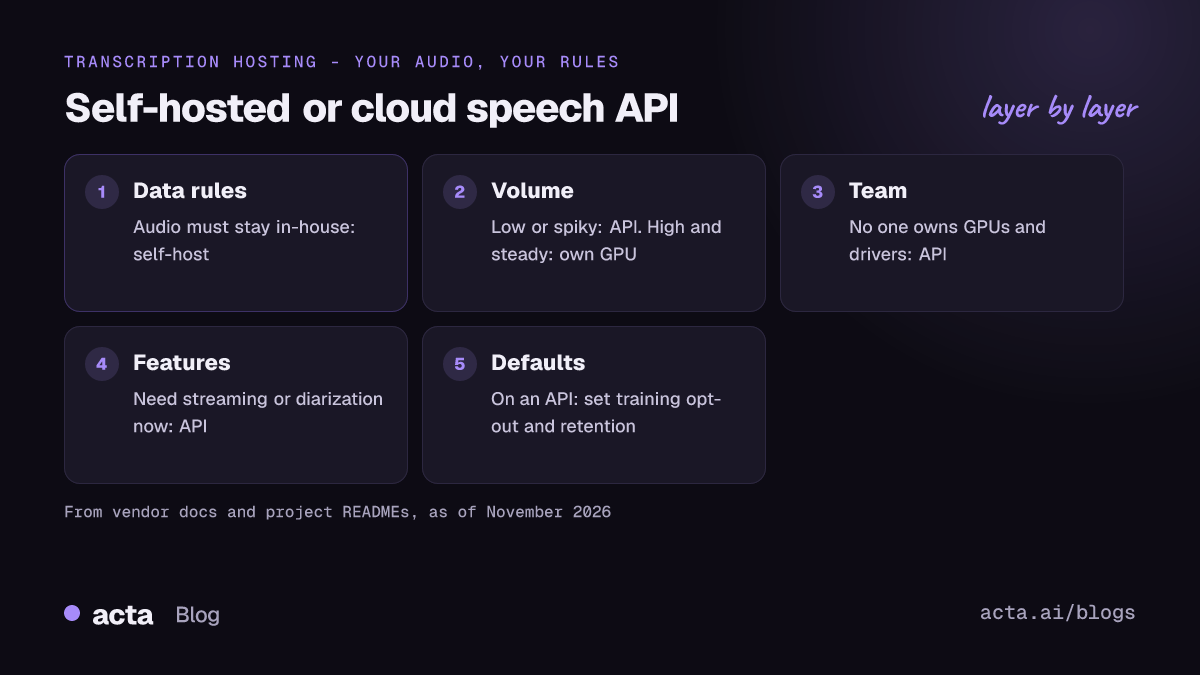
Answer these five points and the choice is usually obvious.
- Check the rules first: list the contracts, regulators or internal policies that say where audio may be processed. If they rule out third parties, you're self-hosting.
- Count your audio: estimate monthly hours and peak hours. Low and spiky favours an API; high and steady favours your own GPU.
- Set the data defaults: if you pick an API, turn on its strictest training and retention settings and add a test that enforces them.
- Test on your worst audio: run the same hard recordings through every candidate and score the errors that change meaning.
- Name an owner: self-hosting without someone responsible for drivers, security and retention is the expensive option, whatever the hardware cost.
If you just need notes from your own meetings without running any of this, try Acta's desktop app or Chrome extension on the 15-day free trial.