Parakeet vs Whisper comes down to languages and hardware. NVIDIA's Parakeet TDT 0.6B v3 is a 600-million-parameter model for 25 European languages with word timestamps, built to run through NVIDIA's NeMo toolkit on an NVIDIA GPU. OpenAI's Whisper covers far more languages and runs almost anywhere once you pick the right runtime: faster-whisper for Python and NVIDIA GPUs, whisper.cpp for Macs, laptops and embedded builds.
This guide compares the four options people actually install for local speech to text in 2026: Parakeet, the original openai-whisper package, faster-whisper and whisper.cpp. Every feature, licence and hardware figure below comes from each project's own model card or README, as of November 2026. There are no speed charts here on purpose: the only speed claims quoted are the ones the projects make themselves, labelled as such. If you need speaker labels as well, that's a separate problem covered in the companion post on diarization.
Key takeaways
- English or European languages on an NVIDIA GPU: try Parakeet TDT 0.6B v3 first. It adds punctuation, capitalization and word timestamps, and auto-detects among its 25 languages.
- Any other language, or mixed-language calls: use a Whisper model. Parakeet v3 cannot be forced to a chosen language, and it only knows 25.
- Python on Linux or Windows with an NVIDIA card: run Whisper through faster-whisper, not the original package. Same weights, less memory, no FFmpeg dependency.
- Apple Silicon, CPU-only boxes, phones or a C/C++ app: whisper.cpp. It runs fully on the GPU via Metal on Apple Silicon and its large model needs about 3.9 GB of memory per its README.
- Memory rule of thumb (arithmetic, not a benchmark): weights in GB = parameters in billions x bits per weight / 8, so a 0.6B model at 16-bit is about 1.2 GB before audio buffers.
Table of contents
- Four engines, two model families
- Parakeet TDT 0.6B v3 is fast English and European ASR on NVIDIA
- OpenAI Whisper is the reference, not the runtime
- faster-whisper vs whisper.cpp depends on your hardware
- Parakeet vs Whisper decision table
- Timestamps and long recordings need different settings
- Meeting audio changes the verdict
- Frequently asked questions
- Pick your local speech-to-text engine
Four engines, two model families
People list these four as rivals, but they aren't the same kind of thing. There are two model families (NVIDIA's Parakeet and OpenAI's Whisper) and, for Whisper, several runtimes that load the same weights in different ways. Picking "Whisper" tells you which model you'll get; picking faster-whisper or whisper.cpp tells you how it will run on your machine.
That matters because most "Parakeet vs Whisper" arguments online are really comparing Parakeet on a datacenter GPU against Whisper on some runtime that wasn't tuned for the hardware. Settle two questions first and the choice mostly makes itself:
- Which languages will you transcribe? If any recording is outside Parakeet v3's 25 European languages, Parakeet is out for that job.
- What will it run on? An NVIDIA GPU, an Apple Silicon Mac, or a plain CPU each point to a different engine.
Only after that should you care about timestamps, licences and packaging. If you've already been through this with LLM runners, the logic is the same as in our Ollama vs LM Studio vs llama.cpp vs vLLM comparison: the model is one decision, the runtime is another.
Parakeet TDT 0.6B v3 is fast English and European ASR on NVIDIA
The Parakeet TDT 0.6B v3 model card describes a 600-million-parameter automatic speech recognition model that extends the English-only v2 to 25 European languages. It detects the language of the audio by itself, writes punctuation and capitalization, and returns word-level and segment-level timestamps. The card lists the licence as CC-BY-4.0, which allows commercial use with attribution; NVIDIA's own build.nvidia.com page refers to the NVIDIA open model licence instead, so read the licence on the card you actually download before shipping it in a product.
Long audio is handled better than you might expect from a small model. The card says it transcribes up to 24 minutes in one pass with full attention (measured on an A100 80GB) and up to 3 hours with local attention, which you switch on in code. NVIDIA's collection page recommends an NVIDIA GPU and lists a 2 GB RAM minimum for loading the model, with more memory needed for longer audio.
It runs through NVIDIA's NeMo toolkit. The NeMo Speech README asks for Python 3.12 or later and PyTorch 2.7 or later, as of November 2026. A minimal run looks like this:
pip install -U "nemo_toolkit[asr]"
import nemo.collections.asr as nemo_asr
asr_model = nemo_asr.models.ASRModel.from_pretrained(model_name="nvidia/parakeet-tdt-0.6b-v3")
output = asr_model.transcribe(["meeting.wav"], timestamps=True)
words = output[0].timestamp["word"]
Two things the card doesn't advertise. First, you can't tell v3 which language to use. A NeMo discussion on forcing the output language confirms the checkpoint has no language-conditioning input, and users report short or ambiguous clips coming back in the wrong language. For one-language European meetings that's rarely a problem; for a call that switches between Hindi and English it rules Parakeet out. Second, NeMo is a heavy dependency built around NVIDIA hardware. Community conversions to ONNX and Core ML exist on Hugging Face, but they aren't NVIDIA's releases, so test them yourself.
NVIDIA also keeps shipping. The NeMo README lists Parakeet-unified-en-0.6b (April 2026), an English model that does both offline and streaming transcription in one checkpoint. If you need live English captions rather than after-the-call transcripts, look at that one, not v3.
OpenAI Whisper is the reference, not the runtime
OpenAI's Whisper model card lists six sizes: tiny (39M parameters), base (74M), small (244M), medium (769M), large (1,550M) and turbo, added in September 2024 and optimized for inference speed. Tiny to medium come in English-only (.en) and multilingual versions; large and turbo are multilingual only. The README puts required VRAM at about 1 GB for tiny and base, 2 GB for small, 5 GB for medium, 10 GB for large and 6 GB for turbo. Code and weights are MIT licensed.
Language coverage is Whisper's real advantage. The model card says the training data covered 98 languages besides English, and it's candid that strong results are reported for about 10 languages and accuracy drops on low-resource ones. In practice: try your language on a 10-minute sample before you commit, and prefer large-v3 or turbo for anything that isn't English.
The card also lists the failure modes you'll meet on meeting audio: hallucinated text that wasn't spoken, repeated phrases, and no live transcription out of the box. The README adds one trap for turbo: it isn't trained for translation, so --task translate returns the original language. Use medium or large if you need speech translated into English.
The original package is fine for a first test:
pip install -U openai-whisper
whisper meeting.wav --model turbo --language English
It needs the ffmpeg command-line tool installed. For anything beyond a test, switch runtime. You keep the same weights and get a faster, leaner engine.
faster-whisper vs whisper.cpp depends on your hardware
Both run Whisper's weights. The difference is the stack underneath and the machines they suit.
faster-whisper: Python, CTranslate2, NVIDIA GPUs
The faster-whisper README describes a reimplementation of Whisper on CTranslate2 and claims it is up to 4 times faster than openai/whisper for the same accuracy while using less memory, with 8-bit quantization available on CPU and GPU. That's the project's claim, measured on its own setups (an RTX 3070 Ti 8GB for the GPU tests, an Intel Core i7-12700K for the CPU test). It needs Python 3.9 or later; GPU use needs cuBLAS for CUDA 12 and cuDNN 9. It decodes audio with PyAV, so FFmpeg isn't required. Licence: MIT.
pip install faster-whisper
segments, _ = model.transcribe("meeting.wav", word_timestamps=True, vad_filter=True)
Its BatchedInferencePipeline is a drop-in replacement for the normal transcribe call, with voice activity detection on by default. Use it for batches of recordings on a GPU server.
whisper.cpp: C/C++, Metal, CPUs and everything else
The whisper.cpp repository is a plain C/C++ implementation with no dependencies. On Apple Silicon inference runs fully on the GPU via Metal, and Core ML can run the encoder on the Neural Engine. It also supports CUDA, Vulkan and OpenVINO, and builds for Linux, Windows, iOS, Android, WebAssembly and Raspberry Pi. Licence: MIT. Its README lists memory use per model: about 273 MB for tiny, 852 MB for small, 2.1 GB for medium and 3.9 GB for large.
git clone https://github.com/ggml-org/whisper.cpp.git
cd whisper.cpp
sh ./models/download-ggml-model.sh base.en
cmake -B build
cmake --build build -j --config Release
./build/bin/whisper-cli -f samples/jfk.wav
It also ships whisper-server, an HTTP server with an OpenAI-like API, and integer quantization (for example Q5_0) to shrink models further.
So, faster-whisper vs whisper.cpp: on a Linux box with an NVIDIA card and a Python pipeline, use faster-whisper. On a Mac, a CPU-only server, or anything you want to ship as a single binary, use whisper.cpp. If you've read our guide to running a local LLM on your laptop, you'll recognise the pattern: ggml-based tools win on Macs and small machines, CUDA-first Python tools win on NVIDIA servers.
Parakeet vs Whisper decision table
Here's the short version, all facts from the official pages above, as of November 2026. "Best local speech to text" has no single answer; it has a best answer per row.
| Engine | Languages | Runs best on | Licence | Pick it if |
|---|---|---|---|---|
| Parakeet TDT 0.6B v3 (NeMo) | 25 European, auto-detected | NVIDIA GPU | CC-BY-4.0 per HF card | English or European audio, NVIDIA server, you want timestamps and punctuation built in |
| openai-whisper | Multilingual (98 non-English in training data) | GPU with enough VRAM | MIT | Quick test or research reference |
| faster-whisper | Same as Whisper | NVIDIA GPU or x86 CPU, Python | MIT | Python pipelines, batch jobs, non-European languages on NVIDIA |
| whisper.cpp | Same as Whisper | Apple Silicon, CPUs, mobile, many GPUs | MIT | Macs, laptops, single-binary apps, a local HTTP endpoint |
My own default for a team that transcribes English and German calls on a Linux server with an NVIDIA card: Parakeet v3 for the bulk, with faster-whisper running whisper large-v3-turbo as the fallback for anything Parakeet can't handle. On a 16 GB MacBook, whisper.cpp with turbo or medium, full stop.
Timestamps and long recordings need different settings
Timestamps matter as soon as you want to jump back to a quote, align speakers, or chunk a transcript for search. The engines handle them differently.
- Parakeet TDT 0.6B v3: word and segment timestamps are a listed feature. Pass timestamps=True to transcribe and read the word list from the result. For recordings over 24 minutes, switch to local attention as the card shows.
- faster-whisper: word_timestamps=True gives a start and end per word. Turn on vad_filter=True for meetings with long silences; skipping silence also cuts the chance of hallucinated text in quiet stretches.
- whisper.cpp: word-level timestamps are marked experimental; use -ml 1 to get one word per line with times. The --vad option with a Silero VAD model sends only detected speech to Whisper.
- openai-whisper: segment timestamps by default. Fine for subtitles, too coarse for quote-level jumps, which is one more reason to move to a faster runtime.
For whisper timestamps on meeting recordings, the pattern that holds up is: VAD on, word timestamps on, then merge words into speaker turns after diarization. If you're feeding transcripts into a search index, our guide to chunking meeting transcripts for RAG shows why turn boundaries and timestamps make better chunks than fixed-size windows.
Meeting audio changes the verdict
Benchmarks run on clean read speech. Meetings aren't clean: people talk over each other, someone joins from a car, a laptop fan hums under every word. Three adjustments matter more than the engine choice.
Capture first. A mixed-down recording of a video call loses who was on which channel. If you control the recording, keep your microphone and the call audio as separate tracks; it makes speaker separation far easier later. Our notes on accents, noise and crosstalk cover the practical fixes.
Speakers second. None of these engines tells you who said what. whisper.cpp has an experimental tinydiarize mode that marks speaker turns, but for real meeting transcripts you'll add a diarization step. Our companion piece on WhisperX vs pyannote for local diarization covers that layer, and speaker diarization for meeting AI explains the concepts.
Consent third. Running a model locally doesn't change the rules about recording people. Read is it legal to record meetings with AI before you point any of this at a client call.

Not everyone wants to maintain a CUDA stack to get meeting notes. Acta records Zoom, Google Meet and Teams without a bot from its desktop app or Chrome extension, transcribes with speaker names and writes the summary and action items after the call. Processing happens in Acta's service rather than on your own GPU, and Acta does not use customer data to train its AI models; meeting language support is listed in the meeting languages guide.
Frequently asked questions
Is Parakeet better than Whisper?
For English and the 25 European languages it supports, on an NVIDIA GPU, Parakeet TDT 0.6B v3 is a strong first choice: it's small at 600 million parameters and includes punctuation and word timestamps. Whisper is better when you need other languages, mixed-language audio, translation into English, or hardware without an NVIDIA GPU. Test both on your own recordings.
What is the best local speech to text on a Mac?
whisper.cpp is the practical choice on Apple Silicon. Its README says inference runs fully on the GPU via Metal, and Core ML can run the encoder on the Neural Engine. Start with the turbo or medium model. Parakeet's official route through NeMo targets NVIDIA GPUs, so on a Mac you'd depend on community conversions.
Which is faster, faster-whisper or whisper.cpp?
It depends on the hardware, and published comparisons disagree. faster-whisper claims up to 4 times the speed of openai/whisper at the same accuracy and is the usual pick on NVIDIA GPUs with Python. whisper.cpp fits Apple Silicon, CPUs and embedded builds. Both use the same Whisper weights, so time them on your own audio and machine.
How much VRAM does whisper large-v3-turbo need?
OpenAI's README lists about 6 GB of VRAM for turbo with the original package, versus about 10 GB for large. Quantized runtimes need less: whisper.cpp lists about 3.9 GB of memory for its large model, and faster-whisper supports 8-bit quantization on CPU and GPU. Leave headroom for long recordings.
Does Parakeet TDT 0.6B v3 support word timestamps?
Yes. NVIDIA's model card lists word-level and segment-level timestamps as a feature, returned when you call transcribe with timestamps=True in NeMo. The same card says the model handles up to 24 minutes per pass with full attention and up to 3 hours with local attention enabled.
Pick your local speech-to-text engine
Run this checklist once with a real recording from your own meetings, not a sample file. It takes an afternoon and saves weeks of second-guessing.
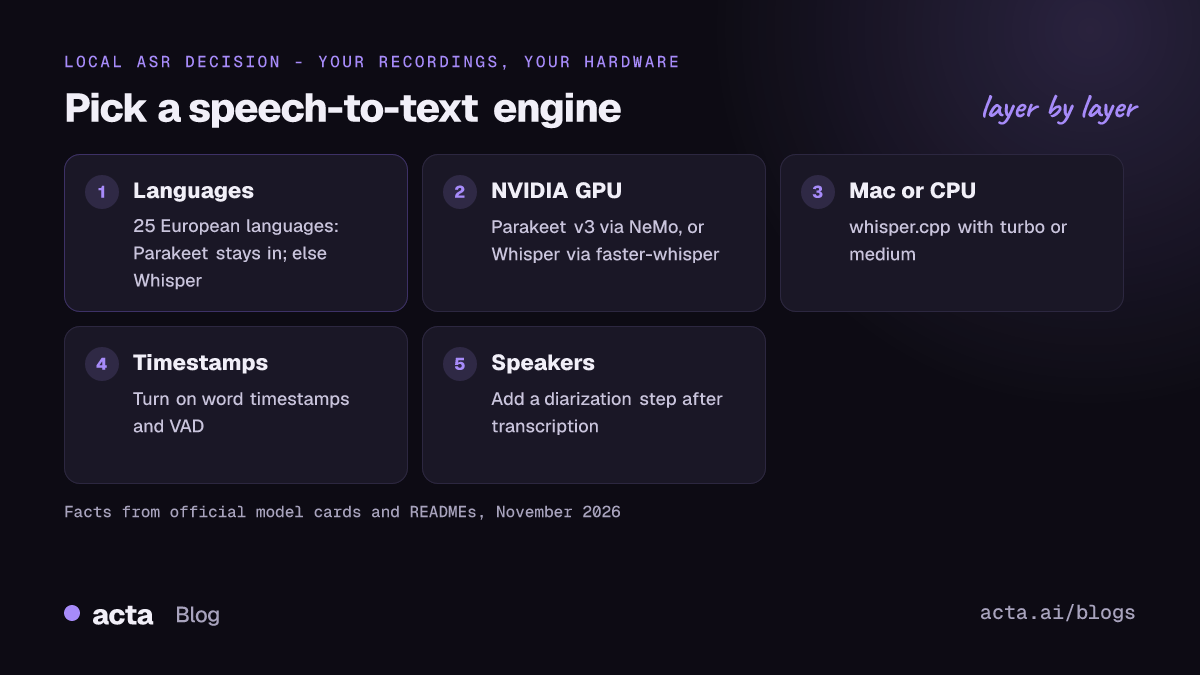
- List your languages: if every recording is English or one of Parakeet v3's 25 European languages, Parakeet stays on the shortlist; otherwise go straight to Whisper.
- Match the hardware: NVIDIA GPU points to Parakeet or faster-whisper; Apple Silicon or CPU-only points to whisper.cpp.
- Check the licence you downloaded: Whisper and both runtimes are MIT; read the licence on the exact Parakeet card you use.
- Turn on VAD and word timestamps: they reduce silence-driven errors and make the transcript usable for quotes and diarization.
- Test a messy call: crosstalk, accents and a bad microphone tell you more than any leaderboard.
If you'd rather skip the setup for everyday calls, try Acta's desktop app on your next meeting during the 15-day free trial.