WhisperX vs pyannote is a slightly misleading match-up: WhisperX uses pyannote for its speaker step. WhisperX is a full transcription pipeline (faster-whisper, word alignment, then pyannote diarization). pyannote.audio is the diarization toolkit on its own, answering only "who spoke when". NVIDIA NeMo is the third option, with end-to-end Sortformer models and a cascaded pipeline. Pick by what you already have and how many speakers your recordings hold.
This is a hands-on comparison for people running speaker diarization on their own machines: setup, gated models and tokens, licences, overlapping speech and what results to expect. Facts come from each project's README, docs and issue tracker, as of November 2026. If you want the concepts first (what diarization is, why "who said what" breaks), read our explainer on speaker diarization for meeting AI and come back.
Key takeaways
- Want one command that returns a transcript with speaker labels? Use WhisperX with --diarize. You still need a Hugging Face token and to accept pyannote's model conditions.
- Already have a transcript, or use a non-Whisper engine such as Parakeet? Run pyannote.audio's community-1 pipeline directly and merge by timestamps yourself.
- Calls with up to four speakers and an NVIDIA stack: test NeMo's Sortformer models. For more speakers or long sessions, NeMo's docs point to the cascaded pipeline.
- Overlapping speech is the weak spot everywhere. WhisperX's README says plainly that overlap isn't handled well, so separate audio tracks beat any model setting.
- Always pass the speaker count when you know it (min_speakers and max_speakers in WhisperX). It's the cheapest accuracy fix available.
Table of contents
- Diarization tools sit at three layers
- WhisperX bundles transcription, alignment and pyannote
- pyannote.audio is the diarization engine underneath
- NVIDIA NeMo offers Sortformer and a cascaded pipeline
- WhisperX vs pyannote vs NeMo at a glance
- Overlapping speech breaks every local pipeline
- Set expectations with a small labelled test
- Frequently asked questions
- Choose your local diarization stack
Diarization tools sit at three layers
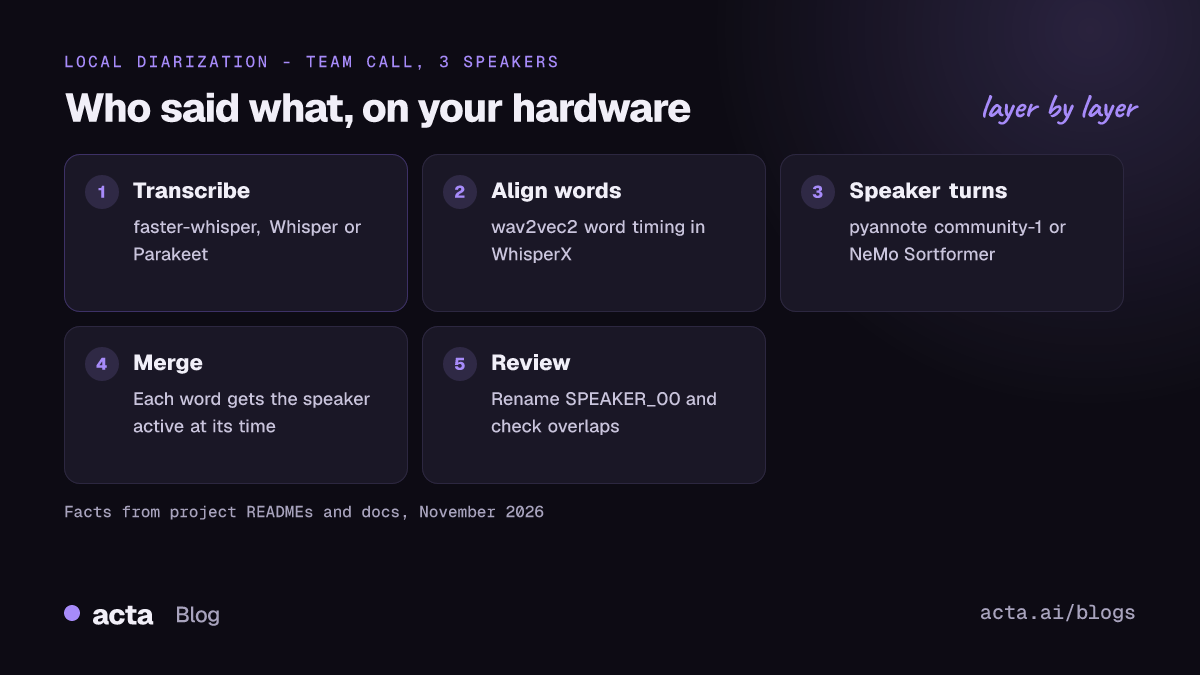
Speaker diarization splits audio into segments and labels each with an anonymous speaker (SPEAKER_00, SPEAKER_01). It doesn't know names and it doesn't transcribe. To get "Priya: we ship Friday" you need three jobs done: transcription, word timing, and speaker turns, then a merge step that gives each word a speaker.
The tools cover different layers of that job:
- pyannote.audio does speaker turns only.
- NeMo has diarization models and its own speech recognition models, which you wire together.
- WhisperX does all three layers plus the merge, using faster-whisper for text, wav2vec2 for word timing and pyannote for speakers.
So the real question behind "whisper speaker diarization" searches is usually: do I want a packaged pipeline, or a diarization component I control? Whisper itself won't help here. OpenAI's Whisper model card lists speaker diarization among the capabilities that OpenAI has not properly evaluated, and the model doesn't output speaker labels.
WhisperX bundles transcription, alignment and pyannote
WhisperX (BSD 2-Clause licence) describes itself as fast speech recognition with word-level timestamps and speaker diarization. Its README lists batched inference on a faster-whisper backend, word timestamps from wav2vec2 alignment, voice activity detection before transcription to reduce hallucination, and multi-speaker labels from pyannote. The project's own claims, as of November 2026: about 70x faster than real time with large-v2, and under 8 GB of GPU memory for large-v2 at beam_size=5.
Setup is short. For GPU use the README asks for CUDA toolkit 12.8 first; CPU-only works without it.
pip install whisperx
whisperx meeting.wav --model large-v2 --diarize --highlight_words True --min_speakers 3 --max_speakers 3 --hf_token YOUR_HF_TOKEN
The token part trips most people up. Diarization needs a Hugging Face read token and you must accept the user agreement for the pyannote/speaker-diarization-community-1 model while logged in. Skip that and the transcription runs but the speaker step fails.
The README is unusually honest about limits, and they're worth reading before you promise anyone speaker-labelled minutes:
- Overlapping speech isn't handled well by Whisper or WhisperX.
- Words containing characters missing from the alignment model's dictionary, like "2014." or "£13.60", can't be aligned and get no timing.
- Alignment needs a language-specific wav2vec2 model. Defaults exist for English, French, German, Spanish and Italian; other languages pull models from Hugging Face.
- Diarization is described as "far from perfect".
The history explains the design. In WhisperX issue 9, which asked whether WhisperX could tell speakers apart, the maintainer proposed assigning each word to a speaker by timestamp overlap with pyannote's turns. That's still the approach, which is why word timing quality and diarization quality are linked: a word with a bad timestamp lands on the wrong speaker.
pyannote.audio is the diarization engine underneath
pyannote.audio is an open-source Python toolkit for speaker diarization, MIT licensed. Its current open pipeline is community-1, which the README says improves speaker counting and assignment over the older 3.1 pipeline. Install it with pip install pyannote.audio; it also needs ffmpeg for audio decoding.
from pyannote.audio import Pipeline
pipeline = Pipeline.from_pretrained("pyannote/speaker-diarization-community-1", token="HUGGINGFACE_ACCESS_TOKEN")
pipeline.to(torch.device("cuda"))
output = pipeline("meeting.wav")
for turn, speaker in output.speaker_diarization: print(turn.start, turn.end, speaker)
Like WhisperX, it's gated: create a token and accept the model's conditions on Hugging Face. Once the weights are cached, inference runs locally. Check the licence on the model card itself, which is separate from the code licence.
The README publishes diarization error rates, last updated September 2025, comparing community-1 with pyannoteAI's paid precision-2 model: 11.2 vs 8.5 on VoxConverse and 17.0 vs 12.9 on AMI (headset mix), lower being better. It also lists self-hosted processing time on an NVIDIA H100: 31 seconds per hour of audio for community-1 on AMI. Treat those as the vendor's numbers on public benchmarks; your meetings will differ. Note that precision-2 in the README's example runs on pyannoteAI's servers with an API key, so it isn't a local option unless you use pyannoteAI's self-hosted version.
One practical gotcha from the tracker. In pyannote issue 1652, a user found the 3.1 pipeline far slower than WhisperX on the same file, with the GPU mostly idle, while rating pyannote's diarization quality higher. The maintainers couldn't reproduce it, but several users reported the slowdown went away when they loaded the audio in memory (mono, 16 kHz) with pyannote's Audio class and passed the waveform instead of a file path. If your GPU sits at low utilization, try that first.
NVIDIA NeMo offers Sortformer and a cascaded pipeline
NeMo (Apache 2.0) has two kinds of speaker diarization, per its docs as of November 2026:
- End-to-end Sortformer: a transformer that outputs speaker labels directly, numbering speakers in order of arrival. Models: diar_sortformer_4spk-v1 (offline) and diar_streaming_sortformer_4spk-v2 and v2.1 (streaming). The "4spk" in the names reflects four speakers.
- Cascaded: MarbleNet voice activity detection, TitaNet-Large speaker embeddings and spectral clustering. NeMo's docs say this design has fewer restrictions on the number of speakers and session length, while end-to-end models are easier to optimize and deploy.
from nemo.collections.asr.models import SortformerEncLabelModel
diar_model = SortformerEncLabelModel.from_pretrained("nvidia/diar_streaming_sortformer_4spk-v2.1").eval()
segments = diar_model.diarize(audio=["meeting.wav"], batch_size=1)
NeMo suits teams already on NVIDIA's stack, especially if you use Parakeet for transcription (our Parakeet vs Whisper comparison covers that choice). The NeMo Speech README asks for Python 3.12 or later and PyTorch 2.7 or later. Model weights carry their own licences, so read each card before commercial use.
Community experience is mixed. In the same WhisperX issue thread, one contributor reported NeMo's diarization as more accurate than pyannote in his tests and built a merge notebook; later users struggled to run it, and one saw it detect a single speaker on files pyannote handled. That's anecdote, not a benchmark, but it's a fair picture: NeMo can be very good and takes more setup.
WhisperX vs pyannote vs NeMo at a glance
| Tool | What it does | Code licence | Gated weights | Pick it if |
|---|---|---|---|---|
| WhisperX | Transcript, word timing, speaker labels | BSD 2-Clause | Yes, pyannote community-1 | You want one command and Whisper's languages |
| pyannote.audio community-1 | Speaker turns only | MIT | Yes, accept conditions | You have your own ASR, or need control over the merge |
| NeMo Sortformer | Speaker labels, offline or streaming | Apache 2.0 (toolkit) | Check model card | Up to four speakers, NVIDIA stack, streaming needs |
| NeMo cascaded | VAD, embeddings, clustering | Apache 2.0 (toolkit) | Check model card | More speakers or long sessions on NVIDIA |
A quick word on the lightweight option. whisper.cpp's experimental tinydiarize mode (-tdrz with a small.en-tdrz model) marks speaker turns as [SPEAKER_TURN] in the output. It tells you a change happened, not who spoke, so it's useful for interview-style audio and not much else. Details are in the whisper.cpp README.

Overlapping speech breaks every local pipeline
Meetings aren't interviews. People interrupt, agree out loud and talk over the end of each other's sentences. All three tools struggle with this, for slightly different reasons.
WhisperX assigns each word to one speaker based on timestamp overlap. When two people talk at once, Whisper usually transcribes only one of them, so the second voice's words simply aren't there to assign. pyannote and NeMo work on the audio, not the text, but the merge step back into a transcript still has to pick one speaker per word.
What actually helps:
- Record separate tracks when you can: your microphone on one, the call on another. Your own voice then needs no diarization at all.
- Set the speaker count. A three-person call labelled as five speakers is the most common failure, and --min_speakers and --max_speakers fix most of it.
- Keep VAD on. Silence and background noise produce phantom speakers.
- Review the first two minutes. Rename SPEAKER_00 and SPEAKER_01 once, then check whether labels stay consistent later in the call.
Our guide to accents, noise and crosstalk has more on fixing capture before the model sees it.
Set expectations with a small labelled test
Published error rates come from public datasets. To know what you'll get, label three of your own recordings by hand (a 1:1, a five-person team call, a noisy hybrid meeting), 10 minutes each, and compare each tool's output.
The usual metric is diarization error rate: the share of speech time that is missed, falsely detected as speech, or given to the wrong speaker. You don't need a scoring library for a first pass. Count the minutes attributed to the wrong person and note which failure you see most: merged speakers, split speakers, or lost interruptions. That tells you which fix to try.
Expect the 1:1 to look nearly perfect and the hybrid room meeting to be the worst, because several people share one microphone and sound similar to the model. If your real workload is mostly room meetings, budget time for review or change how you record. And before you test on real colleagues or clients, check the rules in is it legal to record meetings with AI.
If you'd rather not maintain tokens, CUDA versions and merge scripts, a hosted notetaker is the trade. Acta's transcripts come with speaker names: its desktop app marks your voice as you and names the others from the conversation and calendar invite, while the meeting bot names speakers from the participant list, which is more exact. It isn't a local tool, and Acta does not use customer data to train its AI models.
Frequently asked questions
Does WhisperX use pyannote?
Yes. WhisperX runs faster-whisper for transcription, wav2vec2 for word timing and pyannote.audio for speaker diarization, then assigns each word to a speaker by timestamp. That's why it needs a Hugging Face token and acceptance of the pyannote speaker-diarization-community-1 model conditions before the --diarize option works.
Is pyannote speaker diarization free for commercial use?
The pyannote.audio code is MIT licensed. The community-1 pipeline weights are gated on Hugging Face, so you accept conditions before downloading; read the licence on that model card for your use. pyannoteAI's precision-2 model is a separate commercial product that runs on its servers with an API key unless you use its self-hosted version.
Can Whisper do speaker diarization on its own?
No. Whisper outputs text and timestamps, not speaker labels, and OpenAI's model card lists diarization among capabilities that OpenAI has not properly evaluated. Add a diarization step: WhisperX packages one with pyannote, or you can run pyannote or NeMo separately and merge by timestamps. whisper.cpp's tinydiarize only marks speaker changes.
What is NeMo Sortformer?
Sortformer is NVIDIA NeMo's end-to-end diarization model family. It outputs speaker labels directly and numbers speakers in order of arrival. The offline diar_sortformer_4spk-v1 and the streaming v2 and v2.1 models are named for four speakers. For more speakers or long sessions, NeMo's docs point to its cascaded pipeline.
How do I improve local speaker diarization accuracy?
Fix capture first: separate microphone and call tracks, one microphone per person in rooms where possible. Then pass the known speaker count, keep voice activity detection on and test on your own labelled samples. Overlapping speech remains hard for every local tool, so plan a quick review for meetings where it matters.
Choose your local diarization stack
Decide in this order and you'll avoid most rebuilds.
- Pick the transcription engine first: Whisper-based setups lean to WhisperX; Parakeet or other NeMo ASR leans to NeMo or standalone pyannote.
- Sort out access early: create the Hugging Face token and accept the gated model conditions before you write any code.
- Count your speakers: mostly four or fewer suits Sortformer; larger meetings point to pyannote or NeMo's cascaded pipeline.
- Label a small test set: three recordings, 10 minutes each, scored by hand.
- Plan for overlap: separate tracks and a short human review beat any parameter.
If you'd rather get speaker-labelled notes without running the pipeline, try Acta's Chrome extension on your next call during the 15-day free trial.