Intake and check-in calls set the real job spec
The job description the client emails over is a starting point. The real brief comes out on the hiring manager intake meeting, when the consultant asks why the role exists, what the last person got wrong and what "senior" means in this team. After that come the weekly or fortnightly check-ins, shortlist reviews, interview feedback calls and offer conversations. On a busy desk a consultant might run 15 of these a week across eight live roles.
Each one can move the spec. A must-have drops to nice-to-have because the market is thin. The salary ceiling rises after a candidate turns them down. The office requirement relaxes because the team lead went part-remote. Those job description changes are usually said quickly, near the end of a call, in a "by the way" tone.
And the spec has many readers: the consultant, the resourcers searching, the CRM record that the next consultant will inherit, the job ad, and the hiring manager's own talent partner. If the change reaches only the consultant's head, everyone else keeps working on last week's role. PMI's look at the causes of scope creep makes a point recruiters will recognise: a change that is approved and communicated is just a change. The damage comes from the unannounced one.
A Thursday check-in changed the spec and nobody told sourcing
An illustrative vacancy. Brightwell Talent is a 40-person agency placing data, engineering and finance roles. Aisha Rahman, senior consultant, owns a payments company as a client. Tom Becker sources for her desk. Niamh Byrne is delivery director. The client's hiring manager is Kofi Mensah, Head of Data.
Monday, intake call (45 minutes). Senior Data Engineer. £80,000 to £85,000. Hybrid, two days a week in the Manchester office. Must-haves: Python, dbt, Airflow. Kafka is "a nice-to-have". Near the end, Kofi mentions they've "also spoken to one other agency; whoever gets us a good shortlist first." Aisha writes the spec into the CRM and briefs Tom.
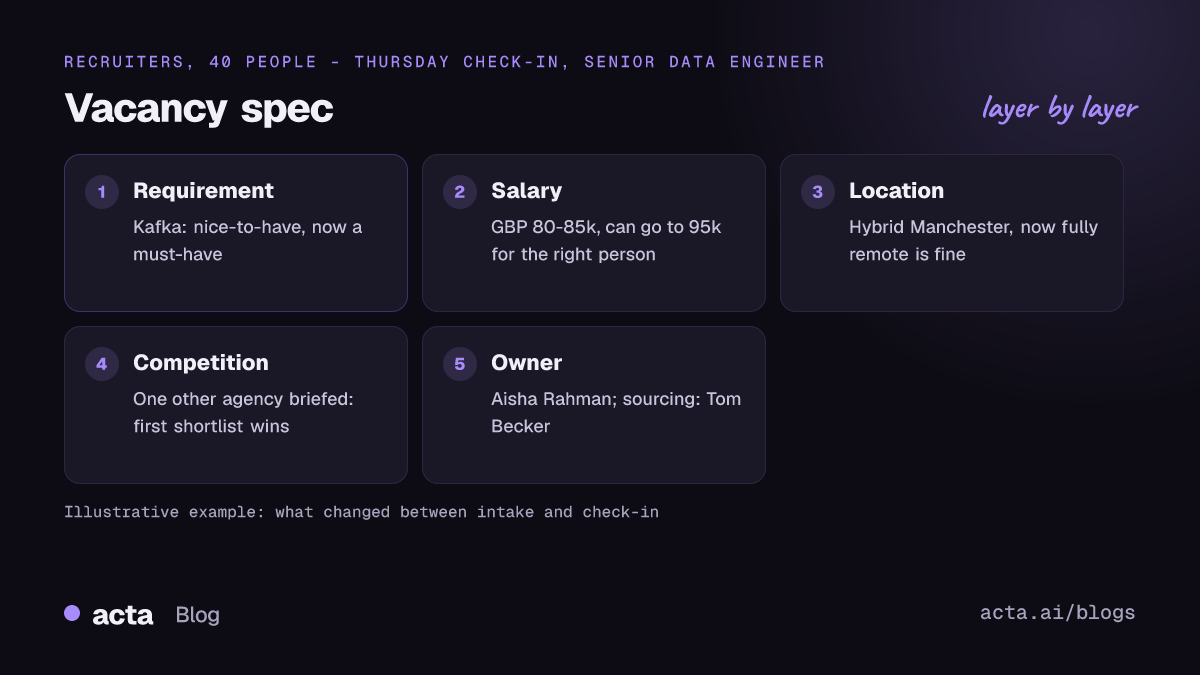
Week 2, Thursday check-in (15 minutes). Kofi: "We've lost the person leading our streaming work, so Kafka is now a must. For the right person we can go to 95. And fully remote is fine." Aisha takes the call from her car between meetings. She tells Tom "Kafka matters more now" later that day. The CRM still says £85,000, hybrid, Kafka optional.
Week 3. Tom keeps screening for Manchester-commutable candidates at £85,000 or less, and turns down two strong remote engineers asking for £92,000. Aisha sends a shortlist of five. Three have no Kafka.
Week 4. Kofi replies: "Did anyone hear what I said last Thursday?" The other agency's shortlist arrived two days earlier. They fill the role. Brightwell loses a fee of around £19,000 at its agreed rate, and a hiring manager who now thinks it doesn't listen.
Two facts were spoken and lost: the spec change on Thursday, and the competing agency on Monday. Both were on calls that could have been recorded.
Recruitment agency client intake call notes follow nine headings
These are the intake call questions that matter, as headings for the notes. Keep each to a few lines:
- Why the role exists and what success looks like at six months.
- Must-haves: no more than four. If everything is a must-have, nothing is.
- Nice-to-haves, ranked.
- Salary band and stretch: the band, and what would justify going above it.
- Location and working pattern: office days, travel, remote limits.
- Interview process: stages, interviewers, dates already in diaries.
- Deal-breakers the hiring manager will reject on sight.
- Competition: other agencies, internal referrals, direct applicants.
- Sign-off: who approves offers, and the fee terms agreed.
Check the spec wording before it becomes an ad. In the US, the EEOC's page on prohibited employment policies and practices covers job advertisements, including ads that state an age preference. This is general information, not legal advice; check local rules wherever you advertise. A hiring manager saying "someone young and hungry" on a call is a cue to rewrite, not to transcribe.
For a general-purpose layout, our client intake meeting notes template covers intake across professions. Recruitment adds two things that template doesn't: the stretch on salary and the competition question.
Acta keeps the live spec, owners and risks per consultant
Aisha records client calls with Acta. The notetaker bot can join a scheduled Teams, Zoom or Meet call even when she dials in from her phone, and at her desk the Acta desktop app records Teams or Zoom calls without a bot joining. Hiring managers should be told the call is recorded; our guide on recording consent and what to say has wording. Candidate interviews are a separate question, covered in our post on recording job interviews.
A vacancy intake template
Acta's built-in Candidate assessment template is for interviews. For client calls, Aisha creates a custom template (Pro) called Vacancy spec, set to "Only matching meetings" so it runs on client calls, not candidate screens:
1. Role and reason (Paragraph)
2. Must-haves and nice-to-haves (Table: Requirement | Must or nice | Exact words used)
3. Package and location (Table: Item | Stated | Stretch or exception)
4. Process and dates (Table: Stage | Who | When)
5. Competition and risks (Bullets)
6. Changes since last call (Bullets: anything that differs from earlier calls about this role)
7. Our follow-ups (Checklist: task, owner, due date)
On the Thursday call, section 3 would have shown "Salary: £80-85k | Stretch: 'for the right person we can go to 95'" and "Location: hybrid | Exception: 'fully remote is fine'".
Decision log, Action items, Risk Registry, OneChat
Aisha's Decision log (My meetings > Outcomes > Decision log) merges what was said across calls about the same point. After Thursday:
Senior Data Engineer: up to £95k, fully remote accepted · Status: Changed
Was: £80-85k, hybrid two days in Manchester · changed Thursday, week 2
Decided by: Kofi Mensah · Owner: Aisha Rahman · Discussed in 2 meetings · Actions: 0 of 2 done
Linked action items, as they'd appear under Outcomes > Action items grouped by Person:
| Action item | Owner | Status |
|---|
| Update CRM record: Kafka must-have, £95k ceiling, remote OK | Aisha Rahman | Overdue 2 days |
| Re-run search for remote Kafka engineers up to £95k | Tom Becker | Due today |
| Send Kofi interview slots for week 4 | Aisha Rahman | Due in 3 days |
The Risk Registry tab would carry the Monday remark: Risk "Client briefed another agency; first good shortlist wins" · Mitigation "Shortlist of three within five working days" (Suggested) · Owner: no owner · Impact High · Status Open, flagged in the "High · no owner" card. When Niamh asks Aisha about the role, OneChat answers "What has Kofi changed about the data engineer role since intake?" with: Kafka moved from nice-to-have to must-have; salary up to £95,000 for the right person; fully remote accepted. Found in: Thursday check-in, with a link to the moment.
Remember these views belong to each person. Tom's Outcomes and OneChat only include the client calls Aisha shares with the workspace.
A spec-keeper agent updates the CRM note and the sourcers
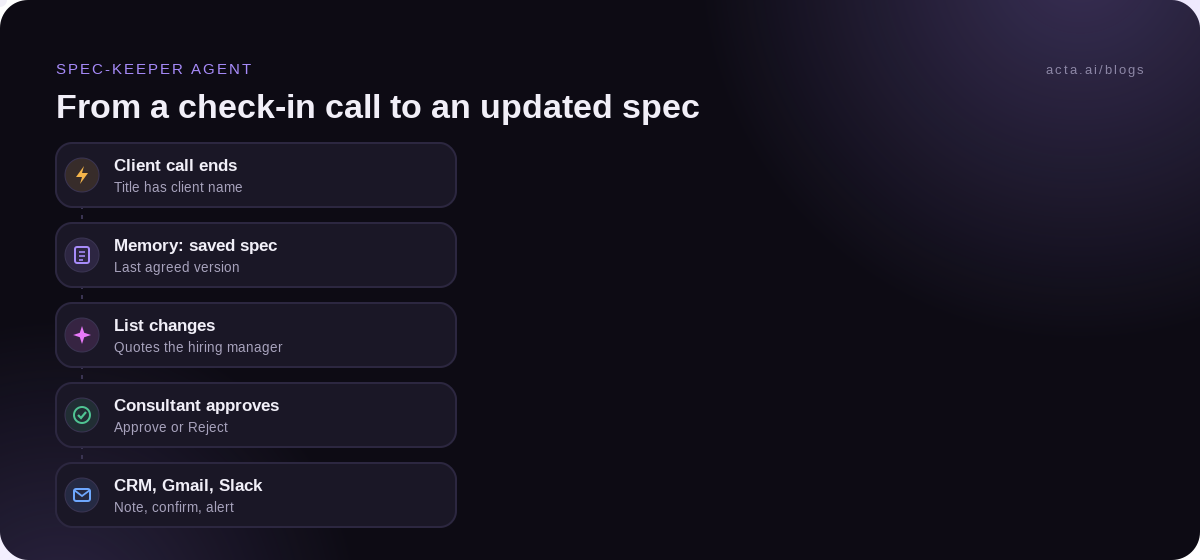
Recording catches the change. An agent makes sure it travels. Acta's Agent Builder (beta) gives you triggers, AI steps, memory and app actions; the steps guide explains each. This recipe uses the Memory step to keep the last agreed spec per role, so the agent can spot what changed:
- Start: "When a meeting ends", with an "Only when" condition: title contains the client's name.
- Acta data: the meeting's notes and the Vacancy spec report.
- Memory (read): the saved spec for this role.
- AI: "Compare this call with the saved spec. List every change to requirements, salary, location, process or competition, quoting the hiring manager. Flag wording that states an age preference or other protected characteristic. If nothing changed, say NO CHANGE."
- If / else: NO CHANGE ends the run.
- Human approval: the consultant who owns the agent approves or rejects, from the Approvals tab or by email.
- HubSpot, Salesforce or Zoho: add a note to the hiring manager's contact with the changes. It is a note, not a field update, so the record's fields still need a human edit. See CRM connections.
- Gmail: draft a two-line confirmation to the hiring manager: "To confirm what you said today: Kafka is now essential and we can present candidates up to £95,000, fully remote."
- Slack: message the sourcing channel with the new spec. Drafts to copy: a revised job ad for LinkedIn, which agents never post themselves.
- Memory (save): store the updated spec for next time.
Run Test on the intake and the check-in in order; the second run should report the Kafka, salary and remote changes. In test mode nothing is sent. Then Turn on. If your agency runs on a recruitment CRM other than HubSpot, Salesforce or Zoho, the HTTP request step can call its API with a key, though that's a job for whoever administers your CRM. The confirmation email is the most valuable step: a hiring manager who replies "yes, correct" has agreed the spec in writing.
Put a recruitment desk on it in two weeks
Who records what
- Consultants: every intake, check-in, shortlist review and offer call with hiring managers, shared with the workspace.
- Resourcers: read shared calls and ask OneChat; record their own candidate screens only with the candidate's consent.
- Delivery director: records the weekly desk meeting where roles are prioritised.
Invite the desk from Settings > Workspace (Owner pays, Admins manage people, Members record and read). The team setup guide has the steps.
Fourteen days
- Day 1: workspace for one desk: two consultants, two resourcers, the delivery director.
- Days 2-3: write and test the Vacancy spec template on a past intake.
- Days 4-7: record every client call on that desk; send hiring-manager confirmations by hand.
- Days 8-10: build the spec-keeper agent, test it on a role that changed, turn it on.
- Days 11-14: run the desk meeting from the Risk Registry's high risks and the Overdue tile; agree that no shortlist goes out against a spec the hiring manager hasn't confirmed in writing.
What to avoid
- Recording candidate calls by default without consent. Keep client and candidate rules separate.
- Assuming the CRM note updates the vacancy fields. It doesn't.
- Letting the competition question go unasked on intake.
Frequently asked questions
What questions should a recruiter ask on a client intake call?
Why the role exists; the four true must-haves; ranked nice-to-haves; salary band and what would justify stretching it; office days and remote limits; interview stages and dates; deal-breakers; which other agencies or channels are working on it; and who signs off offers. Ask the competition question every time, even if it feels awkward.
How do I handle a hiring manager who keeps changing the job spec?
Accept that specs move, and make every change visible. After each call, confirm the changes in writing in two or three lines and ask for a reply. Keep a dated list of versions. If the changes are frequent, raise it kindly: show the list and agree which requirements are now fixed.
Can Acta update our recruitment CRM automatically?
Acta can add a note to a contact in HubSpot, Salesforce or Zoho, either with Push to CRM on a template report or from an agent's app action. It does not map details into CRM fields, so someone still edits the vacancy record. For other CRMs, an agent's HTTP request step can call their API.
Should a recruitment agency record calls with hiring managers?
Many do, because spec changes and competition remarks are easy to miss. Tell the hiring manager at the start of the first call and note their agreement. Candidate interviews need their own consent approach. This is general information, not legal advice; check the rules where you and your clients operate.
How long does the spec-keeper agent take to set up?
An afternoon for most consultants: about an hour to connect Gmail, Slack and the CRM and build the steps, and another hour testing on two past calls and tuning the AI instruction. Test runs send nothing and approvals pass by themselves, so you can try it on real calls safely.
Set up before your next intake call
A spec that lives in one consultant's head is a fee at risk. Before Monday:
- Use the nine headings: on every intake, including competition and salary stretch.
- Record the check-ins: they change more than intakes do.
- Confirm in writing: two lines to the hiring manager after any change.
- Share with the desk: so resourcers search against today's spec.
- Turn on the agent: with approval before the CRM note, email and Slack alert.
Try it on one desk with the 15-day free trial. More for staffing firms is on the recruitment agencies page, and hiring managers on your clients' side may find our structured interviews guide useful.