The weekly store managers call carries the whole chain
In most apparel and footwear chains, the store managers call is the one fixed point of the week. It's usually early, before stores open, on Teams or Google Meet, with store managers joining from their phones in the stockroom. Head office brings the COO or retail operations head, the area managers, the merchandiser or buyer, the visual merchandising lead and someone from HR.
A sensible store manager meeting agenda runs like this: last week's sales against target by store, conversion, average bill value and units per bill; stock (what's selling out, what's stuck, which inter-store transfer moves where); VM and promotions for the coming week; people (rosters, seasonal hires, attrition); and store issues such as AC, lighting, trial rooms and mall notices. Some chains split this into a weekly sales review and a separate retail operations meeting. Smaller chains do it all in one hour.
The trouble is volume. One call can produce 15 to 25 small tasks spread across 22 people. Area managers scribble some, store managers remember theirs, and by Friday nobody can say which stores changed the window. Next week's call becomes a roll call: "Store 9, did you send the transfer? Store 14, did you get it?" That roll call is the most expensive part of the week, because it pushes the actual conversation about sales to the last ten minutes.
Seventeen tasks went in and seven came out
An illustrative example. Threadline (invented) runs 22 apparel stores across Tamil Nadu and Karnataka with about 260 people. COO Lakshmi chairs the Tuesday 9:30 call on Teams. Area managers Prakash (Tamil Nadu) and Divya (Karnataka), merchandiser Arun, VM lead Sneha and HR executive Faisal join from head office.
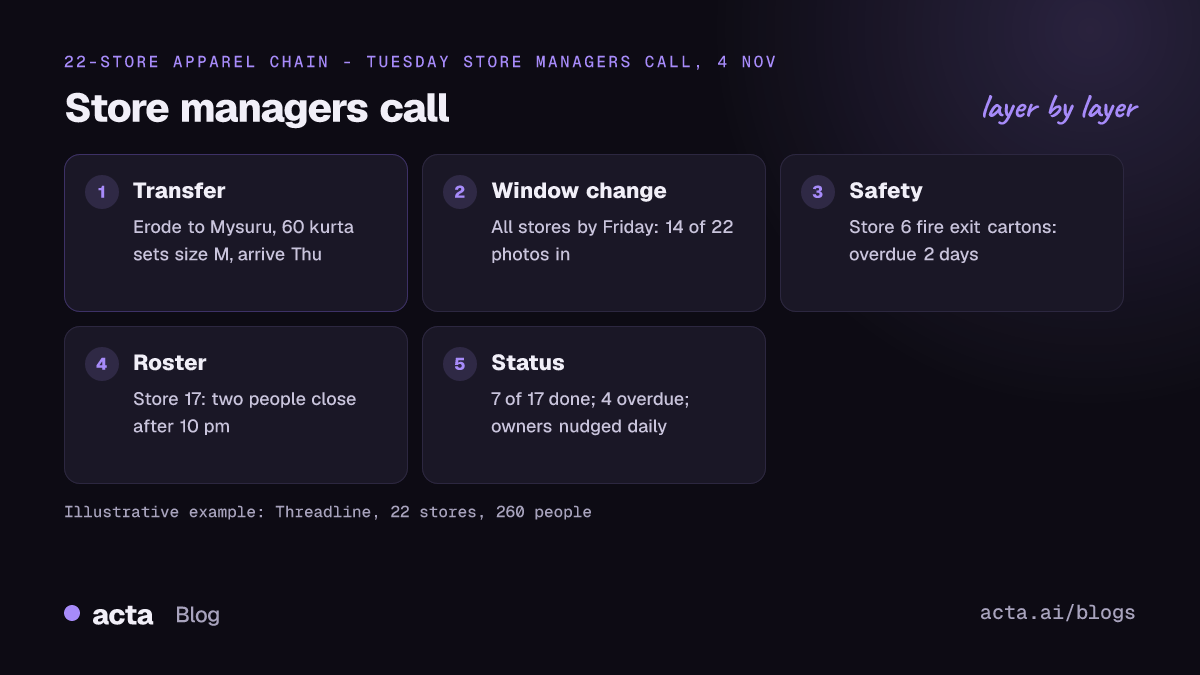
On 4 November the call produced 17 action items. Among them:
- Murali at the Erode store to send 60 festive kurta sets in size M to the Mysuru store by Thursday, for the weekend.
- All stores to finish the festive window change by Friday, using the VM kit couriered on Monday.
- Kavitha at Store 6, inside a mall, to clear festive cartons stacked against the rear fire exit by Wednesday.
- Store 17 to change the roster so that two people close after 10 pm, not one.
- Three stores to reprint price tags on 120 shirts carrying the wrong MRP.
Lakshmi assumed the area managers would track them. Prakash and Divya each assumed the stores would report back. On 11 November, the call spent its first 40 minutes going store by store. The honest count: 7 of 17 done. The kurta transfer left Erode on Saturday and reached Mysuru on Monday, so Mysuru sold out of its best size over the festive weekend; Divya estimated around 1.1 lakh rupees in lost sales. Five stores hadn't changed their windows. And at Store 6, the mall's fire safety officer found the cartons still there and issued a written notice.
None of the tasks were hard. They just had no shared status, so everyone found out late.
Store managers meeting action items need one tracker, by person
Acta pulls action items from each recorded meeting with an owner and, when one was said, a due date. The cross-meeting view lives at My meetings > Outcomes > Action items, with four filter tiles (Open, Overdue, Due this week, Done), a search box, and Group by Meeting or Person. For a store call, group by Person: each store manager becomes a block with their own items. The action item detection guide explains how owners and dates are picked up.
Here is part of Lakshmi's tracker on 7 November, three days after the call, grouped by Person:
| Action item | Owner | Status | Comment |
|---|
| Send 60 kurta sets, size M, Erode to Mysuru | Murali | Overdue 1 day | Courier booked for Saturday; Divya chasing |
| Clear cartons from rear fire exit, Store 6 | Kavitha | Overdue 2 days | Mall godown full; Prakash asking for space |
| Festive window change, all stores | Sneha | Due today | 14 of 22 photos received |
| Two-person closing roster, Store 17 | Faisal | Due tomorrow | Seasonal hire joins Monday |
| Reprint 120 MRP tags, Stores 3, 8, 11 | Arun | Done | Tags sent 6 Nov |
This is what an action item tracker should look like for a chain: one line per task, a status computed from the due date, and a comment that explains the delay. On 7 November Lakshmi would have seen the transfer slipping two days before the weekend, and Divya could have sent stock from a nearer store instead.
Three habits make it work. First, area managers own the hygiene: after their own calls with stores, they add comments and tick "Mark as done" (store managers usually aren't in the workspace). Second, a stock transfer is done when it arrives, not when it's packed. Third, use the search box ("Search action items, e.g. pricing, Jira") with a store name to see everything open for one store before a visit.
Then switch on Auto follow-up for the store call. Choose "Each owner, their own items" so every store manager gets a short daily email listing only their tasks; pick Weekdays, a time before opening such as 9 am, "Due or overdue", and "Stop after" 7 days so it resets with each weekly call. Lakshmi could instead choose "Me, a summary of everyone's items" if she'd rather do the chasing herself. It stays off until someone turns it on, and stops by itself when every item is done.
A store call template keeps 22 stores in the same order
Every recorded meeting gets standard notes with a summary, decisions and action items. For the weekly numbers, the built-in KPI review template (one of Acta's 40 templates by role) is a good start. For the full call, a custom template (paid plan, up to 12 sections) gives head office the same layout every week:
Template name: Store managers call
What should this report do? For a retail chain's weekly store managers call: store-wise sales and issues, stock transfers, VM and promotion changes, people issues, and every task with a store, owner and date.
1. Store numbers discussed (Table: Store | Sales vs target | Conversion | Main issue)
2. Stock transfers agreed (Table: From store | To store | Items and sizes | Arrive by)
3. VM and promotions (Bullets)
4. People and rosters (Bullets)
5. Store safety and maintenance (Table: Store | Issue | Owner | Fix by)
6. Tasks (Checklist: task, owner, due date)
Extra instructions: Name stores by town and number. Write "Not discussed" for stores that didn't come up.
When should Acta use it? Only matching meetings.
"Arrive by" rather than "send by" is deliberate. Test it on a past call with "Test on a past meeting", then tick "Share with my team" so area managers can run the same template on their own store calls. The custom template guide walks through it.
Decisions, risks and OneChat cover what tasks miss
All three views below are per person, like the action tracker: Lakshmi's are built from the meetings she recorded plus those her area managers shared with her in the workspace.
Decision log
Store calls make policy as well as tasks. A filled entry from Lakshmi's Decision log (Outcomes > Decision log): Decision: end-of-season sale starts 26 December, 30% on last season's stock only; festive stock stays full price. Status: Active. Decided by: Lakshmi. Owner: Arun. Actions: 0 of 2 done. If someone later says "let's start on the 20th in Karnataka", the card changes to Changed with the old date shown.
Risk Registry
The Risk Registry tab would have caught Store 6 on 4 November: Risk: festive cartons blocking the rear fire exit at Store 6. Mitigation: move overflow to the mall godown by Wednesday (Agreed). Owner: Prakash. Impact: High. Status: Open, then "Fix is overdue" on Thursday. A second row: one staff member closing Store 17 alone after 10 pm, Medium. The UK HSE's lone working pages and its leaflet Protecting lone workers are a practical reference for thinking through closing shifts, wherever your stores are.
OneChat
OneChat answers across your meetings, with links to where each answer was found. On Friday, Lakshmi asks: "Which stores haven't confirmed the festive window change, and what did each manager say?" The answer names five stores, quotes two managers' reasons (kit damaged in transit, mall approval pending), and links each to its moment in the 4 November call. See the OneChat guide for the scope button and files.
An overdue nudge agent saves the area managers' mornings
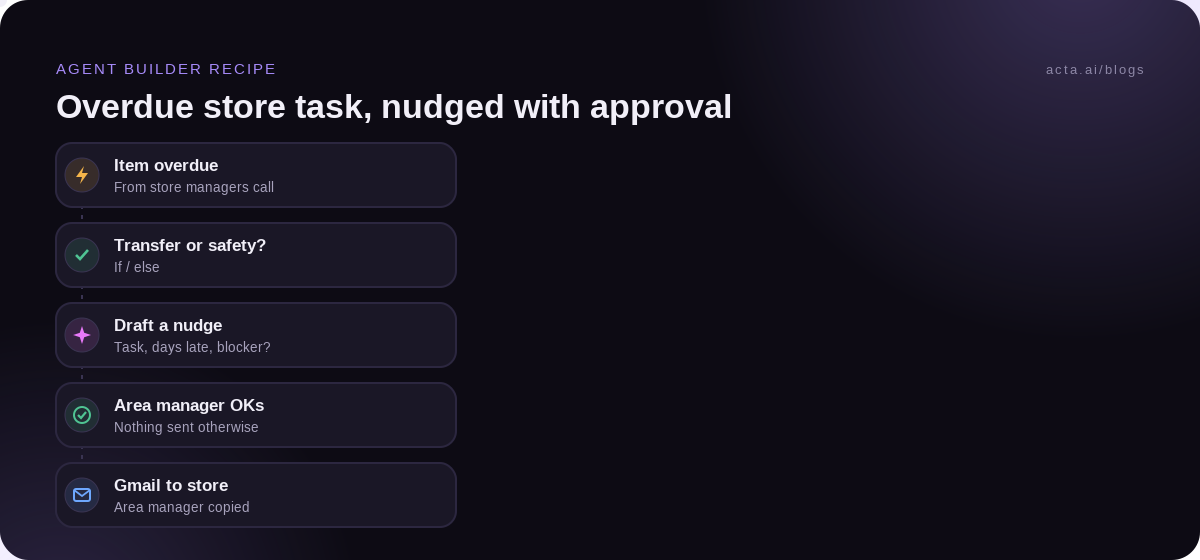
Auto follow-up covers the daily list. For items that slip, Agent Builder (beta) can send a targeted nudge that an area manager approves first:
- Click "New agent". Trigger: Event in a connected app, app Acta, event "action item overdue".
- Add an "Only when" condition so it runs only for items from meetings whose title contains "store managers".
- Add an If / else step: if the item mentions a transfer, safety or a fire exit, continue; otherwise stop and let the daily email handle it.
- Add an AI step: "Write a three-line email to the owner: the task, how late it is, and one question asking what is blocking it. Friendly, no capitals."
- Add Human approval. Approvals go to the agent's owner, so the area manager builds their own copy; nothing is sent without an answer within 24 hours.
- Add a Gmail action to send the email to the store's address, copying the area manager.
- Test it with Run test (nothing is sent), then Turn on.
For more patterns, the post on why action items don't get done is a good companion, and the test and turn on guide covers versions.
A two-week rollout works for a 260-person chain
Each person in the workspace uses a seat; people outside it who only receive follow-up emails don't. At Threadline that is six seats: Lakshmi, Prakash, Divya, Arun, Sneha, Faisal. Pro is $8 per seat a month or $72 a year, and the Outcomes views, Risk Registry and OneChat are included in the 15-day trial and in Pro.
Who records what. Lakshmi records the Tuesday call. On the Teams desktop app the Acta desktop app picks up the meeting by itself with no bot joining. Area managers record their own one-to-one store calls and store visits, using the mobile app in person. Tell store managers the call is recorded and what for; the recording consent post explains what to tell people.
Sharing. Meetings are private by default. Area managers share their store calls with "Everyone in" the workspace so Lakshmi's tracker covers all 22 stores. The team setup guide covers invites and the Owner, Admin and Member roles.
- Days 1-3: Create the workspace, invite the five head-office people, record Tuesday's call, check every item has an owner.
- Days 4-7: Area managers comment and mark done daily; turn on Auto follow-up for store managers.
- Days 8-10: Build the store call template; run it on the first two calls and adjust sections.
- Days 11-14: Open the second call with the Overdue filter; build and test the nudge agent.
Mistakes to avoid: tasks without a named store manager ("someone from Karnataka"), marking transfers done on dispatch, keeping area managers' calls private, and letting the daily email go to a store inbox nobody opens. Ask each manager to confirm the address on day one.
Frequently asked questions
How do I track action items from a store managers call?
Record the call, check that each task has a store manager and a date, then use one cross-meeting tracker grouped by person. Send each manager a daily list of their own open items, and start the next call with what's overdue. Update status from evidence, such as a goods receipt or a window photo.
Do store managers need their own Acta seat?
Not to receive their tasks. With Auto follow-up on and "Each owner, their own items" chosen, each owner gets a daily email of their open items. Seats are for people in the workspace, whether they record or not, usually head office and area managers.
What should a store manager meeting agenda include?
Sales against target by store, conversion and basket measures, stock transfers and stuck stock, VM and promotions for the week, rosters and hiring, and store safety or maintenance issues. Close by reading back every task with a store, owner and arrive-by or fix-by date.
Can the call be recorded if managers join from their phones?
Yes. What matters is how the host joins. If head office runs the call in the Teams or Zoom desktop app, Acta's desktop app records it on the host's computer. In a browser, the Chrome extension does the same. Managers on phones are recorded as participants.
How is this different from a shared spreadsheet?
A spreadsheet holds only what someone types in after the call. Here the tasks come from what was said, with the moment in the recording, owners and dates already filled, and statuses change by themselves as due dates pass. You can still push rows to Google Sheets with an agent if the chain lives in sheets.
Make next Tuesday's call start with what's late
The aim is a call that spends its time on sales, not on a roll call. Before next week:
- Name every owner: store manager, store and day, said out loud.
- Use arrive-by dates: for every transfer, so done means on the shelf.
- Turn on the daily email: each manager sees only their own list.
- Open with Overdue: grouped by person, five minutes, then move on.
- Log safety as risks: blocked exits and lone closings get an owner the same day.
Set up the desktop app on the host's laptop and run next Tuesday's call on the 15-day free trial.