MSP quarterly business review notes should end in a risk list
A QBR note is the written record of a quarterly review between an MSP and a client: service performance, open risks, the technology roadmap, and money. Most MSPs walk in with a polished deck and walk out with nothing written about what the client actually said. The deck shows ticket counts; the conversation is where the client says "let's leave the old laptops until next year".
The risk list is the part that protects both sides. For the client, it is the plain-language view of what could hurt them. For the MSP, it is evidence that a risk was raised, a fix was offered, and someone made a choice. When something breaks months later, that record turns a blame conversation into a planning one.
Public guidance points the same way. CISA's guidance for MSPs and small and mid-sized businesses gives both providers and their customers hardening recommendations, starting with least privilege, and its small and medium businesses page is a sensible link to share with clients who want to read more. Neither replaces your own judgement, but both make the case that security is a shared job, which is exactly what a QBR should document.
QBRs carry the risks that ticket queues never show
An MSP talks to each client in three settings. Service desk calls fix today's problem. Project meetings cover migrations, office moves and new sites. The QBR, with the vCIO, account manager and the client's owner or operations lead, is the only one where someone steps back and asks "what could go wrong this year?"
A typical QBR agenda for MSP clients runs like this:
- Service review: ticket volume, top categories, response against the agreed SLA.
- Security posture: MFA coverage, patch status, endpoint protection, backup success and the last test restore.
- Lifecycle: hardware and software nearing end of support, licence counts.
- Roadmap and budget: what the client wants next year, what it will cost.
- Renewals and commercial changes.
Items 2 and 3 produce the risks. They also produce the most hedging from the client, because every fix costs money. Without a record, the vCIO remembers raising it, the client remembers "maybe later", and the account manager, who was looking at the renewal slide, remembers nothing.
A failed restore test raised in January was forgotten by July
An illustrative case. Northgate IT is a 70-person MSP in Denver. Priya Nair is a vCIO with 14 clients; Sam Okafor is the account manager on most of them. One client is Alder & Finch, a 55-person architecture practice. Helen Marsh runs operations there; Tom Alder is the managing principal.
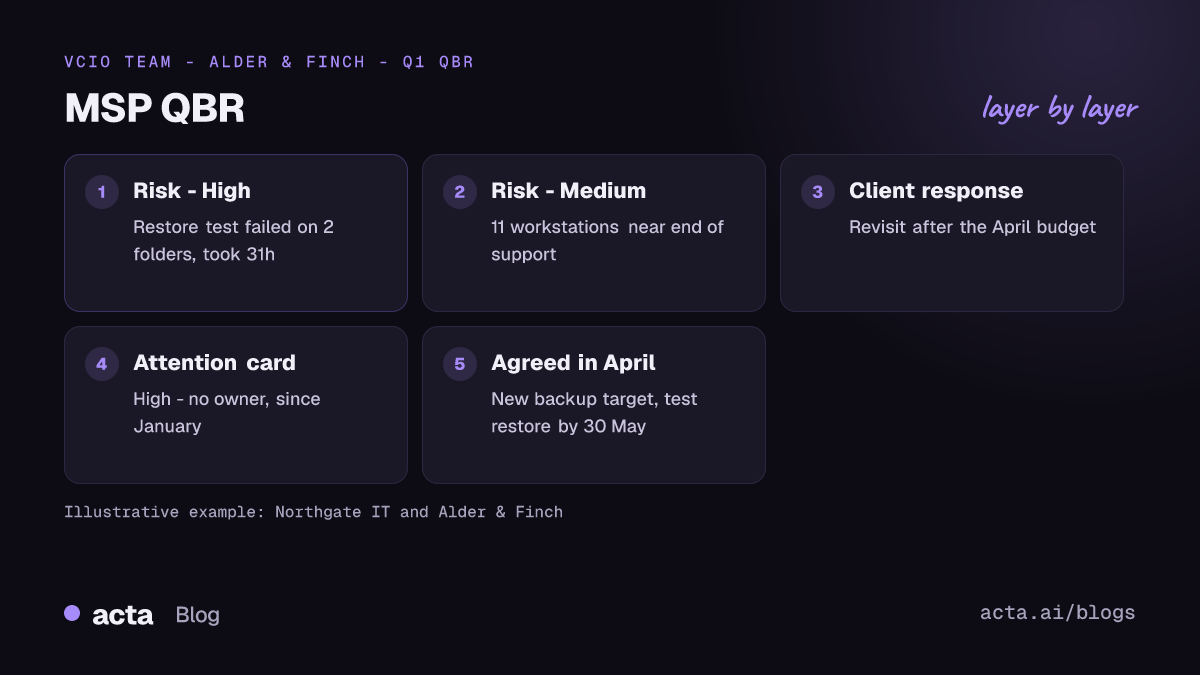
January QBR. Priya raises three things. The nightly backup of the project file server reports success, but December's test restore of one share took 31 hours and failed on two folders. Eleven workstations run an operating system version nearing the end of vendor support. Four shared mailboxes still have no MFA. Helen says, "Let's look at all of that after the April budget." Nobody is named. The meeting ends on the renewal timeline.
April QBR. The meeting is about the renewal: licence true-up, a firewall subscription, a price change. The restore problem never comes up. Priya's deck has a green backup tile because the nightly jobs succeed.
July. The file server's storage fails. The restore takes three days, and a week of project drawings has to be rebuilt from email attachments. Tom asks Sam why nobody warned them. Priya is certain she did. Northgate has a January deck with a green tile and no notes.
The relationship survives, barely, with a service credit. The technical fix was a few hours of work. The failure was a sentence spoken once and never written down with an owner.
The Risk Registry keeps each client risk alive between QBRs
Acta's Risk Registry is a tab under My meetings. It reads your recorded meetings for risks and updates after each new one, with a badge showing which meeting it last read. It is per person: Priya's Risk Registry is built from the meetings she recorded plus the ones colleagues shared with her in the workspace. If Sam records the renewal call and shares it, its risks land in Priya's view too. Think of it as a risk register example that writes itself, and then argue with it.
The table
The table "Risks · all meetings" has six columns: Risk, Mitigation, Owner, Date, Impact and Status. After the January QBR, Priya's row would read:
Risk: Project file server restore failed on two folders and took 31 hours in the last test. Mitigation: None yet. Owner: No owner. Date: none. Impact: High. Status: Open. Tag: New.
Two more rows follow: the eleven workstations nearing end of support (Medium) and the shared mailboxes without MFA (High).
Attention cards
Above the table, up to three cards flag what needs a decision: "High · no owner", "Fix is overdue" and "Getting worse". The restore row sits in "High · no owner" from the day after the January QBR. Each card has buttons to "Assign owner", "Change date", "Mark closed" or "See history". In the Northgate story, that card would have been on Priya's screen in February, March and April.
Agreed versus Suggested mitigation
Mitigations carry a tag. Agreed means it was decided in a meeting, and a play button opens the moment. Suggested means Acta proposed it and nobody has agreed yet. That distinction is the one an MSP needs: "we suggested a restore redesign" and "the client agreed to fund it" are not the same, and the register should never blur them. Once Helen agrees in April to fund a new backup target, the row updates:
Mitigation (Agreed): Move project shares to a new backup target and run a full test restore. Owner: Jordan Reyes. Date: 30 May. Status: Mitigating.
Grouping, filters and history
Group by Project / customer to see all of Alder & Finch's risks together before their QBR, by Impact for a weekly review across clients, or by Owner to see what Jordan's team is carrying. Chips such as "3 high" and "2 no owner" filter the table. Each risk's History shows how it changed and when someone said it was solved. Closed risks move to "Closed (N)", solved in a meeting or closed by you. A risk raised again later stays one row, with the newest details.
For more on spotting risks in ordinary conversation, see project risks hiding in everyday conversations.
A QBR template with a risk table does most of the writing
Acta's built-in Customer QBR template writes a structured QBR report from the recording; the report templates guide shows how templates run after each meeting. If you want MSP-specific vCIO meeting notes, build a custom template (paid plans) under Templates, with "Start from: Built-in" to copy the Customer QBR and change it:
Template name: MSP QBR
What should this report do? For quarterly reviews with managed IT clients: summarise service performance, list every risk raised with the client's response, agreed fixes with owner and date, roadmap items, and renewal points.
- Service summary (Paragraph).
- Risks raised (Table: Risk | Impact | Client response | Owner | Date).
- Agreed actions (Checklist: task, owner, due date).
- Roadmap and budget items (Bullets).
- Renewal and commercial points (Bullets).
The "Client response" column is the one most templates miss. Acta writes "Not discussed" instead of guessing, so an empty response is itself a signal. Our QBR notes template examples show other layouts.
Action items, decisions and OneChat tie risks to renewals
The Risk Registry is the focus, but three other views do supporting work.
Action items
Under Outcomes, the Action items tab lists next steps from every QBR with owners and due dates. A row from April: "Quote new backup target and test restore for Alder & Finch. Owner: Sam Okafor. Due in 3 days." Group by Person to see what each account manager owes clients this week.
Decision log
The Decision log tab holds choices like "Alder & Finch defers workstation replacement to next financial year. Status: Active. Decided by: Tom Alder. Owner: Helen Marsh." If Tom reverses that in October, the card shows Changed with "Was:" and the date. A client risk review six months later starts from facts, not recollection.
OneChat
Before the April QBR, Priya asks OneChat:
Priya: What risks did we raise with Alder & Finch since January, and what did they agree to?
OneChat: Three risks. Restore test failure on the project file server: no fix agreed; Helen said to revisit after the April budget. Eleven workstations nearing end of support: deferred. Shared mailboxes without MFA: no response recorded. Found in: Alder & Finch - Q1 QBR, 14 January, at 22:10 and 26:45.
That one answer, read out at the start of the April meeting, changes the July story.
An Agent Builder recipe sends the QBR recap with owners
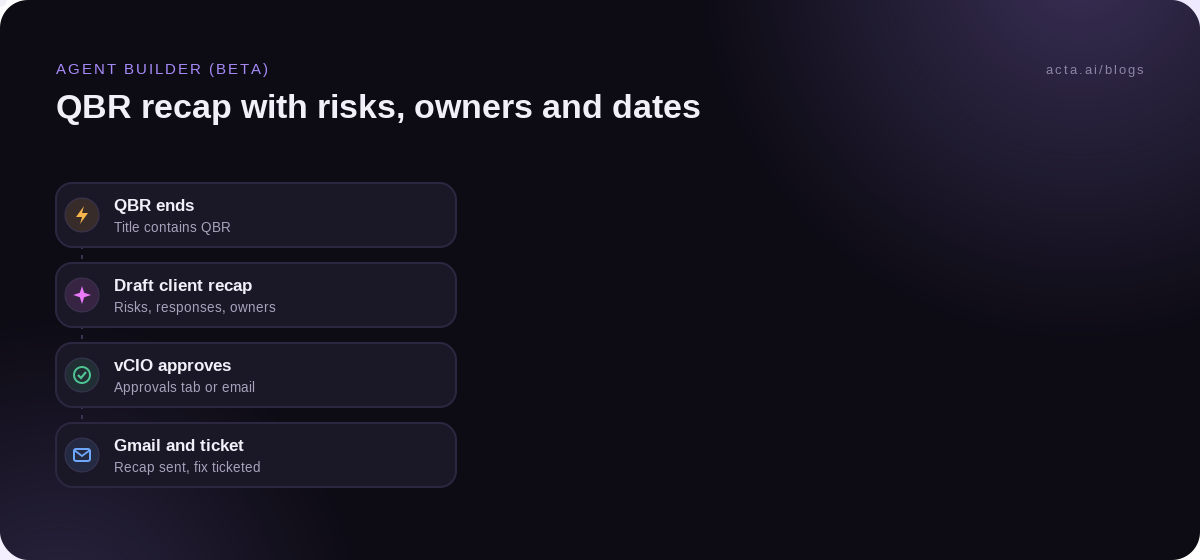
The written recap is the step that slips most after a QBR. Agent Builder (beta) can draft it, wait for the vCIO's approval and open a ticket for each agreed fix. The examples guide shows a similar follow-up agent you can copy.
- In Agent Builder, click "New agent" and name it "QBR recap".
- Trigger: "When a meeting ends", filter "title contains QBR".
- Acta data step: the meeting's notes and action items.
- AI step: "Write a client recap: service summary in two lines, then each risk raised with the client's response, any agreed fix with owner and date, and open questions. Plain English, no jargon."
- Human approval: the vCIO approves or rejects, from the Approvals tab or by email. No answer in 24 hours, nothing goes out.
- Gmail: send the approved recap to the client contact.
- If your service desk runs on Zendesk or Freshdesk, add a step to create a ticket for each agreed fix. On Jira or Asana, create an issue or task instead.
- Test with Run test on last quarter's QBR (nothing is sent), then Turn on.
vCIOs and account managers can adopt it in two weeks
In a 40 to 150 person MSP, the people who need seats are vCIOs, account managers and the service desk lead who joins escalation calls. Engineers who read shared meetings need a seat too, because every workspace member uses one; an engineer who only owns a fix can get it by follow-up email instead. See the workspace setup guide for roles.
- Days 1-2: Invite vCIOs and account managers from Settings, Workspace. Agree titles: "Client - Q2 QBR", "Client - renewal".
- Days 3-7: Record every client QBR and renewal call. Teams and Zoom desktop calls work with the desktop app, browser calls with the Chrome extension, in-person reviews with the mobile app. Share each with "Everyone in" the workspace.
- Week 2: Each vCIO opens the Risk Registry, assigns owners to every High risk and fixes dates. Turn on the recap agent with approval.
Three mistakes to avoid. Recording client meetings without saying so: read what to tell participants before recording. Treating every Suggested mitigation as agreed. And letting the register grow without a monthly pass to close what is solved. Acta's page for managed IT providers has more for this sector, and how to run a QBR customers value covers the meeting itself.
Frequently asked questions
What should an MSP cover in a quarterly business review?
Service performance against the SLA, security posture (MFA, patching, endpoint protection, backups and the last test restore), hardware and software lifecycle, the roadmap and budget, and renewals. End with a written list of risks, the client's response to each, and owners and dates for anything agreed. That list is what the next QBR should open with.
Can our clients see the Risk Registry?
No. The Risk Registry lives in your Acta account and is built from the meetings you recorded or that colleagues shared with you in your workspace. Clients see what you send them, such as an approved recap email listing risks and agreed fixes. Many MSPs paste that list into the next QBR deck.
Does recording QBRs help with security audits or certifications?
Acta does not certify anything and is not a compliance tool. What it gives you is a dated record of what was said: which risks you raised, what the client decided and who took the action. Whether that is useful evidence for a specific audit is a question for your auditor, not your meeting notes.
What is the difference between an Agreed and a Suggested mitigation?
Agreed means the fix was decided in a meeting; you can play the moment it was said. Suggested means Acta proposed it from the conversation and nobody has agreed yet. For an MSP, keep that line sharp: a suggested fix the client never funded should not read like a commitment in the recap.
How many Acta seats does an MSP need?
One seat for each person in the workspace, whether they record or not. For most MSPs that means vCIOs, account managers and perhaps the service desk lead. Pro is 8 dollars per seat a month or 72 dollars per seat a year, and the Risk Registry, Outcomes views and OneChat are included in the 15-day trial and Pro.
Make the next QBR the one with a written risk list
Pick the three clients with the most unresolved findings and make their next QBR the first one with a written, owned risk list.
- Record the review: every QBR and renewal call, shared with the workspace.
- Capture the response: agreed, declined or deferred, for every risk raised.
- Assign owners: no High risk leaves the week without a name and a date.
- Send the recap: approved by the vCIO within a day of the meeting.
- Open with the register: start each QBR with last quarter's open risks.
Record your next QBR with the Acta desktop app and try the Risk Registry free with a 15-day trial.