An action item from a payroll client meeting is a specific input or approval, owned by a named person, due by a stated time. "Brightwater to send overtime" is not one. "Dana Whitfield sends overtime hours for the Dublin and Hilliard clinics by Tuesday 12:00" is. The difference decides whether your specialist spends Wednesday processing or Wednesday phoning.
Payroll is unusual because the outsourcing firm does the work but the client still carries the responsibility. The IRS says it plainly on its page on outsourcing payroll and third-party payers: employers remain ultimately responsible for their federal tax liabilities, even when a provider handles payroll. It also publishes tips for employers outsourcing their payroll, worth sending to new clients. That is general information, not tax advice, but it shapes the relationship: when inputs arrive late, both sides carry the consequences, and both sides want a clean record of who promised what.
So the action list is a shared contract of sorts. It protects the client from a payroll run built on stale data, and it protects your firm when a manager asks why a new hire was not paid.
Payroll bureaus live on four recurring client conversations
Most bureaus hold the same four conversations with every client, on a rhythm set by the pay frequency.
- The pay-period input call: 15 to 30 minutes with the client's HR manager before each run. New hires, leavers, rate changes, overtime, PTO payouts, garnishments, one-off bonuses. This is where most promises are made.
- The variance review: after the preview register, walking through why gross pay jumped 9 percent at one site or why a deduction disappeared.
- Implementation calls: for new clients, covering state registrations, benefits deduction codes, prior payroll history and the first parallel run.
- The quarterly service review: with the owner or controller, covering errors, late inputs, fees and what changes next quarter.
Without a record, small things leak. The client remembers saying "I'll send it Wednesday" and your specialist remembers "Tuesday". A pay rate change is agreed verbally and never reaches the system. A controller approves an off-cycle fee on one call and disputes it on the invoice. None of this is anyone's bad intent. It is just six clients' calls landing on one specialist's Monday.
One late bonus file became an off-cycle run in four days
An illustrative case. Ledgerline Payroll Partners is a 45-person bureau in Columbus, Ohio, running payroll for about 180 small employers. Marcus Hale, a payroll specialist, handles 24 of them. One is Brightwater Dental Group: six clinics, 110 employees, paid every other Friday. Dana Whitfield is Brightwater's HR manager; Luis Ortega is its controller. Tanya Brooks runs client services at Ledgerline.
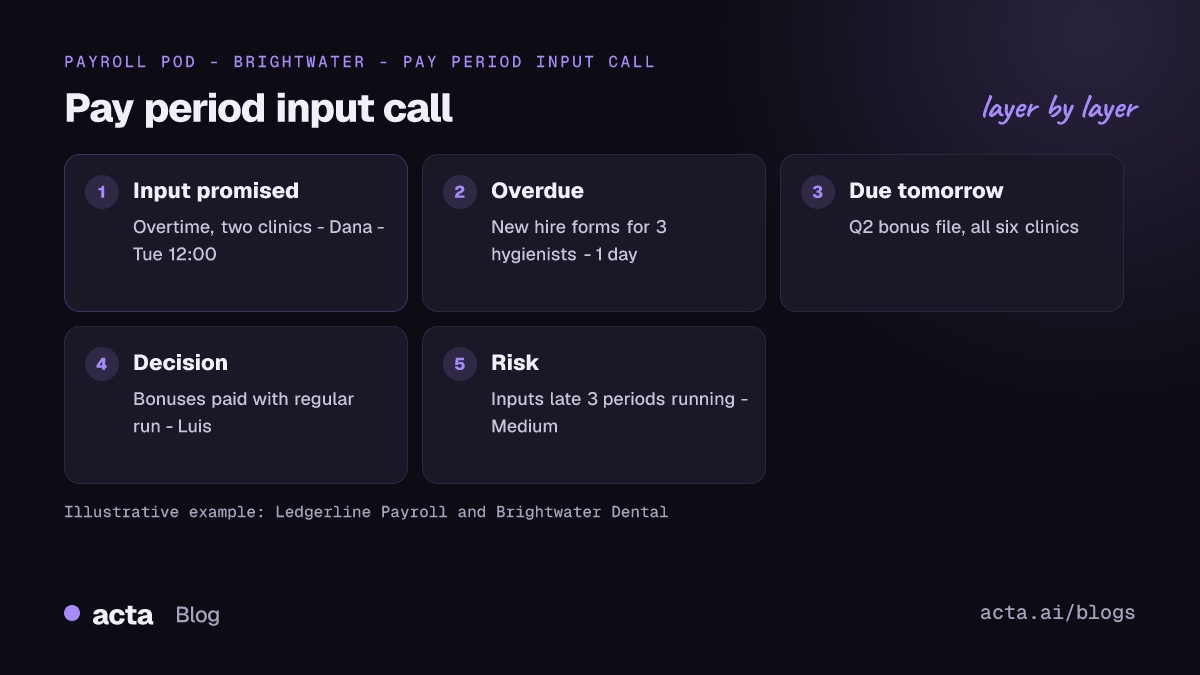
Monday, 9 June. The input call for the 13 June payday. Dana promises three things: overtime hours for two clinics by Tuesday noon, forms for three new hygienists by Tuesday noon, and the quarterly hygienist bonus file by Wednesday 10:00. Processing cut-off is Wednesday at noon. Luis joins for five minutes and says bonuses should go out with the regular run.
Tuesday. Overtime arrives at 11:40. The new hire forms do not. Marcus has four other input calls that day and does not notice.
Wednesday. Two of the three new hire forms land at 14:30. The bonus file arrives Thursday at 16:00, after the run is approved. One hygienist is missing entirely.
The following Monday. Ledgerline processes an off-cycle bonus run and a manual check for the missing hire, and bills Brightwater for the off-cycle payroll. Luis disputes the fee: "We told you on the call bonuses go with the regular run." Dana says nobody reminded her. Tanya has a 45-minute call to smooth it over and no record of who said what.
Nothing here was hard. Four promises were made on a call, and nobody watched them between Monday and Wednesday.
The Action items view shows which client owes what
Acta pulls action items from every recorded call, with owner, due date and the moment it was said; the action item detection guide explains how. For a bureau, the useful part is the cross-meeting tracker: My meetings, then Outcomes, then the Action items tab. It works as an action item tracker for teams, with one caveat: like every Outcomes view it is per person, built from the calls Marcus recorded plus any colleagues shared with him in the workspace.
Filter tiles that match the payroll week
Four tiles sit at the top: Open, Overdue, Due this week and Done, each with a count that doubles as a filter. On Tuesday afternoon Marcus clicks Overdue and sees exactly which client promises have already slipped, across all 24 payrolls, instead of rereading his inbox.
Group by Person, not by Meeting
Group by Meeting is right for the call itself. Group by Person is right for cut-off week, because it gathers every open item a single client contact owes. On Tuesday at 13:00 in the Brightwater case, it would have shown:
Dana Whitfield (3 open)
Send new hire forms for 3 hygienists (W-4 and direct deposit). Overdue 1 day. From: Brightwater - pay period input call, 9 June.
Send Q2 hygienist bonus file, all six clinics. Due tomorrow.
Confirm Hilliard clinic PTO payout for leaver. Due tomorrow.
Each row carries a "Mark as done" tick, the owner, a due chip such as "Overdue 1 day" or "Due tomorrow", and comments. Marcus adds a comment when he calls: "Spoke to Dana 13:20, forms coming by 15:00." The next person who opens the item sees the history without asking.
Auto follow-up for internal owners
Under the Outcomes view, Auto follow-up sends a daily email of open items until they are all done, for meetings you own. You choose "Who gets it" (each owner their own items, you a summary of everyone's, or all meeting participants), "Which items" (All open, Due or overdue, Overdue only), Weekdays or Every day, and "Stop after" 7, 14, 21 or 30 days. For payroll, set "Me, a summary of everyone's items", "Due or overdue", weekdays at 9:00, stop after 7 days. Marcus gets one morning list per pay period; client chasers go through the agent below, where a person approves the wording.
For the habits behind this, two older pieces help: how to end a meeting with owners and deadlines and why action items don't get done.
Built-in templates such as Client review and KPI review suit the quarterly service review. For input calls, write a custom template under Templates with "+ Create template". Custom templates need a paid plan, so during the trial use the built-in ones and the standard notes. Think of it as a payroll input checklist the client never has to fill in.
Template name: Pay period input call
What should this report do? For payroll input calls with a client: list every input the client promised with owner and due time, every employee change agreed, the cut-off and payday, and anything that could delay the run.
- Inputs promised (Checklist: task, owner, due date).
- Employee changes (Table: Employee | Change | Effective date | Document needed).
- Cut-off and payday (Paragraph).
- Approvals given on the call (Bullets): who approved what, such as an off-cycle run or fee.
- Risks to this run (Bullets).
Use "Only matching meetings" so it runs on input calls and not on sales demos, and test it with "Test on a past meeting" before sharing it with your team.
Decision log, Risk Registry and OneChat cover the gaps
Decision log: what the controller approved
The Brightwater fee dispute was about a decision, not a task. The Decision log tab under Outcomes keeps each decision with who decided, the owner and every meeting it came up in. Marcus's log would hold:
Q2 hygienist bonuses are paid with the regular 13 June run, not off-cycle. Status: Active. Decided by: Luis Ortega. Owner: Dana Whitfield. Actions: 0 of 1 done.
The banner "N overdue action items" on that card is the warning: the decision depends on a file that has not arrived. When the bonus run moves off-cycle on a later call, the card flips to Changed and keeps "Was:" with the old wording, which is what Tanya needs when the fee is questioned.
Risk Registry: the client who is late every time
Under the Risk Registry tab, risks from meetings land in one table with Impact, Owner and Status:
Risk: Brightwater inputs arrive after cut-off, third pay period running. Mitigation (Suggested): move the input call to the Friday before and set a Tuesday 10:00 internal deadline. Owner: Tanya Brooks. Impact: Medium. Status: Open. Tag: Getting worse.
"Suggested" means Acta proposed it; it becomes Agreed once someone says it in a meeting.
OneChat: one question across 24 clients
OneChat answers across all your meetings with sources. Before cut-off, Marcus asks:
Marcus: Which clients promised inputs on this week's calls that are still open, and when are they due?
OneChat: Four clients. Brightwater: new hire forms (overdue), bonus file and PTO payout (due tomorrow), owner Dana Whitfield. Corbin Tool and Die: union dues change, due Wednesday, owner Ray Patel. Two others have one item each. Found in: four input calls, 9 and 10 June.
An Agent Builder recipe chases client HR before cut-off
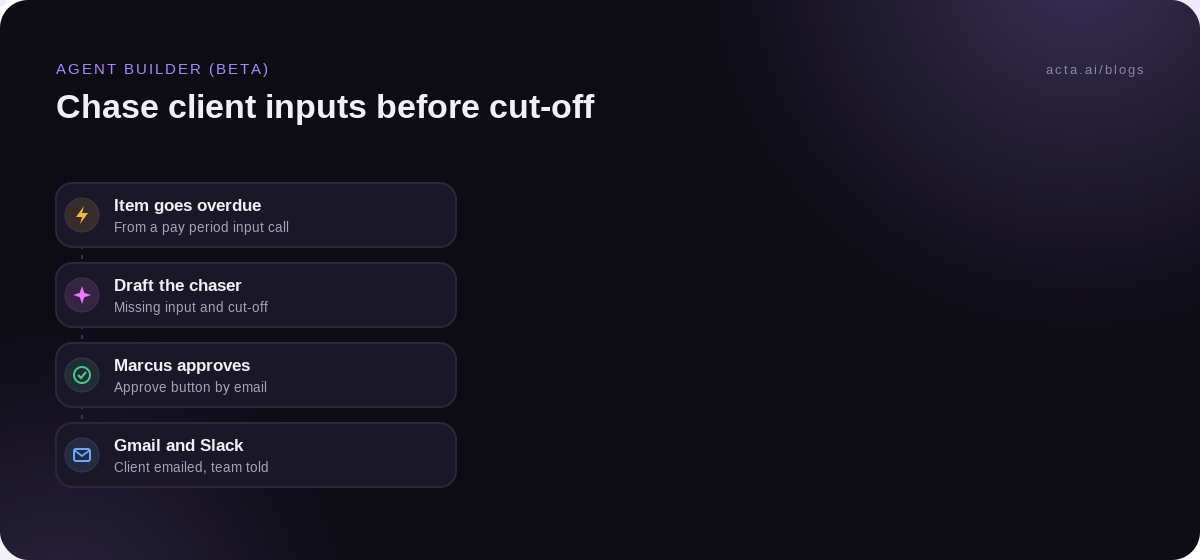
Daily summaries help Marcus. The client needs a nudge the moment something slips. Agent Builder (beta) can send that nudge, with Marcus approving every word. The triggers guide lists the options; this recipe uses an Acta event.
- In Agent Builder, click "New agent" and describe it: "When an input item from a payroll call goes overdue, draft a chaser to the client." Review the draft it builds.
- Trigger: "Event in a connected app", app Acta, event "action item overdue". Add an "Only when" condition: meeting title contains "input call".
- Acta data step: fetch the item, its owner, due time and meeting.
- AI step: "Write a short, friendly email to the owner naming the missing input, the processing cut-off, and what happens if it misses cut-off (paid next run or an off-cycle run). No blame, three sentences."
- Human approval step, with "Also email me Approve and Reject buttons" ticked so Marcus can approve from his phone. Unanswered for 24 hours means nothing is sent.
- Gmail: send the approved email to the client contact.
- Slack: post a one-line note to your team's payroll channel so the backup specialist knows.
- Test, then Run test; nothing goes out during a test. Then Turn on.
Expect to edit the AI's tone for the first few days. Clients notice a robotic chaser, so keep the prompt short and human.
Two weeks is enough to move client managers over
For a bureau of 30 to 80 people, the recorders are client managers and payroll specialists. Payroll processors who never talk to clients can stay out of the workspace for now, so they take no seat; anything assigned to them can reach them by the daily follow-up email. The team setup guide covers invites and roles.
- Days 1-3: Pick one pod (two specialists, one client manager, about 50 clients). The owner invites them from Settings, Workspace, "Invite people". Agree a title rule: "Client - pay period input call".
- Days 4-7: Record every input call. Zoom or Teams desktop calls go through the desktop app; calls in the browser work with the Chrome extension. Share each client call with "Everyone in" the workspace.
- Week 2: Turn on the template, set Auto follow-up, and run the chaser agent with approval. Friday: compare late inputs against the previous two pay periods.
Common mistakes: forgetting to tell clients the call is recorded (read what to tell participants about recording), vague promises with no name or time, and keeping calls private so the backup specialist starts from zero.
Acta's page for HR and payroll outsourcing firms has more on this sector.
Frequently asked questions
How do I stop clients sending payroll inputs after cut-off?
Make every promise specific on the call, with a name and a time at least a day before cut-off, then chase the moment it goes overdue rather than on cut-off morning. A visible list of what each client contact owes, plus a short approved reminder, fixes most lateness. Clients who still miss three periods running belong in a service review.
Can the client's HR manager be the owner of an action item?
Yes. Acta assigns the owner from what was said on the call, so "Dana will send the bonus file by Wednesday" puts Dana's name on the item. If nobody is named, the item shows "Unassigned". Saying names and times out loud is the single habit that makes the tracker work.
What is an off-cycle payroll and why do late inputs cause one?
An off-cycle payroll is an extra run outside the regular schedule, often for a missed bonus, a correction or a new hire left out. Late inputs cause one because the regular run is already approved. Bureaus often charge for it, which is why a clear record of when the input was promised matters in a fee dispute.
Can a backup specialist see another specialist's client calls?
Only calls shared with the workspace. Meetings are private by default; the share icon offers "Everyone in" the workspace. Shared calls show under "Shared with me", and the backup's OneChat can answer about them. Their own Action items view and Decision log then include those shared calls.
Is this included in the trial?
Yes. The Outcomes views (Action items and Decision log), the Risk Registry and OneChat are included in the 15-day trial and in Acta Pro. Custom report templates need a paid plan. Pro costs 8 dollars per seat a month, or 72 dollars per seat a year.
Pick the clients whose inputs slip most
Start with the five clients whose late inputs cost you the most off-cycle runs last quarter. Their input calls are where a record pays for itself.
- Name the owner: every input promised has a client-side name and a time.
- Set the buffer: due times at least 24 hours before processing cut-off.
- Check by person: Group by Person on Monday and Tuesday of each pay week.
- Chase with approval: an overdue item triggers a drafted reminder a specialist approves.
- Keep decisions: off-cycle runs and fees approved on a call go in the Decision log.
Record your next input calls with the Acta desktop app and start a 15-day trial with one pod before the rest of the firm.