Field review calls carry the facts donors ask about
Most mid-size NGOs run on the same rhythm. Block coordinators join a weekly field call with the program manager. Once a month, at the program review, the MEAL officer walks through indicator progress against the logframe, finance raises budget variance, and the director decides what changes. Every quarter the grants manager turns all of that into a narrative report for the donor.
The trouble is the gap between the calls and the report. The narrative is written six weeks later by someone who was on neither call, working from a spreadsheet and whatever the minutes say. If the minutes say "training delayed, will reschedule", so does the report, and the donor reads a number that does not match the field.
That is a record-keeping problem, not a people problem. Good NGO program review meeting notes capture three things a spreadsheet does not: why a number moved, what the team agreed to do about it, and whether anyone promised to tell the funder. The OECD's evaluation criteria, which many institutional donors use, ask exactly these questions about relevance and effectiveness; its guide on applying evaluation criteria thoughtfully stresses adapting the criteria to context, which you can only do if the context was written down. The criteria themselves, including the later addition of coherence, are set out in Better Criteria for Better Evaluation. If your board minutes are the other gap, the guide to nonprofit board minutes for volunteer secretaries covers that side.
A flooded block and a missing footnote show where the record breaks
Here is an illustrative quarter. Sahyog Livelihoods Trust (a made-up name) has 140 staff and runs a goat-rearing and savings-group program for 1,100 households across three blocks, funded by a family foundation. The Q3 target for "households completing second-round livestock training" is 220 in Kesla block.
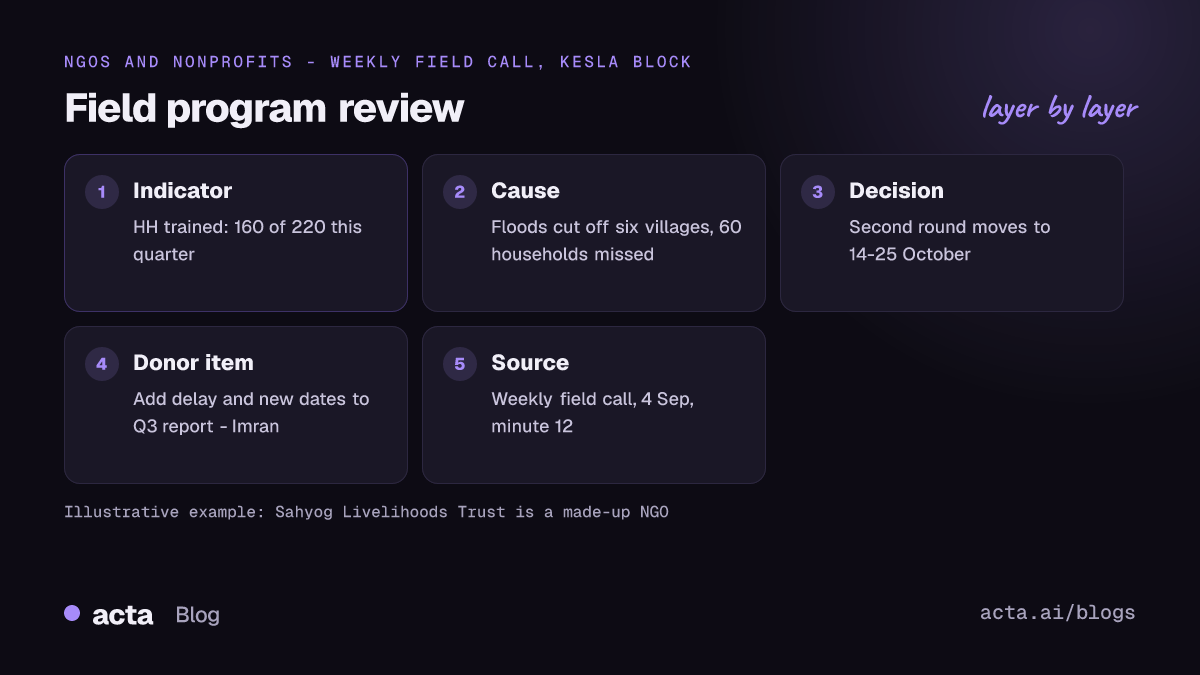
Week 1, 4 September. On the weekly field call, block coordinator Rekha Uikey says floods have cut off six villages and 60 households will miss the September session. Program manager Imran Qureshi agrees to move the second round to 14 to 25 October and says, "I'll put a line in the Q3 report so the foundation isn't surprised." Nobody writes the second sentence down. The minutes read: "Kesla training postponed due to floods."
Week 6. Grants manager Farah Siddiqui drafts the Q3 narrative from the MEAL tracker, which shows 160 trained against 220. She writes "slightly behind target, catch-up planned", with no cause and no new dates. Imran is in the field and does not read the draft.
Week 9. The foundation's program officer visits, hears from a savings group that "the training never came", and asks why the report mentioned no floods and no new schedule. The answer lives only in Imran's memory and Rekha's WhatsApp messages. Nobody did anything wrong in the field; the promise to tell the donor simply never became anyone's task.
A program review template turns each call into indicator-ready notes
Generic minutes summarise the conversation instead of answering the report's questions. Acta's built-in KPI review and Decisions & RACI templates (Operations group, under Templates) get you closer; turn both on for the monthly review. See how custom templates work for the version below.
For the field calls, a custom template built around your logframe works better. Custom templates are on paid plans (not the trial), up to 10 per person, and you can switch on "Share with my team" so every coordinator's calls use the same layout. Here is one you can copy, set to "Only matching meetings" with the description "Weekly field calls and monthly program reviews for donor-funded livelihoods programs":
Template: Field program review
1. Indicator progress (Table: Indicator | Target this quarter | Reported this week | Comment)
2. Delays and their causes (Bullets, in the coordinator's own words)
3. Changes to the activity plan (Bullets: what moved, new dates, who agreed)
4. Things the donor should hear about (Checklist: item, owner, due date)
5. Community feedback and quotes (Bullets)
6. Follow-ups from this call (Checklist: task, owner, due date)
Extra instruction: "Use household and village numbers exactly as said. Write Not discussed rather than guessing."
Section 4 is the one that would have saved Sahyog. When Imran said he would tell the foundation, the template turns that sentence into a checklist line with his name on it, rather than leaving it buried in a paragraph about floods.
OneChat answers the donor's question from the meetings themselves
OneChat is the part of this setup that changes how a grants manager works. It answers questions across all your meetings, plus any files and links you add, and every answer lists where it was found under Found in; clicking a source opens that meeting at the moment it was said. The OneChat help guide covers the basics. For donor reporting, four habits matter.
Ask per indicator, not per meeting
Farah's mistake was working from the tracker. With OneChat she would start from the question the donor will ask. A realistic exchange:
Question: What did the field teams say about second-round livestock training in Kesla between 1 July and 30 September? Include any changes to dates and anything we said we'd tell the foundation.
Answer (summarised): On the 4 September field call, Rekha Uikey reported floods cutting off six villages and 60 households missing the September session. Imran Qureshi agreed to move the second round to 14 to 25 October and said he would add a line to the Q3 report for the foundation. The 18 September program review noted the new dates but did not mention informing the donor. Found in: Weekly field call, 4 Sep; Monthly program review, 18 Sep.
Add the proposal and results framework as files
Drop the approved proposal, the logframe and last quarter's report into the chat (up to 10 files at a time; they are kept under Artifacts). Then ask, "Which Q3 indicators in the results framework are behind target according to the field calls?" OneChat reads both and shows which source each point came from. Use the scope button under the box to limit a question to some meetings, to your files and links, or to everything.
Ask follow-through questions directly
There is no separate promises screen in Acta; you ask OneChat. "What did we promise the foundation this quarter, and which are still open?" returns commitments with owners and how late they are. When an answer is a decision worth keeping, ask OneChat to add it to the Decision log.
Download it, then write the narrative yourself
An answer can be downloaded as a Word report or a PowerPoint deck for the variance annex. OneChat gives you evidence; the grants manager still writes the narrative. One limit: teammates can ask OneChat only about meetings you shared with the workspace, so the field calls must be shared for Farah's questions to find them.
Three screens keep follow-through visible between reports
OneChat answers questions when you ask. The other three views keep things in front of you without asking. All three are per person: each one is built from the meetings that person recorded or that were shared with them in the workspace. There is no single company-wide register, so decide whose views matter. At Sahyog that is Imran's (program) and Farah's (grants).
| Where in Acta | Example entry | What Farah or Imran sees |
|---|
| My meetings > Outcomes > Action items | "Add Kesla flood delay and new training dates to Q3 report", owner Imran Qureshi, from Weekly field call 4 Sep | Status pill "Overdue 9 days"; appears under the Overdue tile and when grouped by Person |
| Outcomes > Decision log | "Kesla second-round training moves to 14-25 October", decided by Imran, owner Rekha Uikey | Status Changed; "Was: second round completes by 30 Sep"; Actions 1 of 3 done |
| Risk Registry | "Households trained in Kesla will miss Q3 target by 60", Impact High, owner Imran | Mitigation Agreed: move training, flag variance in report; Date 15 Oct; Status Mitigating |
The Action items tab has tiles for Open, Overdue, Due this week and Done, grouped by Meeting or by Person. Turn on Auto follow-up and Acta emails each owner their own open items every weekday until they are done, which is the nudge he needed while in the field.
The Decision log merges repeat mentions into one decision with a quoted history. Its "Changed or reversed" tile is where a grants manager should look before every report, and Export CSV gives you a file for the variance annex.
In the Risk Registry, a mitigation is tagged Agreed when the team decided it in a meeting, or Suggested when it is Acta's idea. Watch the "High · no owner" card: a flood risk with no owner is how a quarter gets away from you. For more on why follow-ups die, read why action items don't get done.
An agent can draft the variance notes before reporting week
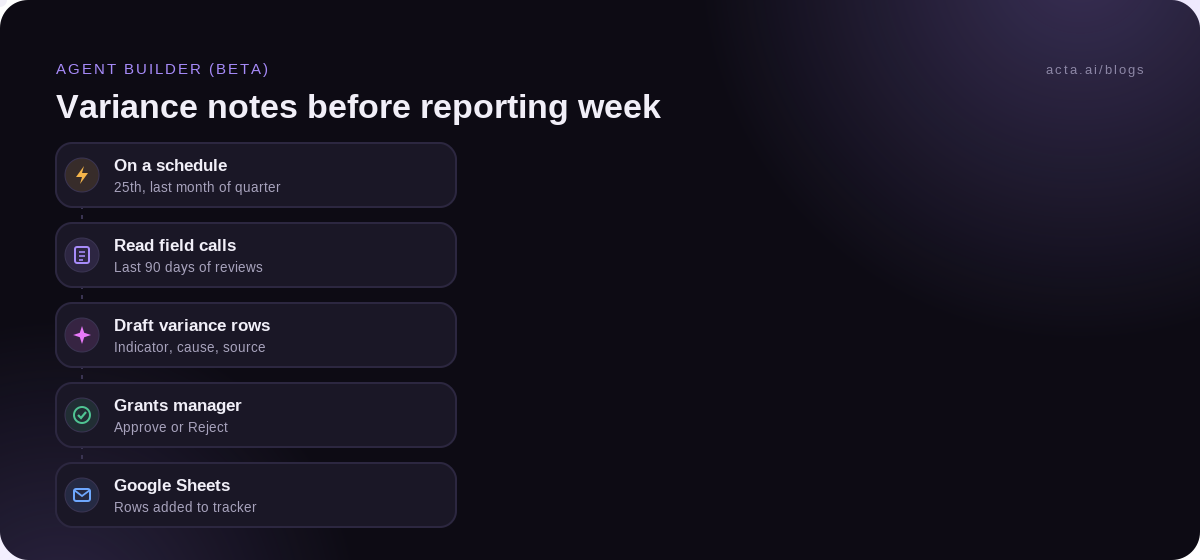
Once the meetings are captured, Agent Builder (beta) can do the first pass of report prep on a schedule. Here is a recipe a grants manager can set up in an afternoon, using only steps the builder offers:
- Open Agent Builder, click New agent and describe it: "On the 25th of the last month of each quarter, list indicator variances from field calls for the donor report." Or choose "Start from blank instead".
- Set the trigger to On a schedule.
- Add an Acta data step that pulls meetings from the last 90 days whose titles contain "field call" or "program review".
- Add an AI step with the instruction: "For each indicator that is behind target, write one row: indicator, what the field said, the agreed change, whether the donor was told, and the source meeting and date."
- Add a Human approval step and tick "Also email me Approve and Reject buttons". If nobody answers within 24 hours, nothing is sent.
- Add a Google Sheets action to add the rows to your "Quarterly donor report" sheet, then a Slack message to the #grants channel saying the sheet is ready.
- Click Test, then Run test. In a test nothing is sent; you see what the agent would write. When it looks right, click Turn on.
Keep the approval step: a donor sheet with a wrong household count is worse than no sheet. The approvals guide explains the Approve and Reject flow.
Good NGO program review meeting notes need a two-week team rollout
An NGO of 40 to 200 people needs five or six people capturing the meetings that feed reports, shared with the people who write them.
Who records what
- Program manager: the weekly field calls and the monthly program review. For online calls, a bot-free option like the Acta desktop app records from their own laptop without a bot joining.
- MEAL officer: data review meetings and any in-person review at the district office, using the mobile app on the table.
- Grants manager: every call with the donor's program officer.
Field calls often switch between Hindi and English; Acta detects Hindi, including Hinglish, by itself, so coordinators can speak the way they normally do. Tell people at the start of each call that it is being recorded, and read the guide on recording consent and what to tell participants before you start. Never record beneficiary conversations about health, violence or other sensitive matters.
Two weeks, day by day
- Days 1-2: The owner creates the workspace and invites the program manager, MEAL officer, grants manager and director from Settings > Workspace > Invite people. During the trial, invites are free for up to 10 people.
- Days 3-5: Record that week's field calls. Share each with Everyone in the workspace using the share icon; meetings are private by default. Teammates find them under Shared with me.
- Days 6-7: Farah asks OneChat five real questions about last month and checks every source.
- Week 2: Add the coordinators who run their own calls. Run the monthly program review with the template. Turn on Auto follow-up for meetings Imran owns.
- Day 14: Review the Decision log together for 20 minutes.
Mistakes to avoid
- Recording but not sharing. If the field calls stay private, OneChat cannot answer the grants manager.
- Letting "we'll tell the donor" live as a sentence. Make it an action item with an owner on the call.
For the wider program, the Acta page for NGOs and nonprofits shows other meetings worth capturing. The Outcomes views, the Risk Registry and OneChat are included in the 15-day trial and in Pro.
Frequently asked questions
What should NGO program review meeting notes include?
They should include indicator progress against targets, the cause of every delay in the field team's own words, any change to activities or dates with who agreed it, items the donor should be told, and follow-ups with an owner and due date. Short narrative is fine; what matters is that a grants manager can trace each number back to a conversation.
How do I find what a field team said months ago?
Ask a cross-meeting tool a specific question with a date range, such as "What did the Kesla team say about training delays between July and September?" In Acta, OneChat answers across every meeting shared with you and lists the meetings it used, so you can open the exact moment and quote it accurately in a donor report.
Can our donor reporting rely on AI-written notes?
Use them as evidence, not as the final text. AI notes capture what was said, including numbers and quotes, which is more than most handwritten minutes. A person who knows the program should still check figures against the monitoring data, write the narrative, and confirm anything sensitive before it goes to a funder.
Is it safe to record field calls with partner staff?
Tell everyone at the start that the call is recorded and why, and follow the consent rules where your staff work. Keep beneficiary conversations on sensitive matters off the record entirely. Each person's meetings in Acta are private by default and are shared only when the owner chooses to share them with the workspace.
How is this different from a monitoring and evaluation meeting log?
An M&E log records the numbers. A monitoring and evaluation meeting captured in Acta also keeps the reasons, the agreed changes and the promises made around those numbers, each linked to the meeting it came from. Use both: the MEAL tracker for data, the meeting record for context and nonprofit meeting minutes your board can trust.
Build your next donor report from what was said
If the last donor query took a week of WhatsApp archaeology, start with the meetings closest to the report:
- Pick three meeting types: weekly field call, monthly program review, donor calls.
- Set the template: turn on KPI review and Decisions & RACI, then add a field program review template with a "donor should hear about" checklist.
- Share by default: every program meeting goes to Everyone in the workspace.
- Ask before you write: one OneChat question per off-track indicator, sources opened.
- Check the changes: read the Decision log's "Changed or reversed" tile and the Action items Overdue tile before every report.
Install the desktop app for this week's field calls and try the whole setup on a 15-day free trial.