A meeting cost calculator multiplies each attendee's loaded hourly rate by the time they spend on the meeting, including prep, then adds the results. For a recurring meeting, multiply that by how many times it runs a year. You can build one in a spreadsheet in about 15 minutes with seven columns, and this guide gives you the exact formulas, a copy-ready template and three worked examples.
Meeting Productivity 11 min read
Meeting Cost Calculator: The Formula, a Template and 3 Examples
Build a meeting cost calculator in a spreadsheet: the formula, how to get a loaded hourly rate, a copy-ready template, three worked examples and the levers that cut cost.
By Sarma BKP, Founder & CEO, Acta · Updated
It's for managers, operations leads and anyone who wants to put a number on a meeting before cutting it. It doesn't cover buying a tool; a spreadsheet does the job and keeps salary data under your control. If you only want the background on why meetings cost what they do, our explainer on the cost of meetings covers that. This post is the build.
Key takeaways
- The core formula: cost = sum of (loaded hourly rate x hours spent, including prep) across all attendees.
- Loaded rate = annual salary / 2,080 working hours / wage share. BLS data for June 2026 puts wages at 70.0% of US private-industry compensation costs, so dividing by 0.70 is a reasonable US default.
- Always annualise recurring meetings. A weekly 60-minute meeting for eight people on a $90,000 average salary costs about $494 each time and about $23,700 over 48 weeks in our example.
- Cost per decision is often more useful than cost per meeting, because it shows which meetings earn their keep.
- Length, headcount and frequency are the three levers. Cutting the example meeting to 45 minutes and six people takes its annual cost from about $23,700 to about $13,400.
Table of contents
- The meeting cost formula is rate times time times people
- Use a loaded hourly rate, not salary alone
- Build a meeting cost calculator in seven steps
- Three worked examples show where the money goes
- Cost per decision tells you which meetings earn their keep
- Cut meeting cost with length, headcount and frequency
- Mistakes and troubleshooting decide whether people trust the number
- Frequently asked questions
- Put your meeting cost calculator to work
The meeting cost formula is rate times time times people
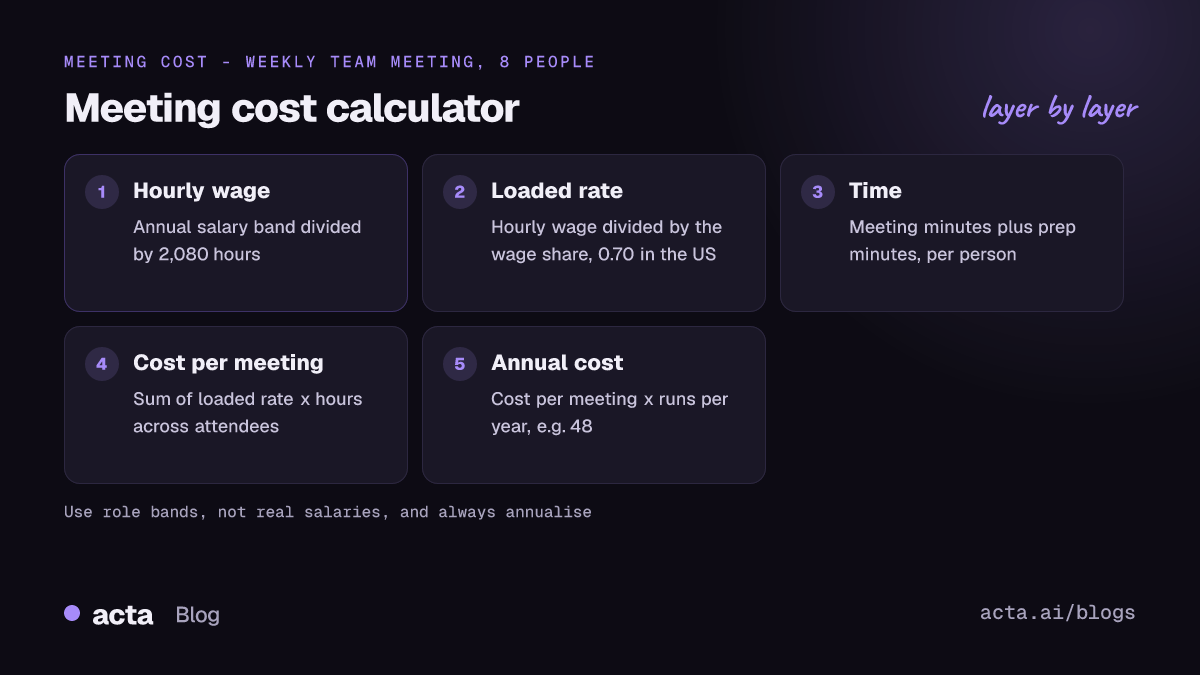
Every meeting cost calculator, from a sticky note to a calendar plugin, runs the same arithmetic. For each attendee, take their hourly cost to the business, multiply by the hours they spend on the meeting, and add up the rows.
Meeting cost = sum over attendees of (loaded hourly rate x (meeting minutes + prep minutes) / 60)
Annual cost = meeting cost x number of times it runs per year
Three inputs drive the answer: the rate, the time and the number of people. If everyone earns roughly the same, you can shortcut it to average loaded rate x hours x headcount. Once you mix a few senior people with juniors, use a row per person or per role, because the senior rows dominate the total.
What the formula leaves out is opportunity cost: the work people would have done instead. That's real but hard to price, so most teams leave it as a note rather than a number. The direct cost is persuasive enough on its own.
Use a loaded hourly rate, not salary alone
Salary isn't what a person costs. Employers also pay for benefits, payroll taxes and insurance. The US Bureau of Labor Statistics publishes this split in its Employer Costs for Employee Compensation series. In the June 2026 release, private-industry compensation averaged $46.89 per hour worked, of which wages and salaries were $32.82, or 70.0% of employer costs. Benefits made up the other 30.0%. For state and local government workers, wages were 61.2%.
That gives you a simple conversion. Work out the hourly wage, then divide by the wage share to get the loaded rate.
- Hourly wage: annual salary / 2,080 (52 weeks x 40 hours). Use your own standard hours if they differ.
- Loaded rate: hourly wage / 0.70 for a US private-sector default, or your finance team's own on-cost figure.
Example: a $90,000 salary is $43.27 an hour in wages and about $61.81 an hour loaded. Outside the US, BLS figures don't apply; ask finance for the employer on-cost percentage for your country, or use their standard internal day rate. For contractors, use the rate you actually pay them.
One judgement call: should you use real salaries or role bands? Use bands. Real salaries in a shared spreadsheet are a privacy problem, and the extra precision rarely changes the decision. A band average per role gets you within a reasonable margin and nobody's pay is exposed.
Build a meeting cost calculator in seven steps
This works in Google Sheets or Excel, with the same formulas in both.
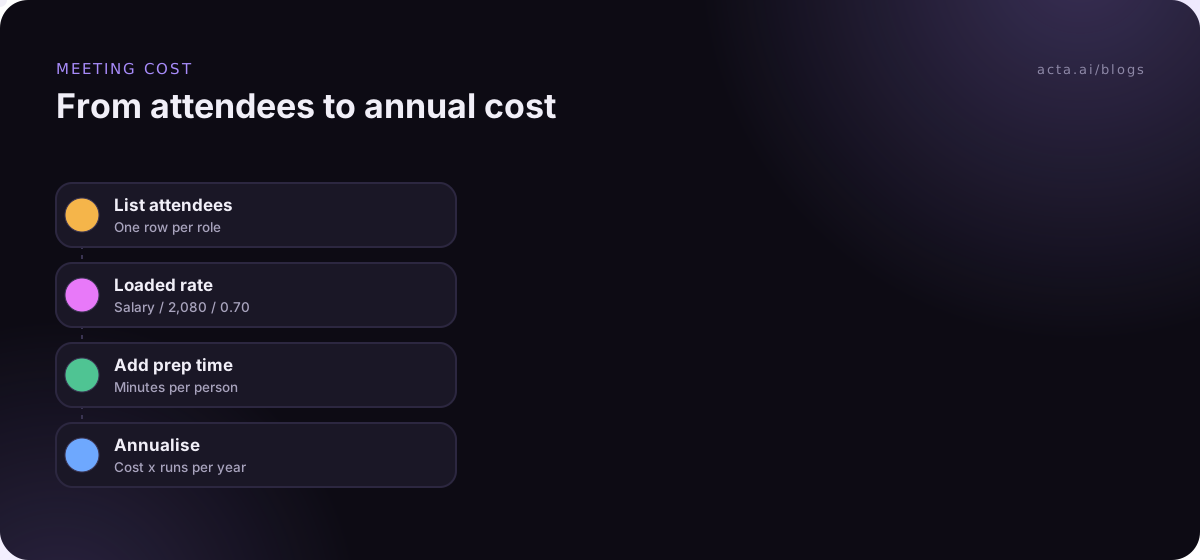
- Set up the inputs. In cell J1 type "Wage share" and in J2 enter 0.70 (or your finance figure). In J4 type "Hours per year" and in J5 enter 2080.
- Create the columns. Row 1 headers: A Role, B Annual salary, C Hourly wage, D Loaded rate, E Meeting minutes, F Prep minutes, G Cost.
- Add the hourly wage formula. In C2: =B2/$J$5.
- Add the loaded rate. In D2: =C2/$J$2.
- Add the cost per person. In G2: =D2*(E2+F2)/60. Copy C2:G2 down for each attendee.
- Total it. In G22: =SUM(G2:G21) for the cost of one meeting.
- Annualise it. In J7 type "Runs per year", enter the number in J8 (48 for weekly, 24 for fortnightly, 12 for monthly), and in J10: =G22*J8.
Here's the template as a block you can copy into your notes or a doc before you build it.
Meeting: ___ | Frequency: ___ | Runs per year: ___
Wage share: 0.70 (US private default) | Hours per year: 2,080
Row per attendee: Role | Annual salary (band) | Hourly wage = salary / 2,080 | Loaded rate = wage / 0.70 | Meeting minutes | Prep minutes | Cost = loaded rate x (meeting + prep) / 60
Cost per meeting = sum of Cost column
Annual cost = cost per meeting x runs per year
Decisions per meeting (average): ___ | Cost per decision = cost per meeting / decisions
Keep the calculator on one tab and a list of your recurring meetings on another, with one row per meeting and its annual cost pulled across. That second tab is the one people will actually read.
Three worked examples show where the money goes
These use illustrative salaries, US defaults (2,080 hours, 0.70 wage share) and rounded results. Swap in your own bands.
Example 1: the weekly team meeting. Eight people, 60 minutes, average salary $90,000, no prep. The loaded rate is $61.81, so one meeting costs 8 x $61.81 x 1 hour, about $494. Over 48 working weeks that's about $23,700 a year. Nobody would approve a $23,700 purchase without a discussion, yet this meeting renews itself every Monday.
Example 2: the short meeting with senior people. Three directors on $180,000 (loaded about $123.63 an hour) and two managers on $120,000 (loaded about $82.42), for 30 minutes. That's about $268. Add 15 minutes of prep each, which is realistic for a decision meeting with a pre-read, and it rises to about $402. Prep added half again to the cost, which is why short meetings with a long pre-read aren't as cheap as they look.
Example 3: the monthly steering committee. Ten people on $150,000 (loaded about $103.02), for 90 minutes, monthly. Each meeting costs about $1,545, and the year about $18,500. That number alone doesn't say whether it's worth it. The next section does.
Cost per decision tells you which meetings earn their keep
A high cost isn't a problem if the meeting produces something worth more. The cleanest proxy is decisions. Divide the cost per meeting by the average number of decisions it makes.
The steering committee in Example 3 makes about two decisions a meeting, so each decision costs roughly $773. If those decisions unblock a quarter's roadmap, that's cheap. If the "decisions" are mostly "we'll revisit next month", it's expensive, and the fix is a sharper agenda, not a shorter meeting. Our guide on how to run a decision meeting covers how to make decisions actually land.
To get the decision count, you need a record. Count the decisions in the minutes for the last three meetings and take the average. If there are no minutes, that's your first finding. A tracked list, as described in how to track decisions made in meetings, makes this a two-minute job each month.
For status meetings, where nothing is decided by design, use a different test: could a written update deliver the same information? If yes, the cost per decision is effectively infinite, and the meeting is a candidate for async.
Cut meeting cost with length, headcount and frequency
Once you have the number, three levers move it. Here's what each does to Example 1, the $23,700-a-year weekly team meeting.
| Change | New annual cost | Saving |
|---|---|---|
| Shorten 60 to 45 minutes | About $17,800 | About $5,900 |
| 45 minutes and 6 people instead of 8 | About $13,400 | About $10,400 |
| Fortnightly instead of weekly, 60 minutes | About $11,900 | About $11,900 |
Headcount is usually the easiest lever socially. People don't mind being told they're optional, as long as they get the outcome. Length is next: set default meeting lengths to 25 or 50 minutes and most meetings shrink without anyone negotiating. Frequency is the hardest, because recurring meetings feel like infrastructure, but it saves the most.
Whatever you cut, give people a way to catch up. The two optional attendees in the table only stay away if they trust they'll see the decisions and their action items. Share notes after every meeting; our guide on sharing meeting notes with people who weren't there covers the format. If you record meetings to produce those notes, tell participants first; see our guide to AI meeting recording and consent. A recorder like the Acta desktop app captures Zoom and Teams calls from your own computer, without adding a bot to the meeting.
For a wider view of which meetings to cut first, our guide on how to reduce meetings pairs well with this calculator.
Mistakes and troubleshooting decide whether people trust the number
A meeting cost calculator only changes behaviour if people believe it. These are the mistakes that make them stop believing it, and how to fix them.
- Using salary instead of loaded cost: Your numbers come out roughly 30% low for a typical US private employer. Divide by the wage share.
- Forgetting prep and travel: For decision meetings with pre-reads, prep can add half again, as Example 2 shows. Add a prep column even if it's often zero.
- Counting 52 weeks: Holidays and leave mean a weekly meeting rarely runs 52 times. Use 48 or your own figure.
- Publishing real salaries: Use role bands. If a number lets someone work out a colleague's pay, the spreadsheet will be shut down, and rightly.
- Totals that look wrong: Check that minutes are divided by 60, that the wage-share cell is locked with $ signs, and that the SUM range covers every attendee row.
- Using cost as a weapon: A big number in a team channel can feel like an accusation. Share it as information with a proposed change attached.
Shopify is the best-known example of putting meeting cost in front of people. As Fortune reported in July 2023, the company rolled out a meeting cost calculator for Google Calendar that estimates the cost of meetings with three or more attendees from average compensation data. You don't need a plugin to get the same effect. A shared tab with your recurring meetings and their annual cost starts the same conversation.
Acta doesn't calculate meeting cost, but it helps with the decision count. It writes a transcript with speaker names, a summary, decisions and action items with owners for each recorded meeting, so counting decisions for the last three steering meetings takes a minute, and people who were dropped from the invite can still read what was agreed.
Frequently asked questions
How do you calculate the cost of a meeting?
Multiply each attendee's loaded hourly rate by the hours they spend on the meeting, including prep, and add the results. The loaded rate is salary divided by annual working hours, then divided by the wage share of total compensation. For a recurring meeting, multiply the cost of one meeting by the number of times it runs a year.
What hourly rate should I use in a meeting cost calculator?
Use a loaded rate, not salary alone. Divide annual salary by 2,080 hours, then divide by the wage share. BLS data for June 2026 shows wages at 70.0% of US private-industry compensation costs, so 0.70 is a reasonable US default. Outside the US, ask your finance team for the local employer on-cost figure.
Is it a good idea to show meeting costs in calendar invites?
It can be, if the culture is ready. A visible cost makes people think before inviting ten colleagues. It can also feel like surveillance or shaming. A softer start is a monthly list of recurring meetings and their annual cost, shared with a proposed change, before adding numbers to individual invites.
Should I include opportunity cost in a meeting cost calculator?
Usually not as a number. Opportunity cost, the work people would have done instead, is real but hard to price credibly, and inflated estimates make people dismiss the whole calculation. Keep the calculator to direct cost and mention opportunity cost in words when you present it, especially for engineers and other makers.
How do I calculate cost per decision?
Divide the cost of one meeting by the average number of decisions it makes. Count decisions from the minutes of the last three meetings to get the average. It's most useful for steering committees and planning meetings. For status meetings that don't make decisions, ask whether a written update could replace them instead.
Put your meeting cost calculator to work
The spreadsheet takes 15 minutes. The value comes from using it on the meetings that renew themselves every week.
- Build the sheet: set up the seven columns, the wage share and hours-per-year cells, and the annual cost formula.
- Use role bands: agree salary bands with finance so no individual pay appears in the file.
- List recurring meetings: add every weekly and fortnightly meeting with its annual cost on a second tab.
- Add decisions: record average decisions per meeting and calculate cost per decision for the expensive ones.
- Propose one change each: for the top three by cost, propose a shorter length, fewer attendees or lower frequency, and review after a month.
When fewer people attend, shared notes do the catching up; try the Acta Chrome extension or desktop app on those meetings during the 15-day free trial.
Found this useful? Share it with your team.