Decisions & Follow-through 6 min read
How to Track Decisions Made in Meetings
Stop re-arguing last week's decisions. What a meeting decision record should include, how to keep a decision log by hand, and how Acta builds one automatically.
Quick answer: To track decisions made in meetings, keep one decision log per team or project, separate from meeting notes. For each decision record what was decided, who decided it, the owner, the date and meeting, the reason, its status and what it replaces. Read decisions back aloud, log them within 24 hours, never overwrite old entries, and review open ones monthly, or let an AI assistant such as Acta build the log for you.
Here's a scene you've probably lived through. It's Thursday, and the team is halfway through a planning call when someone says, "Wait, didn't we already decide to push the launch?" Three people remember it differently. One is sure it was the 15th. Another thinks it was "sometime in November." The person who actually made the call is on leave.
Twenty minutes later you've re-decided the same thing, slightly differently, and nobody wrote it down this time either. Meetings are where decisions get made. They're also where decisions go to disappear.
Why do decisions get lost after meetings?
Mostly because meeting notes are built for the meeting, not for next month. Notes are written as a running story: who said what, in order. A decision ends up buried in paragraph six, between a tangent about pricing and someone's hiring update. Action items at least get a bullet point. Decisions usually don't.
A few other things make it worse:
- Nobody owns the notes. Everyone assumes someone else wrote it down.
- Decisions change quietly. The launch moves from the 1st to the 15th, but the old date is still in last month's doc.
- The "why" is lost. Six weeks later you remember what was decided but not the reason, so it's easy to reopen.
- Notes live in ten places. A Google Doc here, a Slack thread there, someone's notebook.
What should a meeting decision record include?
Keep it small. If recording a decision takes more than thirty seconds, people stop doing it. Each entry needs these fields (with an example):
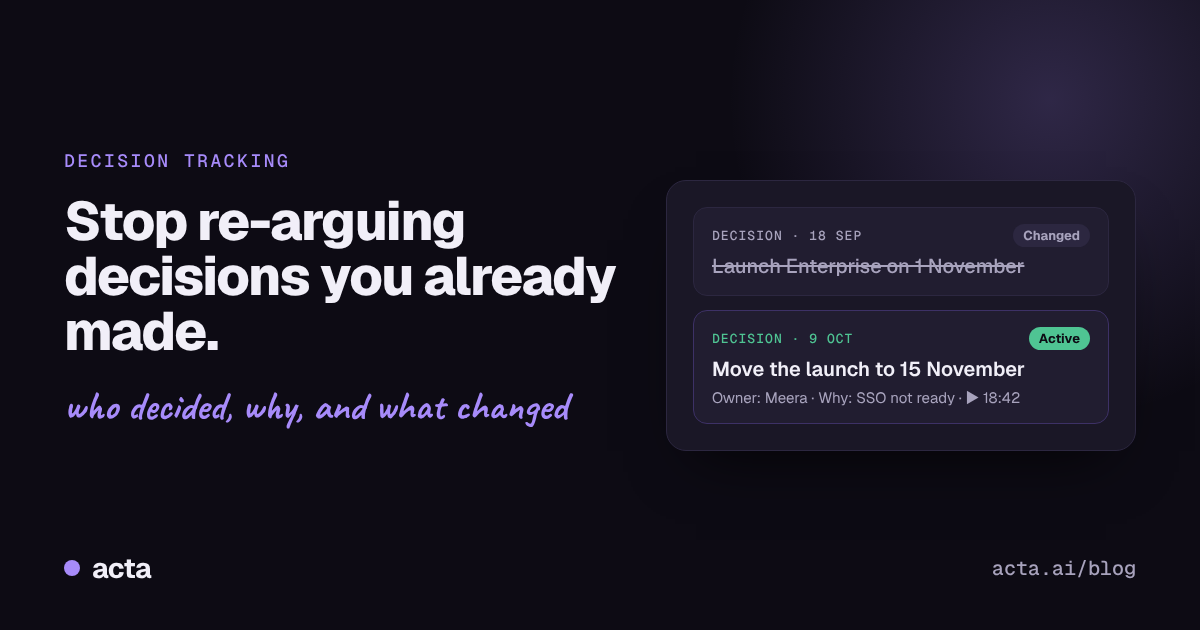
- Decision: Move the Enterprise launch to 15 November
- Decided by: Meera, with sign-off from the product team
- Owner: Meera
- Date and meeting: 9 October, Pricing sync
- Why: SSO won't be ready for 1 November
- Status: Active, done, changed or reversed
- Replaces: "Launch on 1 November" (decided 18 September)
That last field matters more than it looks. When a decision changes, you want to see the history, not just the latest version. That's how you answer the question every team eventually asks: "Why did we change our mind?" There is a short version of this format in our answer on keeping a meeting decision log.
How do you keep a decision log by hand?
If you want to start today with nothing but a spreadsheet, here's a routine that works:
- Create one decision log per team or project. A shared sheet or a wiki page, not one per meeting.
- Add a "Decisions" section to every meeting agenda. Leave it at the bottom, empty.
- Say it out loud. When something is agreed, the person running the meeting says, "Okay, so the decision is..." and reads it back. It sounds formal, but it catches most misunderstandings on the spot.
- Copy decisions into the log within 24 hours. One row each, with the fields above.
- Never delete or overwrite. If a decision changes, mark the old row as "changed" and add a new row that points back to it.
- Review the open ones monthly. Anything still "active" that should be "done"? Anything nobody remembers agreeing to?
This works. The problem is step 4. On a busy week, nobody copies anything into anything.
How does Acta track decisions for you?
This is the part of the job we built Acta to take over. Acta joins your Zoom, Google Meet or Microsoft Teams calls, or records through its desktop app or Chrome extension, and builds the decision log from the conversation itself.
Decisions are pulled out of the conversation automatically
When someone says "let's go with the 15th," Acta records it as a decision, with who decided it and who owns it. You don't need to stop the meeting to write it down.
Every decision links back to where it was made
Click a decision and you land on that point in the recording and transcript. No more arguing about what was actually said, because you can go and listen.
Changes are tracked, not overwritten
When a later meeting changes a decision, Acta shows the new one alongside what it replaced. "Launch on 1 November" doesn't vanish; it shows as changed, with a link to the meeting where the date moved.
Each decision has a status
Active, done, changed or reversed. You can filter for the ones that need attention instead of scrolling through everything.
You can ask about decisions in plain English
Acta's assistant, OneChat, lets you type "What did we decide about pricing this month?" and get an answer that points back to the meetings it came from. It can also search documents you've added to Acta, such as a pricing PDF or a policy page, so you can check a decision against what's written down. More on this in how to ask questions across all your meetings.
Decisions sit next to action items
A decision without follow-through is just a nice idea. Acta pulls out the tasks that come with each decision, with owners and due dates, so you can see whether the work is actually happening. See how to track action items across meetings.
It works from Claude too
If your team uses Claude, Acta's connector for Claude and ChatGPT lets you ask "What did we decide this week?" from inside Claude, and even mark a decision done when the work ships. Our guide on using Claude with your meeting notes walks through the setup.
What does decision tracking look like in practice?
Say your product team meets every Tuesday:
- 18 September: The team decides to launch the Enterprise plan on 1 November. Acta logs it, owner Meera.
- 9 October: In the pricing sync, Meera says SSO won't be ready and proposes the 15th. Everyone agrees. Acta logs the new decision and marks the old one as changed.
- 20 October: A new sales hire asks, "When's the Enterprise launch, and why did it move?" Instead of asking around, they open the decision log, or ask OneChat, and see both decisions, the reason and a link to the moment Meera explained it.
Nobody had to remember to write anything down.
What are the most common decision-tracking mistakes?
- Logging discussions as decisions. "We should probably look at pricing" isn't a decision. A decision needs agreement and an owner.
- Skipping the owner. A decision with no owner doesn't get carried out.
- Keeping decisions only in meeting notes. They need their own list, or they get buried again.
- Hiding the history. If you overwrite old decisions, you lose the "why," and that's what stops the same debate happening twice.
Frequently asked questions
What is a decision log?
A decision log is a running list of decisions a team has made, with who made each one, when, why and its current status. It's kept separate from meeting notes so decisions stay easy to find.
What's the difference between a decision and an action item?
A decision is what the group agreed ("we'll launch on the 15th"). An action item is a task someone owns to make it happen ("Ravi updates the pricing page by Friday"). Most decisions create one or more action items.
How do I stop my team re-arguing old decisions?
Record the reason with every decision, keep old versions instead of deleting them, and link each decision to where it was made. When someone reopens it, you can show what was agreed and why in a few seconds.
Can AI record decisions from meetings automatically?
Yes. AI meeting assistants like Acta identify when something is agreed and add it to a decision log with the owner and a link to that moment in the recording. It's still worth reviewing them weekly, as you would a manual log.
Is there a free meeting decision log template?
Yes. Use the fields in this article as your columns: decision, decided by, owner, date and meeting, why, status and replaces. It works in Google Sheets, Excel or Notion.
Try it on your next meeting: start free with Acta and watch your first decision log build itself.