Use Cases 6 min read
Project Status Reports With RAG Ratings, Written From Your Status Meetings
Acta turns a project status meeting into a status report: a red, amber or green rating per project with a reason, blockers, risks and action items with owners.
Quick answer: A project status report is a short update that tells stakeholders whether each project is on track, usually with a red, amber or green (RAG) rating, plus blockers, risks and next actions. Acta writes one from your recorded status meeting: it rates each project discussed, gives a one-line reason for the colour, lists blockers and risks, and tracks action items with owners and due dates.
Status meetings exist so that problems surface early. Leads walk through each workstream, someone mentions that a vendor is late, someone else says the test environment is down again, and a decision gets made on the spot. Then the meeting ends and the person who runs it has to turn 40 minutes of conversation into a report for people who were not in the room.
That write-up is where things slip. It gets done late, it reads greener than the meeting sounded, or the risk that came up in passing never makes it onto the page. Acta's Project status template exists to close that gap.
What is a project status report?
A project status report summarises where a project stands against its plan: schedule, scope, budget and quality, along with the issues that could change the outcome. It is usually sent weekly or after each steering meeting, and its readers range from the delivery team to sponsors who only want to know whether to worry.
Most teams use a traffic-light system, often called RAG status:
- Green: on track, no intervention needed.
- Amber (or yellow): some slippage or a live risk, but the delivery date and budget are still achievable with action.
- Red: the project will likely miss its date, scope or budget without a decision from someone above the team.
The colour alone is not enough. A useful report says why a project is amber, what is blocking it and who is doing what about it. PMI's article on the anatomy of an effective status report makes the same point: keep reports short and structured, and match the detail to the audience reading them.
What does Acta's Project status report include?
The report follows the order a sponsor reads in, from the overall picture down to who owns the next step:
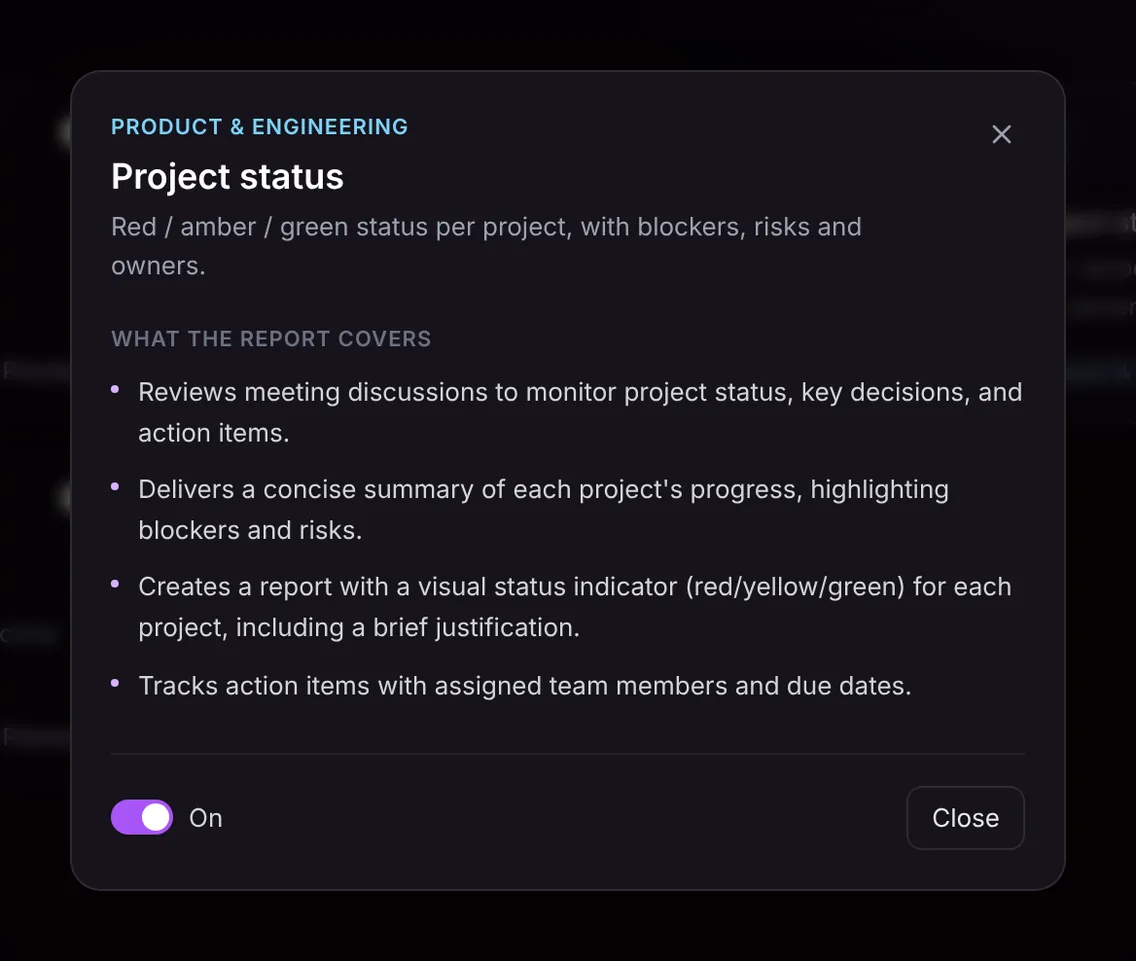
- Status, decisions and actions from the discussion. Acta reads the whole meeting to find each project that was discussed, the key decisions made about it and the action items agreed.
- Progress summary per project. A concise summary of each project's progress, with blockers and risks called out rather than buried in the narrative.
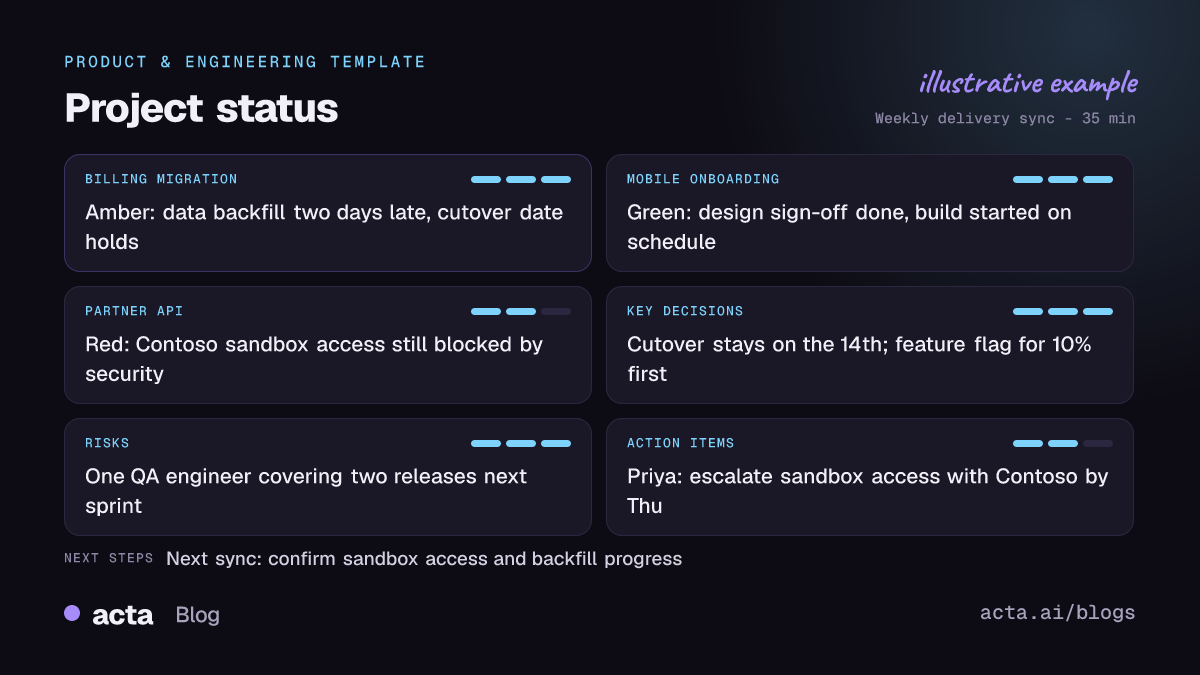
- A red, yellow or green indicator with a justification. Each project gets a visual status and a brief reason, so a reader can see that the partner API is red because sandbox access is still blocked, not just that it is red.
- Action items with owners and due dates. Every commitment made in the meeting is listed with the person responsible and the date they gave.
Here is the template in Acta's Templates page, with the preview of what the report covers:
And an illustrative example of a finished report:
Who is it for, and why does it help?
The template is built for program and project managers, engineering managers, delivery leads and PMO staff who run recurring status or steering meetings. It also suits operations leaders who track several cross-functional initiatives at once. If that sounds like your week, the product and engineering and operations pages show the other ways teams use Acta.
Situations where it earns its place:
- The weekly delivery sync. Five workstreams in 30 minutes. Instead of writing the update afterwards, you check the draft and send it.
- Steering committee prep. The sponsor asks why billing moved to amber two weeks ago. The reason is in that week's report, in the words the team used at the time.
- Handover between PMs. A new project manager can read a run of reports and see how each risk developed, who owned it and what was decided.
- Early warning. Risks often show up as a throwaway remark before they become an escalation. Our piece on project risks hiding in everyday conversations covers the common ones; the report keeps them visible.
Because the status comes from what was said, it is also harder to drift into optimism. If the team said the backfill is two days late, the report says so.
How does Acta pick this template automatically?
You do not have to switch the template on before every meeting. Acta reads the conversation and, when it fits, picks the Project status template even if you have not turned it on. The report is labelled "Auto" and Acta tells you why it chose it, for example that the meeting walked through several workstreams, discussed whether each was on schedule, named blockers and assigned follow-ups.
The signals it looks for in a status meeting include:
- People reporting progress on named projects, milestones or releases.
- Talk about dates slipping or holding, dependencies, and what is blocked.
- Risks, escalations and decisions about scope or sequencing.
- Commitments like "I'll chase security by Thursday".
If you like the result, one click on "Turn on for future meetings" keeps the template on. The reverse also holds: when the template is on and the meeting is something else, such as a customer demo or a hiring debrief, it does not force out an empty status report. It is listed under "Not relevant" with the reason.

How do you use the Project status template?
- Record the status meeting. Acta joins Zoom, Google Meet or Microsoft Teams with a meeting bot, or you can record without a bot using the desktop app, the Chrome extension or the mobile apps. You can also upload a recording.
- Turn the template on. Go to Templates, find Project status in the Product & Engineering group, preview what it covers and switch it on. Or leave it off and let Acta pick it when it fits.
- Open the meeting's Templates tab. The report sits next to the summary and transcript.
- Share it. Copy it into your status email or wiki, or download it as PDF, Word or Markdown for the steering pack.

Tips for a more complete status report
The report only contains what was said, so a few habits help:
- Name the project before you talk about it. "On billing migration..." makes it easy to group points correctly.
- Say the colour out loud. "I'd call this amber" gives the report your judgement, not just an inference.
- State owners and dates. "Priya, can you have that by Thursday?" becomes an action item with both filled in.
- Close with a recap. Thirty seconds of "so, decisions and actions" makes the last section sharper.
Project status pairs well with the other Product & Engineering templates. Ticket suggestions turn engineering discussion into Jira-ready tickets, and the CTO brief gives technical leaders a shorter read across meetings. To follow commitments across weeks, see how to track action items across meetings.
Frequently asked questions
What should a project status report include?
At minimum: an overall status per project, the reason for it, blockers, risks, key decisions and action items with owners and dates. Acta's report covers each of these from the meeting.
What does RAG status mean in project management?
RAG stands for red, amber, green. Green is on track, amber means slippage or risk that the team can still recover, and red means the project needs a decision or help to meet its date, scope or budget.
Can one report cover several projects?
Yes. If a meeting covers several projects, Acta gives each one its own status, justification and summary, so a portfolio review produces one report with a row per project.
Does Acta invent a status if nobody mentioned one?
No. The report is written only from what was said. If a project came up briefly with no detail, the report reflects that rather than filling the gap.
Run your next status meeting with Acta and try it free for 15 days.


