Four calls decide whether a UAE shipment runs on time
A forwarder's day in Dubai or Abu Dhabi is a string of short conversations. Four of them carry most of the risk, and each produces a different kind of note.
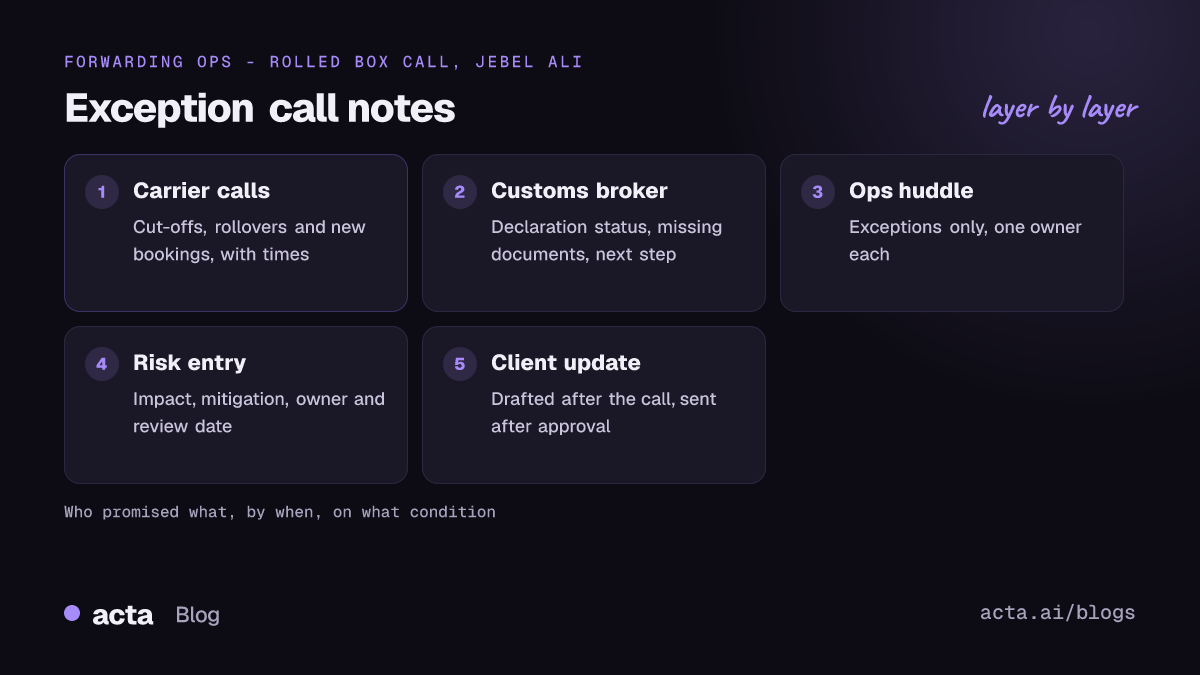
- Carrier calls. Space confirmations, cut-offs, rollovers and free time. The note is a list of commitments with times.
- Customs broker check-ins. Which declaration is filed, which document is missing, what the inspection result was. In Dubai, declarations and duty payments go through the Dubai Trade portal, which DP World describes as offering online processing of customs declarations. In Abu Dhabi, customs services run through the Advanced Trade and Logistics Platform (ATLP), the emirate's trade single window built and operated by AD Ports Group's Maqta Gateway. Note the platform reference your broker gives you, not just "filed".
- The daily ops huddle. Fifteen minutes with ops, customer service and the warehouse. The note is a list of exceptions and owners.
- Shipment exception calls. A box rolled, a hold placed, a truck missed its gate slot. The note is a risk, a decision and an update the client will read.
Geography shapes these calls. Jebel Ali is operated by DP World, and its terminal and carrier cut-offs drive most Dubai sea bookings. Dubai South's Logistics District, according to the Dubai Media Office, has direct links to the cargo terminals at Al Maktoum International Airport and access to Jebel Ali through a bonded corridor, so sea-air moves often involve both sites in one conversation. Khalifa Port brings ATLP and Abu Dhabi customs into the picture.
2026 added one more reason to write things down. Since shipping through the Strait of Hormuz was disrupted in late February 2026, Seatrade Maritime reports that DP World has moved over a million TEU through alternative corridors, including east coast ports linked to Jebel Ali by truck and rail. Routings and transit times have changed often this year. As of November 2026, confirm the current routing with each carrier on every call, and write the routing they gave you into the note.
A promise record needs who, what, when and on what condition
Most forwarding disputes aren't about what happened. They're about what someone said would happen. "The carrier said it would load" is useless a week later. "Carrier rep Rahul at the line's Dubai office confirmed the box loads on Thursday's vessel, provided the VGM is in by Tuesday 16:00" settles the argument.
Follow these steps on every carrier and broker call:
- Name the person and the company. First name, desk or office, and which carrier, broker or haulier they speak for.
- Say the reference. Booking number, container number or declaration number, read out once so it lands in the notes.
- Repeat the promise in one sentence. "So you're confirming..." makes the other side correct you on the spot if you heard it wrong.
- Pin the time and place. Date, time and the terminal, port or warehouse. "Tomorrow" means nothing in a note read two days later.
- State the condition. Most promises in freight are conditional: documents in, payment cleared, inspection passed.
- Agree your side. What you owe back and by when, with an owner on your team.
Here's a template you can paste into any notes tool or shared log:
Promise log | Call: [carrier / broker / haulier] | Date: [date]
Reference: [booking / container / declaration number]
They promised: [what], by [date, time], at [terminal / port / warehouse]
Condition: [what must happen first]
We owe: [what], owner [name], by [date, time]
Told the client? [yes / no, who, when]
The daily ops huddle should read exceptions, not shipments
The fastest way to kill a morning huddle is to go through every live shipment. Read only the exceptions and keep the note in the same order each day:
- Rolled or at-risk bookings for the next seven days, with the carrier's latest word.
- Customs holds and queries at Jebel Ali, Khalifa Port and the airport, with the broker's next step.
- Missing documents: invoice, packing list, certificate of origin, permits. Who is chasing whom.
- Trucking and gate slots that need booking or moving today.
- Client escalations and who calls back.
Teams here often mix English with Hindi, Arabic or Urdu in the huddle. Run the record in English. If you use a recorder, know its language limits; Acta, for example, picks up Hindi and Hindi-English mixes on Auto, needs Arabic selected manually because it's in beta, and doesn't support Urdu, Malayalam or Tagalog yet. Setting the notes language to English gives the branch manager one readable record (the post on Hindi-speaking teams in the UAE shows how); the meeting languages guide has the details.
Shipment exception calls need a risk entry before a fix
When a container is late, the instinct is to jump to the fix. Write the risk down first. A risk entry records what could go wrong for the client, how bad it is, who owns the response and when it will be checked again. Without it, the same delay gets discussed on three calls and nobody owns it.
In Acta, the Risk Registry (a tab under My meetings) collects the risks raised in your recorded meetings and updates them after each new one. Each row has a risk, a mitigation, an owner, a date, an impact level (High, Medium or Low) and a status (Open, Mitigating or Closed). A mitigation is tagged Agreed when it was decided in a meeting, or Suggested when it's only Acta's idea and nobody has agreed it. Group by Project / customer to see every open risk for one consignee. Here's how an entry for a delayed container might look:
| Field | Example entry |
|---|
| Risk | 40ft box for an Al Quoz retailer rolled from Thursday's vessel; store opening stock arrives late |
| Mitigation | Agreed: rebook on next sailing; split urgent pallets to airfreight via Dubai South if the client approves cost |
| Owner | Fatima Al Hammadi (ops) |
| Date | Confirm new booking by Monday 12:00 |
| Impact | High: opening date at risk |
| Status | Mitigating |
The names and details are illustrative. The point is the shape: a risk someone can act on, with a date that makes it obvious when it slips. A row marked "Getting worse" after the next call is your cue to escalate to the branch manager.
Action items by owner keep carrier and broker chases visible
Exception calls create small tasks: chase the VGM, send the corrected invoice to the broker, rebook the truck, call the client. Tracked per shipment, they hide. Tracked per person, they're obvious.
In Acta, every recorded call's tasks land in My meetings, then Outcomes, then Action items. Switch Group by to Person and you can see that Arjun owes three chases and two are overdue. The tiles across the top (Open, Overdue, Due this week, Done) double as filters. A daily follow-up email can remind each owner of their own open items, and stops by itself once everything's done.
Decisions deserve their own record. When ops agrees "move this consignee's urgent cargo to air until the backlog clears", that's a decision, not a task. The Decision log under Outcomes keeps it with who decided, its status (Active, Changed, Reversed or Done) and every meeting where it came up, so when the client asks why their cost went up, you can point to the call. For a wider look at why tasks slip after calls, see meeting follow-through.
Many of these calls happen on WhatsApp with drivers and brokers, or on Teams with carriers. If a bot can't join, a desktop recorder can capture the call from your own computer; the post on recording any call on your computer covers WhatsApp and other apps. Tell people you're recording. The UAE PDPL meeting recording guide covers consent, free zones and notices, and the guide to recording consent and what to tell participants covers the general principles; both are general information, not legal advice.
An Agent Builder (beta) recipe emails the client after you approve
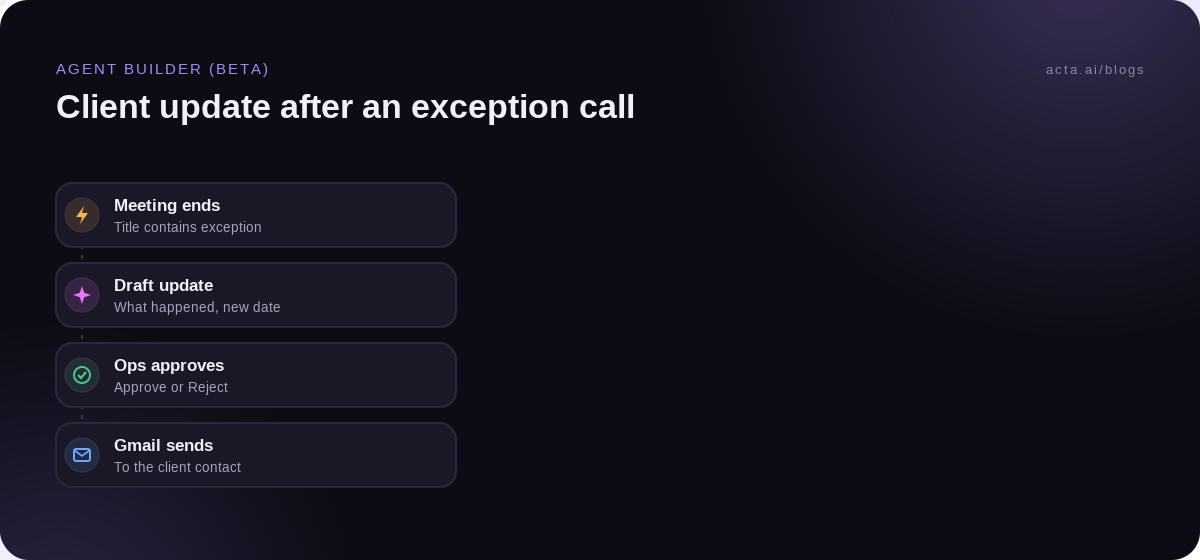
Clients want an update after every exception call, and ops managers rarely have time to write one. Acta's Agent Builder, which is in beta, can draft that email and wait for your approval before anything goes out. Here's a recipe:
- Create the agent. In Agent Builder, click New agent and describe it in words, or start from blank.
- Set the trigger. Choose "When a meeting ends" and filter on the title, for example meetings whose title contains "exception".
- Add an AI step. Ask it to write a short client update from the meeting: what happened, what was agreed, the new date and who is the contact. Tell it not to promise anything that wasn't agreed on the call.
- Add a Human approval step. Approvals go to the agent's owner, in the Approvals tab or by email if you tick "Also email me Approve and Reject buttons". If nobody answers within 24 hours by default, nothing is sent.
- Add the Gmail action. Send the approved text to the client contact.
- Test before you turn it on. Click Test, then Run test on a past exception call. Nothing is sent in a test. Then click Turn on.
The approvals guide explains the approve and reject flow step by step. Keep the approval step even when the drafts look good. One wrong ETA in an automatic email to a client costs more than the minute it takes to check.
A filled example: freight forwarding UAE meeting notes for a rolled box
Here's how the notes from one 12-minute exception call might read. Everything is illustrative.
Exception call: rolled container, Al Quoz retail consignee | Ops: Fatima Al Hammadi, Arjun Menon | Carrier: Rahul (line's Dubai office) | Broker: Omar (customs brokerage)
What happened: 40ft box rolled from Thursday's vessel. Carrier cites space; next sailing offered, departure to be confirmed Monday.
Promises: Rahul to confirm the new booking and ETA by Monday 12:00, provided the VGM stays valid. Omar confirms the declaration can be amended once the new vessel is known; no new documents needed.
Decision: offer the client airfreight for 6 urgent pallets via Dubai South, subject to the client approving cost.
Risk: High, store opening stock late. Owner Fatima. Review Monday 12:00.
Actions:
1. Arjun Menon: send airfreight option and cost to client, Sunday 15:00.
2. Fatima Al Hammadi: confirm new booking with Rahul, Monday 12:00.
3. Omar: amend declaration once vessel is confirmed, same day.
Client update: drafted, waiting for Fatima's approval.
Read it back and ask: if Fatima is off sick on Monday, can Arjun pick this up from the note alone? If yes, it's a good note.
Common mistakes and how to fix them
- "Carrier will revert." No name, no time. Fix: name the rep and get a time, even if the answer is "by end of day Monday".
- ETAs without a source. Write where each ETA came from: the carrier rep, the line's schedule or your own estimate.
- Decisions hidden in WhatsApp. Chat is fine for speed. Copy the final decision into the shipment record or your notes tool the same day.
- Routing assumed, not confirmed. In a year when routings have changed often, write the routing the carrier gave on this call.
- The recorder missed the other side. If a laptop recorder only caught your voice, check that meeting sound is allowed. On Windows, "Let desktop apps access your microphone" must be on; on a Mac, allow System Audio Recording Only.
- Arabic call came back wrong. Auto doesn't pick Arabic. Choose Arabic in Settings before the call, and expect beta accuracy; the Arabic transcription setup guide walks through it.
Where Acta fits for a forwarding team
Acta records carrier, broker and client calls with a bot, the desktop app or the Chrome extension, and turns each into a summary, decisions, action items with owners and a follow-up email draft. The freight forwarding page and the UAE page show the setup. It doesn't replace your freight system; it keeps the record of what people said.
Frequently asked questions
What should freight forwarding meeting notes in the UAE include?
Freight forwarding meeting notes in the UAE should include the booking, container or declaration reference, who promised what and by when, any condition attached, the port or terminal (Jebel Ali, Khalifa Port or the airport), what your team owes back with an owner, and whether the client has been told. Write times in full, never "tomorrow".
How do I keep a record of carrier promises in Dubai?
For carrier calls in Dubai, repeat each promise back in one sentence, then log the rep's name, the booking number, the date and time, the terminal and the condition. Keep the log where the whole ops team can search it, not in one person's WhatsApp. If you record calls, tell the carrier rep first.
What is a shipment exception call?
A shipment exception call is a call held when something goes off plan: a rolled booking, a customs hold, a missed truck slot or damaged cargo. For UAE forwarders, the notes should capture the risk, the agreed fix, one owner, a review date and the client update. Exception notes are the ones clients and auditors ask for later.
Can I record WhatsApp calls with drivers and customs brokers?
Technically yes. Acta's desktop app can record any calling app on your computer, including WhatsApp, by pressing Record. In the UAE, tell the other person you're recording and follow your company's policy and applicable law; this is general information, not legal advice. Calls held on a phone, rather than a computer, need a different method.
Set up your exception-call routine this week
You don't need a new system to fix this. You need the same few habits on every call.
- Adopt the promise log: who, what, when, where and on what condition, for every carrier and broker call.
- Change the huddle: exceptions only, same five headings every morning.
- Open risks early: one entry per delayed box, with an owner and a review date.
- Track by person: review overdue chases at noon and before the evening handover.
- Approve every client update: automate the draft, never the send.
To record carrier and broker calls without a bot, install the Acta desktop app for Teams, Zoom and WhatsApp calls, or the Chrome extension for Google Meet and Teams in the browser, and try it free for 15 days.