Freight forwarder customer call notes must hold five facts
A customer call note in forwarding is a working record of what the forwarder offered and the shipper accepted, written so someone who missed the call can act on it. The test: could your customer service executive raise the right invoice and plan the right gate-in from this note alone?
Five facts pass that test. First, the lane and equipment: port pair, transhipment or direct, 20' or 40' high cube, number of boxes. Second, the rate and what it covers: base ocean freight, BAF, peak season surcharge, origin THC, destination charges, documentation fees. Third, validity: "valid for sailings up to 15 March" is a different promise from "valid for bookings made by 15 March". Fourth, cut-offs: SI cut-off, VGM cut-off and CY or gate-in cut-off, with date, time and vessel. Fifth, the next steps with an owner and a date.
Cut-offs deserve extra care because a missed one costs real money. Under the SOLAS rules summarised on the IMO's page on verifying the gross mass of a packed container, a container without a verified gross mass should not be loaded on the ship. The UK government's guidance on verified gross mass of containers puts the duty on the shipper. So when a line moves the VGM cut-off, who you told, and when, is the whole story.
Forwarding desks agree prices in conversations nobody writes down
Most forwarders run on a handful of recurring conversations. Each one creates commitments, and almost none of them get minutes, which is why meeting notes for freight forwarders need to be built around these calls rather than formal meetings.
- Rate request calls: sales or the pricing desk with the shipper's logistics manager. Rates, validity and free days are agreed here, often with a "let me check with the line and call you back".
- Booking and documentation calls: customer service with the shipper or its factory. Vessel, ETD, SI and VGM cut-offs, container pickup and stuffing dates.
- The morning operations huddle: 15 minutes on what is sailing this week, what is at risk of rolling and which carrier changed a schedule.
- Key account reviews: monthly or quarterly with the shipper's management on volumes, transit times, claims and next season's contract rates.
Without a record, the same failures repeat. A rate quoted "with BAF" is invoiced without it, a validity date is remembered as a booking date, and a cut-off change reaches the wrong person. Nobody is lying; three people heard three slightly different things.
A Rotterdam booking shows how a quote drifts across three calls
Here is an illustrative case. Bayline Freight is a 48-person forwarder in Chennai. One of its steady shippers is Kavi Home Furnishings, a bedlinen exporter in Karur that moves six to eight 40' high cubes a month to Rotterdam. The people: Meera Raghavan runs sales, Joel D'Souza sits on the pricing desk, Anwar Basha handles Kavi's bookings in customer service, and Ritu Krishnan is Kavi's logistics manager.
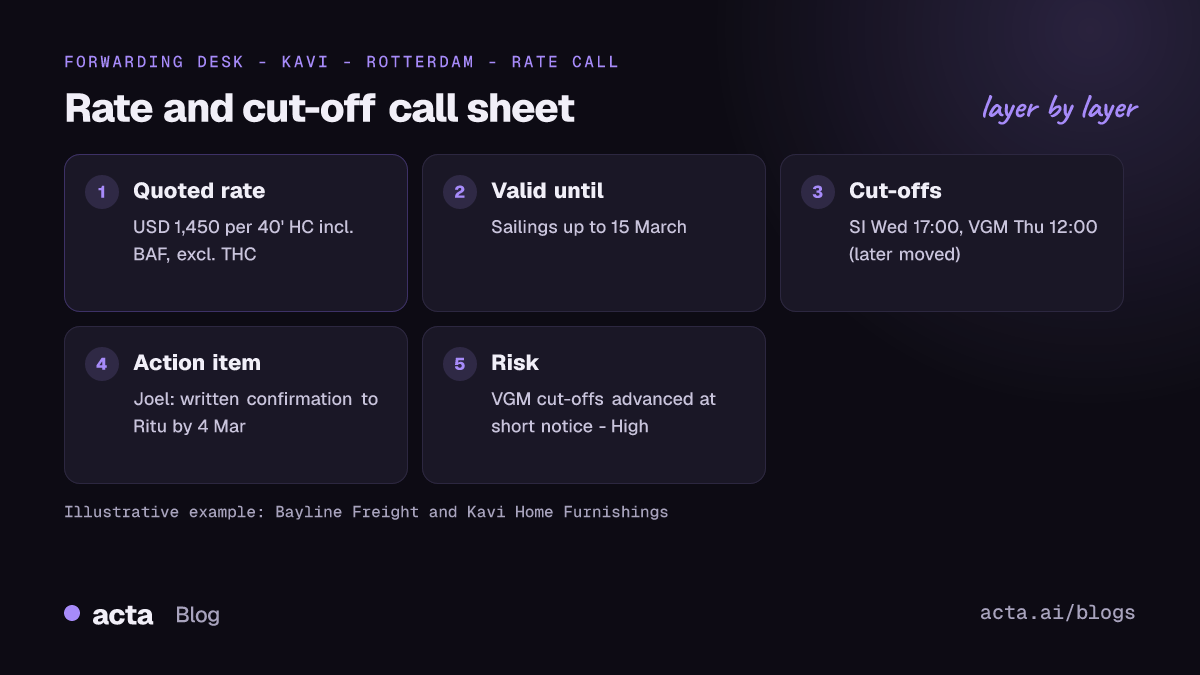
Tuesday, 3 March. Ritu asks for a rate on four 40' high cubes. Joel quotes 1,450 dollars per box, says it includes BAF, and adds that origin THC and destination charges are extra. Valid for sailings up to 15 March. Ritu says "fine, book them". Joel means to send a written confirmation and doesn't.
Monday, 9 March. On the booking call, Anwar tells Ritu the vessel sails on the 14th, with SI cut-off Wednesday at 17:00 and VGM cut-off Thursday at noon.
Wednesday, 11 March. The line brings the VGM cut-off forward to Wednesday 18:00 because of an earlier berthing window. Anwar phones the Karur factory and tells the supervisor, Suresh. Ritu is travelling and never hears. Two VGMs arrive Thursday morning, and two boxes roll to the following week's sailing.
Friday, 20 March. The invoice arrives. Ritu says Joel promised "1,450 all-in", and the two rolled boxes are billed at 1,610 dollars because the line's rate rose after the 15th. She wants both reversed. Meera spends a day rebuilding what was said and can prove neither side.
Now run the same month with every call recorded and shared in Bayline's Acta workspace. The facts come back in minutes, and the outcome is fairer to both sides.
A custom template turns every rate call into a quote sheet
Acta's 40 built-in report templates include a Contract negotiation template and a Customer QBR template, both useful for key account reviews. For daily rate and booking calls, a custom template fits better. You build one under Templates with "+ Create template", start from "Describe it" and let Acta draft sections you then edit. Custom templates are a paid-plan feature, so during the 15-day trial lean on the built-in ones. The custom templates guide walks through the builder.
This is the template Bayline would write, called "Rate and cut-off call sheet":
What should this report do? For calls with shippers about freight rates or bookings: list every rate quoted with what it includes, its shipping rate validity, every cut-off mentioned, and what each side promised to do next.
- Quoted rates (Table, 5 columns): Lane | Equipment | Rate | Included / excluded charges | Valid until.
- Cut-offs mentioned (Table, 4 columns): Vessel or ETD | SI cut-off | VGM cut-off | Gate-in cut-off.
- Free days and detention terms (Bullets).
- Who we told (Bullets): which person at the shipper heard each rate or cut-off.
- Promises (Checklist: task, owner, due date).
- Open questions (Bullets).
Set "When should Acta use it?" to "Only matching meetings" so it skips internal calls, test it with "Test on a past meeting", then tick "Share with my team" so every salesperson can turn it on.
OneChat settles the what-did-we-quote argument with the source
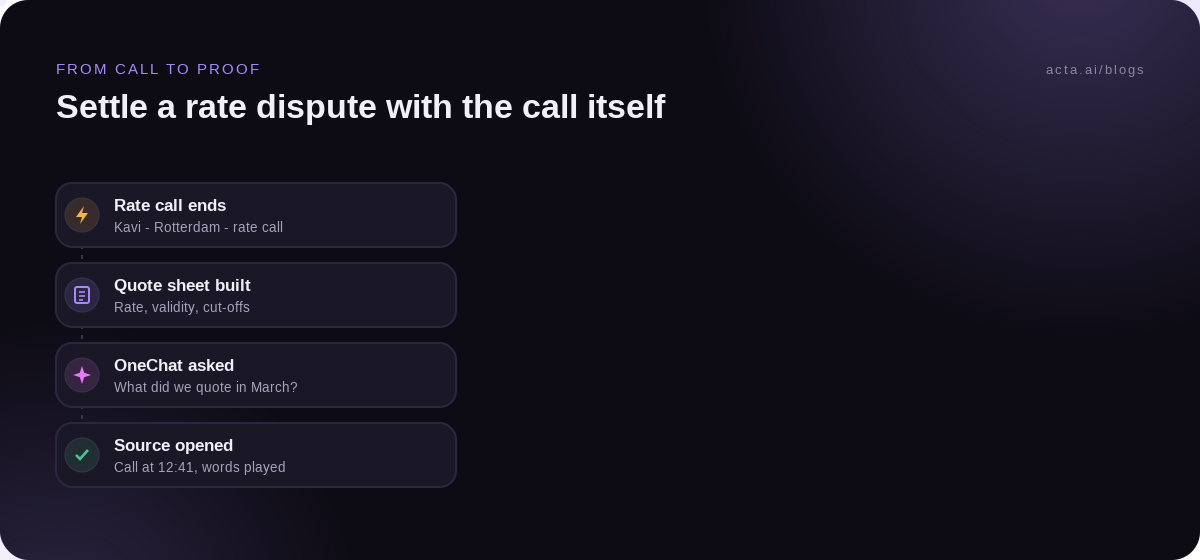
OneChat is the search box at the top of Acta's sidebar. It answers questions across all your meetings, and any files and links you add, and every answer lists where it was found; clicking a source opens the call at that moment. That last part matters more than the answer itself, because in a rate dispute nobody accepts a summary, they accept the recording. The OneChat help guide covers scope and files.
On 20 March, Meera asks two questions.
Meera: What rate did Joel quote Kavi for Rotterdam 40' high cubes in March, and what did it include?
OneChat: Joel quoted 1,450 dollars per 40' high cube, including BAF, with origin THC and destination charges extra, valid for sailings up to 15 March. Ritu agreed to book four boxes. Found in: Kavi - Rotterdam - rate call, 3 March, at 12:41.
Meera: When did we tell Kavi about the VGM cut-off moving, and who did we tell?
OneChat: Anwar told Suresh at the Karur factory on 11 March that the VGM cut-off had moved to 18:00 that day. Ritu was not on that call, and no later meeting mentions it to her. Found in: Kavi - booking - factory call, 11 March, at 02:15.
The answers cut both ways. THC was always excluded, so Kavi pays it. The cut-off change went to the wrong person, so Bayline holds 1,450 dollars on the two rolled boxes and absorbs 320 dollars. Meera plays both moments to Ritu and closes it in one call.
One rule to explain to the team early: a colleague's OneChat can only answer about meetings shared with the workspace. If Joel keeps his rate calls private, Meera's question returns nothing from them.
Action items, the Decision log and the Risk Registry cover the rest
OneChat answers the question you ask; the views under My meetings surface the ones you forgot. Each is built per person from the meetings they recorded or that colleagues shared with them, so Meera's views cover her calls plus what her team shares.
Action items: the promise nobody kept
Under Outcomes, the Action items tab lists every next step from every call, with tiles for Open, Overdue, Due this week and Done. Group by Person and Joel's missed confirmation shows up on 5 March, not on the 20th:
Email Kavi written rate confirmation: 1,450 USD per 40' HC Chennai-Rotterdam incl. BAF, excl. THC and destination charges, valid to 15 Mar sailing. Owner: Joel D'Souza. Overdue 2 days. Meeting: Kavi - Rotterdam - rate call.
Turn on Auto follow-up for your own calls and Acta emails each owner their open items every weekday until they are done.
Decision log: routing choices that stick
The Decision log tab merges the same decision across calls and keeps its history. A row from Meera's log after the dispute:
Kavi's Rotterdam boxes move via direct service only until end of April; no Colombo transhipment. Status: Active. Decided by: Meera Raghavan. Owner: Anwar Basha. Discussed in 2 meetings. Actions: 1 of 2 done.
Risk Registry: the cut-off problem as a row
The Risk Registry tab collects risks raised in meetings and updates them after each new one:
Risk: Line advancing VGM cut-offs on the Rotterdam service at short notice. Mitigation (Agreed): confirm cut-offs in writing to Ritu and the factory 48 hours before, and again on any change. Owner: Anwar Basha. Date: 27 Mar. Impact: High. Status: Mitigating.
If cut-off changes come up again in the morning huddle, the row is tagged "Getting worse", and a High risk with nobody's name on it lands in the "High · no owner" card at the top.
An Agent Builder recipe confirms rates and cut-offs in writing
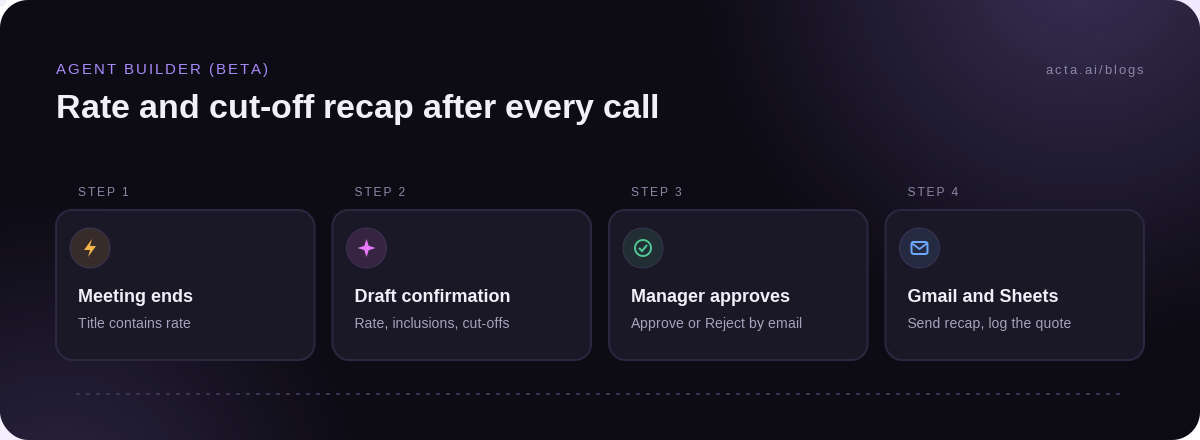
Most of Bayline's trouble came from one missing email, the freight quote follow-up nobody sent. Agent Builder (beta) can write that email after every rate or booking call and wait for a person to approve it. A sales manager can set this up in an afternoon:
- Open Agent Builder, click "New agent", and either describe it in words or choose "Start from blank instead". Name it "Rate and cut-off recap".
- Set the trigger to "When a meeting ends", with the filter "title contains rate". Make a second copy later for "booking".
- Add an Acta data step to pull the meeting's notes and action items.
- Add an AI step: "Write a short email to the shipper confirming lane, equipment, rate, what it includes and excludes, validity, any cut-offs with date and time, and next steps. If something was not said, write: not discussed on the call."
- Add a Human approval step and tick "Also email me Approve and Reject buttons". If nobody answers within 24 hours, nothing is sent.
- Add a Gmail action: draft a reply to the shipper's contact. Switch to "send" once you trust the drafts.
- Add a Google Sheets action that adds a row to your quote log: customer, lane, rate, validity, call date.
- Click Test, then Run test on last week's call. Nothing is sent during a test. When the draft reads right, Turn on.
Agents act as you, so the email leaves from the approver's Gmail and replies come back to them. The approvals guide explains the Approve and Reject flow.
Roll it out to sales, pricing and customer service in two weeks
Start with the pricing desk, four or five salespeople and the customer service team that handles bookings. Warehouse and trucking can wait. The workspace setup guide covers invites and roles.
- Days 1-2: The owner creates the workspace, invites the pricing desk, one sales team and its customer service executives from Settings, Workspace, "Invite people", and agrees the call-naming rule.
- Days 3-5: Everyone records customer calls. Calls on the Zoom or Teams desktop apps, or on WhatsApp desktop, work with the desktop app: it detects Zoom and Teams meetings and records any other call when you press Record. Calls on Google Meet work with the Chrome extension. Share each customer call with "Everyone in" the workspace.
- Week 2: Turn on the custom template, run the agent in draft-only mode, and have the sales head open the Monday pricing meeting by asking OneChat which quotes expire this week.
Avoid three mistakes: recording without telling the shipper (see our guide on recording consent and what to tell participants), leaving calls Private so colleagues cannot find them, and trusting a OneChat answer without clicking the source.
For the client side of the notice, these disclosure email templates for clients save time, and if your team is new to asking questions across calls, this piece on asking questions across every meeting shows the habit. Acta's page for freight forwarders collects the rest.
Frequently asked questions
How do I find a rate we quoted on a call weeks ago?
Ask OneChat in plain words, for example "What did we quote Kavi for Rotterdam in March?" It searches the calls you recorded and those your colleagues shared with you, answers with the rate and conditions, and lists the call and time it came from. Click the source to hear the exact words before you rely on them in a dispute.
Does this replace our freight software or rate management system?
No. Your freight system still holds bookings, rate sheets and invoices. Acta holds what people said on calls: the quote as spoken, the cut-off as told, the promise as made. When an invoice and a customer's memory disagree, the call record shows which one matches what was actually agreed.
Is it legal to record calls with shippers and overseas agents?
Rules differ by country and sometimes by state, so treat this as general information, not legal advice. The safe habit is to tell everyone at the start that the call is recorded for notes, and repeat it in writing. Acta's desktop app has a "Copy notice" button that pastes a short recording notice into the call chat.
Can a sales manager see calls their team recorded?
Only the ones shared with the workspace. Each person's meetings are private by default; the share icon offers "Everyone in" your workspace or Private. Shared calls appear under "Shared with me", and the manager's OneChat can answer about them. Action items, the Decision log and the Risk Registry are built per person from their own and shared calls.
What does it cost for a ten-person sales and customer service team?
Acta Pro is 8 dollars per seat a month billed monthly, or 72 dollars per seat a year, so ten seats run 80 dollars a month or 720 dollars a year. Each person in the workspace uses a seat, including customer service staff who only read shared calls. The Outcomes views, Risk Registry and OneChat are included in the 15-day trial and in Pro.
Start with the calls that end in disputes
You do not need every call recorded on day one. You need the calls where money and dates are agreed, captured the same way each time, and confirmed in writing.
- Pick the calls: rate requests and booking calls with your top 15 shippers.
- Fix the format: lane, equipment, rate with surcharges named, validity, cut-offs, promises.
- Share by default: every customer call goes to the workspace so OneChat can answer for the whole desk.
- Confirm in writing: a recap within the hour, approved by a person before it is sent.
- Review weekly: overdue items by person, High risks without an owner, decisions marked Changed.
Try it on next week's rate calls with the Acta desktop app, and start the 15-day trial for the sales and pricing desk first.