Client design meetings carry instructions nobody writes down
A practice's week is full of meetings where design gets decided: monthly client design meetings, fortnightly design team meetings with the structural engineer, services engineer and quantity surveyor, stage sign-off reviews, planning pre-application meetings, and later the site progress meetings. The project architect chairs or attends most of them, often while also presenting drawings, sharing a model and answering questions about the programme.
Institutional clients make this harder. A school trust, a housing association or a university decides through people who aren't in the room: an estates committee, governors, a finance director. The client's representative at the meeting will often say yes on the spot and promise to "take it to the committee". That sentence is an approval with a condition attached, and the condition is the part that tends to vanish from the minutes.
RIBA's Plan of Work splits a project into eight stages, from strategic definition to use. Imperial College London's estates project procedures are a good public example of a client organising projects by those stages and applying change control from Stage 2 onwards. The point for a small practice is that after concept design, almost every client instruction is a change, and changes need a record that outlives the meeting.
A spoken facade approval became a £38,000 dispute
This example is illustrative. Marlow Ash is a 22-person practice designing a two-storey teaching block for a primary school run by a multi-academy trust. Clare Whitcombe is the director; Femi Adeyemi is project architect. On the trust's side, Paul Garside is head of estates and Janet Moore is finance director. Owen Hartley is the cost consultant.
12 March, Stage 3 client design meeting. Femi shows two facade options. Paul says: "Go with the terracotta rainscreen rather than the brick slips. It'll look far better from the playground. The governors will be fine; I'll take it to the estates committee next month." Femi's notes say "Facade: terracotta agreed (PG)."
Late March. The team redraws the elevations and starts terracotta detailing. Nobody asks Owen for a cost check, because the client "agreed".
April. The estates committee meets. The facade isn't on the agenda; Paul is on leave.
Early May, Stage 4 cost check. Owen reports the terracotta adds about £38,000. Janet emails Clare: "The trust has not approved a change of facade material. Please revert to the Stage 2 design." Marlow Ash has spent around 60 hours on the change and asks for an additional fee. The trust declines, pointing out there is no written instruction.
Both sides are partly right. Paul did instruct the change, out loud. He also said it depended on the committee. A decision log that kept his exact words would have shown an approval with an open condition, an owner for that condition and no cost check, which is a very different thing from "terracotta agreed".
The architecture client meeting decision log needs six fields
Keep it per project, in whatever tool the practice actually opens:
- Instruction: one sentence. "Facade changes from brick slips to terracotta rainscreen on the teaching block."
- Given by: name and role. Note whether that person has authority to commit cost.
- Condition: anything it depends on, with an owner and date. "Estates committee approval, Paul Garside, April meeting."
- Cost and programme effect: "Cost check requested from cost consultant" until a number exists.
- Status: active, changed, reversed or done.
- Written confirmation: date sent and date acknowledged.
This design decision log sits alongside your design change register, not in place of it. The register is the formal list of changes with their drawings and fees; the log is where client approval in architecture is first caught, while it is still a sentence in a meeting. PMI's paper on scope change control puts impact analysis at the centre of handling a change request, which for a practice means the cost check comes before the redrawing. Our guide on how to track decisions made in meetings covers the general habit, and the construction meeting minutes examples help once you're on site.
Acta's Decision log keeps the quote, the condition and the follow-through
Femi records client and design team meetings with Acta: the notetaker bot joins Teams or Zoom, and for the client's own calls where bots aren't allowed, the Acta Chrome extension records Google Meet, Teams in the browser or the Zoom web client from his browser. For a meeting around a table in the school, the mobile app records in person. Tell everyone at the start; our post on recording consent suggests wording.
Templates for design meetings
The built-in Decisions & RACI template gives a who-decides table for each meeting, and Project status suits design team meetings (see how report templates work). Femi adds a custom template, a Pro feature, called Client instructions, run on "Only matching meetings":
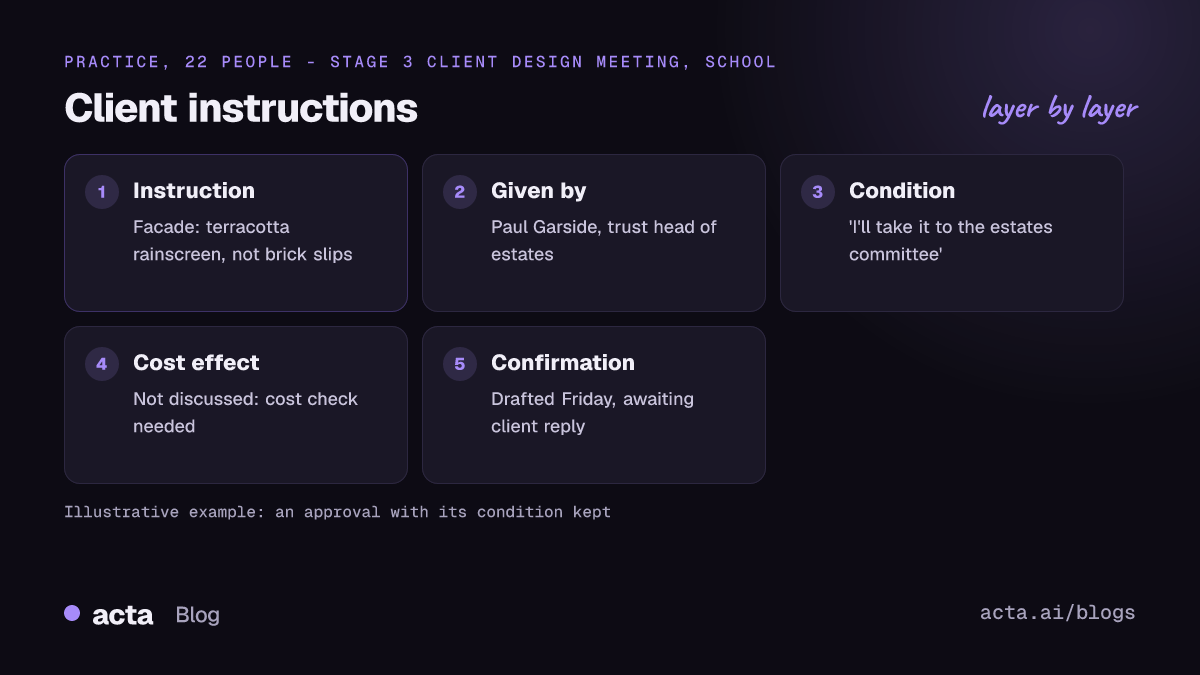
1. Client instructions (Table: Instruction | Given by | Condition | Cost or programme effect mentioned)
2. Options discussed but not chosen (Bullets)
3. Needs written confirmation (Checklist: task, owner, due date)
4. Stage and sign-off position (Paragraph)
5. Client's exact words on any approval (Bullets)
For 12 March, row one of the table would read: Facade to terracotta rainscreen | Paul Garside | "I'll take it to the estates committee next month" | Not discussed.
The Decision log card
Femi's Decision log sits at My meetings > Outcomes > Decision log. It is his, built from the meetings he recorded and those shared with him in the workspace; Clare has her own from her meetings. Acta merges mentions of the same decision across meetings into one card. By mid-April it would read:
Teaching block facade: terracotta rainscreen replaces brick slips · Status: Active
Decided by: Paul Garside · Owner: Femi Adeyemi · First discussed 12 Mar · Discussed in 2 meetings
History: first raised, client design meeting 12 Mar: "The governors will be fine; I'll take it to the estates committee next month" ▶ · confirmed, design team meeting 26 Mar: "We're detailing terracotta now" ▶
Actions: 0 of 2 done · 1 overdue action item
The two linked action items show the gap plainly:
| Action item | Owner | Status |
|---|
| Take facade change to estates committee | Paul Garside | Overdue 9 days |
| Request cost check on terracotta from cost consultant | Femi Adeyemi | No due date |
| Issue revised Stage 3 elevations | Femi Adeyemi | Done |
The "Need follow-through" tile counts decisions like this, so Femi would see it the moment he opened the log. In May, when the trust asked to revert, he would edit the card; it would show Reversed with the history intact. If Acta merges two different decisions, say the facade and a separate choice to keep brick slips on the hall, "Not the same decision?" splits them. Use Export CSV at each stage review to update the formal design change register.
Risk Registry and OneChat
The Risk Registry tab would hold: Risk "Facade change not approved by trust; cost unknown" · Mitigation "Cost check before Stage 4 detailing" (Agreed, from the 26 March meeting) · Owner Femi Adeyemi · Impact High · Status Open. When Janet's email arrived, Clare could ask OneChat: "When did the trust approve the terracotta facade, who said it, and was there a condition?" It would answer that Paul Garside instructed it on 12 March, with the condition that he would take it to the estates committee, and that no later meeting records committee approval. Found in: client design meeting, 12 Mar. That answer is the basis of a fair conversation about the fee.
A Friday agent drafts written confirmations of instructions
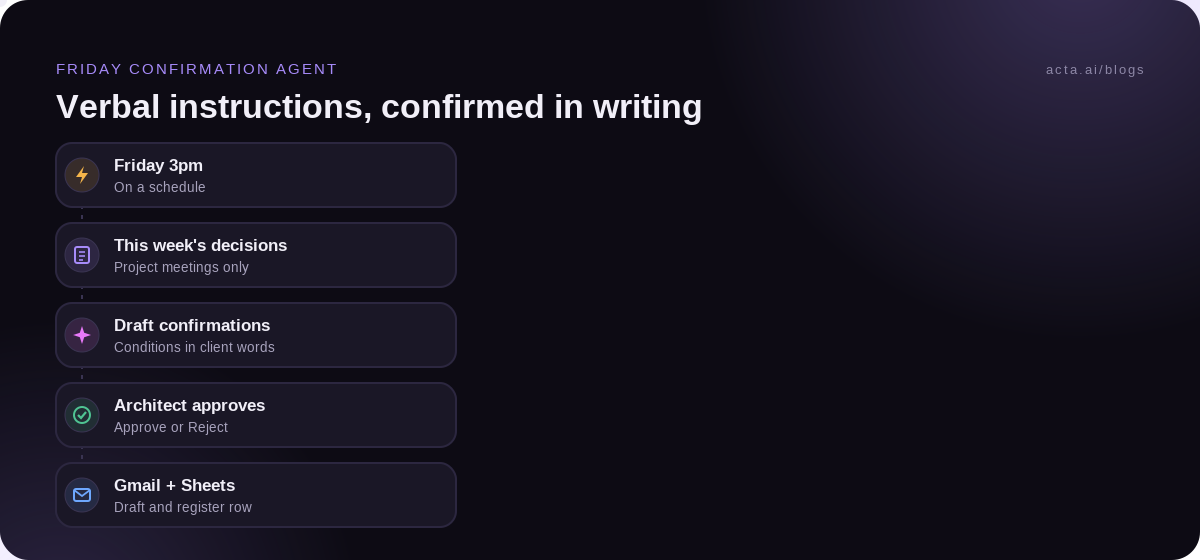
A verbal instruction becomes much safer once it's confirmed in writing and acknowledged. Doing that by hand every week is exactly the job that slips. Acta's Agent Builder (beta) can do the drafting on a timer; the example agents show the building blocks. Recipe:
- Start: "On a schedule", Fridays at 3pm.
- Acta data: decisions made or changed this week in meetings whose title contains the project name.
- For each decision:
- AI: "Write a short confirmation of client instruction: what was instructed, by whom, on what date, any condition in the client's own words, and the cost or programme effect if known, otherwise 'cost check to follow'. Ask the client to reply to confirm."
- Merge the drafts into one email per client.
- Human approval: the project architect reviews and approves; with "Also email me Approve and Reject buttons" on, he can do it from his phone. No answer in 24 hours, nothing is sent.
- Gmail: create a draft to the client's representative, copying the director.
- Google Sheets: add a row per instruction to the project's design change register, with the date confirmation was drafted.
Test it first: Test, then Run test on a week with a few decisions in it. Nothing is sent in a test, and the approval passes by itself, so you see the drafts safely. When the wording sounds like your practice, Turn on. If the Friday email to Paul had gone out on 14 March, the condition would have been in writing within two days, and either the committee would have heard about it or Janet would have asked why not.
Introduce it across the practice in two weeks
Who records which meetings
- Project architects: client design meetings, design team meetings and stage reviews, shared with Everyone in the workspace.
- Directors: fee and appointment conversations; share when they affect the brief.
- Site architects: site progress meetings during construction, using the mobile app or the bot.
- Internal design crits: optional; they add noise to the Decision log unless you use "Not a decision" freely.
The owner sets up the workspace and invites staff from Settings > Workspace, with Admin for the practice manager and Member for project staff. Meetings are private by default; shared ones appear under Shared with me.
The two weeks
- Days 1-2: pick one live project at Stage 3 or 4. Set up the workspace, install recorders, turn on Decisions & RACI and write the Client instructions template.
- Days 3-6: record every client and design team meeting on that project. Each evening the project architect spends ten minutes in the Decision log assigning owners and adding conditions as action items.
- Days 7-9: build the Friday agent and test it on the first week.
- Day 10: send the first real confirmations after approval.
- Days 11-14: show the directors one caught condition, then add two more projects and agree that no material or area change is drawn before a cost check is requested.
Traps
- Writing "agreed" in the log when the client said "subject to". Keep the condition.
- Assuming the director's views include the project architect's meetings. They don't unless shared.
- Letting the agent send to clients without approval.
Frequently asked questions
Is a verbal client approval binding on an architecture project?
It depends on your appointment terms and the contract, so treat this as general information, not legal advice. In practice, a verbal instruction is hard to rely on if it is later disputed, especially when the person giving it attached a condition. Confirm instructions in writing promptly and ask for an acknowledgement.
What should a design decision log include for a building project?
The instruction in one sentence, who gave it and whether they can commit cost, any condition with its owner and date, the cost and programme effect, a status, and the date written confirmation was sent and acknowledged. Link each entry to the meeting where it was said, ideally with the exact words.
How is a decision log different from a design change register?
The decision log catches instructions as they are spoken in meetings, including conditional ones that aren't yet changes. The design change register is the formal record of agreed changes, with drawing revisions, cost and fee effects. Use the log to feed the register: in Acta, Export CSV gives you a file to update it from.
Can our client, engineers or cost consultant see the Decision log?
Not inside Acta. The Decision log belongs to each Acta user in your workspace and is built from their own meetings and those shared with them. To share decisions outside the practice, export the CSV, paste the relevant rows into minutes, or send the written confirmations the Friday agent drafts.
Which meetings should an architecture practice record?
Start with client design meetings, design team meetings and stage sign-off reviews, because that is where instructions and conditions are given. Add site progress meetings once construction starts. Tell participants at the start of each meeting; most clients appreciate an accurate record of what they asked for.
Make the decision log part of every stage
A decision log works when it is kept from the meeting, not from memory a week later. For your next client design meeting:
- Record and share: client and design team meetings, shared with the workspace.
- Keep the condition: log "subject to" with its owner and date.
- Cost before drawing: request a cost check before acting on material or area changes.
- Confirm every Friday: agent-drafted, architect-approved.
- Feed the register: export the log at each stage review.
Try it on one live project with the 15-day free trial. The architecture firms page has more on how practices use Acta.