Daily quality meetings generate more actions than anyone tracks
Most food plants run a short daily quality meeting, often standing, next to the QA lab or the production office. QA reports overnight results, holds and releases; production raises line issues; maintenance confirms equipment checks; and someone from stores or procurement says what came in. Once a week, the food safety team meets for longer to review trends, complaints, supplier performance and open corrective actions. Customer calls with importers and audits sit on top.
The daily meeting is fast and useful, and it is where actions go to die. They get written on a whiteboard that is wiped at noon, in a QA register nobody else reads, or in someone's phone. By Thursday nobody remembers whether maintenance checked the sterilizer log or whether procurement heard back from the supplier.
The distinction regulators draw makes this sharper. For facilities covered by the U.S. FDA's preventive controls rule for human food, the regulation in 21 CFR Part 117 treats a correction (fixing the immediate problem) differently from a corrective action (also reducing the chance it happens again), and expects corrective actions to be documented. This is general information, not regulatory advice. In practice it means the quick fix gets done on the day, and the slower, cross-team action, the one that stops a repeat, needs tracking.
A cumin lot on hold shows how a supplier action slips
An illustrative case. Vanya Spices (a made-up company) has 180 staff and grinds, sterilizes and packs cumin, coriander and chilli for export, mainly to importers in the US. Anjali Mehta is QA manager, Suresh Patel is plant head, Vinod Rao runs procurement, Harish Desai supervises production, Joseph Mathew leads maintenance, and Dr. Nisha Iyer runs the micro lab.
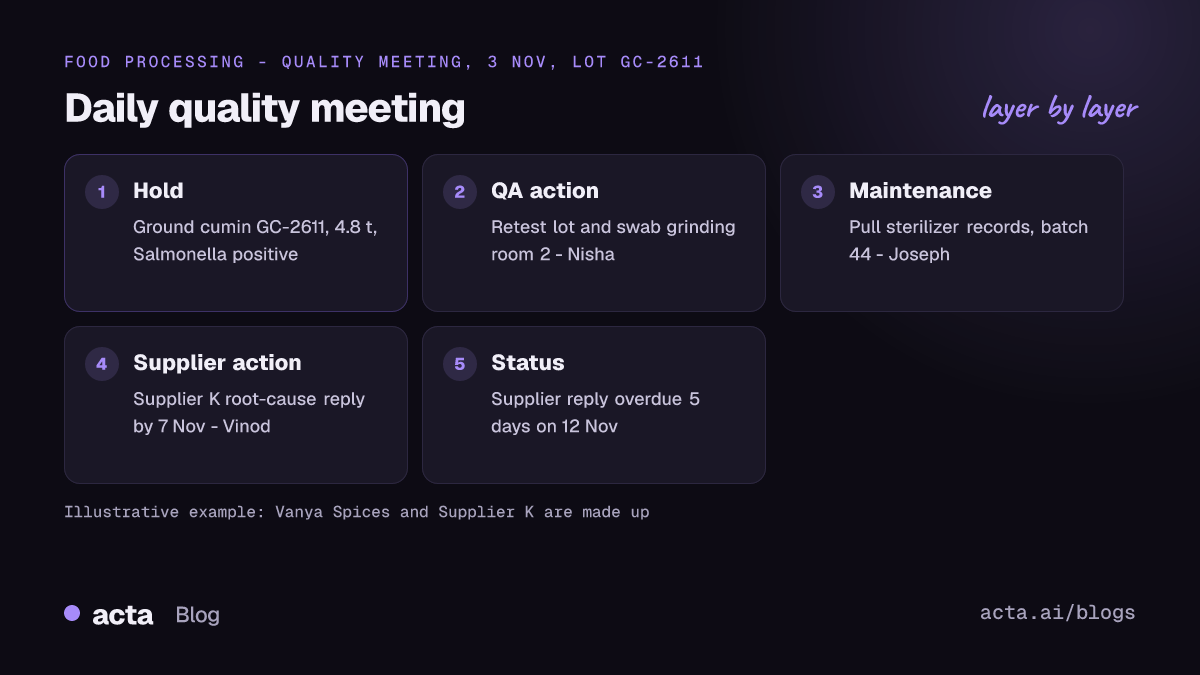
Monday 3 November, daily quality meeting. Finished-product testing finds Salmonella in ground cumin lot GC-2611, 4.8 tonnes. Anjali puts the lot on hold. Six actions come out of the 15-minute meeting: retest the lot (Nisha), run environmental swabs in grinding room 2 (Nisha), pull the steam sterilizer's time and temperature records for that batch (Joseph), segregate remaining raw cumin from the same supplier (Harish), tell the importer (Anjali), and issue a supplier corrective action request to Supplier K asking for their root cause and corrective action by Friday 7 November (Vinod).
That week. Five actions close. Vinod sends the request on Tuesday, then leaves for a sourcing auction. Supplier K does not reply. Nobody chases, because nobody is looking at a list that includes Vinod's item.
Wednesday 12 November. A 12-tonne truck from Supplier K arrives. Receiving checks the supplier's certificate of analysis, which looks fine, and moves the bags to the raw store. At the morning meeting, Harish asks whether Supplier K has been cleared. The room goes quiet. The load is caught before it reaches the grinder, but only because Harish happened to ask.
A quality meeting template that writes actions the right way
Acta's built-in Incident post-mortem and Vendor review templates (Operations group) suit the weekly food safety team meeting and supplier reviews; see vendor review meeting layouts for what to cover. The daily meeting needs something shorter. A custom template (paid plans; up to 12 sections; shared with the team so every shift lead uses it) can look like this:
Template: Daily quality meeting (runs on "Only matching meetings": morning quality meetings and food safety team meetings)
Holds and releases (Table: Lot | Product | Reason | Decision)
Test results discussed (Bullets: test, lot, result)
Corrections done today (Bullets)
Corrective actions (Checklist: task, owner, due date)
Supplier issues (Table: Supplier | Issue | What we asked for | Due)
Customer complaints and importer contacts (Bullets)
Extra instruction: "Use lot numbers exactly as said. Each corrective action starts with a verb and names one person."
The split between "Corrections done today" and "Corrective actions" mirrors how your team already thinks, and keeps the quick fixes from cluttering the tracker. Meetings that end with clear owners are easier to track at all; ending a meeting with owners and deadlines covers the habit.
Food plant quality meeting action items belong in one cross-meeting tracker
Acta picks up action items with owners from each meeting (see how action item detection works). On the meeting's own page, the Action items card shows each task with its owner, a time chip that plays the moment it was agreed, and "Mark as done". The cross-meeting view is where the plant gets its grip: My meetings > Outcomes > Action items.
What Anjali's tracker shows on 12 November
| Action | Owner | Tag | Status pill |
|---|
| Get Supplier K's root-cause and corrective action response for GC-2611 | Vinod Rao | Procurement | Overdue 5 days |
| Retest lot GC-2611 (two samples, accredited lab) | Dr. Nisha Iyer | QA | Done |
| Swab grinding room 2, zones 2 and 3 | Dr. Nisha Iyer | QA | Done |
| Pull sterilizer time and temperature records for batch 44 | Joseph Mathew | Maintenance | Done |
| Hold all incoming Supplier K cumin for in-house micro test | Harish Desai | Production | Due today |
The tiles across the top read Open, Overdue, Due this week and Done, each with a count that doubles as a filter. The meeting card for "Daily quality meeting, 3 Nov" shows "1 overdue" and a "4 of 6 done" bar. Group by Person and Vinod's overdue item sits at the top of his list. Comments live on the row, so "Supplier says reply by 14 Nov, chasing daily" stays with the task, not in a WhatsApp thread.
Turn on Auto follow-up for the hold meeting
In the Auto follow-up settings, switch on "Send daily follow-ups" for meetings you own. Then choose:
- When: 7:30, Weekdays, before the morning meeting.
- Who gets it: "Each owner, their own items", so Vinod gets his supplier item and nothing else.
- Which items: "Due or overdue", to keep the email short.
- Stop after: 21 days, long enough for a supplier response cycle.
Click Preview email before saving. Follow-ups stop by themselves once every item is done, and recipients can unsubscribe. The bell on a meeting card pauses follow-ups for that meeting only. With this on, Vinod would have had a reminder in his inbox every weekday from 8 November, at the auction or not. The "Follow-up email" button on the card also writes a one-off email draft if you would rather chase by hand.
One limit to be clear about: this tracker is per person. Anjali sees the actions from meetings she recorded and those shared with her in the workspace. If Vinod records a supplier call and keeps it private, its actions never reach her list.
Decisions, risks and OneChat cover what a task list misses
Decision log (Outcomes > Decision log, also per person): "Supplier K cumin is released only after our own micro test, not on the supplier's certificate", decided by Anjali Mehta, owner Harish Desai, status Active, actions 0 of 1 done. It sits under the "Need follow-through" tile until receiving confirms the rule is in place.
Risk Registry: "Incoming cumin from Supplier K may carry the same contamination; receiving relies on the supplier's certificate", Impact High, owner Vinod Rao, Mitigation Agreed ("hold all Supplier K lots for in-house testing"), Date 7 Nov, status Mitigating. On 12 November the card "Fix is overdue" appears, because the supplier's response is late.
OneChat, which answers across meetings with sources:
Question: Which actions from the GC-2611 hold are still open, and what did we tell the importer?
Answer: One action is open: Vinod Rao is waiting for Supplier K's root-cause response, due 7 November. Anjali Mehta told the importer on 3 November that the lot is on hold pending retest and that no product from it has shipped. Found in: Daily quality meeting, 3 Nov; Importer call, 3 Nov.
Upload the supplier's reply as a file in OneChat when it arrives, and ask whether their root cause matches what your swabs and sterilizer records showed. Every answer shows where each point came from.
An escalation agent tells the plant head before the next truck arrives
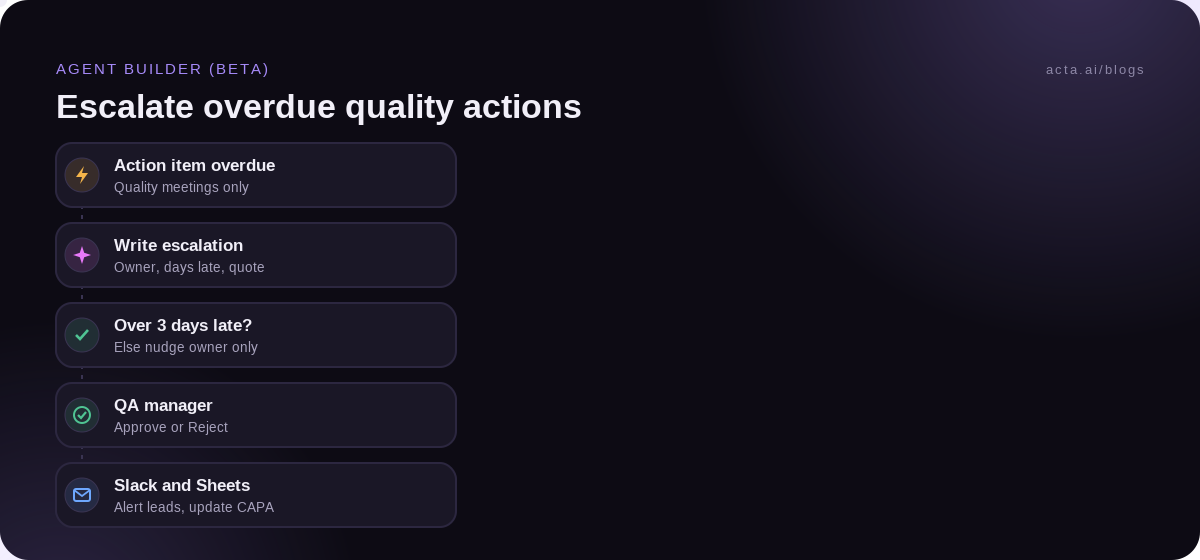
Reminders nudge the owner. An escalation tells the person who can change priorities. With Agent Builder (beta), a QA manager can set this up in an afternoon:
- Click New agent: "When a quality or supplier action is overdue, tell the plant head with the quote from the meeting."
- Trigger: Event in a connected app, app Acta, event "action item overdue". Under "Only when", the meeting title contains "quality" or "food safety".
- AI: "Write three lines: the action, the owner, days overdue, the lot or supplier, and what was said when it was agreed."
- If / else: if more than three days overdue, continue to escalation; otherwise send a Slack message to the owner only.
- Human approval: Anjali approves the escalation. Unanswered approvals lapse after 24 hours and nothing is sent.
- Slack: message the #plant-leads channel. Google Sheets: find the row for the lot in your CAPA tracker and update its status to "Escalated".
- Test, then Run test, then Turn on.
Pair it with a receiving rule: any delivery from a supplier with an open corrective action goes to quarantine. The agent tells people; the rule protects the product.
Roll it out across QA, production and procurement in two weeks
Who records which meetings
- QA manager: the daily quality meeting and the weekly food safety team meeting, using the Acta mobile app on the table. Hold it in the QA office rather than beside the grinders; noise ruins any recording.
- Procurement manager: supplier calls and supplier reviews.
- Plant head: importer and customer calls. On Teams or Zoom, the desktop app records from the laptop with no bot joining.
Meetings that mix Hindi and English work; Acta detects Hindi, including Hinglish, by itself. Tell staff the meeting is recorded and why, and read the guide on recording consent and what to tell participants. Shift handovers can feed the same tracker; see shift handover notes templates.
The two weeks
- Days 1-2: Create the workspace and invite QA, production, maintenance and procurement leads from Settings > Workspace (free for up to 10 people during the trial). The team guide explains roles.
- Days 3-5: Record every daily quality meeting and share it with Everyone in the workspace. Meetings are private until shared.
- Week 2, Monday: Open each meeting with the Overdue count. Turn on Auto follow-up as above.
- Week 2, Thursday: Run the food safety team meeting with the Incident post-mortem template and check the Decision log for actions with no owner.
- Day 14: Add the escalation agent, tested on last week's overdue items.
Mistakes to avoid
- Writing "follow up with supplier" as an action. It has no end, so it never closes.
- Letting procurement record supplier calls privately. QA's tracker never sees them.
- Marking items done too early. Tick an action only when the evidence (the retest result, the supplier's reply) is actually in.
The Acta page for food processing companies covers other plant meetings. Outcomes, the Risk Registry and OneChat are included in the 15-day trial and in Pro.
Frequently asked questions
How should a food plant track corrective actions from meetings?
Use one corrective action tracker that pulls actions from every meeting, with a single owner, a due date and a visible status for each. Review the overdue items at the start of the daily quality meeting, send owners an automatic daily reminder, and escalate anything more than a few days late to the plant head.
What is a supplier corrective action request?
A supplier corrective action request is a formal ask to a supplier to investigate a problem with what they delivered, find the root cause and tell you what they will change. Track it as an action item owned by someone on your side, usually procurement, with a due date, and link it to a receiving hold.
Who should own actions from the daily quality meeting?
One named person per action, from whichever team does the work: QA for retests and swabs, maintenance for equipment records, procurement for supplier responses, production for segregation. The QA manager owns the list and chairs the review, but should not own every task, or the list becomes a personal to-do list.
Can we record meetings on a noisy production floor?
Short meetings next to running grinders or packing lines are hard for any recorder. Hold the daily quality meeting in an office or a quieter corner, put the phone in the middle of the group, and keep it to one speaker at a time. Tell everyone it is being recorded before you start.
Does a food safety team meeting need different notes from the daily one?
Yes. The daily quality meeting is about today's holds, results and quick corrections. The weekly food safety team meeting reviews trends, open corrective actions, supplier performance and complaints, and makes decisions that change procedures. Use a short template for the daily meeting and a fuller one, such as an incident post-mortem, for the weekly review.
Start with tomorrow morning's quality meeting
You do not need a new system to start. You need tomorrow's meeting recorded and its actions written properly:
- Record the daily quality meeting: phone on the table, in a quiet room, shared with the workspace.
- Write actions as verb, owner, date: no "follow up with supplier".
- Open with the Overdue count: two minutes, every morning.
- Turn on daily follow-ups: each owner gets their own due or overdue items before the meeting.
- Tie supplier actions to receiving: an open supplier action means the next delivery waits.
Install the desktop app for importer and supplier calls and try the tracker on a 15-day free trial.