An incentive trip is planned in six kinds of meeting
A corporate incentive trip runs through a familiar set of meetings. The client briefing sets objectives, budget per head and dates. The weekly client status call is where requirements move: headcount, partners invited or not, activity choices, the gala dinner theme. The internal ops meeting divides work between the project manager, air desk and ground team. DMC calls with the destination management company cover transfers, venues and guides. Supplier calls with the hotel group desk and airline groups team settle contracts and deadlines. And the pre-departure briefing locks the final rooming list and run sheet.
Good incentive trip planning depends on carrying a change from the first of these meetings to the right supplier quickly. The client's events lead mentions on a Tuesday call that the sales VP wants top performers to bring partners. That one sentence changes the room count, the flight block, the gala seating and the budget. If it lives only in the project manager's head, the hotel finds out when the rooming list arrives, by which time the extra rooms may be gone.
There is a contractual side as well. In the UK, the government publishes question-and-answer guidance on the Package Travel Regulations for organisers and retailers and a guidance note on what counts as a package, and ABTA reports that revised regulations will apply to bookings made after 6 April 2027. Whether a particular corporate trip is caught depends on how it is arranged, so check with your adviser. Either way, a clear record of what the client asked for, and when, protects you.
A 120-person trip grew to 134 and the hotel never heard
An illustrative case. Bluewater Incentives is a 32-person B2B travel company in London. Its client Corvane Systems booked a four-night sales incentive in Lisbon for 120 people in mid-June. Sophie Marlow is Bluewater's director, Raj Patel the trip's project manager, Elena Costa runs ground operations with the Lisbon DMC, and Ben Okoro handles the group air booking. On the client side, Laura Fenwick is the events lead.
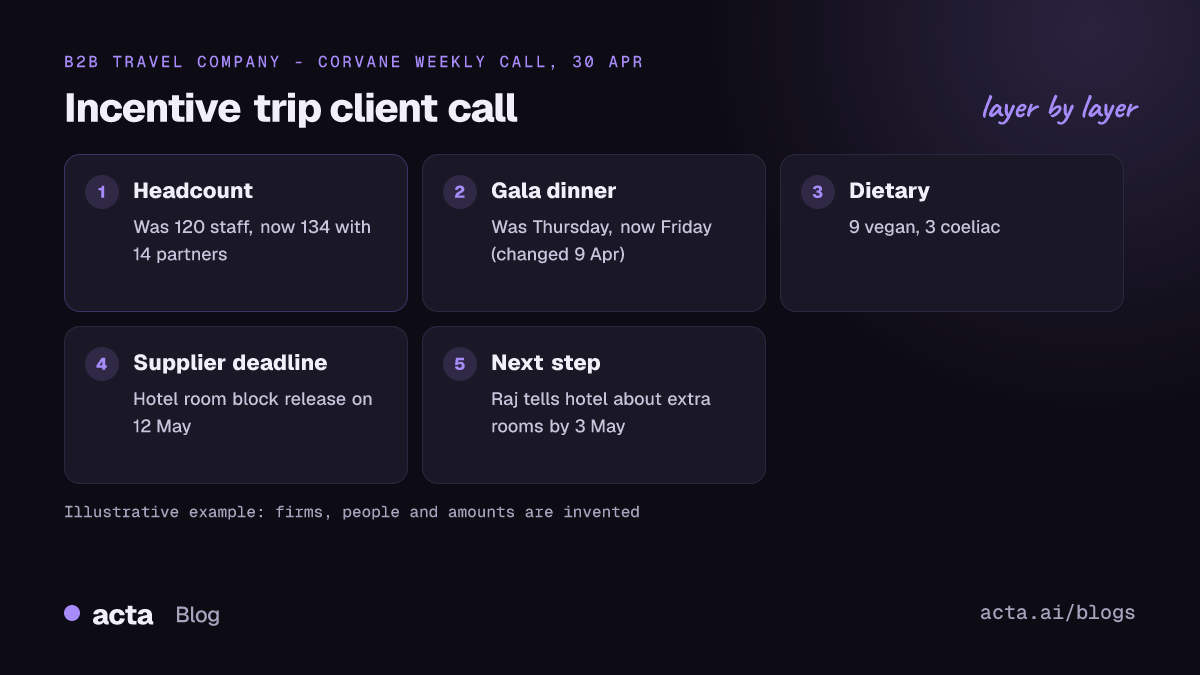
Over five weekly calls, the requirements moved like this. On 2 April, headcount was 120 in 96 rooms. On 9 April, the gala dinner moved from Thursday to Friday because the CEO's flight changed. On 16 April, Laura said, "Mark wants the top 14 to bring partners. I'll confirm numbers by Friday, but plan on it." On 23 April, the dine-around was swapped for a river boat evening, and dietary needs went to 9 vegan and 3 coeliac. On 30 April, Laura confirmed the 14 partners in passing while discussing name badges.
Raj updated the DMC about the boat and the gala. Nobody told the hotel about the partners. Eight could join a performer's double room, but six performers had been placed in shared twins, so six more rooms were needed, and the hotel contract released unsold rooms from the block 30 days before arrival, on 12 May. Raj sent the rooming list on 20 May. The hotel had six rooms fewer than needed, at a public rate far above the group rate, and Bluewater absorbed about EUR 6,800 to keep the client whole. Every fact needed to prevent it had been said on a recorded call three weeks earlier.
Ordinary minutes describe a meeting. For group travel you want notes that describe a delta: what is different from last week. The useful unit is a group booking change log row: item, was, now, requested by, date, which supplier must hear. Keep the rooming list itself in your booking system or spreadsheet; the notes tell you when it must change.
Acta's built-in templates cover part of it. Project status suits the internal ops meeting, Vendor review suits a quarterly review with your main DMC, and Contract negotiation suits the hotel contract call where release dates and attrition are agreed. For the weekly client call, write a custom meeting notes template. Custom templates need a paid plan; you can have up to 10, each with up to 12 sections, and the custom templates guide covers the builder:
Template name: Incentive trip client call
What should this report do? For calls with a corporate client about a group trip or incentive: record every change to requirements, the supplier deadlines mentioned, and what the client still has to decide.
1. Requirement changes (Table: Item | Was | Now | Requested by)
2. Headcount and rooms (Paragraph: latest numbers as stated)
3. Dietary and access needs (Table: Need | Number | Notes)
4. Supplier deadlines mentioned (Table: Supplier | Deadline | What is due)
5. Client decisions still pending (Bullets)
6. Next steps (Checklist: task, owner, due date)
Extra instructions: Quote numbers exactly as spoken. Mark anything said as "probably" or "plan on it" as unconfirmed.
Keep the dietary table to counts, not names; the rooming list in your booking system is where named needs belong. Run "Test on a past meeting" on the 16 April call and the first table should show: Partners for top performers | None | 14 partners, unconfirmed | Laura Fenwick.
Agent Builder turns each client call into supplier drafts
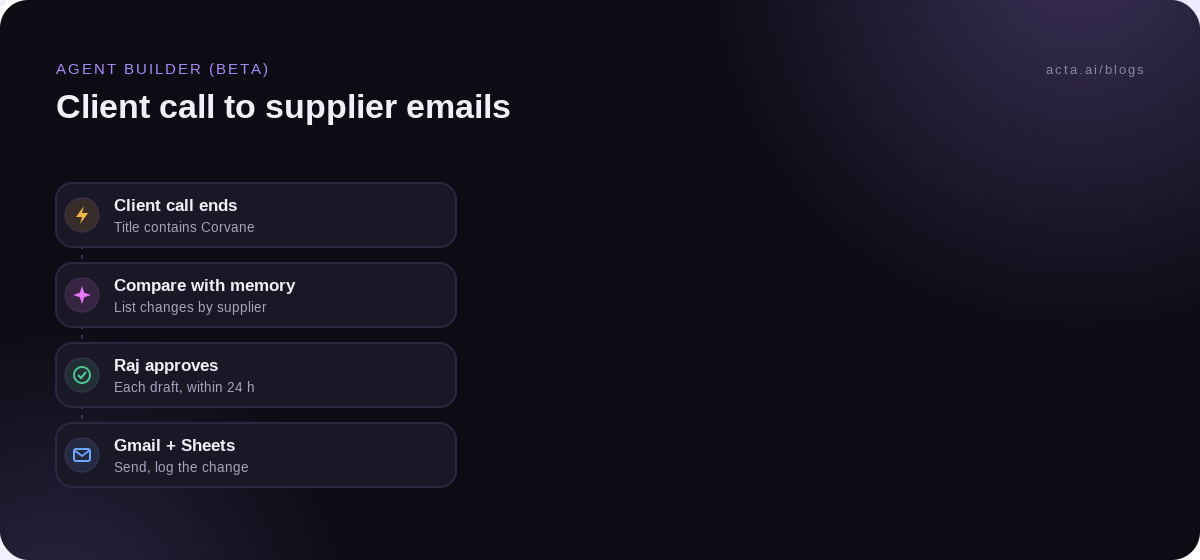
A template gives you the change list. Someone still has to tell the hotel, the airline desk and the DMC. That handoff is where Bluewater failed, and it is the part Agent Builder (beta) handles well. Open Agent Builder from the sidebar, click New agent, describe it in a sentence ("after each Corvane client call, draft supplier emails for any requirement change"), and Acta drafts the steps; or choose "Start from blank instead". The finished agent looks like this:
- Start: "When a meeting ends", only when the title contains "Corvane".
- Acta data step: get the meeting's notes, including the Incentive trip client call report.
- Memory step: read the last confirmed headcount, room count and gala date for this trip.
- AI step: "Compare this call with the stored numbers. List each change, the supplier it affects (hotel, airline, DMC, venue) and a short email for that supplier stating what changed and asking for confirmation."
- Switch on supplier type: hotel and DMC changes go to Gmail drafts; flight changes become an Asana task for the air desk.
- Human approval: Raj, as the agent's owner, sees each draft in the Approvals tab, or by email with Approve and Reject buttons. If he does not answer within 24 hours, nothing is sent.
- Gmail: send the approved emails from the operations mailbox.
- Google Sheets: add a row per change to the trip's change log; then update the Memory step with the new numbers.
Build it once, then test it properly. Click Test, then Run test on the 16 April and 30 April calls. In a test, emails and messages are only shown and approvals pass by themselves, so nothing reaches a supplier. Check that the hotel draft for 30 April asks for six more rooms. Use Check to catch missing settings, then Turn on; the agent shows "On · version 1". Later edits go live with Update the live version, and History shows every run.
Three settings matter. Set the AI step's failure behaviour to "Try again", so a slow run retries instead of silently stopping. Connect Gmail, Google Sheets and Slack under Connectors ("Connect here"), and connect Asana from the Integrations page (the connect apps guide explains both). And remember that agents act as you: connect the shared operations mailbox, not someone's personal inbox, so suppliers reply to a place the whole team reads.
A second agent watches supplier deadlines daily
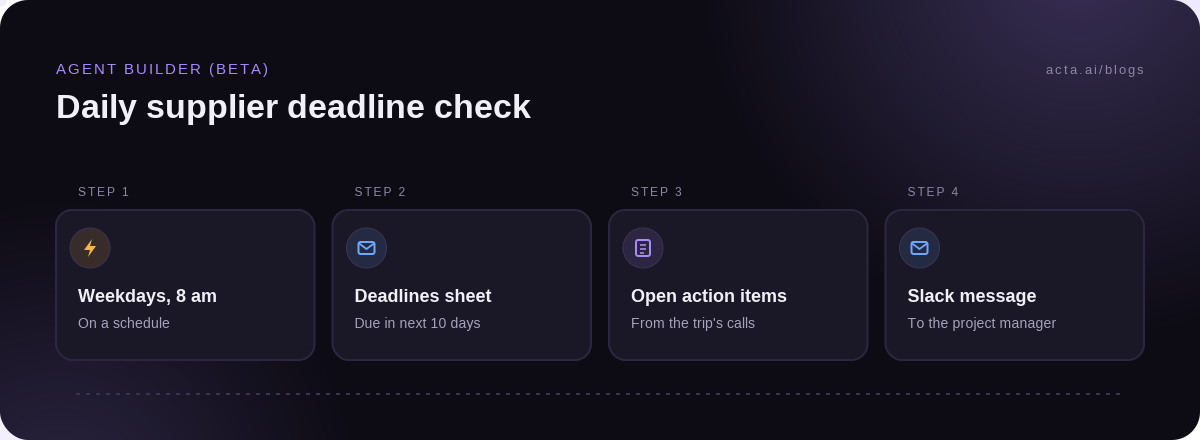
The change agent catches new requirements. A second, simpler agent catches the dates that quietly pass. This is the most useful bit of travel agency workflow automation for any firm with group contracts, because release dates sit in contracts and nobody rereads contracts.
- Start: "On a schedule", every weekday at 8 am.
- Google Sheets: find rows in the trip deadlines sheet (room block release, name list, deposits, final numbers) due in the next 10 days.
- If / else: no rows, stop.
- Acta data step: fetch open action items from that trip's meetings.
- AI step: "For each deadline, say what is due, to whom, and whether any open action item or unconfirmed change from the calls affects it."
- Slack: message the trip's project manager with the list.
Because this one only messages your own team, some firms skip the approval step. If the Slack message goes to a shared channel that includes freelancers or client staff, add Human approval before it. On Bluewater's trip, this agent would have told Raj on 2 May: "Hotel room block release on 12 May. Unconfirmed change on 16 April and confirmed 30 April: 14 partners, rooms needed not yet sent to the hotel."
Action items, decisions, risks and OneChat back up the agents
Agents act on meetings. The Outcomes views in My meetings show the state of things when you want to look for yourself. Each person sees their own, built from the meetings they recorded or that were shared with them in the workspace.
Action items (Outcomes > Action items), grouped by Person, would have shown Raj: "Tell hotel about 14 partners and confirm extra rooms · Owner: Raj Patel · Corvane weekly call, 30 Apr · Due 3 May · Overdue 4 days". The Decision log would hold: "Gala dinner on Friday, not Thursday · Status: Changed · Was: Thursday · changed 9 Apr · Decided by: Laura Fenwick · Owner: Elena Costa · Actions: 1 of 1 done". The Risk Registry would show: "Risk: Hotel block releases 12 May; extra rooms for partners unconfirmed · Mitigation: Suggested, ask hotel to hold rooms past release · Owner: Raj Patel · Date: 12 May · Impact: High · Status: Open".
And OneChat answers the question every ops person asks before a supplier call:
Question: What is the latest headcount and room count for Corvane Lisbon, and when did each number last change?
Answer: 134 guests: 120 staff plus 14 partners. Partners were first mentioned as likely on 16 April and confirmed on 30 April ("so that's the 14 partners, yes, badges for them too"). Rooms have not been restated since 2 April, when the figure was 96.
Found in: Corvane weekly call, 30 Apr (00:27:54); Corvane weekly call, 16 Apr (00:11:20); Corvane weekly call, 2 Apr (00:06:02)
Each source opens the call at that moment. For more agent ideas, meeting automation workflows every team should build is a good list, and why automations break explains why the approval and retry settings above matter.
A travel team can go live in two weeks
Decide who records. The trip project manager records client calls and supplier calls, usually on Teams or Zoom; the Acta desktop app records from their own laptop without a bot joining, which suits clients who dislike bots. Ground ops records DMC calls. Site inspections abroad can be recorded on the mobile app. Tell clients and suppliers the call is recorded for accurate notes; our guide to recording meetings with AI and what to tell participants covers consent (general information, not legal advice).
Then set up the workspace in Settings > Workspace with "Invite people"; roles are Owner, Admin and Member, and meetings are private until shared. Agree that every client and supplier call for a live trip is shared with the workspace, so the air desk and ground team can ask OneChat about it. The workspace guide has the steps.
- Days 1 to 3: one live trip, one project manager. Build the client call template and test it on two past calls.
- Days 4 to 7: record every call for that trip; share each one; start the deadlines sheet.
- Week 2, Monday: build the change agent and run tests on the week's calls.
- Week 2, Wednesday: turn it on; add the deadline agent.
- Week 2, Friday: review every approval with the director: how many drafts went out unedited, how many needed changes.
Mistakes to avoid: inconsistent meeting titles (the agent filters on "Corvane", so "Lisbon trip sync" is invisible to it); skipping approval on supplier emails; storing named health details in meeting notes; and assuming one person's Decision log is a shared company record, when each person's view comes from their own and shared meetings.
Acta records client and supplier calls, writes notes and change tables, tracks action items, decisions and risks, and runs agents that draft the follow-up work for your approval. Outcomes, the Risk Registry and OneChat are included in the 15-day trial and in Pro. The Acta page for travel agencies shows the setup.
Frequently asked questions
What should group tour planning meeting notes include?
Every requirement change with what it replaced, who asked and when; the current headcount and room count as stated; dietary and access needs as counts; supplier deadlines mentioned; client decisions still pending; and next steps with owners and dates. Mark anything said as "probably" as unconfirmed, and re-confirm it on the next call.
Can an AI agent email hotels and DMCs for us?
It can draft them. An agent can compare each client call with the last confirmed numbers and draft supplier emails, but keep a human approval step so the project manager checks every email before it goes. If nobody approves within 24 hours, nothing is sent, which is the safe default for supplier commitments.
How do we stop missing room block release dates?
Put every release date, name list deadline and deposit date in one sheet per trip, and run a daily check for the 10 days ahead. Match each date against open action items and unconfirmed changes from client calls. Most misses happen because a change was agreed on a call but never reached the hotel.
Do these agents need technical skills to build?
No coding is needed. You describe the agent in a sentence and Acta drafts the steps, or you add steps yourself: trigger, AI step, approval, app action. The harder part is deciding the rules, such as which titles to match and who approves. Agent Builder is in beta, so test each agent before relying on it.
Is a corporate incentive trip covered by package travel rules?
It depends on how the trip is arranged and contracted. In the UK, government guidance explains what counts as a package and what organisers must do, and ABTA reports revised regulations for bookings after 6 April 2027. This is general information, not legal advice; ask your adviser about your specific contracts.
Set up your next trip's change log
You do not need to automate everything at once. Start with one trip and the one handoff that hurt you last time.
- Template the client call: a was/now table for every requirement change.
- List the deadlines: release, name list and deposit dates in one sheet per trip.
- Draft, then approve: an agent writes supplier emails, the project manager approves.
- Check daily: a weekday deadline message for the last 45 days before departure.
- Share every call: so the air desk and ground team can ask OneChat.
Record your next client call with the desktop app or the Acta Chrome extension, and build your first trip agent during the 15-day free trial.