A production meeting action tracker turns spoken promises into owned rows
Most plants already have an action tracker of sorts: a register by the board, an Excel sheet on the PPC laptop, a WhatsApp group. Each fails in the same place. Somebody has to listen to the meeting, decide what counted as a commitment, and write it down with a name and a date. On a busy morning with a line down, that somebody is busy too.
A useful production meeting action tracker has four columns that never stay empty: the task in plain words, a single owner (a person, not "QA"), a due date, and a status that changes from open to done or overdue. Everything else, such as department tags or comments, is a bonus. If a row has two owners, it has none.
My rule for supervisors: if you would be annoyed when it is not done by Friday, it is an action item.
Plant meetings run on memory, and memory leaks between shifts
A typical manufacturing SME runs a small set of recurring meetings, and each produces work. The daily production meeting at the start of the general shift covers yesterday's output against plan, rejections, breakdowns and today's priorities. The production head, shift supervisors, the QA head, maintenance, stores and the PPC engineer stand around the board for ten to twenty minutes. Then there is the shift handover, the weekly quality review (PPM, customer complaints, open 8Ds), the maintenance review, and customer calls where the quality head commits to a containment plan.
Without a record, the night-shift supervisor never hears what was promised at 9:15, and Monday's rework task is re-discussed on Wednesday as if new. The customer asks for the 8D D5 status and three people give three dates. Nobody is lying; they remember different meetings. Office teams have the same follow-through gap, but a plant feels it faster, as scrap or a debit note.
One rejected batch shows exactly how rework owners slip
An illustrative case: the plant, people and numbers are invented, but any Chakan component plant will recognise it.
Shreeram Precision is a 120-person machining unit near Pune making brake caliper brackets for a Tier-1 supplier. On a Monday morning the customer rejects a lot of 1,800 brackets: the bore diameter is drifting oversize on parts from one VMC cell. The daily production meeting that morning agrees five things in about six minutes:
- Sachin (cell supervisor) to segregate and rework the 1,800 parts in-house by Wednesday.
- Meera (QA head) to send the customer a containment plan by 5 pm and update the control plan to 100% bore gauging.
- Ravi (tool room) to replace the boring bar insert and raise a purchase requisition for spares.
- Imran (maintenance) to check spindle runout on VMC 4 and share the report.
- Kavita (PPC) to re-plan Thursday's dispatch.
Tuesday's meeting is about a hydraulic leak, Wednesday's about a castings shortage. The bracket list is "in progress" in everyone's head. On the following Monday the customer's SQE calls for the 8D: the root cause section needs the runout report, which Imran measured but never shared because nobody asked for it in writing. Ravi changed the insert but assumed Sachin would tell purchase about spares; the plant is down to two inserts with a three-week lead time. Sachin finished 1,400 of the 1,800 parts and was moved to an urgent order. Five owners, five reasonable stories, one late 8D.
The Action items view shows who is late before 9:15
With Acta, the production head records the daily production meeting on a phone with the Acta mobile app (the meeting is in person, so there is no call to join), and the QA head records customer calls on Teams with the desktop app, which captures the call without a bot joining. Plants that talk in a Hindi-English mix can leave the language on Auto; Marathi is available as a beta language you pick in Settings, and the meeting languages guide is honest about where accuracy is still improving.
After each meeting Acta writes notes with decisions and action items, each with an owner when a name was said. Two built-in report templates fit a plant well: KPI review for the weekly output and PPM meeting, and Incident post-mortem for the meeting where the team works through a rejection. On a paid plan you can add a custom template; this is the one I would write for the daily production meeting:
Template name: Daily production meeting
What should this report do? For the morning production meeting at a machining plant: output against plan, rejections and rework, breakdowns, and the tasks agreed with owners.
Sections: 1. Output vs plan (Table: Line or cell, Plan, Actual, Gap reason). 2. Rejections and rework (Table: Part, Quantity, Defect, Rework owner). 3. Breakdowns (Bullets). 4. Customer commitments made (Bullets, with the customer's name). 5. Tasks agreed (Checklist: task, owner, due date). 6. Carried over from earlier meetings (Bullets).
When should Acta use it? Only matching meetings.
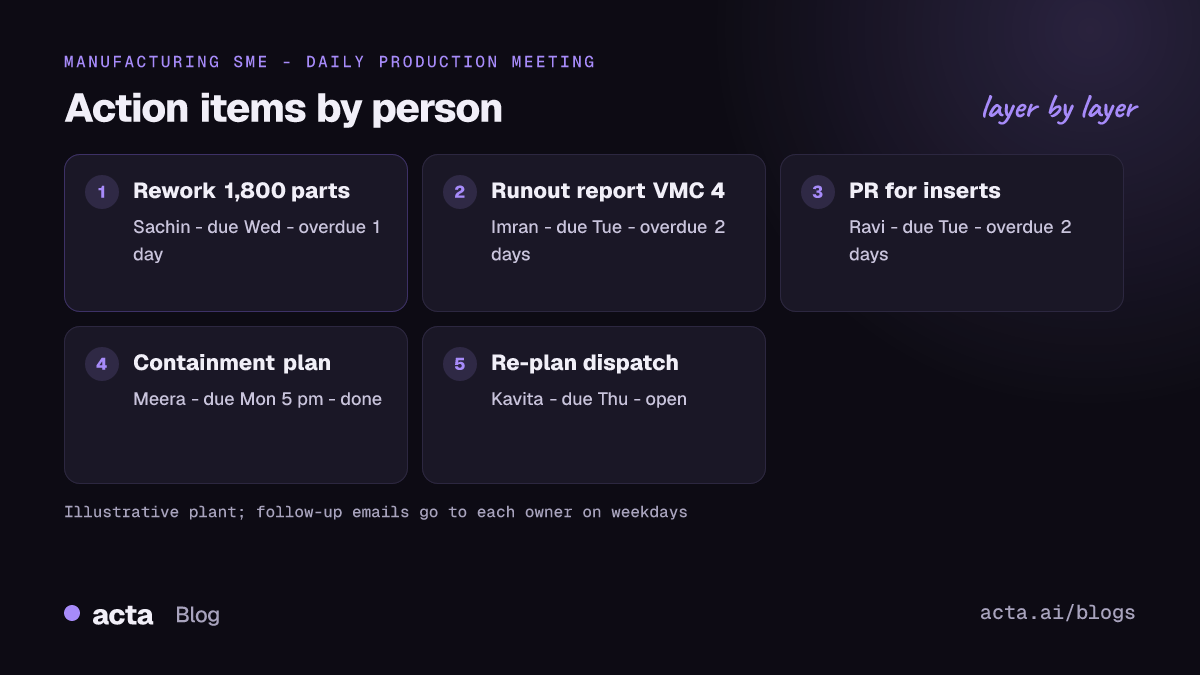
The custom template gives you a tidy daily report, and its rework table is the start of real rework tracking. The part that stops slipping is the cross-meeting tracker: My meetings > Outcomes > Action items. It collects the action items from every meeting the production head recorded or that colleagues shared with them, with tiles for Open, Overdue, Due this week and Done that double as filters. On the Thursday after the rejection, grouped by Person, it would have looked like this:
| Action item | Owner | From meeting | Status | Comment |
|---|
| Share VMC 4 spindle runout report | Imran | Daily production meeting, Mon | Overdue 2 days | "Measured 0.012, will send" (Imran) |
| Raise PR for boring bar inserts | Ravi | Daily production meeting, Mon | Overdue 2 days | None |
| Rework 1,800 brackets | Sachin | Daily production meeting, Mon | Overdue 1 day | "1,400 done, 400 left" |
| Send containment plan to customer | Meera | Daily production meeting, Mon | Done | Sent 4:40 pm |
Two settings make this work without nagging by hand. First, the Auto follow-up email: turn on "Send daily follow-ups", choose Weekdays at 8:30 am, set "Who gets it" to "Each owner, their own items", and "Which items" to Due or overdue. Each owner gets a short list of their own items every weekday morning until all are done, and it stops by itself. Set "Stop after" to 14 days for the daily meeting. Second, comments on a row: Imran can reply "report attached to email" on the item instead of saying it again at the board.
One habit worth copying: open the tracker filtered to Overdue before walking to the board, and start the meeting with those rows. Pair it with ending each meeting with owners and deadlines.
Decisions, risks and questions need their own place
A task list is not where you keep the decision that created the tasks. In the bracket case, the decision was "hold dispatch of bracket lots until 100% bore gauging is in place". In Outcomes > Decision log it appears as a card with status Active, decided by the plant head, owner Meera, and its linked action items with "3 of 5 done". Ten days later the weekly quality review relaxes it to "sampling 1 in 5 after three clean lots"; the card moves to Changed, shows "Was: 100% bore gauging on all lots", and the History lists both meetings with the quoted lines. The "Need follow-through" tile flags decisions whose actions are behind.
The insert shortage is a risk, not a task, and it belongs in the Risk Registry tab. Acta reads the meetings for risks and updates the table after each new one. The row would read: Risk "Boring bar inserts down to two; supplier lead time three weeks", Mitigation "Buy one box from the Bhosari distributor" tagged Agreed, Owner Ravi, Date 18 Oct, Impact High, Status Mitigating. If nobody had taken it, the card "High · no owner" would sit at the top.
All three views are personal. The production head's Decision log, Action items view and Risk Registry are built from the meetings the production head recorded plus the ones colleagues shared in the workspace. Meera sees her own set. That is why sharing matters, which the rollout section covers.
When the SQE calls, Meera asks OneChat: "What did we promise the customer about the bracket rejection, and what is still open?" The answer lists the containment plan sent Monday, the 100% gauging decision and its later change, and the open runout report, with Found in pointing to the Monday daily production meeting and the weekly quality review, each opening at the moment it was said. For one meeting only, Ask Acta on that meeting's page does the same job.
An escalation agent for overdue rework takes one afternoon
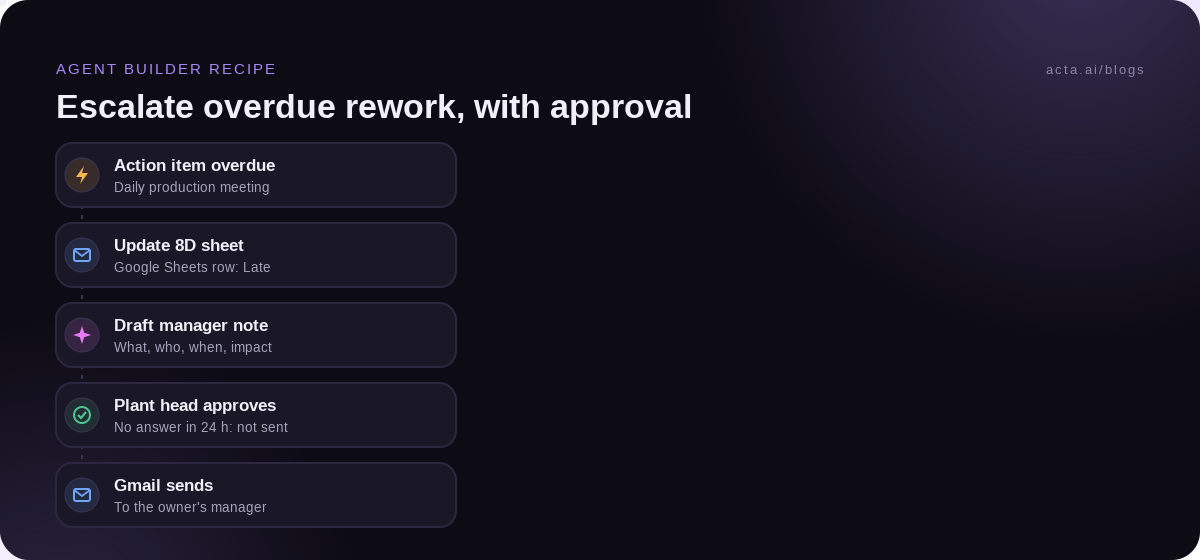
The daily email covers the owner. Sometimes the plant head also wants the 8D sheet updated and the owner's manager told, but only after a human has looked. Agent Builder (beta) handles that. Here is a recipe a plant head or IT-minded PPC engineer can build in an afternoon:
- Open Agent Builder, click New agent and choose Start from blank instead.
- Trigger: Event in a connected app > Acta > action item overdue. Add an "Only when" condition: the meeting title contains "Daily production".
- Step Acta data: fetch the item, its owner, the meeting and the moment it was agreed.
- Step Action: Google Sheets, find the row for that part in your "8D actions" sheet and update its status to "Late".
- Step AI: write a three-line note to the owner's manager: what was promised, by whom, on which day, and the customer impact.
- Step Human approval: the agent's owner gets Approve or Reject in the Approvals tab, and by email if you tick "Also email me Approve and Reject buttons". With no answer in 24 hours, nothing is sent.
- Step Action: Gmail, send the approved note.
- Click Test, then Run test (nothing is sent in a test), and finally Turn on.
The approvals guide explains the approval step in detail. Keep the approval in; one wrong escalation email costs more shop-floor goodwill than ten late reminders.
Roll it out on the shop floor in two weeks
For a plant of 50 to 200 people, the workspace typically holds five to ten people, one seat each: plant head, production manager, QA head, maintenance head, PPC and one or two customer-facing engineers. Supervisors receive follow-up emails as owners without recording anything or joining the workspace. The owner sets up the workspace from Settings > Workspace and sends invites; the team setup guide covers roles. Each person's meetings are private by default, so the habit to build is clicking the share icon and choosing Everyone in the workspace for plant meetings.
Week 1. Day 1: create the workspace, invite the recorders, and say at the daily production meeting that it is being recorded and why. Days 2 to 5: record only the daily production meeting; at the end, the production head repeats each task with a name and a day. Friday: look at the Action items view grouped by Person together, and fix anything "Unassigned".
Week 2. Add the weekly quality review and customer calls. Turn on Auto follow-up for overdue items. Build the custom template. On day 10, run the escalation agent in test mode only. On day 14, decide whether to switch it on.
Mistakes to avoid: recording every shift huddle in week one; letting the plant head be the only recorder; keeping the old Excel tracker alive "just in case"; and skipping the consent conversation. Tell people what is recorded and why; our post on recording consent and what to tell participants is general information, not legal advice.
If you are working towards the government's ZED certification for MSMEs, which rates quality and process discipline at Bronze, Silver and Gold levels, a dated record of who agreed what at each quality review is a useful habit; the scheme's eligibility page lists the details. More on how Acta fits plants is on our manufacturing SMEs page.
Acta records in-person and online meetings, writes the notes and action items, and keeps the Outcomes views, Risk Registry and OneChat available in the 15-day trial and on Pro ($8 per seat a month, or $72 per seat a year). It will not fix a meeting where nobody says who owns the task.
Frequently asked questions
What should a production meeting action tracker include?
Keep five fields: the task in plain words, one named owner, a due date, a status (open, overdue, done) and the meeting where it was agreed. Add a comment field for updates such as "1,400 of 1,800 reworked". Department tags help larger plants. Avoid shared owners like "QA team"; one person must answer for each row.
Can Acta record a daily production meeting held on the shop floor?
Yes. Use the Acta mobile app on a phone held near the group, or Record audio in a browser in the conference room. Noise from presses and compressors lowers transcript quality, so stand away from the loudest machines and keep the phone close to whoever speaks most. Notes and action items appear after the meeting.
How is this different from an Excel action item tracker for teams?
Excel only knows what someone typed. Acta builds the list from what was said, links each item to the moment in the recording, marks it overdue by itself and emails owners daily if you turn that on. Many plants still keep Excel for the customer's 8D format and update it from the tracker.
Will supervisors without an Acta seat get reminders?
The Auto follow-up email can be set to go to each owner with their own items, so a supervisor named in the meeting can be reminded without recording anything. Click Preview email to check what goes out. Seats are only for people in the workspace, recorders and readers alike, and email recipients can unsubscribe.
Can the whole management team see one shared tracker?
Each person's Action items view, Decision log and Risk Registry is their own, built from meetings they recorded or that were shared with them. When the production head shares the daily production meeting with the workspace, colleagues can open it and ask OneChat about it, and their views include it.
Do these meeting minutes for small business work in Hindi?
Hindi, including Hindi-English mixes, is detected automatically when the language is set to Auto. Marathi, Tamil, Telugu, Kannada and Bengali are beta languages you choose in Settings, and accuracy is still improving. You can keep the notes in English while the transcript stays in the spoken language.
Decide which meetings feed your tracker first
Do not start with every meeting in the plant. Start with the one where most rework and corrective action follow-up is agreed, and prove the habit there.
- Pick two meetings: the daily production meeting and the weekly quality review.
- Say names and days aloud: close every agenda item with "who, by when".
- Read by person on Fridays: group the Action items view by Person and clear "Unassigned".
- Automate the reminder, not the judgement: daily email for overdue items, human approval for escalations.
- Share plant meetings: choose Everyone in the workspace so the QA head's and production head's views match.
Try it on next Monday's meeting with the Acta desktop app or the mobile app, free for 15 days via Acta pricing.