Tax season runs on client calls nobody writes up
A mid-sized CA firm holds a lot of short meetings. There are data-collection calls with each client's accountant or owner at the start of the season, query calls once the team has gone through the books, closing calls before the return or audit report is signed, and the internal Monday WIP review where the partners go through every open assignment and its blockers. New clients add a KYC and engagement meeting.
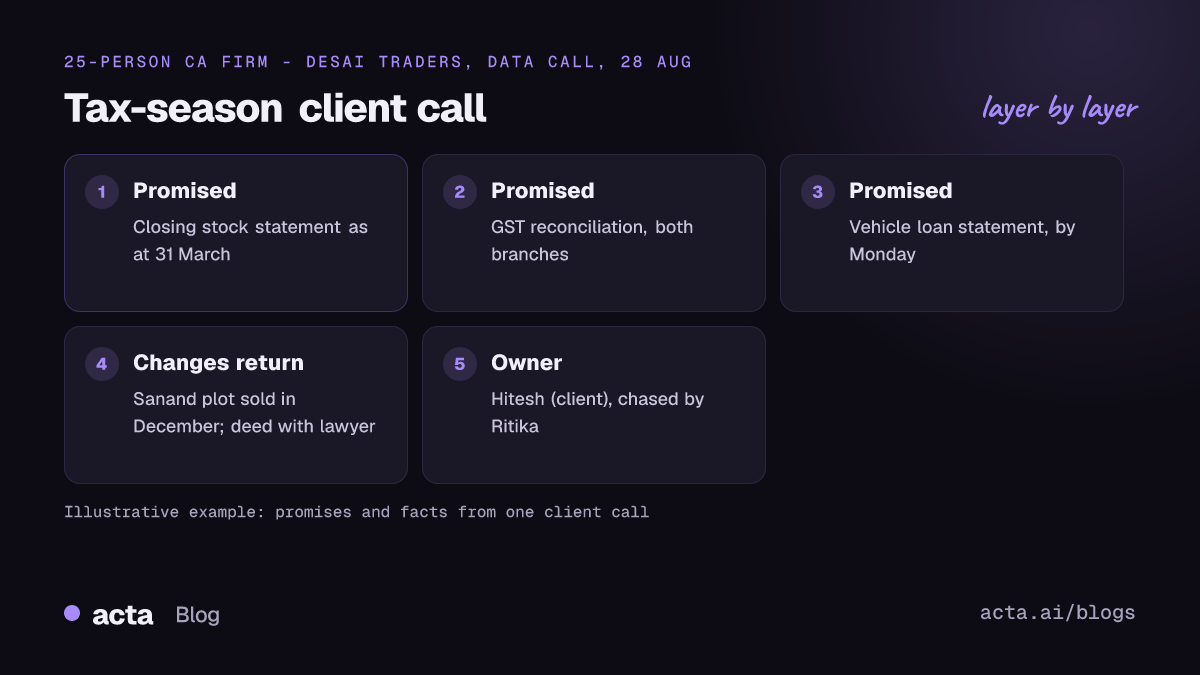
The client calls are where facts arrive. "We'll send the stock statement as at 31 March and the GST reconciliation for both branches by Monday." "Oh, and we sold that plot near Sanand in December." The article assistant on the call writes "stock stmt, GST reco" on a pad, and the plot sale, said as an aside, lands nowhere. Three weeks later a different senior picks up the file because the first one moved to a bank audit.
Deadlines make it worse. The Income Tax Department publishes its due-date calendar each year and dates are sometimes extended, so check it rather than relying on memory; its return of income pages explain who files what. In the last fortnight before a due date, every day spent chasing a document you could have chased two weeks earlier is a day of late nights for your team. Our page for accounting and CA firms covers the other meetings worth capturing.
An Ahmedabad firm missed a plot sale mentioned on a call
The firm and clients here are invented. Shah Rao & Associates is a 25-person CA firm in Ahmedabad with two partners, CA Nikhil Shah and CA Ananya Rao, a tax manager, Pooja, and a group of seniors and article assistants. Desai Traders, a hardware wholesaler with two branches, is a tax audit client.
28 August. Kunal, an article assistant, has a 25-minute video call with Hitesh, Desai Traders' accountant. Hitesh promises the closing stock statement, the GST reconciliation for both branches and the loan statement for a new vehicle loan, "all by Monday." Near the end, Hitesh's owner, Mr Desai, joins for two minutes and says, "Also tell Nikhil-bhai we sold the Sanand plot in December; the deed is with our lawyer." Kunal emails Hitesh: "Pls send docs discussed."
2 September. The stock statement and one reconciliation arrive. Nobody notices the second branch and the loan statement are missing. Kunal is moved to a bank branch audit.
11 September. Ritika, a senior, takes over. She asks Kunal over WhatsApp what was pending. He remembers the GST reconciliation, not the plot.
22 September. At partner review, Nikhil reads the draft and asks, "Didn't Desai sell land this year? He mentioned it at a wedding." Pooja has no record. The firm spends two days getting the sale deed and the purchase cost, at the busiest point of the season, and the client asks why they weren't asked a month earlier.
The fact was said clearly, on a call, to the firm. It just was not findable by the person who needed it.
Client meeting notes for CA firms start with promised documents
Structure the notes around what the next person on the file needs: what is coming, what changes the numbers, and what is still unanswered. The client intake meeting notes template covers onboarding; for tax season client calls, use a tighter format.
In Acta, the built-in Client review and Compliance check templates (both in the Finance group) work for annual review meetings and for checking that required points were covered. KYC onboarding fits the first meeting with a new client. For data-collection and query calls, Pooja would create a custom template (custom templates are on paid plans; up to 10 per person):
Template name: Tax-season client call
What should this report do? For calls with a tax or audit client: list every document the client promised with the period and date, any fact that could change the return, our queries with the client's answers, and our next steps.
Documents promised (Checklist: task, owner, due date)
Facts that may change the return (Bullets: property or asset sales, new loans, new businesses, foreign income, anything said in passing)
Queries and answers (Table: Query | Client's answer | Still open?)
Our next steps (Checklist)
Extra instructions: Keep amounts, dates and names exactly as said. Name the client's person for each promise.
When should Acta use it? Only matching meetings
The first section works as a document checklist the client dictated to you. Use "Test on a past meeting" on a call from last week to see the output first. When a section never came up, the report says "Not discussed" rather than filling the gap.
OneChat answers questions across every client call
Per-call notes fix the next call. The Desai problem was different: someone who was not on the call needed to know, three weeks later, what was said. OneChat is built for that. It answers questions across all the meetings you recorded or that colleagues shared with you, plus files and links you add, and each answer shows a Found in list. Clicking a source opens the recording at the moment it was said. (On a single meeting's page, Ask Acta answers about that call alone.)
Here is what Ritika could have asked on her first morning with the file:
Question: What did Desai Traders say they would send us, and did they mention anything that changes the return?
Answer: On 28 August Hitesh promised three items by Monday 1 September: the closing stock statement as at 31 March, the GST reconciliation for both branches, and the vehicle loan statement. Mr Desai also said the Sanand plot was sold in December and the deed is with their lawyer.
Found in: Desai Traders, data collection call, 28 Aug (at 03:10 and 23:45)
Now add files. Drop in the client's document index or the "received" sheet your team keeps (up to 10 files at a time; they stay under Artifacts), and ask, "Which of the documents Desai promised are not in the received list?" OneChat compares the call with the file and answers with both sources.
The bigger win is across clients. Use the scope button under the question box to cover all meetings, then ask what a partner actually needs during peak weeks:
- "Which clients promised documents by this Friday, and who on our side took each call?"
- "Which clients mentioned selling property, shares or a business on any call since July?"
- "What did we tell Kapoor Clinic about the advance tax shortfall, and did they agree?"
Questions about promises are handled in OneChat itself; there is no separate promises screen. If your partners prefer Claude or ChatGPT, the MCP connector lets them ask the same kind of question there. The OneChat guide covers scope and files.
A note on language: Acta transcribes English and Hindi (including Hinglish) automatically, and offers Marathi as a beta language. Gujarati is not supported yet, so calls held mostly in Gujarati will not transcribe well; many firms run client calls in English or Hindi anyway.
Partners get follow-through from Action items, decisions and risks
Three views under My meetings turn calls into a working list. Each is personal: Pooja's views draw on the meetings Pooja recorded or that were shared with her. To give a partner a firm-wide picture, every client call has to be shared with the workspace.
Action items. In Outcomes, on the Action items tab, grouped by Person, Pooja would see "Send GST reconciliation for branch 2 (Desai Traders)", owner Hitesh, status "Overdue 10 days", next to her own team's items. The Overdue and Due this week tiles become the agenda for the Monday WIP review. Add a comment ("chased on 12 Sep, promised Thursday") so the next person sees the history.
Decision log. The Outcomes tab also holds decisions. "Include capital gains on the Sanand plot in this year's return; client to supply sale deed and purchase cost" would appear as Active, decided by Nikhil, owner Pooja, with the 28 August quote in its History. If the client later said the sale completed in the next financial year, the card would move to Changed and keep the old wording.
Risk Registry. A row such as "Desai Traders: three documents pending, two weeks before audit sign-off", Impact High, owner Ritika, mitigation "Partner to call Mr Desai" marked Agreed, status Open. If nobody owns it, it appears under "High · no owner".
OneChat, the Outcomes views and the Risk Registry are all part of the 15-day trial and of Pro.
A document-chase agent drafts the client email for approval
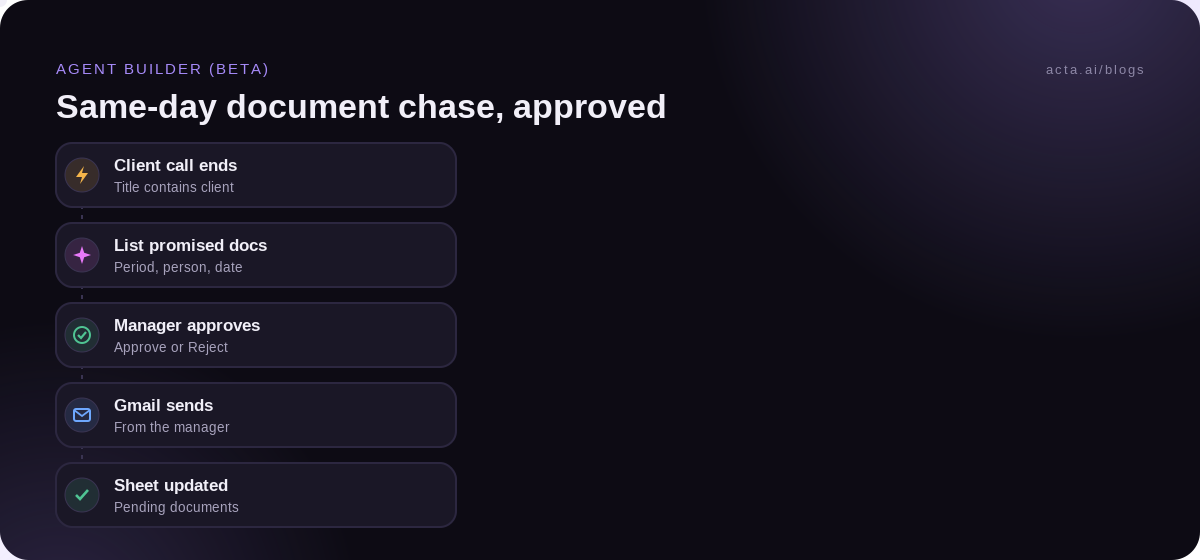
Agent Builder (beta) can send the client follow-up email listing what they promised on the same day, while the call is fresh in everyone's mind. Nothing goes to a client without a manager's click. See the Agent Builder page for the building blocks.
- Click "New agent" and choose the trigger When a meeting ends, filtered to titles containing "client".
- Add an Acta data step for the meeting's notes and the Tax-season client call report.
- Add an AI step: "Write a short, polite email to the client listing each document they promised, the period it covers and the date they gave. Do not add anything they did not promise."
- Add a Human approval step for the tax manager, with email Approve and Reject buttons.
- After approval, a Gmail action sends the email from the manager's account.
- Add a Google Sheets action that adds one row per promised document to your pending documents sheet.
- Use Test, then Run test, on two recent calls. In a test, emails are only shown, never sent. Then Turn on.
If the manager does not approve within 24 hours, no email goes out. Agents act as the person who built them, so build it from the manager's own Acta account.
Roll it out across the firm before the next deadline
Start with the people who take client calls: seniors, managers and partners. Article assistants who take data-collection calls should record too. Everyone in the workspace uses a seat, including staff who only read shared meetings, and the firm's workspace owner pays for them. Partners usually take the Owner and Admin roles.
Set it up from Settings, then Workspace, with "Invite people". On each client call, use the share icon and pick "Everyone in" the workspace; colleagues find it under Shared with me. The team setup guide walks through roles. Client calls on Zoom or Teams can be captured from your own PC with the Acta desktop app, with no bot in the call.
Tell clients before you record. A one-line notice at the start of the call is usually enough; our disclosure email templates help, and the guide to recording meetings with AI covers consent in general terms. Neither is legal advice, and your engagement letter may need a line on it.
- Week 1: one manager and her team record every client call. Turn on the Tax-season client call template on day two. On day five, compare its document lists with what the team wrote by hand.
- Week 2: all client-facing staff record and share. Partners start the Monday WIP review with the Overdue tile and one OneChat question per partner. Turn on the document-chase agent at the end of the week.
Mistakes to avoid: keeping calls private, so the next person on the file cannot ask about them; recording only the partner's calls when the facts arrive on the article assistant's; and sending client emails from an agent without the approval step.
Frequently asked questions
What should client meeting notes for CA firms include?
Every document the client promised, with the period it covers, the client's person and the date; any fact that changes the return or audit, such as an asset sale or new loan; your queries and the client's answers; and your next steps with owners. Keep amounts and dates exactly as said, and note who on your side took the call.
How can a partner see what every client promised?
Share each client call with the firm's workspace. In Acta, the partner can then ask OneChat across those meetings, for example "which clients promised documents this week and haven't sent them?", and each answer links to the call and moment. The Action items view grouped by Person also lists client-side promises with due dates.
Is there a promises screen for client commitments?
No. In Acta, questions about promises and follow-through are answered in OneChat, which draws on action items and the Decision log from your meetings. The closest screen is Outcomes, Action items, grouped by Person. The same questions can also be asked from Claude or ChatGPT through the MCP connector.
Do article assistants need their own seats?
Only if you add them to the workspace. Each member uses a seat whether they record or only read shared client calls; Pro is $8 per seat per month billed monthly, or $72 per seat per year. An article assistant who just needs their own follow-ups can get them by the daily Auto follow-up email without joining. During the 15-day trial, invites are free for up to 10 people.
Should we tell clients that calls are recorded?
Yes. Tell them at the start, say why (so nothing they tell you is lost), and offer to stop if they prefer. Consent rules vary by country and situation, so check what applies to your firm; this is general information, not legal advice. The Acta desktop app has a Copy notice button to paste a recording notice into the meeting chat.
Set up your firm before peak season
The fix is a habit more than a tool: every promise written down with a date, every call findable by whoever holds the file next.
- Agree the format: documents promised, facts that change the return, queries and answers, next steps.
- Record client-facing staff: including article assistants who run data-collection calls.
- Share by default: every client call goes to the workspace.
- Ask daily in peak weeks: one cross-client OneChat question each morning.
- Chase the same day: an approved email listing what the client promised.
Try it on your next client calls with the 15-day trial from the pricing page, or record Meet and Teams calls in your browser with the Chrome extension.