Steering calls are where scope is really decided
The statement of work is signed once. After that, scope lives in a handful of recurring conversations: the fortnightly steering committee with the client sponsor and their direct reports, the weekly working session with the client's project lead, interview rounds with middle managers, and the occasional "quick call" a sponsor books because something came up in their own leadership meeting.
Each of those meetings produces small decisions. Most are harmless: push the data request, add a depot visit. A few quietly change the size of the job, and they rarely sound like it at the time. The sponsor says "while you're in there, could you look at the shift rota?" and a partner who wants the relationship to go well says "happy to take a look." Nobody types that into the RAID log, because nobody thought of it as a decision.
PMI's guidance on scope change makes the useful distinction here: a change that is analysed and approved is just change, and scope creep is the change nobody authorised (see PMI's top five causes of scope creep). The trouble for a small firm is that the authorising moment happened out loud, on a video call, with six people half-listening. If you can't show what was said, the conversation about fees later turns into your word against theirs.
Another PMI piece, Scope change control: control your projects or your projects will control you, argues the job is not to stop change but to manage it, starting with impact analysis.
One "we'll take a look" cost a 15-person firm nine days
Here is an illustrative case, made up but typical. Halden Partners is a 15-person operations consultancy. It won a 10-week, fixed-fee operating model review (£84,000) for a 300-person regional food distributor. The sponsor is the COO, Dev Malhotra. The CFO, Ruth Stavely, signs off fees. On Halden's side: Tomás Reid, partner; Hannah Okafor, engagement manager; and Callum Shaw, analyst.
Week 3, steering call 2. Dev mentions that night-shift overtime in the warehouse is out of control. "While you're mapping the depot processes, can you look at the shift pattern too?" Tomás answers, "Sure, we'll take a look." Hannah writes "shift pattern - TR to consider" in her notebook.
Week 4. Callum, trying to be useful, spends two days modelling a new rota.
Week 5, steering call 3. Dev asks how the shift work is going and whether it'll be in the final report. Tomás says it's "progressing". Ruth asks a direct question: "This is within the agreed fee, yes?" Tomás says they'll come back on that. Nobody does.
Week 8. The shift model has grown into a full option appraisal. Halden has spent nine consultant days on it. Hannah raises a change request. Ruth replies that the steering committee "agreed in week 3 that Halden would cover shifts", and refuses the extra fee. Halden writes off roughly £11,000 to protect the renewal.
The evidence existed. Tomás agreed to "take a look", not to work for free, and in week 5 he deferred the fee question out loud. A log built from those calls would have shown an open, ownerless decision from week 3.
A consulting engagement decision log records five things per decision
A spreadsheet works. What matters is five fields, filled within a day of the meeting:
- The decision in one sentence, written so a stranger understands it: "Shift-pattern review is out of scope unless a change request is signed."
- Who decided, by name and role. "The client" is not an answer when the COO and CFO disagree.
- Inside or outside the statement of work. If outside, name the change request and the days.
- Owner and next action, with a date. A decision without an owner drifts.
- Source: the meeting, the date and, ideally, the exact words.
If you want a ready-made shape, our post on a decision log and RACI built from meetings covers a general decision log template, and the steering committee minutes examples show how to write the minutes themselves. What a consultancy adds is the SOW column. That single field turns a generic log into a change request log, because every "outside" entry is either priced or politely declined.
Keep it short and current. Ten live decisions with owners beat forty stale ones, and reviewing them in the first five minutes of each steering call takes much of the sting out of scope creep in consulting.
Acta builds the log from the calls you already hold
Acta records the steering call (with a meeting bot, or with no bot through the Acta desktop app if the client is wary of notetakers), writes the notes and pulls out decisions and action items with owners. Tell the client you're recording and why; our guide to recording consent and what to tell participants has wording you can reuse. Here is what Halden's engagement would have looked like.
Templates: one built-in, one written for scope
Under Templates, Hannah switches on the built-in Decisions & RACI and Project status templates. Then she writes a custom template (custom templates need a paid Pro seat) using "+ Create template" and "Describe it", set to "Only matching meetings" so it runs on steering calls and not on internal stand-ups:
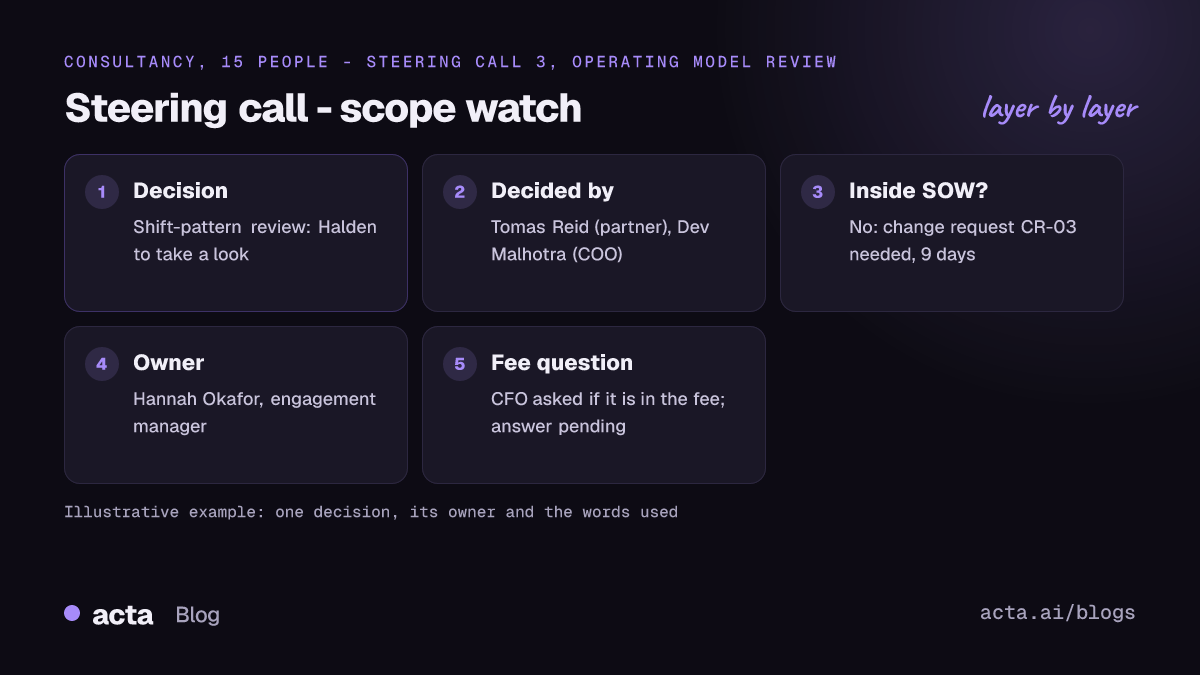
Steering call - scope watch
What should this report do? "For client steering committee calls on fixed-fee engagements: list every decision, every request that may sit outside the agreed statement of work, any fee or timeline question raised, and who owns each follow-up."
1. Decisions made (Table: Decision | Decided by | Inside SOW? | Owner)
2. New requests from the client (Table: Request | Asked by | What we said, in their words | Change request needed?)
3. Fee and timeline questions (Bullets)
4. Follow-ups we committed to (Checklist: task, owner, due date)
5. Exact quotes on scope (Bullets)
Extra instruction: "Use the speakers' own words for anything about scope or fees."
Before saving, she uses "Test on a past meeting" on the week 3 call. The report's "New requests" table would have shown: Shift pattern review | Dev Malhotra | "Sure, we'll take a look" (Tomás Reid) | Yes.
The Decision log: Hannah's view of every steering call
The Decision log lives at My meetings > Outcomes > Decision log. It is personal: it is built from the meetings Hannah recorded or that colleagues shared with her in the workspace, so Tomás sees his own version from his own meetings. Duplicates are merged, so the shift-pattern topic appears once, with a history line for each meeting where it came up. By week 5 the card would read:
Warehouse shift-pattern review: Halden to "take a look" · Status: Active
Decided by: Tomás Reid, Dev Malhotra · Owner: No owner yet · Discussed in 2 meetings
History: first raised, Steering call 2 (14 Oct) "Sure, we'll take a look" ▶ · confirmed, Steering call 3 (28 Oct) "This is within the agreed fee, yes?" ▶
Actions: 0 of 0 done · Banner: No owner yet / No action items yet
The "Need follow-through" tile at the top counts decisions like this one, and Hannah would click "Assign owner", give it to herself and add an action: "Send CR-03 for shift review, 9 days". Once Ruth's answer arrived, Hannah could edit the statement to "Shift review out of scope unless CR-03 is signed" and the card would show it as Changed, with "Was: Halden to take a look" kept underneath. If the client later dropped the idea, "Mark as reversed" keeps the record honest. Use Export CSV before each steering call to paste the decision table into the pack.
Action items, Risk Registry and OneChat fill the gaps
My meetings > Outcomes > Action items groups the engagement's commitments by meeting or by person. Filtered to Open, Hannah's list for week 5 would include:
| Action item | Owner | Status |
|---|
| Confirm with Ruth whether shift review is inside the fee | Tomás Reid | Overdue 3 days |
| Send depot process maps for Leeds and Hull | Callum Shaw | Due tomorrow |
| Book interviews with three night-shift supervisors | Hannah Okafor | Due in 4 days |
The Risk Registry tab, also built from Hannah's meetings, would carry a row like: Risk "Unpriced shift-pattern work may be treated as in scope" · Mitigation "Raise change request before more analysis" (Suggested) · Owner: no owner · Impact: High · Status: Open. It would show in the "High · no owner" card, which is precisely the nudge a busy engagement manager needs.
Then OneChat, which answers across meetings with sources. In week 8, when Ruth claimed the committee had agreed shifts were included, Hannah could ask: "What did we say about the shift pattern and the fee, across all Corvel steering calls?" A fair answer: "Shift work was first raised by Dev Malhotra on 14 Oct; Tomás Reid said 'we'll take a look'. On 28 Oct Ruth Stavely asked whether it was within the fee and Tomás said Halden would come back on that. No agreement on fee appears in later meetings." Found in: Steering call 2, Steering call 3. That is a calm, factual email to Ruth, not an argument.
A scope-watch agent can flag changes before the invoice does
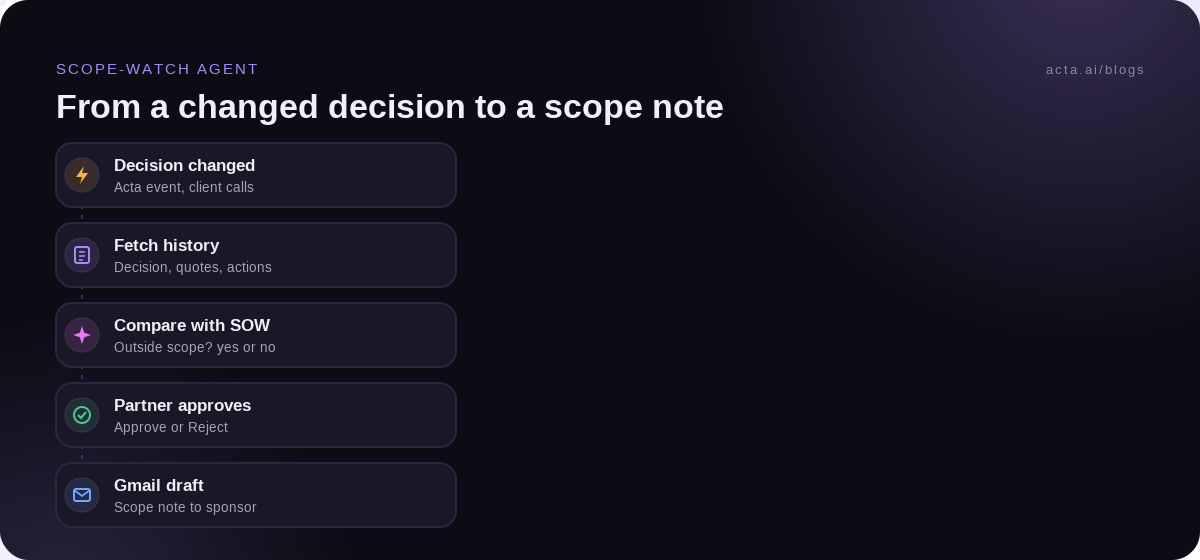
Acta's Agent Builder (beta) lets you string triggers, AI steps and app actions together without code. Agents act as you, and nothing is sent until you approve it. Here is a recipe an engagement manager can set up in an afternoon:
- Start: choose "Event in a connected app", app Acta, event "decision made or changed". Add an "Only when" condition so it fires for meetings whose title contains the client's name.
- Acta data: fetch the decision, its history and linked action items.
- AI: paste a ten-line summary of the signed statement of work into the instruction, then ask "Does this decision add work, deliverables or days that the statement of work does not include? Answer yes or no, then write a three-line scope note for the partner."
- If / else: if the answer is no, stop. If yes, carry on.
- Human approval: the note waits in the Approvals tab, and with "Also email me Approve and Reject buttons" switched on it lands in your inbox too. No answer in 24 hours means nothing goes out.
- Action: Gmail, draft (not send) a short email to the client sponsor confirming what was agreed and that a change request will follow; and Slack, message the partner.
Click Test and Run test on last week's steering call first; in a test nothing is sent and approvals pass by themselves. When the output looks right, Turn on. The help guide to approvals in Agent Builder explains who gets the approval request (the agent's owner).
Roll it out across the firm in two weeks
You need one engagement, one engagement manager who likes structure, and a clear rule about which meetings get recorded.
Who records what
- Engagement managers record every client steering call and working session, and share them with the workspace (share icon > Everyone in your workspace). Their Decision log becomes the main record for that engagement.
- Partners record sponsor one-to-ones and commercial conversations, sharing them only when they touch scope.
- Analysts record interviews when the interviewee agrees, and keep them private unless the engagement manager needs them.
Workspace setup is short: the owner invites colleagues from Settings > Workspace, picks Admin or Member, and teammates see shared meetings under the Shared with me tab. The team setup guide covers invites and roles.
The two-week plan
- Days 1-2: owner sets up the workspace; one engagement manager installs the recorder, turns on Decisions & RACI and writes the scope-watch template.
- Days 3-5: record every client meeting on that engagement. Each evening, spend five minutes in the Decision log assigning owners and splitting anything Acta merged wrongly ("Not the same decision?").
- Week 2, day 1: open the next steering call by walking through the "Need follow-through" decisions. Clients tend to like this; it feels like grip.
- Week 2, days 2-4: build and test the scope-watch agent on recorded calls. Switch on Auto follow-up emails for action items if owners keep missing dates.
- Week 2, day 5: partners' meeting. Show one real catch, agree the recording rules, and add the next two engagements.
Mistakes to avoid
- Assuming the partner can see the engagement manager's log. Each person's log comes from their own and shared meetings, so share the client calls.
- Letting the agent email clients directly in week one.
- Recording without telling the client. Say it at the start of the engagement and again on the first call.
Frequently asked questions
Is a decision log the same as a RAID log?
No. A RAID log tracks risks, assumptions, issues and dependencies, and decisions are often its thinnest column. A consulting engagement decision log is narrower and stricter: one sentence per decision, who decided, owner, status, source and whether it sits inside the statement of work.
Can our client see the Decision log in Acta?
Not directly. The Decision log belongs to each Acta user and is built from their recorded meetings plus those shared with them in your workspace. To show the client, use Export CSV and paste the table into the steering pack, or send the relevant decisions in a follow-up email.
How do I raise scope creep with a client without damaging the relationship?
Raise it early and with their own words. Quote the meeting where the request was made, say what it would add in days, and offer two options: a change request, or dropping something else of similar size. Doing it within a week of the request feels like good management; doing it at invoice time feels like an ambush.
What if the client won't allow a notetaker bot on calls?
Record from your own computer instead. Acta's desktop app captures Zoom and Teams desktop meetings and other calls without a bot joining, and the Chrome extension does the same for Google Meet, Teams in the browser and the Zoom web client. Still tell participants you are recording.
What does Acta cost for a small consultancy?
Acta Pro is $8 per seat per month billed monthly, or $72 per seat per year. Every consultant in the workspace uses a seat, recorder or not. The Decision log, Action items, Risk Registry and OneChat are included in the 15-day free trial and in Pro, so you can test them on a live engagement first. Custom templates need Pro.
Choose how your firm will keep engagement decisions
Whatever tool you use, the habit is the same: every scope-touching sentence on a steering call becomes a logged decision with an owner within a day. A quick check before your next engagement starts:
- Name the log owner: the engagement manager, not the partner, keeps the decision log for each engagement.
- Add the SOW column: mark every decision inside or outside the statement of work and link change requests.
- Record the right calls: steering calls and working sessions, shared with the workspace so partners see them.
- Review in the first five minutes: open each steering call with decisions that still need follow-through.
- Automate one thing: a scope-watch agent that drafts, never sends, until you trust it.
Try it on your next steering call with the 15-day free trial, and if bots aren't welcome, record from the Acta Chrome extension instead. For more on running consultancies with Acta, see the management consultancies page.